
DietrichGebert/ponytailPlugins
Makes your AI agent think like the laziest senior dev in the room. The best code is the code you never wrote.
138k
1 add
Skills Cleaner adds Claude Code commands for profiling skill usage, listing installed skills, searching for a skill path, and comparing skills for duplicates. It also installs hooks that log skill calls into `~/.claude/skill-usage.jsonl` so the reports can show calls, tokens, duration, and nested sub-skills.
Builders who use Claude Code and want to see which skills they use, where they live, and which ones overlap.
You can measure skill usage and remove redundant skills instead of guessing which ones to keep.
`/profile-skills` reports calls, token consumption, model, and runtime, with an optional HTML dashboard opened in the browser.
`/list-skills` scans project, personal, and plugin skill locations and groups results by source.
`/search-skills` finds a skill and shows the installed path.
`/clean-skills` compares installed skills for similarity, flags likely duplicates, and guides removal.
Hook scripts record skill start, prompt submit, and stop events, then flush turn data into per-skill logs.
claude plugin marketplace add amebahead/skills-cleaner
claude plugin install skills-cleaner
/plugin marketplace add amebahead/skills-cleaner
/plugin install skills-cleaner
A Claude Code plugin for profiling and managing installed skills — track usage, visualize statistics, and clean up duplicates.
claude plugin marketplace add amebahead/skills-cleaner
claude plugin install skills-cleaner
Or within Claude Code:
/plugin marketplace add amebahead/skills-cleaner
/plugin install skills-cleaner
| Command | Description |
|---|---|
/profile-skills | Track skill usage stats, token consumption, and visual HTML report |
/list-skills | List installed skills grouped by project / personal / plugin |
/search-skills | Search for a skill by name and show its path |
/clean-skills | Compare skills for similarity and clean up duplicates |
Track and analyze skill usage across sessions. Shows per-skill call counts and token consumption, with automatic normalization of qualified names (plugin:skill and skill are merged).
Terminal report:
  Skill Usage Report (all time)

   #  Skill                         Tokens  Calls  AvgTime  Model
   1  subagent-driven-development    10.0K      1    15.3s  opus-4-7
   2  brainstorming                   8.2K      3     8.1s  opus-4-7
   3  receiving-code-review           2.6K      1     4.2s  sonnet-4-6
   4  profile-skills                  1.2K      3     0.5s  opus-4-7

  Total: 22.0K tokens | 8 calls | 4 skills | 43.7s runtime
  Period: 2026-04-13 ~ 2026-04-14
HTML visual report (--detail):
Opens an interactive HTML dashboard in the browser with:
skill-name (plugin-name), grouped by plugin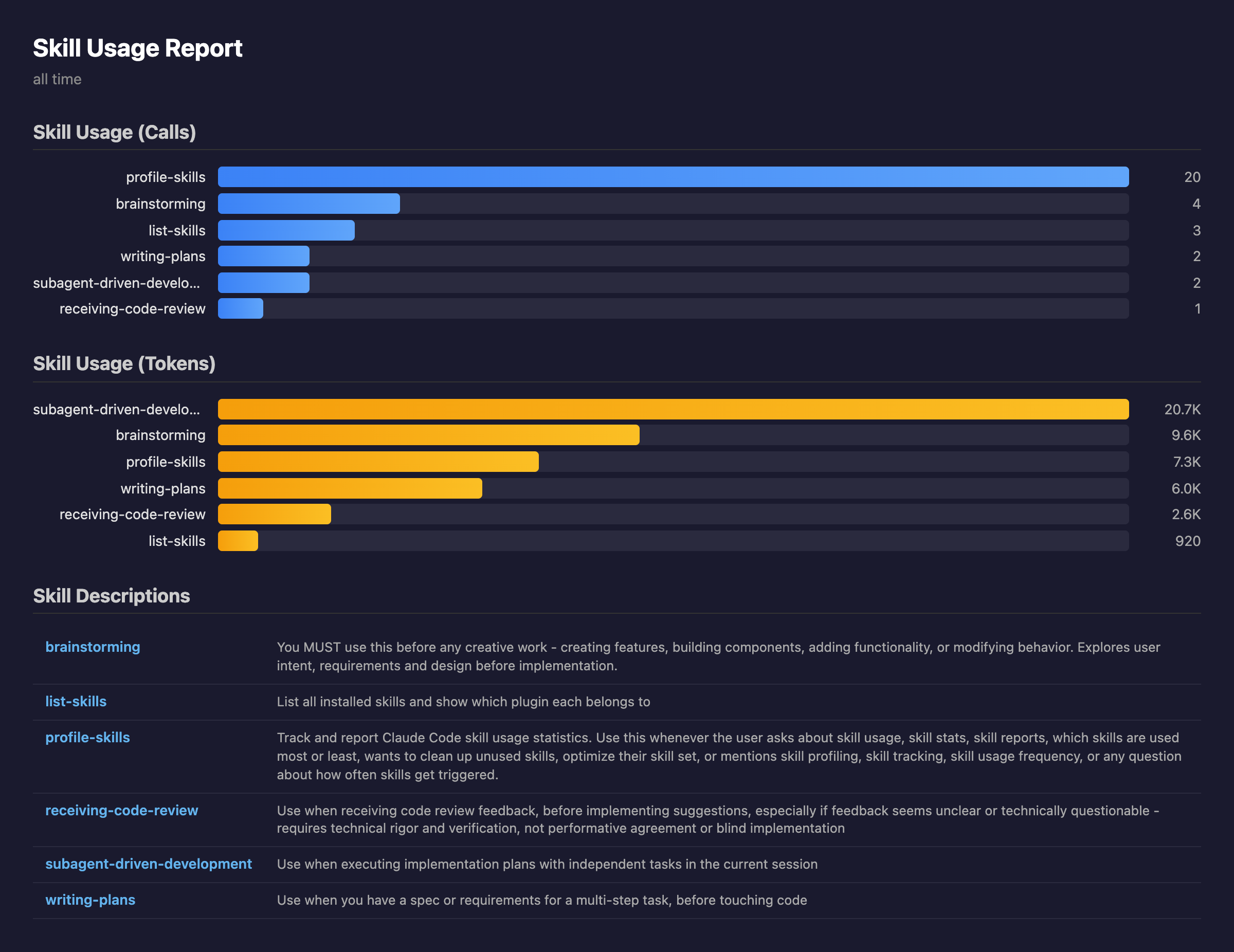
The HTML is self-contained (no external dependencies) and served on localhost:8765.
Options:
--period day|week|month|all — Filter by time period--top N — Show only top N skills--detail — Open HTML visualization in browserShows installed skills grouped by source. Three scopes are scanned:
<cwd>/.claude/skills/** (walks up from the current working
directory to find the nearest one); shown first when present.~/.claude/skills/**.~/.claude/plugins/cache/**, grouped by plugin name.Descriptions are condensed to a keyword-style summary (pushy Use when … /
This skill should be used when … framings are stripped, capped at ~50
chars). Skill names are highlighted — ANSI bold cyan in the terminal, inline
code in the chat panel — so they stand out at a glance.
Installed Skills (17 total)
  project: /Users/me/work/my-app

project (1 skill)
  test-skill         A test project-local skill

personal (2 skills)
  my-custom-skill    Custom automation tool
  my-helper          Helper for daily tasks

superpowers (10 skills)
  brainstorming      Explores user intent before implementation
  writing-plans      Create implementation plans from specs
  ...
Useful flags: --no-project (skip the project scan), --project-dir <path>
(point the project scan elsewhere), --format {text,markdown,json},
--color {always,auto,never}.
Find a skill by name and see where it's installed.
Search: "debug"  →  2 results

  debugging
    Source:  superpowers (plugin)
    Path:    ~/.claude/plugins/cache/superpowers/skills/systematic-debugging/SKILL.md

  debug-helper
    Source:  personal
    Path:    ~/.claude/skills/debug-helper/SKILL.md
Compares all installed skills for similarity, generates a report, and interactively guides cleanup.
4-stage pipeline:
Collect → Parallel Compare → Report → Interactive Removal
Report shows only 70%+ similarity pairs:
#1  executing-plans  VS  subagent-driven-development
    ██████████████████░░ 85%  ·  plugin VS plugin
| Grade | Similarity | Meaning |
|---|---|---|
| 🔴 | 90%+ | Remove candidate |
| 🟡 | 70-89% | Review suggested |
| 🟢 | <70% | Unique (excluded from report) |
Then presents similar pairs one at a time for interactive removal with a final confirmation gate.
/list-skills and /profile-skills write their report to a temp file and read it back so the rendered table is shown directly in Claude's response (instead of a collapsed +N lines Bash panel). On verbose=false Claude Code asks for Read permission the first time it touches each path. To skip the prompt, add this rule to your ~/.claude/settings.json (or a project .claude/settings.json):
{
  "permissions": {
    "allow": [
      "Read(/tmp/skills-cleaner-*.txt)"
    ]
  }
}
A single glob covers both list-skills and profile-skills. Plugin-shipped permission allowlists aren't currently a supported Claude Code feature, so this rule has to live in user or project settings.
This plugin automatically tracks skill usage via three hooks registered in plugin.json:
| Hook | Event | Role |
|---|---|---|
track-skill-start.sh | PostToolUse (Skill matcher) | Appends a pending entry for Claude-initiated skill calls |
track-skill-prompt.sh | UserPromptSubmit | Appends a pending entry for user-initiated /skill-name calls; also flushes any leftover pending state |
track-skill-stop.sh | Stop | Delegates to _pending_flush.py to atomically flush pending entries into per-turn log records |
The flush logic groups pending entries by turn: the first skill in a turn becomes the root entry, and any skills triggered after it (Claude-initiated within the same turn) nest under sub_skills. Token counts are sliced by invocation timestamp so root and subs never overlap. Streaming chunks (same message.id) are deduped, and tool-injected user entries (Skill output, etc.) are excluded from turn boundaries so the window isn't truncated mid-turn.
Each record captures four token fields (input_tokens, cache_read_input_tokens, cache_creation_input_tokens, output_tokens), the Claude model used, and duration_ms bounded by the turn's last assistant message. Data is logged to ~/.claude/skill-usage.jsonl:
{"skill":"using-superpowers","ts":"2026-04-28T10:00:00Z","session":"abc123","source":"user","model":"claude-opus-4-7","duration_ms":1800,"input_tokens":1,"cache_read_input_tokens":0,"cache_creation_input_tokens":0,"output_tokens":300,"sub_skills":[{"skill":"brainstorming","ts":"2026-04-28T10:00:05Z","source":"claude","model":"claude-opus-4-7","duration_ms":4500,"input_tokens":3,"cache_read_input_tokens":0,"cache_creation_input_tokens":0,"output_tokens":400}]}
{"skill":"list-skills","ts":"2026-04-28T10:05:00Z","session":"def456","source":"user","model":"claude-sonnet-4-6","duration_ms":2100,"input_tokens":5,"cache_read_input_tokens":100,"cache_creation_input_tokens":0,"output_tokens":1234}
Existing flat-format entries (no sub_skills, single output_tokens field) continue to load — no migration is required.
MIT
Sign in to join the discussion.
No comments yet. Be the first to say what this is good for.
Makes your AI agent think like the laziest senior dev in the room. The best code is the code you never wrote.

Graphs that teach > graphs that impress. Turn any code into an interactive knowledge graph you can explore, search, and ask questions about. Works with Claude Code, Codex, Cursor, Copilot, Gemini CLI, and more.

OmO: Just type "mass ulw" keyword with your prompt. Now you are the master of graph engineering.
Persistent Context Across Sessions for Every Agent – Captures everything your agent does during sessions, compresses it with AI, and injects relevant context back into future sessions. Works with Claude Code, OpenClaw, Codex, Gemini, Hermes, Copilot, OpenCode + More
Opinionated Oxlint rules for rejecting low-evidence TypeScript and JavaScript patterns
Teams-first Multi-agent orchestration for Claude Code