

JuliusBrussee/
caveman

🪨 why use many token when few token do trick — Claude Code skill that cuts 65% of tokens by talking like caveman
105k
1 add
Lazy Skills is a Go-based terminal UI for discovering and managing agent skills. It shows installed skills, checks which agents can use them, explains broken visibility, and lets you run safe fixes and installs from one place.
Builders who manage agent skills across project and global scopes in Claude Code, Codex, Cursor, Gemini CLI, or similar tools.
You can see, fix, and install agent skills without digging through folders by hand.
Shows project, global, universal, and agent-specific skills in one TUI view.
Lets you switch agents and see which skills are actually usable by each one.
Flags missing `SKILL.md`, invalid frontmatter, broken symlinks, missing lock entries, and ghost agent skills.
Shows metadata, rendered content, and the exact command before it runs, with confirmation for destructive actions.
Supports open, reinstall, update, remove, prune orphaned locks, and bulk update or removal flows.
Scans local checkouts or GitHub sources and searches skills.sh from inside the app to find and install new skills.
Provides read-only health reports and restore commands for skills missing from disk but present in lock files.
curl -fsSL https://lazyskills.sh/install | sh
brew install --cask alvinunreal/tap/lazyskills
irm https://lazyskills.sh/install.ps1 | iex
go install github.com/alvinunreal/lazyskills/cmd/lazyskills@latest
lazyskills
lazyskills

Blazing-fast mission control for agent skills.



"I don't debug broken skills by hand - I have a TUI to be disappointed for me."
LazySkills is a blazing-fast terminal UI for managing agent skills. It gives you one place to see what is installed, which agents can use each skill, why visibility may be broken, and what actions are safe to run next.
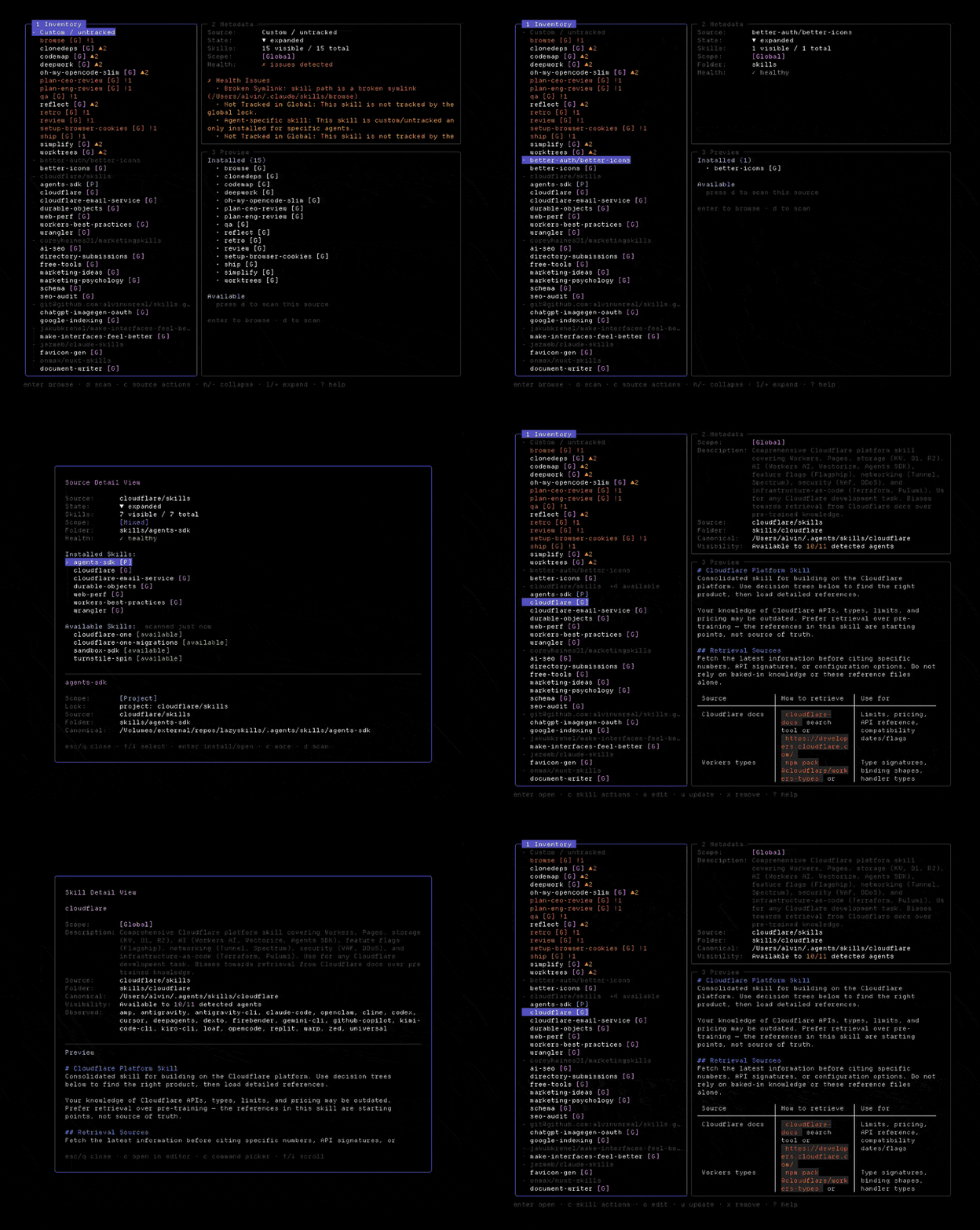
SKILL.md, invalid frontmatter, broken symlinks, missing lock entries, and ghost agent skills.Recommended for macOS and Linux:
curl -fsSL https://lazyskills.sh/install | sh
Or use Homebrew:
brew install --cask alvinunreal/tap/lazyskills
Windows:
irm https://lazyskills.sh/install.ps1 | iex
Go users:
go install github.com/alvinunreal/lazyskills/cmd/lazyskills@latest
Then launch it:
lazyskills
Run LazySkills from a project:
lazyskills
Start with the left pane. It groups skills by source, so you can quickly see what came from the same repo, local folder, or custom install.
Useful keys:
| Key | What it does |
|---|---|
/ | Search skills |
a | Cycle through agent visibility filters |
f | Toggle project/global/all scopes |
enter | Open details for a skill or source |
c | Show available actions |
n | Find new skills from skills.sh |
space | Select a skill for bulk actions |
u | Reinstall/update selected skill |
x | Remove selected skill |
? | Show the full keymap |
LazySkills previews actions before running them, and destructive actions require confirmation.
For agent-friendly registry search without opening the TUI:
lazyskills find --json "browser automation"
Run a read-only health report for the current project:
lazyskills doctor
It ranks scan errors before warnings and shows the affected skill or workspace, path, and safe next step. Use structured output in scripts or other agents:
lazyskills doctor --json
lazyskills doctor --cwd /path/to/project
Doctor never changes skills or lock files. It reports findings and points to commands such as lazyskills restore when a locked skill is missing from disk.
Restore skills that are recorded in the project or global lock file but missing from disk:
lazyskills restore --global
lazyskills restore --project
lazyskills restore --all
Pass skill names to restore only those entries, or --yes to accept the preview non-interactively:
lazyskills restore --project code-review tdd
lazyskills restore --global --yes
Without a scope flag, restore checks both scopes. Before each install it rescans and revalidates that skill’s lock identity and restore command, then aborts without running remaining commands if the skill disappeared, its lock metadata changed, or its command changed—reporting any skills already restored. That narrows races with concurrent installs; it does not make restore fully race-free.
LazySkills can check for new releases and show the command to update your installation manually.
Run the update command directly from your terminal to check for updates and get upgrade instructions:
lazyskills update
Options:
--check: Query if a newer version is available. Exits 0 if status is checked cleanly.--print-command: Print the command required to upgrade on your channel (e.g. brew upgrade) and exit.When a newer version of LazySkills is available, an update notification will appear in the TUI footer:
· U update (vX.Y.Z available)
Press U (capital U) from the inventory view to open the update info modal, which will display the release details and the specific terminal command you need to run to upgrade manually.

There are Lazy Skills stickers. Star the repo and you're entered into a draw to win some, shipped worldwide at no cost to you.
Winners are drawn from stargazers and announced in the sticker giveaway issue, tagged by their GitHub username, so you'll get a notification if it's you. Shipping details are arranged privately from there.
MIT - see LICENSE.
Sign in to join the discussion.
No comments yet. Be the first to say what this is good for.
🪨 why use many token when few token do trick — Claude Code skill that cuts 65% of tokens by talking like caveman

The best-benchmarked open-source AI memory system. And it's free.

Orca is the ADE for working with a fleet of parallel agents. Run any coding agent with your own subscription. Available on desktop, mobile and remote runtime.

A cross-platform desktop All-in-One assistant for Claude Code, Codex, OpenCode, OpenClaw, Grok Build & Hermes Agent. Only official website: ccswitch.io

Never stop coding. Free MIT AI gateway: one endpoint, 352 providers (150+ free), 1200+ models Kimi, Claude, GPT, Gemini, GLM, DeepSeek, MiniMax. Works with Claude Code, Codex, Cursor, OpenCode, Cline & Copilot. Quota-aware auto-fallback, RTK+Caveman compression saves 15-95% tokens, MCP/A2A, Desktop/PWA. Built by 550+ contributors

Compress tool outputs, logs, files, and RAG chunks before they reach the LLM. 20% fewer tokens for coding agents, 60-95% fewer tokens for JSON, same answers. Library, proxy, MCP server.