

DietrichGebert/ponytailPlugins
Makes your AI agent think like the laziest senior dev in the room. The best code is the code you never wrote.
138k
1 add
Claude Paper turns a PDF into a paper library, a quick summary, a full study pack, and a local web viewer. It works by installing agent-specific skills, commands, hooks, and adapter files that keep the same workflow across supported agents.
Builders who want Claude Code, Codex, or OpenCode to handle research papers the same way across sessions.
You can study papers once and get the same summaries, notes, demos, and viewer no matter which agent you use.
Extracts title, authors, abstract, links, and full paper text from a PDF.
Creates a short screening summary in `quick-summary.md` before a deep study.
Generates README, summary, insights, Q&A, and other notes based on paper complexity.
Builds clean reference implementations and notebook demos when the paper supports them.
Provides a Nuxt.js viewer with math rendering for browsing studied papers at `http://localhost:5815`.
Ships manifests and generated wrappers so the same workflow works in Claude Code, Codex, OpenCode, and DeepSeek Harness.
npx --yes @zlzliqing/claude-paper@latest install
npx --yes @zlzliqing/claude-paper@latest install --target claude-code
npx --yes @zlzliqing/claude-paper@latest install --target codex
npx --yes @zlzliqing/claude-paper@latest install --target opencode
npx --yes @zlzliqing/claude-paper@latest install --target deepseek-harness
# Upgrade all supported agents
npx --yes @zlzliqing/claude-paper@latest upgrade

# Keep upgrading only the agents selected during installation
npx --yes @zlzliqing/claude-paper@latest upgrade --target codex,opencode
/plugin marketplace add alaliqing/claude-paper
/plugin install claude-paper
# Claude Code
/claude-paper:summary /path/to/paper.pdf

# OpenCode
/claude-paper-summary /path/to/paper.pdf
Help me study the paper at ~/Downloads/attention-is-all-you-need.pdf
Transform research papers into comprehensive learning environments


A research-paper learning plugin for Claude Code, Codex, OpenCode, and DeepSeek Harness. It preserves the same study workflow, generated materials, code demonstrations, and interactive web viewer across supported agents.
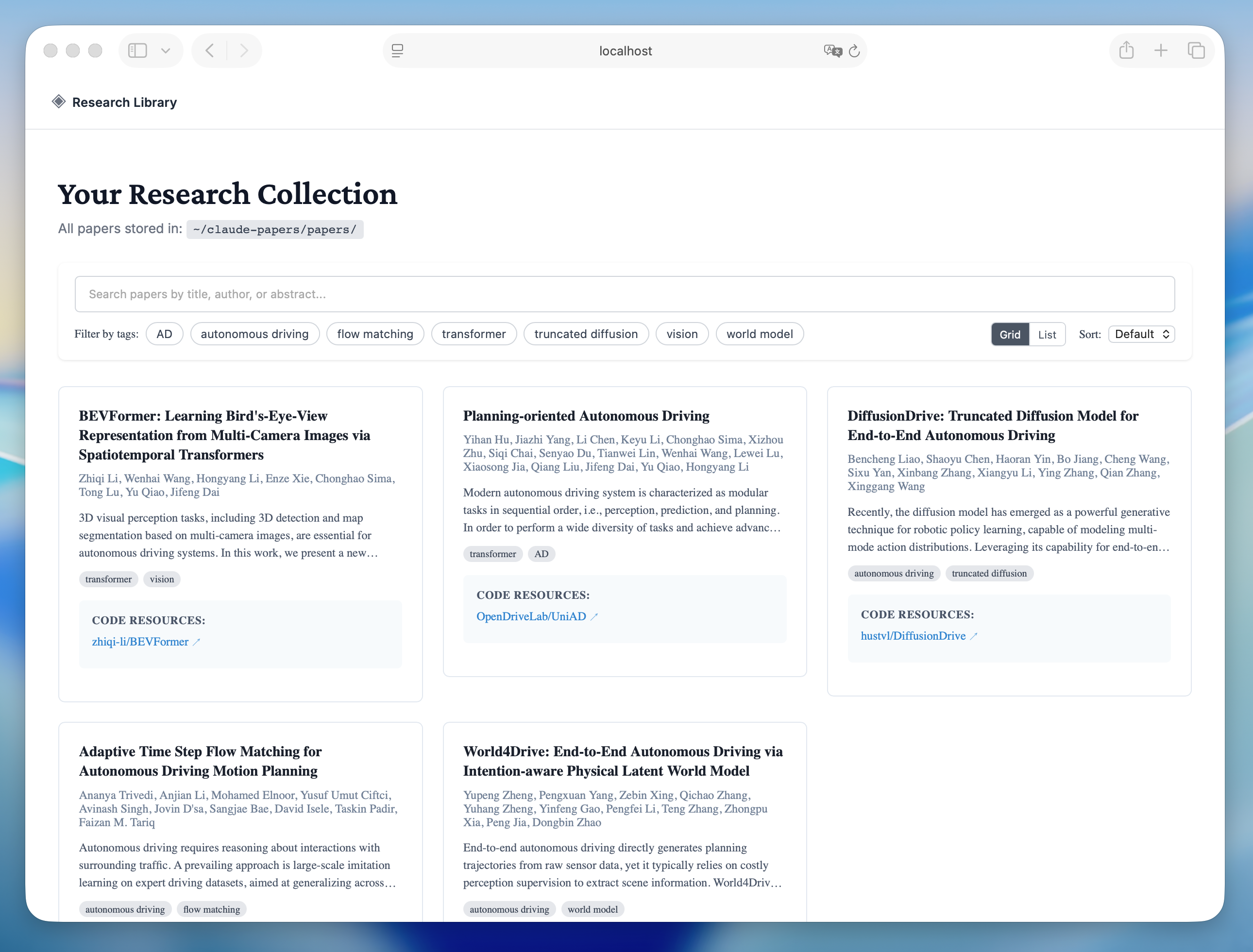
Library View - Browse and search your paper collection |
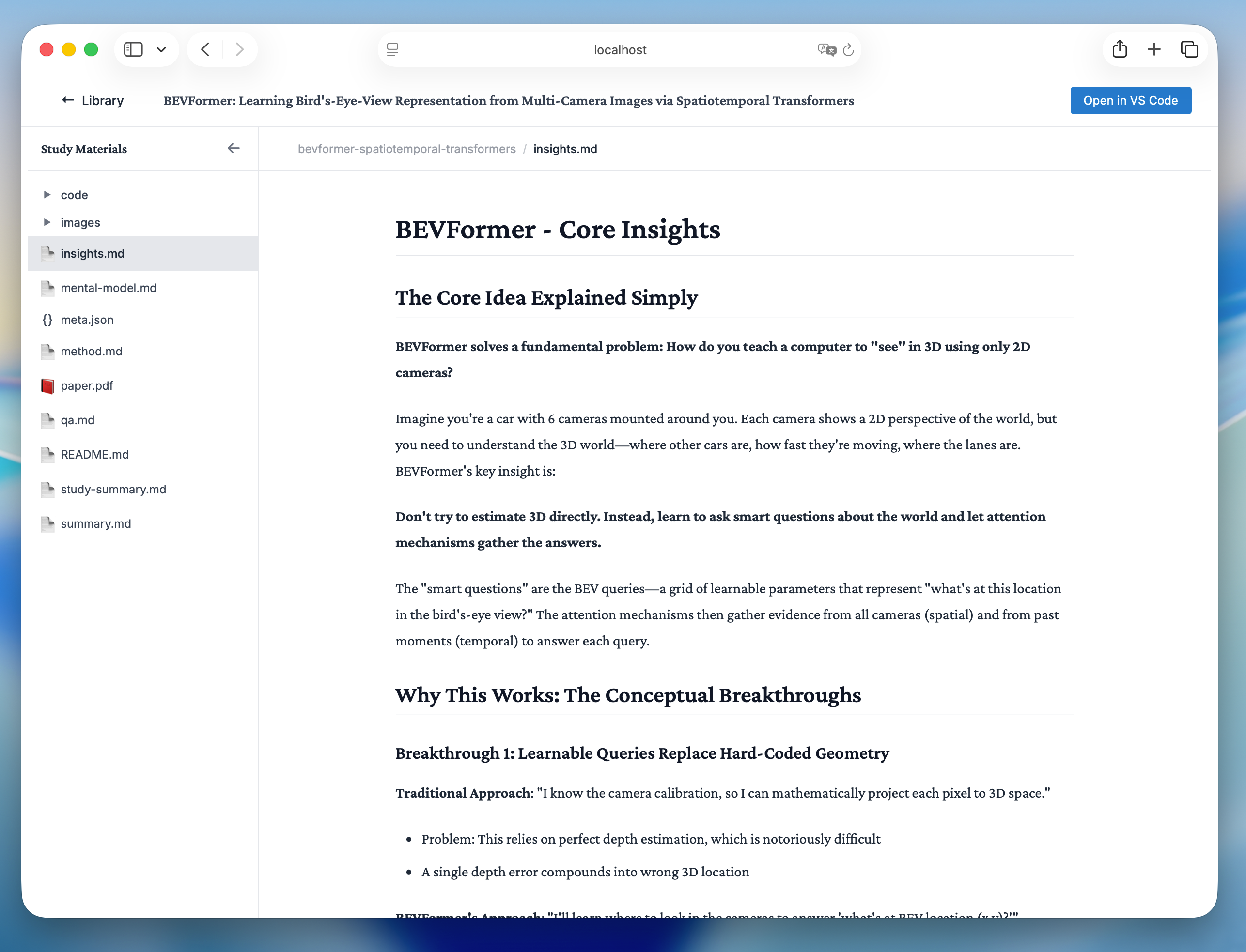
Reading View - Study papers with rich formatting and math support |
paper.txt while keeping a 50k preview in metadataInstall Claude Code, Codex, OpenCode, and DeepSeek Harness with one command—no repository clone required:
npx --yes @zlzliqing/claude-paper@latest install
The default all target covers all four agents. For Claude Code, the installer uses the official Claude CLI to register the package-local marketplace and install or update the user-scoped plugin. For the other agents, it installs the shared Skills and OpenCode commands where applicable.
Install only selected agents when needed:
npx --yes @zlzliqing/claude-paper@latest install --target claude-code
npx --yes @zlzliqing/claude-paper@latest install --target codex
npx --yes @zlzliqing/claude-paper@latest install --target opencode
npx --yes @zlzliqing/claude-paper@latest install --target deepseek-harness
Upgrade an existing installation with the same formal distribution channel:
# Upgrade all supported agents
npx --yes @zlzliqing/claude-paper@latest upgrade

# Keep upgrading only the agents selected during installation
npx --yes @zlzliqing/claude-paper@latest upgrade --target codex,opencode
The default upgrade target is all. If the existing installation only targets selected agents, pass the same --target list during upgrade so no additional agent integrations are added.
The npm package copies its packaged plugin runtime to the user data directory, installs the generated compatibility Skills in ~/.agents/skills/ when a shared-Skills host is selected, and adds OpenCode commands when OpenCode is selected. It initializes ~/claude-papers/ only when the library does not already exist. Restart the selected agents after installation or upgrade.
If you only use Claude Code, you can still install directly from its marketplace:
/plugin marketplace add alaliqing/claude-paper
/plugin install claude-paper
Claude Paper currently runs through Agent Skills; no separate MCP server installation or configuration is required.
all or claude-code is selectedbrew install popplersudo apt-get install poppler-utilssudo pacman -S popplerAsk the selected agent for a quick summary, or use the host command directly:
# Claude Code
/claude-paper:summary /path/to/paper.pdf

# OpenCode
/claude-paper-summary /path/to/paper.pdf
In Codex or DeepSeek Harness, ask for a quick paper summary or explicitly load the claude-paper-summary Skill. This creates quick-summary.md while preserving the PDF, complete paper.txt, and metadata in the shared paper library.
Simply ask the selected agent to study a paper:
Help me study the paper at ~/Downloads/attention-is-all-you-need.pdf
You can also use URLs:
# Direct PDF URL
Help me study the paper at https://arxiv.org/pdf/1706.03762.pdf

# arXiv abstract URL (automatically converted to PDF)
Help me study the paper at https://arxiv.org/abs/1706.03762
The agent will automatically trigger the study workflow and:
# Claude Code
/claude-paper:webui

# OpenCode
/claude-paper-webui
In Codex or DeepSeek Harness, ask the agent to start the Claude Paper web viewer or explicitly load the claude-paper-webui Skill.
Opens the interactive web interface at http://localhost:5815 where you can:
Papers are organized in ~/claude-papers/papers/{paper-slug}/:
~/claude-papers/
├── papers/
│   └── {paper-slug}/
│       ├── paper.pdf                     # Original PDF file
│       ├── paper.txt                     # Complete extracted text
│       ├── meta.json                     # Paper metadata (title, authors, etc.)
│       ├── quick-summary.md               # Concise screening summary (quick workflow)
│       ├── README.md                     # Quick navigation and overview
│       ├── summary.md                    # Detailed summary
│       ├── insights.md                   # Key insights (most important!)
│       ├── method.md                     # Methodology (if complex)
│       ├── mental-model.md              # Paper categorization (if needed)
│       ├── reflection.md                # Future directions (if needed)
│       ├── qa.md                         # Learning questions
│       ├── index.html                    # Interactive HTML explorer
│       ├── images/                       # Extracted figures and tables
│       │   ├── fig1.png
│       │   └── fig2.png
│       └── code/                         # Code demonstrations
│           ├── core-demo.py              # Clean reference implementation
│           └── concept-demo.ipynb        # Interactive Jupyter notebook
│
└── index.json                           # Global search index
claude-paper/
├── package.json                       # npm distribution manifest
├── bin/
│   └── claude-paper.mjs              # npx install and upgrade entry point
├── .claude-plugin/
│   └── marketplace.json              # Claude Code marketplace catalog
├── .codex-plugin/
│   └── plugin.json                   # Codex plugin manifest
├── .agents/skills/                   # OpenCode and DSH discovery entries
├── .opencode/commands/               # OpenCode slash-command wrappers
├── skills/                           # Codex packaged Skill adapters
├── scripts/
│   ├── sync-agent-adapters.mjs       # Deterministic adapter generator
│   └── install-agent-adapters.mjs    # Cross-agent installer and upgrader
├── plugin/
│   ├── .claude-plugin/
│   │   └── plugin.json              # Plugin manifest
│   ├── skills/
│   │   ├── study/
│   │   │   ├── SKILL.md             # Study workflow definition
│   │   │   └── scripts/
│   │   │       ├── parse-pdf.js    # PDF parsing utility
│   │   │       └── extract-images.py  # Image extraction
│   │   ├── summary/
│   │   │   └── SKILL.md             # Quick summary workflow definition
│   │   └── webui/
│   │       └── SKILL.md             # Web viewer workflow definition
│   ├── commands/
│   │   └── webui.md                # /webui command
│   ├── hooks/
│   │   ├── hooks.json              # Session lifecycle hooks
│   │   └── check-install.sh        # Installation verification
│   ├── src/
│   │   └── web/                    # Nuxt.js web viewer
│   │       ├── components/         # Vue components
│   │       ├── composables/        # Vue composables
│   │       ├── server/             # API endpoints
│   │       └── package.json
│   └── package.json
└── README.md
# Verify cross-agent adapters and reviewed canonical Claude Skills
npm test

# Verify generated adapters are synchronized
npm run check:adapters

# Test PDF parsing
node plugin/skills/study/scripts/parse-pdf.js /path/to/paper.pdf

# Test web viewer
cd plugin/src/web
npm run dev

# Test full workflow
cd /path/to/claude-paper
claude --plugin-dir ./plugin
/claude-paper:study /path/to/paper.pdf
# Runs adapter checks and tests before producing the publishable tarball
npm pack --dry-run
# Build web viewer
cd plugin/src/web
npm run build

# The built viewer will be in .output/
No configuration required! The plugin uses sensible defaults:
~/claude-papers/581550,000 characters; complete extracted text remains in paper.txtYou can modify behavior by editing the skill file at:
plugin/skills/study/SKILL.md
Contributions are welcome! Please:
git checkout -b feature/amazing-feature)git commit -m 'add amazing feature')git push origin feature/amazing-feature)This project is licensed under the MIT License - see the LICENSE file for details.
Sign in to join the discussion.
No comments yet. Be the first to say what this is good for.
Makes your AI agent think like the laziest senior dev in the room. The best code is the code you never wrote.

Graphs that teach > graphs that impress. Turn any code into an interactive knowledge graph you can explore, search, and ask questions about. Works with Claude Code, Codex, Cursor, Copilot, Gemini CLI, and more.

OmO: Just type "mass ulw" keyword with your prompt. Now you are the master of graph engineering.
Persistent Context Across Sessions for Every Agent – Captures everything your agent does during sessions, compresses it with AI, and injects relevant context back into future sessions. Works with Claude Code, OpenClaw, Codex, Gemini, Hermes, Copilot, OpenCode + More
Opinionated Oxlint rules for rejecting low-evidence TypeScript and JavaScript patterns
Teams-first Multi-agent orchestration for Claude Code