
koala73/worldmonitorConnectors
Real-time global intelligence dashboard. AI-powered news aggregation, geopolitical monitoring, and infrastructure tracking in a unified situational awareness interface
86k
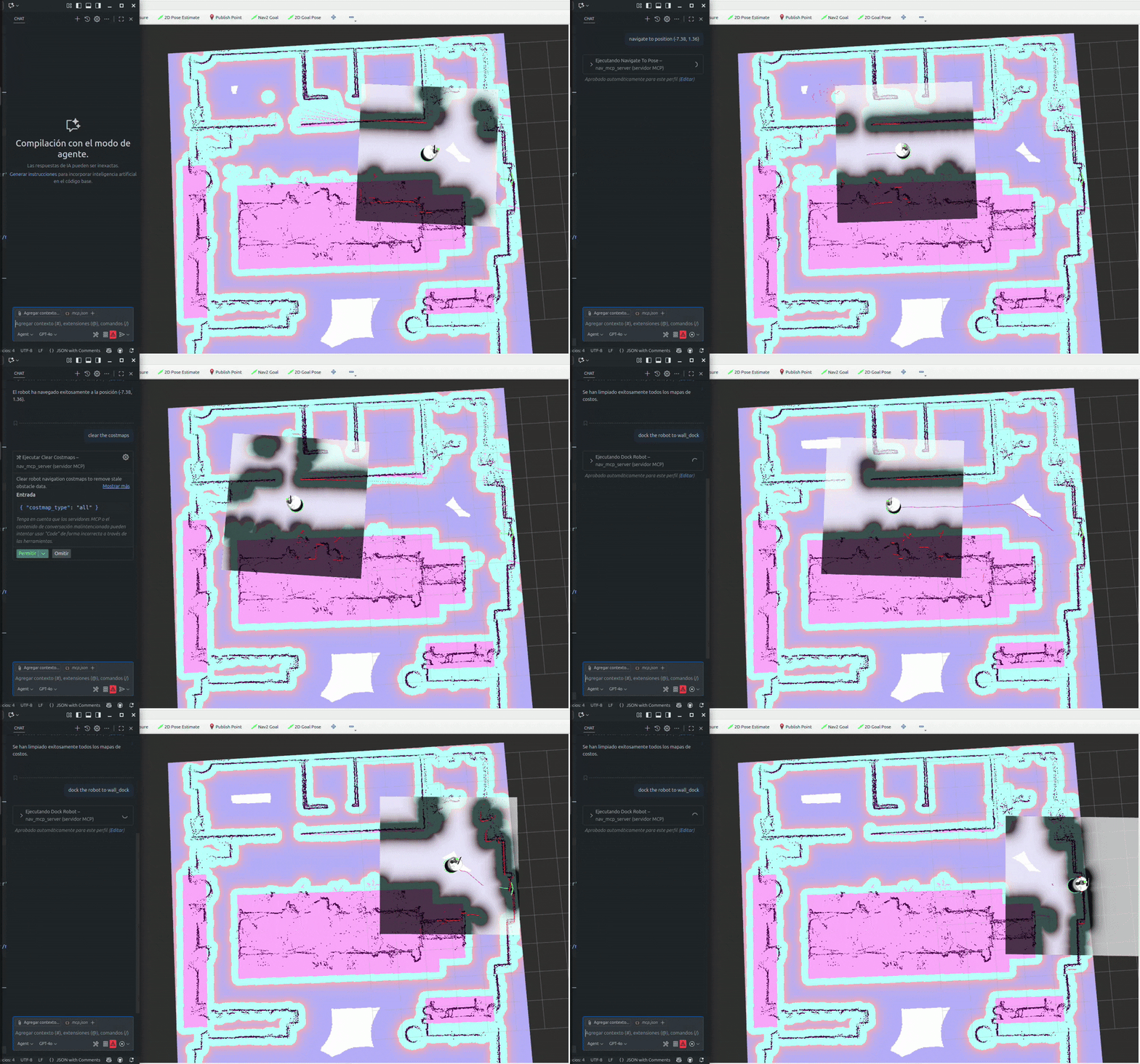
Nav2 MCP Server turns Nav2 navigation actions into MCP tools and resources. It supports moving to poses, following waypoints, docking, clearing costmaps, reading robot pose, canceling navigation, and managing Nav2 lifecycle state. The server can run over stdio or HTTP and is set up for ROS 2 environments.
Builders who want to connect Claude Desktop, Cursor, or other MCP clients to Nav2 robots.
You can control and monitor a Nav2 robot from an MCP client instead of wiring each ROS 2 action by hand.
Provides tools for `navigate_to_pose`, `follow_waypoints`, `spin_robot`, `backup_robot`, `dock_robot`, and `undock_robot`.
Exposes `get_robot_pose`, `get_path`, and `get_path_from_robot` for checking state and planning routes.
Lets you clear costmaps and start or shut down Nav2 with `clear_costmaps` and `nav2_lifecycle`.
Supports non-blocking navigation, progress updates, and cancellation with `cancel_navigation`.
Runs in ROS 2 Jazzy environments and supports `stdio` or `http` transport through environment settings.
cp .env.example .env
git clone https://github.com/ajtudela/nav2_mcp_server.git
cd nav2_mcp_server
# Set up ROS 2 environment variables if needed
export ROS_DOMAIN_ID=0
uv sync
uv add git+https://github.com/ajtudela/nav2_mcp_server.git
docker build -t nav2-mcp-server:latest .
docker pull ghcr.io/ajtudela/nav2_mcp_server:latest
uv run nav2_mcp_server







An MCP (Model Context Protocol) server that provides tools and resources to control and monitor Nav2 navigation operations, allowing seamless integration with Nav2-enabled robots through the MCP protocol.
| Tool | Description | Parameters |
|---|---|---|
| navigate_to_pose | Navigate the robot to a specific pose (position and orientation) in the map frame | x: float, y: float, yaw: float |
| follow_waypoints | Navigate the robot through a sequence of waypoints in order | waypoints: str (JSON array) |
| spin_robot | Rotate the robot in place by a specified angle | angle: float |
| backup_robot | Move the robot backward by a specified distance | distance: float, speed: float |
| dock_robot | Dock the robot to a charging station or dock | x: float, y: float, yaw: float, dock_id: str, dock_type: str, nav_to_dock: bool |
| undock_robot | Undock the robot from a charging station or dock | dock_type: str |
| clear_costmaps | Clear robot navigation costmaps to remove stale obstacle data | costmap_type: str |
| get_robot_pose | Get the current position and orientation of the robot | — |
| cancel_navigation | Cancel the currently active navigation task | — |
| nav2_lifecycle | Control Nav2 lifecycle (startup or shutdown) | action: str |
| get_path | Compute a navigation path between two poses | start_x: float, start_y: float, start_yaw: float, goal_x: float, goal_y: float, goal_yaw: float, planner_id: str |
| get_path_from_robot | Compute a navigation path from the robot's current pose to a goal pose | goal_x: float, goal_y: float, goal_yaw: float, planner_id: str |
| Variable | Default | Description |
|---|---|---|
ROS_DOMAIN_ID | — | ROS 2 domain ID for network isolation (recommended to set) |
ROS_LOCALHOST_ONLY | — | Set to '1' to restrict ROS 2 communication to localhost only |
| Variable | Default | Description |
|---|---|---|
TRANSPORT_MODE | stdio | Transport mode: stdio (local integration) or http (network) |
HTTP_HOST | 0.0.0.0 | HTTP host binding (only used when TRANSPORT_MODE=http) |
HTTP_PORT | 3001 | HTTP port (only used when TRANSPORT_MODE=http) |
LOG_LEVEL | INFO | Logging level: DEBUG, INFO, WARNING, ERROR, CRITICAL |
ROS_DOMAIN_ID | — | ROS 2 domain ID for network isolation (recommended) |
ROS_LOCALHOST_ONLY | — | Set to '1' to restrict ROS 2 communication to localhost only |
cp .env.example .env
.env to customize settings:# Transport mode: 'stdio' for local, 'http' for containerized/network
TRANSPORT_MODE=stdio
# HTTP settings (only needed if using http transport)
HTTP_HOST=0.0.0.0
HTTP_PORT=3001
# Logging
LOG_LEVEL=INFO
Clone the repository and install with uv:
git clone https://github.com/ajtudela/nav2_mcp_server.git
cd nav2_mcp_server
# Set up ROS 2 environment variables if needed
export ROS_DOMAIN_ID=0
uv sync
Or install directly from the repository:
uv add git+https://github.com/ajtudela/nav2_mcp_server.git
Build the image:
docker build -t nav2-mcp-server:latest .
Pull the latest image from the Docker registry:
docker pull ghcr.io/ajtudela/nav2_mcp_server:latest
uv run nav2_mcp_server
Add this configuration to your application's settings (mcp.json):
{
  "nav2 mcp server": {
    "type": "stdio",
    "command": "uv",
    "args": [
      "run",
      "--directory",
      "/path/to/nav2_mcp_server",
      "nav2-mcp-server"
    ],
    "env": {
      "ROS_DOMAIN_ID": "0",
      "ROS_LOCALHOST_ONLY": "1"
    }
  }
}
"nav2 mcp server": {
    "type": "stdio",
    "command": "docker",
    "args": [
        "run",
        "-i",
        "--rm",
        "ghcr.io/ajtudela/nav2_mcp_server"
    ],
    "env": {
      "ROS_DOMAIN_ID": "0",
      "ROS_LOCALHOST_ONLY": "1"
    }
}
"nav2 mcp server": {
  "type": "http",
  "url": "http://localhost:3001/mcp",
  "env": {
    "TRANSPORT_MODE": "http",
    "LOG_LEVEL": "INFO"
  }
}
Sign in to join the discussion.
No comments yet. Be the first to say what this is good for.
Real-time global intelligence dashboard. AI-powered news aggregation, geopolitical monitoring, and infrastructure tracking in a unified situational awareness interface

Universal provider proxy for OpenAI Codex & Claude Code — use any LLM (Claude, Gemini, Grok, DeepSeek, Ollama…) with Codex CLI, App, SDK, and Claude Code
Open-source auth gateway connecting 1400+ SaaS providers to AI agents through SDK, CLI, MCP, HTTP, and OpenAPI.
Open-source 3D architectural editor with a local CLI, MCP tools, and practical workflows for humans and AI agents.

Open-source MCP server for comparing products and asking the buyer before purchase.

A MCP for Claude Desktop / Claude Code / Windsurf / Cursor to build n8n workflows for you