

JuliusBrussee/
caveman

🪨 why use many token when few token do trick — Claude Code skill that cuts 65% of tokens by talking like caveman
105k
1 add
evil-winrm-py gives you an interactive WinRM shell for remote Windows machines, with upload and download commands, script loading, DLL and EXE execution, and authentication options like NTLM, Kerberos, certificates, and pass-the-hash. It can also run as an MCP server so compatible clients can call WinRM login, execute, and logout as tools.
Builders who need an interactive WinRM shell or MCP access to remote Windows hosts.
You can manage remote Windows sessions from the terminal instead of stitching together one-off WinRM commands.
Run commands on a remote Windows host in a persistent shell with history and colorized output.
Upload files to the host and download files back, with progress reporting and checksum verification.
Load local PowerShell functions, run local `.ps1` scripts remotely, and auto-complete cmdlets and file paths.
Load local DLLs as modules and upload and execute local EXEs on the remote host.
Supports NTLM, pass-the-hash, certificate auth, and Kerberos with custom SPN options.
Exposes WinRM login, execute, and logout as MCP tools with support for multiple sessions.
Connects to Just Enough Administration session configurations through a custom endpoint name.
sudo apt install gcc python3-dev libkrb5-dev krb5-pkinit
# Optional: krb5-user
pip install evil-winrm-py
pip install evil-winrm-py[kerberos] # for kerberos support on Linux

# Note: building gssapi and krb5 packages may take some time, so be patient.
git clone https://github.com/adityatelange/evil-winrm-py
cd evil-winrm-py
pip install .
pip install .[mcp] # for optional MCP server support (requires Python 3.10+), not yet released on PyPI
pip install --upgrade evil-winrm-py
pip uninstall evil-winrm-py
evil-winrm-py -i 192.168.1.100 -u Administrator -p P@ssw0rd --ssl




evil-winrm-py is a python-based tool for executing commands on remote Windows machines using the WinRM (Windows Remote Management) protocol. It provides an interactive shell with enhanced features like file upload/download, command history, and colorized output. It supports various authentication methods including NTLM, Pass-the-Hash, Certificate, and Kerberos.
[!NOTE] This tool is designed strictly for educational, ethical use, and authorized penetration testing. Always ensure you have explicit authorization before accessing any system. Unauthorized access or misuse of this tool is both illegal and unethical.
The original evil-winrm is written in Ruby, which can be a hurdle for some users. Rewriting it in Python makes it more accessible and easier to use, while also allowing us to leverage Python’s rich ecosystem for added features and flexibility.
I also wanted to learn more about winrm and its internals, so this project will also serve as a learning experience for me.
Tab completion.Tab completion.up/down arrow keys.Includes support for:
Detailed documentation can be found in the docs directory.
sudo apt install gcc python3-dev libkrb5-dev krb5-pkinit
# Optional: krb5-user
evil-winrm-pyYou may use pipx or uv instead of pip to install evil-winrm-py.
pipx/uvis a tool to install and run Python applications in isolated environments, which helps prevent dependency conflicts by keeping the tool's dependencies separate from your system's Python packages.
pip install evil-winrm-py
pip install evil-winrm-py[kerberos] # for kerberos support on Linux

# Note: building gssapi and krb5 packages may take some time, so be patient.
or if you want to install with latest commit from the main branch you can do so by cloning the repository and installing it with pip/pipx/uv:
git clone https://github.com/adityatelange/evil-winrm-py
cd evil-winrm-py
pip install .
pip install .[mcp] # for optional MCP server support (requires Python 3.10+), not yet released on PyPI
pip install --upgrade evil-winrm-py
pip uninstall evil-winrm-py
Check Installation Guide for more details.

For above mentioned distributions, you can install evil-winrm-py directly from their package managers. Thanks to the package maintainers for packaging and maintaining evil-winrm-py in their respective distributions.
Details on how to use evil-winrm-py can be found in the Usage Guide.
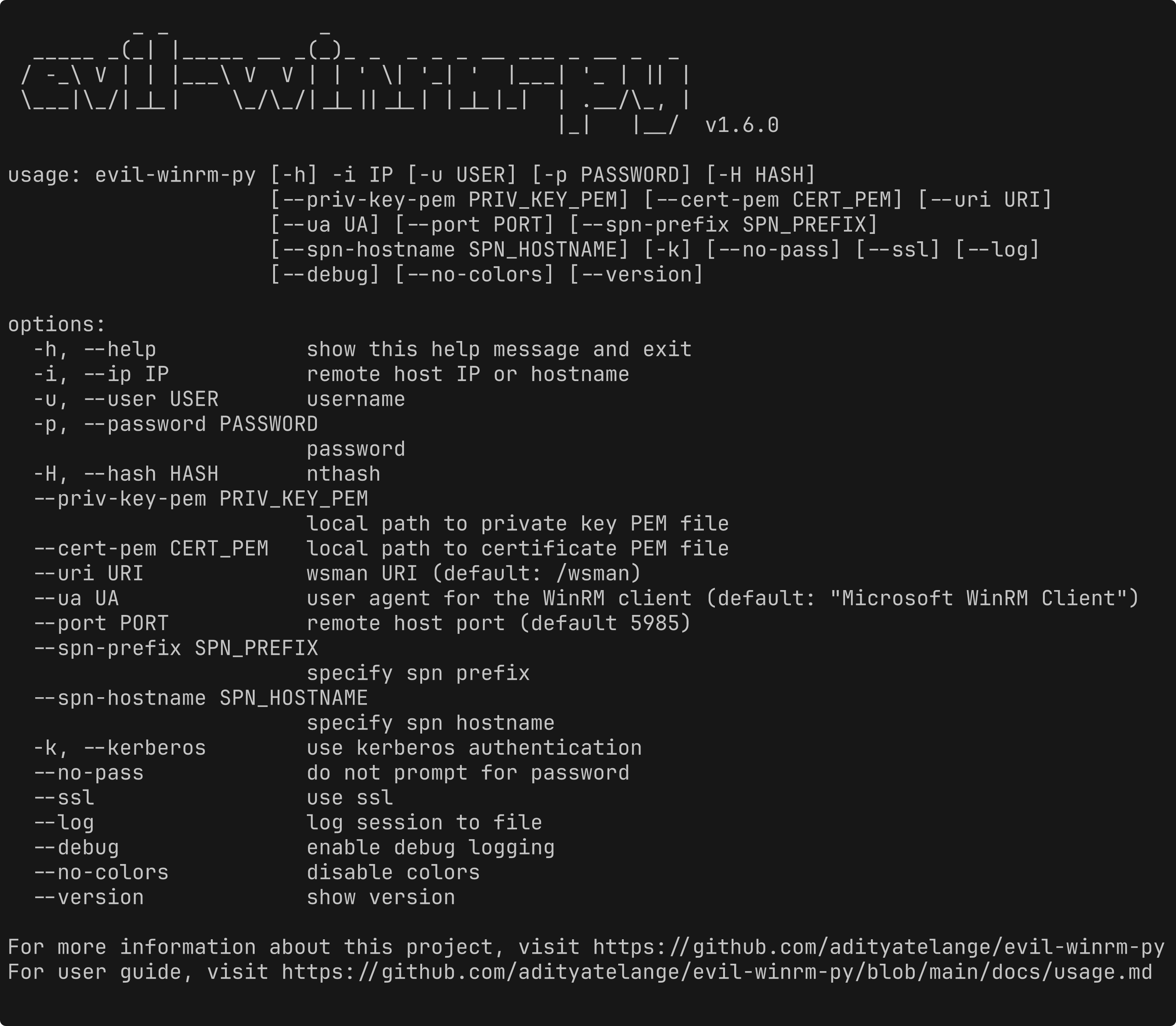
usage: evil-winrm-py [-h] [-i IP] [-u USER] [-p PASSWORD] [-H HASH] [-c CONFIGURATION_NAME]
                     [--priv-key-pem PRIV_KEY_PEM] [--cert-pem CERT_PEM] [--uri URI] [--ua UA]
                     [--port PORT] [--spn-prefix SPN_PREFIX] [--spn-hostname SPN_HOSTNAME] [-k]
                     [--no-pass] [--ssl] [--log] [--debug] [--no-colors] [--version] [--mcp]
                     [--mcp-port MCP_PORT] [--mcp-host MCP_HOST]

options:
  -h, --help            show this help message and exit
  -i IP, --ip IP        remote host IP or hostname
  -u USER, --user USER  username
  -p PASSWORD, --password PASSWORD
                        password
  -H HASH, --hash HASH  nthash
  -c CONFIGURATION_NAME, --configuration-name CONFIGURATION_NAME
                        session configuration (JEA endpoint) to connect to (default: Microsoft.PowerShell)
  --priv-key-pem PRIV_KEY_PEM
                        local path to private key PEM file
  --cert-pem CERT_PEM   local path to certificate PEM file
  --uri URI             wsman URI (default: /wsman)
  --ua UA               user agent for the WinRM client (default: "Microsoft WinRM Client")
  --port PORT           remote host port (default 5985)
  --spn-prefix SPN_PREFIX
                        specify spn prefix
  --spn-hostname SPN_HOSTNAME
                        specify spn hostname
  -k, --kerberos        use kerberos authentication
  --no-pass             do not prompt for password
  --ssl                 use ssl
  --log                 log session to file
  --debug               enable debug logging
  --no-colors           disable colors
  --version             show version
  --mcp                 start in MCP server in streamable HTTP mode (experimental feature, use with --mcp-port and --mcp-host to customize the server address and port if needed)
  --mcp-port MCP_PORT   port for MCP streamable HTTP mode (default 8000)
  --mcp-host MCP_HOST   host for MCP streamable HTTP mode (default 127.0.0.1)

For more information about this project, visit https://github.com/adityatelange/evil-winrm-py
For user guide, visit https://github.com/adityatelange/evil-winrm-py/blob/main/docs/usage.md
Example:
evil-winrm-py -i 192.168.1.100 -u Administrator -p P@ssw0rd --ssl
With the mcp extra installed, you can run evil-winrm-py as an MCP server, exposing WinRM login/execute/logout as tools for MCP-compatible clients (e.g. Claude, other AI agents) over streamable HTTP. It supports multiple concurrent WinRM sessions via a session_id.
evil-winrm-py --mcp
# or customize the address:
evil-winrm-py --mcp --mcp-host 0.0.0.0 --mcp-port 8000
[!NOTE] This is an experimental feature. Since it allows remote command execution on Windows hosts via MCP tools, only expose it on trusted networks and to trusted MCP clients.
Menu:
[+] services                                                - Show the running services (except system services)
[+] upload <local_path> <remote_path>                       - Upload a file
[+] download <remote_path> <local_path>                     - Download a file
[+] loadps <local_path>.ps1                                 - Load PowerShell functions from a local script
[+] runps <local_path>.ps1                                  - Run a local PowerShell script on the remote host
[+] loaddll <local_path>.dll                                - Load a local DLL (in-memory) as a module on the remote host
[+] runexe <local_path>.exe [args]                          - Upload and execute (in-memory) a local EXE on the remote host
[+] menu                                                    - Show this menu
[+] clear, cls                                              - Clear the screen
[+] exit                                                    - Exit the shell
Note: Use absolute paths for upload/download for reliability.
Sign in to join the discussion.
No comments yet. Be the first to say what this is good for.
🪨 why use many token when few token do trick — Claude Code skill that cuts 65% of tokens by talking like caveman

The best-benchmarked open-source AI memory system. And it's free.

Orca is the ADE for working with a fleet of parallel agents. Run any coding agent with your own subscription. Available on desktop, mobile and remote runtime.

A cross-platform desktop All-in-One assistant for Claude Code, Codex, OpenCode, OpenClaw, Grok Build & Hermes Agent. Only official website: ccswitch.io

Never stop coding. Free MIT AI gateway: one endpoint, 352 providers (150+ free), 1200+ models Kimi, Claude, GPT, Gemini, GLM, DeepSeek, MiniMax. Works with Claude Code, Codex, Cursor, OpenCode, Cline & Copilot. Quota-aware auto-fallback, RTK+Caveman compression saves 15-95% tokens, MCP/A2A, Desktop/PWA. Built by 550+ contributors

Compress tool outputs, logs, files, and RAG chunks before they reach the LLM. 20% fewer tokens for coding agents, 60-95% fewer tokens for JSON, same answers. Library, proxy, MCP server.