
DietrichGebert/ponytailPlugins
Makes your AI agent think like the laziest senior dev in the room. The best code is the code you never wrote.
138k
1 add
Sync Vault is an Obsidian plugin that connects a vault to cloud drives such as Baidu Netdisk, Aliyun Drive, Quark Drive, OneDrive, WebDAV, and S3. It supports bi-directional sync, backup, media preview, and cloud links inside notes. The built-in MCP server and CLI commands let Claude Code and Cursor read, search, and manage cloud files.
Builders who keep an Obsidian vault in cloud storage and want agents to access those files.
You can sync notes across devices and let your agent read or manage cloud files without leaving Obsidian.
Creates `[]()` links and `![]()` embeds for cloud resources after rendering inside Obsidian notes.
Exposes cloud file operations like list, read, create, delete, move, upload, download, and semantic search to MCP clients.
Adds Obsidian commands such as `sync-vault:list`, `sync-vault:search`, `sync-vault:read`, `sync-vault:info`, and `sync-vault:doctor`.
Supports one-way and bi-directional sync with conflict handling, recoverable deletes, large-file ignores, and plugin/theme sync.
Includes distributed collaborative editing for shared work across devices.
Works with Baidu Netdisk, OneDrive, Aliyun Drive, 115 Drive, Quark Drive, Tencent COS, Nutstore, InfiniCloud, and 123 Pan.
npm install -g @mcpwizard/sse-bridge







The missing bridge between your 10 TB cloud drive and your AI brain. Access, sync, and link everything—images, PDFs, audio, video—across devices without filling up local storage.
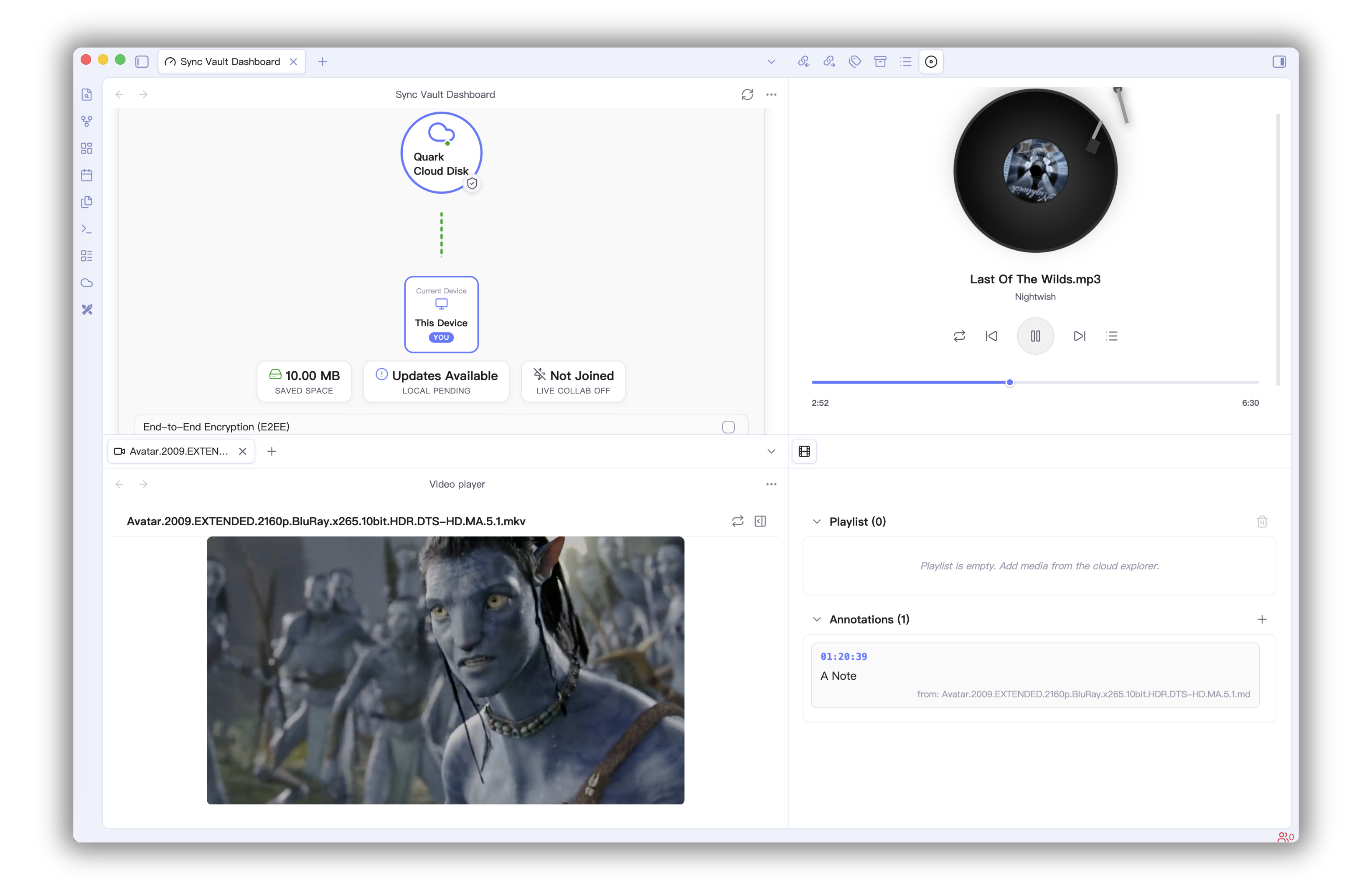
Generate links based on file ID and path, integrated into Obsidian notes after rendering.
[]() format to link cloud resources.![]() format to embed cloud resources.Built-in Model Context Protocol (MCP) Server, allowing LLMs / AI Agents to directly access and operate on files in your Cloud Storage.
| Tool Name | Description | Note |
|---|---|---|
get_cloud_account_info | Get cloud account and storage capacity info | |
list_cloud_files | List files and folders at a specified cloud path | |
read_cloud_file | Read cloud file content (supports streaming) | |
create_cloud_file | Create a new file or folder in the cloud | |
delete_cloud_file | Delete a cloud file or folder | |
move_cloud_file | Move a cloud file or folder | |
rename_cloud_file | Rename a cloud file or folder | |
download_cloud_file | Download a cloud file to local storage | |
upload_cloud_file | Upload a local file to the cloud | |
semantic_search | Global search based on semantics | Baidu Netdisk only |
sharelink_set | Set/Create a sharing link | Baidu Netdisk only |
upload_by_url | Upload via offline URL task | Baidu Netdisk only |
Sync Vault provides Obsidian CLI commands for automation scripts and AI Agent workflows:
| Command | Purpose | Common Parameters |
|---|---|---|
sync-vault:help | Show CLI command help | help=true |
sync-vault:list | List cloud directory files (pagination/filter/recursive) | path cloud limit offset type minSize modifiedAfter recursive |
sync-vault:search | Search cloud files (with pagination/type filter) | query cloud limit offset path type |
sync-vault:read | Read cloud file content | path cloud maxLength |
sync-vault:info | Get account and storage status | cloud |
sync-vault:doctor | Diagnose Sync Vault health status | cloud |
Common examples:
obsidian sync-vault:list path=/ cloud=aliyun limit=100 offset=0
obsidian sync-vault:search query=obsidian cloud=quark type=markdown
obsidian sync-vault:read path=/Notes/Welcome.md cloud=onedrive maxLength=8192
obsidian sync-vault:info cloud=aliyun
obsidian sync-vault:doctor cloud=aliyun
Tip: all sub-commands support
help=trueto show command-specific usage.
Baidu Netdisk Bi-directional Sync Demo
Distributed collaborative editing, Demo.
| No. | Cloud Service | Supported Features |
|---|---|---|
| 1 | Baidu Netdisk | Backup, Sync, Online Image Preview, Online PDF Reading, Video Playback, Audio Playback, Cloud Link |
| 2 | OneDrive | Backup, Sync, Online Image Preview, Online PDF Reading, Audio Playback, Video Playback, Cloud Link |
| 3 | Aliyun Drive | Backup, Sync, Online Image Preview, Online PDF Reading, Audio Playback, Video Playback, Cloud Link |
| 4 | 115 Drive | Online Image Preview, Online PDF Reading, Audio Playback, Video Playback, Cloud Link |
| 5 | Quark Drive | Backup, Sync, Online Image Preview, Online PDF Reading, Cloud Link |
| 6 | Tencent COS | Backup, Sync |
| 7 | Nutstore | Backup, Sync |
| 8 | InfiniCloud | Backup, Sync |
| 9 | 123 Pan | Backup, Sync |
Search for sync vault ce in the plugin market, or click here to install quickly.
Add the following code in .claude/mcp.json (Note: change 3000 to the actual port):
{
  "mcpServers": {
    "sync-vault-mcp": {
      "type": "sse",
      "url": "http://127.0.0.1:3000/sse"
    }
  }
}
Since Claude Desktop only supports STDIO method to connect MCP Server, you can choose a bridge to connect Sync Vault MCP. Here you can choose sse-bridge.
npm install -g @mcpwizard/sse-bridge{
"mcpServers": {
"sync-vault-mcp": {
"command": "npx",
"args": [
"@mcpwizard/sse-bridge",
"http://127.0.0.1:3000/sse"
]
}
}
}
In Cursor/Trae's MCP settings, choose to manually add MCP Server (Sync Vault MCP defaults to http://127.0.0.1:3000/sse).
{
  "mcpServers": {
    "sync-vault-mcp": {
      "type": "sse",
      "url": "http://127.0.0.1:3000/sse"
    }
  }
}
Sign in to join the discussion.
No comments yet. Be the first to say what this is good for.
Makes your AI agent think like the laziest senior dev in the room. The best code is the code you never wrote.

Graphs that teach > graphs that impress. Turn any code into an interactive knowledge graph you can explore, search, and ask questions about. Works with Claude Code, Codex, Cursor, Copilot, Gemini CLI, and more.

OmO: Just type "mass ulw" keyword with your prompt. Now you are the master of graph engineering.
Persistent Context Across Sessions for Every Agent – Captures everything your agent does during sessions, compresses it with AI, and injects relevant context back into future sessions. Works with Claude Code, OpenClaw, Codex, Gemini, Hermes, Copilot, OpenCode + More
Opinionated Oxlint rules for rejecting low-evidence TypeScript and JavaScript patterns
Teams-first Multi-agent orchestration for Claude Code