
obra/
superpowers

obra/superpowersSkills
An agentic skills framework & software development methodology that works.
285k
1 add
This skill helps you solve the blank-canvas problem by turning one prompt into three distinct design directions. It then supports variation, critique, token extraction, UX review, and export to HTML or React depending on the project.
Builders who want Claude Code to generate and refine distinct UI directions without starting from scratch.
You can go from one vague prompt to three concrete, divergent design options and keep iterating on the one you choose.
Creates three fully formed variants from one prompt, each with a different visual direction.
Recognizes common product types like dashboards, SaaS pages, portfolios, mobile apps, and editorial layouts.
Supports commands like vary strong, remix colors, shuffle layout, add motion, and make interactive.
Runs usability checks for heuristics, accessibility, onboarding, information architecture, and conversion patterns.
Scans existing code for tokens, inconsistencies, and migration opportunities, then produces reports and token output.
Writes HTML by default or React `.tsx` in React projects, with browser preview and persisted context.
Includes domain references for dashboards, SaaS, editorial, ecommerce, mobile, and more, plus core design-system guidance.
claude skill install https://github.com/YuqingNicole/variant-design-skill
# Linux / macOS / WSL2
curl -fsSL https://raw.githubusercontent.com/NousResearch/hermes-agent/main/scripts/install.sh | bash

# Windows (PowerShell)
iex (irm https://raw.githubusercontent.com/NousResearch/hermes-agent/main/scripts/install.ps1)
npm install -g openclaw@latest
openclaw onboard --install-daemon
/new             → start a new design session
/think high      → enable extended thinking for complex design decisions
/reset           → clear context and start fresh
design a dashboard for a crypto trading terminal
show me 3 directions for a SaaS landing page
give me UI options for a wellness app
developer tools homepage, code-first hero with CLI snippet, dark Data/Technical direction

landing page for an AI agent tool — Dark Indigo palette, Geist font, Code-First layout from saas.md

3 variations for a food delivery app — one Warm/Human, one Bold/Expressive, one Neo-brutalist

reproduce the visual style of [site you described] — dark navy, monospace, swim lane diagrams
English | 中文
Solve the blank canvas problem. Prompt → 3 fully-formed distinct designs → vary → export.
A Claude Code skill inspired by the Variant design community, powered by the Impeccable design system. Give it a prompt, get three divergent design directions — each from a different studio's aesthetic — then iterate with one-word actions.
Three variations from a single prompt — each feels like a different studio:
| A — Editorial | B — Dark Dashboard | C — SaaS Landing |
|---|---|---|
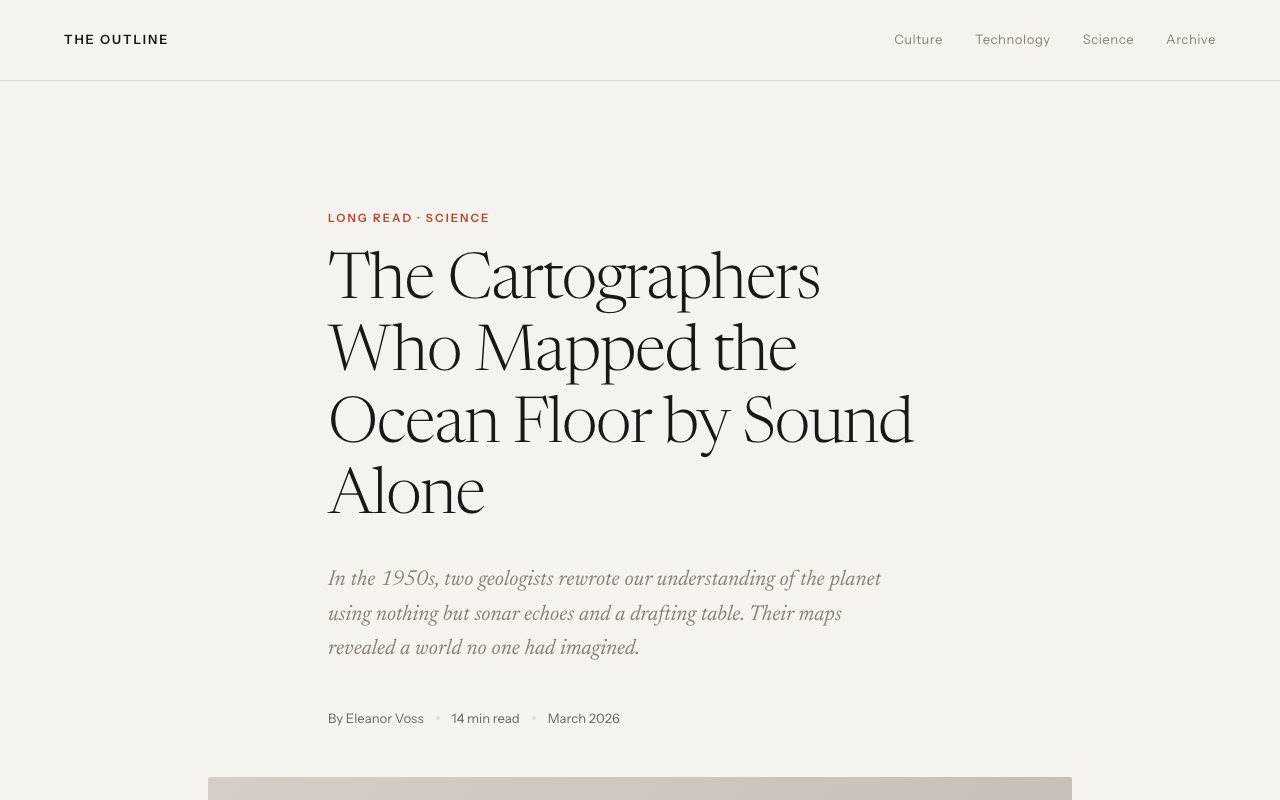 | 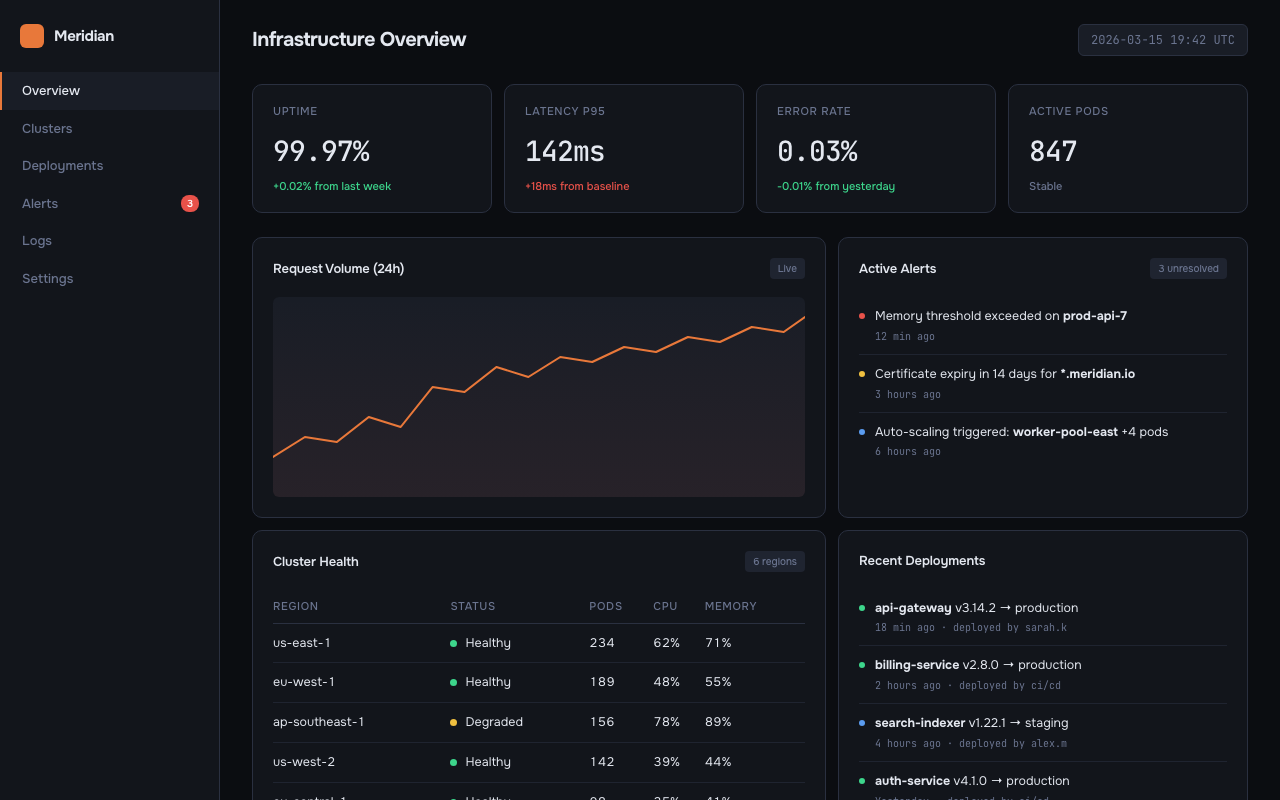 | 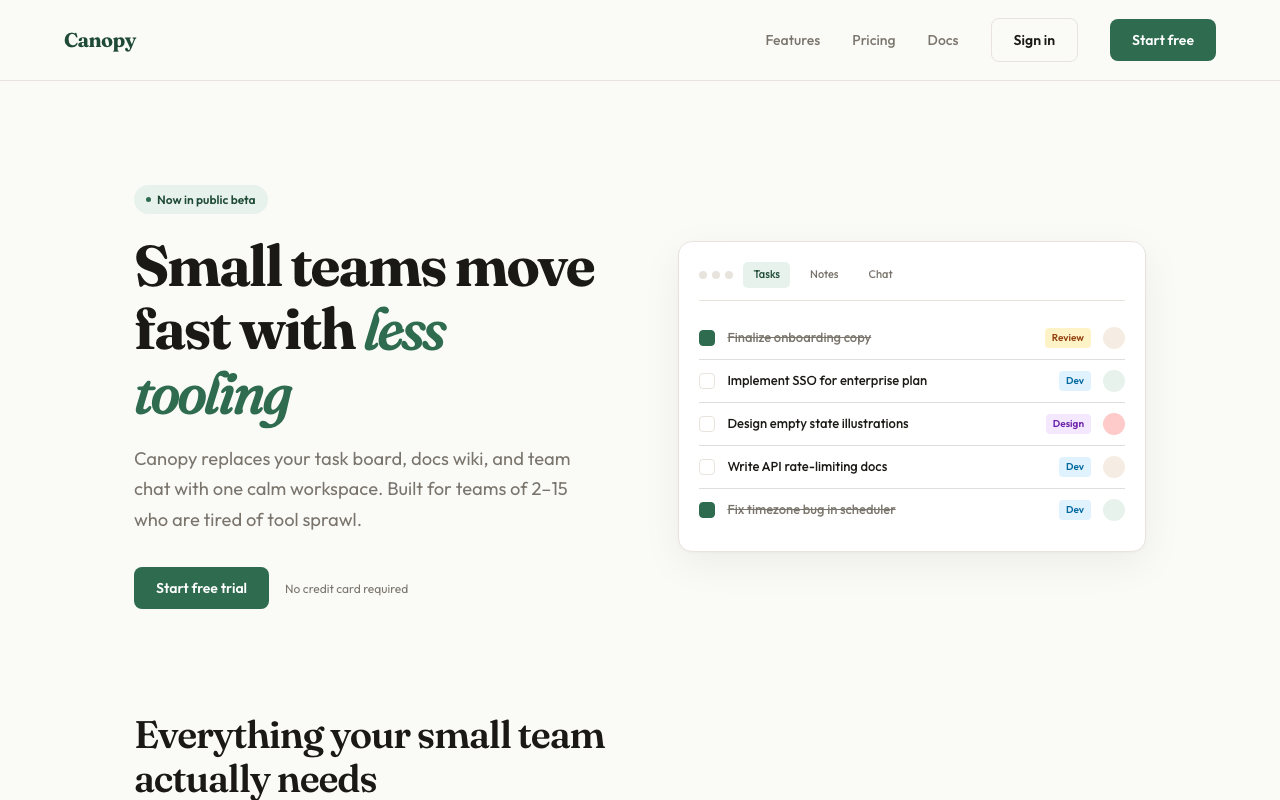 |
.tsx components; generates zero-dependency interactive HTML otherwise. Real content, no lorem ipsumComprehensive usability evaluation grounded in Nielsen Norman Group research — 13 specialized reference libraries covering everything from heuristics to conversion design.
ux review              → Full heuristic evaluation of current design
review this design     → Walk flows, flag violations with severity ratings
cognitive load         → Identify what's making this feel complex
mental models          → Diagnose why users get confused here
affordances            → Does this look clickable / draggable / interactive?
dark patterns          → Ethical audit of interaction patterns
navigation             → Information architecture and navigation usability
accessibility / a11y   → WCAG compliance and inclusive design audit
mobile gestures        → Mobile interaction conventions audit
onboarding             → First-use experience and activation flow review
chart / data viz       → Data visualization selection and design audit
design tokens          → Token architecture and theming review
conversion / CTA       → Conversion design and trust signal audit
design critique        → How to give and receive effective design feedback
user research          → How to plan usability tests and research methods
audit                    → Full style consistency report
tokens                   → Extract tokens from existing CSS
match                    → Generate new pages matching your existing style
new page pricing         → Add /pricing page following your current design
migrate                  → Phased plan to consolidate design tokens
compare old new          → Side-by-side existing vs. redesigned
claude skill install https://github.com/YuqingNicole/variant-design-skill
Or add manually to your project's SKILL.md — copy the contents of SKILL.md into your existing skill file.
Hermes Agent is a self-improving AI agent framework that supports 200+ models and persists skills across sessions.
Install Hermes:
# Linux / macOS / WSL2
curl -fsSL https://raw.githubusercontent.com/NousResearch/hermes-agent/main/scripts/install.sh | bash

# Windows (PowerShell)
iex (irm https://raw.githubusercontent.com/NousResearch/hermes-agent/main/scripts/install.ps1)
Load this skill into Hermes:
# 1. Start Hermes
hermes

# 2. Point it at this skill file — paste SKILL.md contents into your workspace's AGENTS.md
#    (~/.hermes/workspace/AGENTS.md  or the project-level equivalent)
cat SKILL.md >> ~/.hermes/workspace/AGENTS.md

# 3. Select your model
hermes model   # choose any provider (Anthropic, OpenAI, OpenRouter, etc.)

# 4. Start designing
hermes
> design a SaaS landing page with 3 variations
Hermes persists skills in its skill registry — once loaded, variant-design is available in every subsequent session without re-loading.
OpenClaw is a local-first AI assistant gateway that connects 40+ messaging platforms (WhatsApp, Telegram, Slack, Discord, iMessage, etc.) to AI agents.
Install OpenClaw:
npm install -g openclaw@latest
openclaw onboard --install-daemon
Load this skill into OpenClaw:
# 1. Copy SKILL.md contents into your OpenClaw workspace AGENTS.md
cat SKILL.md >> ~/.openclaw/workspace/AGENTS.md

# 2. Set your model in ~/.openclaw/openclaw.json
{
  "agent": {
    "model": "anthropic/claude-sonnet-4-6"
  }
}

# 3. Start the gateway
openclaw onboard --install-daemon

# 4. Use via any connected channel (Telegram, Slack, iMessage, etc.)
> design a dashboard with 3 variations
> ux review
> vary strong A
In-session commands (any channel):
/new             → start a new design session
/think high      → enable extended thinking for complex design decisions
/reset           → clear context and start fresh
OpenClaw routes your design requests through the connected channel directly to the agent — you can trigger vary strong A, remix colors, or ux review from Telegram or iMessage the same way you would in a terminal.
Claude.ai (web/desktop): Paste the contents of SKILL.md into a Project's custom instructions, or drop it at the top of a conversation as a system prompt.
API / custom integrations: Include SKILL.md as a system message before your user turn.
The simplest way — just describe what you want:
design a dashboard for a crypto trading terminal
show me 3 directions for a SaaS landing page
give me UI options for a wellness app
You can be more specific by naming an aesthetic direction, a palette, or even an existing site you want to match:
developer tools homepage, code-first hero with CLI snippet, dark Data/Technical direction

landing page for an AI agent tool — Dark Indigo palette, Geist font, Code-First layout from saas.md

3 variations for a food delivery app — one Warm/Human, one Bold/Expressive, one Neo-brutalist

reproduce the visual style of [site you described] — dark navy, monospace, swim lane diagrams
Tip: the more constraints you name (direction + palette + layout pattern), the more targeted the output. The more open the prompt, the more divergent the three variations will be.
[what it is] + [domain] + [aesthetic direction or palette] + [layout hint] + [any signature detail]
Examples:
| Goal | Prompt |
|---|---|
| Match a specific site's vibe | "developer tool landing page — dark Data/Technical, CLI code hero, Dark Indigo palette" |
| Explore freely | "landing page for a mindfulness app" |
| One fixed + two free | "3 directions for a finance dashboard — one must be Amber Finance dark terminal" |
| Multi-screen flow | "3-screen onboarding flow for a meditation app, Wellness Soft palette" |
After seeing the initial 3 variations, iterate with:
| Action | What happens |
|---|---|
| Vary strong | Push current direction to its extreme |
| Vary subtle | Polish and refine, same aesthetic |
| Distill | Strip to essence — remove everything non-essential |
| Change style | Keep layout, swap entire visual language |
| Remix colors | 3 alternative palettes using OKLCH: analogous / complementary / unexpected |
| Shuffle layout | Same content + style, different composition |
| Add motion | Layer micro-interactions and animations onto current design |
| Dramatize | Push interactions to cinematic maximum (parallax, 3D tilt, curtain reveal) |
| Make interactive | Add functional patterns: filtering, charts, drag-and-drop, form validation |
| Polish | Refine against design system: typography, spacing, interactions, motion, copy |
| Critique | Systematic audit against all 8 design system dimensions |
| Extract tokens | Export design tokens as CSS / JSON / Tailwind config |
| See other views | Mobile / dark mode / empty state / onboarding / hover states |
| Mix | Combine two variations: "Mix A + B" or "A's layout + C's colors" |
In Claude Code you can use shorthand for fast iteration:
A vary strong          → Push Variation A to maximum
B remix colors         → 3 new palettes for Variation B
C → mobile             → Show C as mobile viewport
pick A                 → Select A as winner
A + B colors           → Mix A layout with B palette
tokens A               → Extract CSS tokens from A
compare                → Side-by-side view of all 3
open B                 → Re-open B in browser
react A                → Export Variation A as React .tsx component
react B                → Export Variation B as React .tsx component
show context           → Print current persisted palette/fonts/direction
reset context          → Clear context, start fresh next session
Files are written to variant-output/ and auto-opened in your browser — you never need to manually find or open files. Each variation comes with a compact Summary Card in the terminal (direction, palette, fonts, interactions). Actions are grouped into Reshape / Tune / Animate / Refine / Export categories.
On iteration, the same file is overwritten and re-opened — your browser tab refreshes automatically. The terminal shows a 2-3 line summary of what changed, not the full code.
Context persists across sessions. When you re-enter a project directory, the skill reads variant-output/.variant-context.json and resumes your last palette, fonts, direction, and iteration count automatically:
✦ Resuming context: Amber Warm · Editorial · Instrument Serif + Instrument Sans · picked B · 4 iterations
  (reset context to start fresh)
No need to re-specify preferences you've already confirmed. Use show context to inspect the current context, or reset context to start fresh.
Output format is context-aware: if your current directory contains a React project (package.json with react dependency), output is .tsx components. Otherwise, zero-dependency HTML is the default. Override with --react or --html. See below for more.
In a React project, the skill automatically switches to .tsx output:
# In a React/Next/Vite project directory:
design a dashboard  →  generates variant-output/VariantA.tsx, VariantB.tsx, VariantC.tsx
                        Detects Next.js → adds "use client" where needed
                        Detects framer-motion → uses it; otherwise CSS animations

# In any other directory:
design a dashboard  →  generates variant-output/variant-dashboard-A.html (unchanged)

# Explicit override anywhere:
design a dashboard --react   →  always .tsx
design a dashboard --html    →  always HTML

# Export a specific variation:
react A              →  export Variation A as .tsx
export to next       →  export winning variation as Next.js App Router component
Generated .tsx files go to variant-output/ — move them to src/components/ to include in your project's build. The preview command is inferred from your package.json scripts (npm run dev, pnpm dev, etc.).
Scenario-specific materials (starter prompts, palettes, typography, layouts, real community examples):
| File | Domain |
|---|---|
references/dashboard.md | Data dashboards, analytics, monitoring, trading terminals |
references/editorial.md | Magazines, journalism, long-form, news |
references/saas.md | SaaS landing pages, B2B, developer tools |
references/ecommerce.md | E-commerce, consumer apps, fintech cards |
references/education.md | Learning apps, quizzes, language tools |
references/creative.md | Generative art, music tools, creative software |
references/mobile.md | iOS/Android apps, onboarding, home screens |
references/portfolio.md | Designer portfolios, developer showcases, freelancer sites |
references/food-beverage.md | Restaurants, recipes, coffee brands, bakeries, cocktail bars |
references/fashion.md | Fashion brands, streetwear, beauty, interior design, lifestyle |
references/palettes.md | Universal palette library — 39 palettes × 7+ aesthetic directions (incl. Pinterest trends) |
references/interactive-patterns.md | Filtering, drag-and-drop, charts, lightbox, carousels, multi-step forms |
references/ux-heuristics.md | Nielsen's 10 heuristics · Fitts's Law · Hick's Law · Jakob's Law · severity ratings · evaluation protocol |
references/ux-psychology.md | Mental models · cognitive load · Gestalt principles · reading patterns · affordances · attention · memory · trust |
references/ux-information-architecture.md | Navigation patterns · information scent · card sorting · tree testing · labeling rules · search design · IA anti-patterns |
references/ux-accessibility.md | WCAG 2.1 AA · keyboard navigation · semantic HTML · ARIA usage · color contrast · accessible forms · a11y code scans |
references/ux-research-methods.md | Usability testing · user interviews · SUS/NPS · A/B testing · analytics · research method selection matrix |
references/ux-mobile-patterns.md | Touch targets · thumb zones · gesture conventions · iOS vs Android · bottom gesture conflicts · mobile forms |
references/ux-onboarding.md | Aha moment · empty states · progressive disclosure · signup flow · activation funnel · onboarding anti-patterns |
references/ux-data-visualization.md | Chart selection · visual encoding hierarchy · dashboard density · color encoding · interactive patterns · data anti-patterns |
references/ux-content-strategy.md | Content models · taxonomy · multilingual UX · RTL layouts · content lifecycle · multi-surface design |
references/ux-design-tokens.md | Three-tier token architecture · naming conventions · semantic tokens · multi-brand theming · dark mode · Style Dictionary |
references/ux-component-specs.md | Button/input/modal/toggle full state machines · spacing specs · ARIA patterns · keyboard interaction |
references/ux-design-critique.md | Feedback frameworks · taste trap · HiPPO problem · async review · critique vs review · self-critique checklist |
references/ux-conversion-patterns.md | Trust signals · landing page anatomy · CTA copy · pricing page patterns · form conversion · dark pattern identification |
Foundational design principles loaded for every generation:
| File | Covers |
|---|---|
references/design-system/typography.md | Modular scale, fluid type, font pairing, OpenType features, vertical rhythm |
references/design-system/color-and-contrast.md | OKLCH color space, tinted neutrals, 60-30-10 rule, dark mode, WCAG contrast |
references/design-system/spatial-design.md | 4pt grid, container queries, squint test, hierarchy through multiple dimensions |
references/design-system/motion-design.md | 100/300/500 rule, ease-out-expo, stagger, reduced motion, perceived performance |
references/design-system/interaction-design.md | 8 interactive states, focus-visible, forms, modals, keyboard navigation |
references/design-system/responsive-design.md | Mobile-first, content-driven breakpoints, input detection, safe areas |
references/design-system/ux-writing.md | Button labels, error formulas, empty states, voice vs tone, accessibility |
references/design-system/micro-interactions.md | Scroll reveals, hover effects, counters, parallax, page transitions, toasts |
references/design-system/style-audit.md | Token extraction, consistency detection, audit reports, migration plans |
PRs welcome. Each domain reference file follows a consistent 6-section schema:
Design system references follow the Impeccable style structure with principles, code examples, and anti-patterns.
The examples/ directory contains runnable demos:
| File | What it demonstrates |
|---|---|
examples/coffee-brand-interactive.html | Full interactive landing page: curtain reveal, staggered entrance, scroll reveals, animated counters, product filter, card hover lift, image zoom, SVG donut chart, flavor bar animation, toast notifications, mobile hamburger menu, back-to-top, reduced motion fallbacks |
Open any example directly in your browser to see the interactions in action.
Built with Claude Code Skills. Design system powered by Impeccable.
Sign in to join the discussion.
No comments yet. Be the first to say what this is good for.
An agentic skills framework & software development methodology that works.

Turn any codebase, with its docs, SQL schemas, configs, and PDFs, into a queryable knowledge graph. A /graphify skill for Claude Code, Cursor, Codex, and Gemini CLI: local deterministic AST parsing, every edge explained, no vector store.

Topic in, narrated explainer video out. A Claude Code / Codex skill that turns any topic into a black-canvas motion-graphics explainer video with TTS voiceover, subtitles and a chapter progress bar. Chinese or English; every frame drawn in code with Remotion.
Public repository for Agent Skills
Open-source AI job search: scan job portals, evaluate listings into a structured A-H report with a global 1-5 score, tailor your CV, track applications — runs locally in your AI coding CLI (Claude Code, Codex, OpenCode, Antigravity…)

Production-grade engineering skills for AI coding agents.