
JuliusBrussee/
caveman

🪨 why use many token when few token do trick — Claude Code skill that cuts 65% of tokens by talking like caveman
105k
1 add
VibePod wraps multiple coding agents behind one command and runs each one in its own Docker or Podman container. It adds local metrics collection, HTTP traffic tracking, and a dashboard so you can compare agent runs side by side.

Builders who want one command to launch different coding agents with isolation and local tracking.
You can run and compare agents without setting up each one by hand.
Runs Claude, Codex, Gemini, Copilot, and other supported agents through `vp run <agent>`.
Starts each agent inside its own Docker or Podman container.
Collects usage, token, and HTTP traffic data locally and shows it in a dashboard.
Lets you compare multiple agents side by side from the dashboard.
Installs reusable prompt recipes per project or per user with `vp skills add`.
Builds cached image layers from `.vibepod/overlay/` fragments for per-project agent setup.
Runs agents as Agent Client Protocol endpoints with `--acp` for editor panels like Zed.
pip install vibepod
brew install vibepod/vibepod/vibepod
conda install -c conda-forge vibepod
mamba install -c conda-forge vibepod
pixi global install vibepod
vp run <agent>
# examples:
vp run claude
vp run codex
vp run vibe   # alias of devstral
vp run <agent> -- <agent-args>





VibePod is a unified CLI (vp) for running AI coding agents in isolated
Docker or Podman containers — no required configuration, no setup. Just
vp run <agent>. Includes built-in local metrics collection, HTTP traffic
tracking, and an analytics dashboard to monitor and compare agents side-by-side.
vp run <agent> just works. Optional YAML for custom configurationvp skills addFROM-less Dockerfile fragment in .vibepod/overlay/ and VibePod auto-builds a cached, content-addressed image layer on top of the agent's base image — one clearly named image per project and agent (docs)vp run inside a herdr pane reports agent state automaticallyVibePod is available on PyPI:
pip install vibepod
with Homebrew:
brew install vibepod/vibepod/vibepod
and on conda-forge for conda, mamba, and pixi users:
conda install -c conda-forge vibepod
mamba install -c conda-forge vibepod
pixi global install vibepod
vp run <agent>
# examples:
vp run claude
vp run codex
vp run vibe   # alias of devstral
Extra arguments after the agent are forwarded to the agent process. Use --
before agent flags so VibePod does not parse them as its own options:
vp run <agent> -- <agent-args>
--ikwid)Use --ikwid to append each agent's auto-approval / permission-skip flag when supported.
| Agent | --ikwid appended args |
|---|---|
claude | --dangerously-skip-permissions |
gemini | --approval-mode=yolo |
devstral (vibe) | --auto-approve |
copilot | --yolo |
codex | --dangerously-bypass-approvals-and-sandbox |
pi | --approve |
agy | --dangerously-skip-permissions |
opencode | Not supported |
auggie | Not supported |
tau | Not supported |
jcode | Not supported |
freebuff | Not supported |
qwen | --approval-mode=yolo |
dsh | Not supported |
--acp)vp run <agent> --acp turns VibePod into an Agent Client Protocol adapter, so the containerized agent appears directly in the AI panel of any editor with ACP support (e.g. Zed) — with isolation, profiles, overlays and proxy metrics intact. Supported out of the box: claude, gemini, qwen, codex, opencode, copilot, auggie, jcode, devstral and pi.
Register vp as a custom/external agent server in your editor. Zed example (settings.json):
{
  "agent_servers": {
    "VibePod Claude": {
      "type": "custom",
      "command": "vp",
      "args": ["run", "claude", "--acp"],
      "env": {}
    }
  }
}
Run vp config allow-dir /path/to/project once first (the editor's stdin is a pipe, so the interactive prompt cannot run). See the ACP docs for details and limitations.
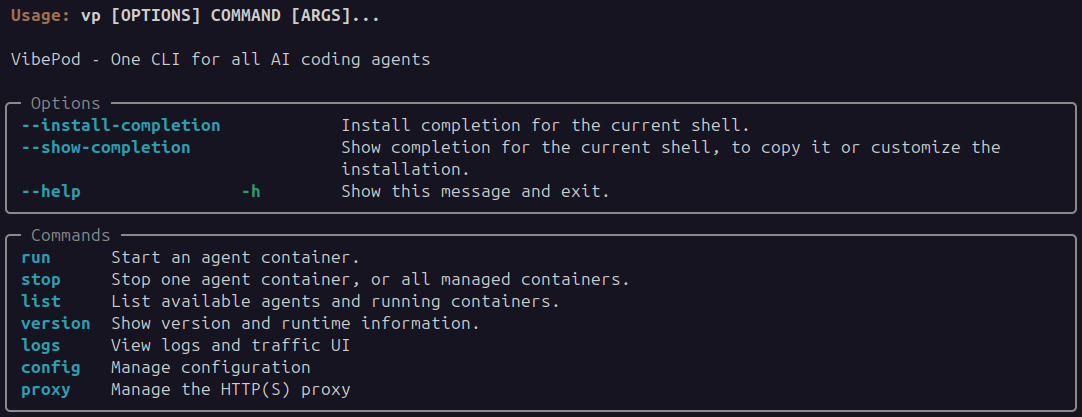


This repository contains an initial v1 implementation with:
vp run <agent>vp stop <agent|--all>vp listvp config initvp config showvp config pathvp versionVibePod collects metrics locally while your agents run and serves them through a built-in dashboard.
| Command | Description |
|---|---|
vp logs start | Start or resume dashboard for collected metrics |
vp logs stop | Stop the dashboard container |
vp logs status | Show dashboard container status |
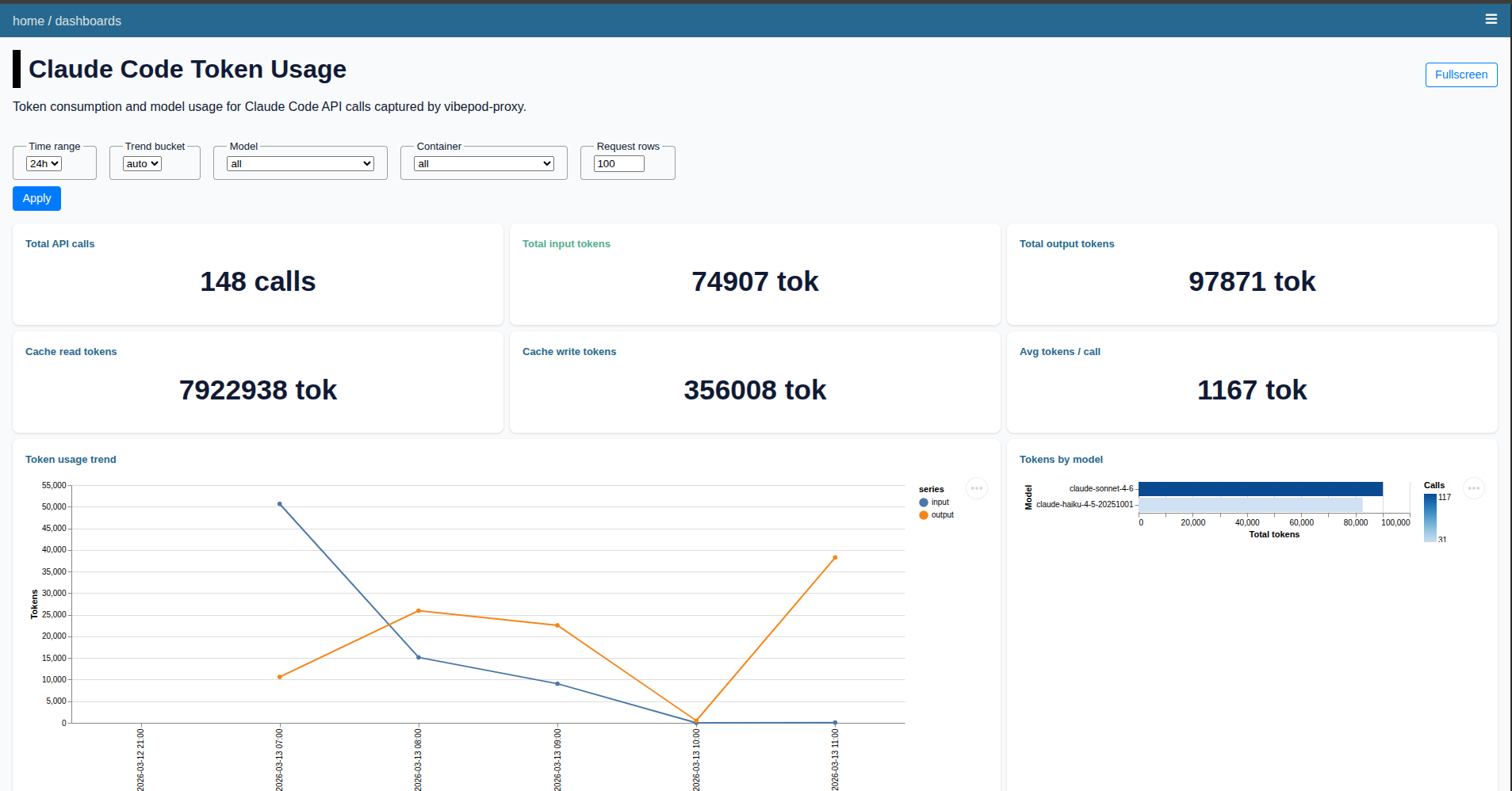
The dashboard shows per-agent HTTP traffic, usage over time, and Claude token metrics. It also lets you compare agents side-by-side. All data stays on your machine.
All agent images are published under the vibepod namespace on Docker Hub. Source Dockerfiles are in VibePod/vibepod-agents.
Current defaults:
claude -> vibepod/claude:latestgemini -> vibepod/gemini:latestopencode -> vibepod/opencode:latestdevstral (alias: vibe) -> vibepod/devstral:latestauggie -> vibepod/auggie:latestcopilot -> vibepod/copilot:latestcodex -> vibepod/codex:latestpi -> vibepod/pi:latestagy -> vibepod/agy:latesttau -> vibepod/tau:latestjcode -> vibepod/jcode:latestfreebuff -> vibepod/freebuff:latestqwen -> vibepod/qwen:latestdsh -> vibepod/dsh:latestdatasette -> vibepod/datasette:latestproxy -> vibepod/proxy:latest (repo)You can override any single image directly:
VP_IMAGE_CLAUDE=vibepod/claude:latest vp run claude
VP_IMAGE_GEMINI=vibepod/gemini:latest vp run gemini
VP_IMAGE_OPENCODE=vibepod/opencode:latest vp run opencode
VP_IMAGE_DEVSTRAL=vibepod/devstral:latest vp run devstral
VP_IMAGE_DEVSTRAL=vibepod/devstral:latest vp run vibe   # same agent/image as devstral
VP_IMAGE_AUGGIE=vibepod/auggie:latest vp run auggie
VP_IMAGE_COPILOT=vibepod/copilot:latest vp run copilot
VP_IMAGE_CODEX=vibepod/codex:latest vp run codex
VP_IMAGE_PI=vibepod/pi:latest vp run pi
VP_IMAGE_AGY=vibepod/agy:latest vp run agy
VP_IMAGE_TAU=vibepod/tau:latest vp run tau
VP_IMAGE_JCODE=vibepod/jcode:latest vp run jcode
VP_IMAGE_FREEBUFF=vibepod/freebuff:latest vp run freebuff
VP_IMAGE_QWEN=vibepod/qwen:latest vp run qwen
VP_IMAGE_DSH=vibepod/dsh:latest vp run dsh
VP_DATASETTE_IMAGE=vibepod/datasette:latest vp logs start
VP_SKILLS_ENGINE_IMAGE=vibepod/skills-engine:latest vp skills list
MIT License - see LICENSE for details.
Sign in to join the discussion.
No comments yet. Be the first to say what this is good for.
🪨 why use many token when few token do trick — Claude Code skill that cuts 65% of tokens by talking like caveman

The best-benchmarked open-source AI memory system. And it's free.

Orca is the ADE for working with a fleet of parallel agents. Run any coding agent with your own subscription. Available on desktop, mobile and remote runtime.

A cross-platform desktop All-in-One assistant for Claude Code, Codex, OpenCode, OpenClaw, Grok Build & Hermes Agent. Only official website: ccswitch.io

Never stop coding. Free MIT AI gateway: one endpoint, 352 providers (150+ free), 1200+ models Kimi, Claude, GPT, Gemini, GLM, DeepSeek, MiniMax. Works with Claude Code, Codex, Cursor, OpenCode, Cline & Copilot. Quota-aware auto-fallback, RTK+Caveman compression saves 15-95% tokens, MCP/A2A, Desktop/PWA. Built by 550+ contributors

Compress tool outputs, logs, files, and RAG chunks before they reach the LLM. 20% fewer tokens for coding agents, 60-95% fewer tokens for JSON, same answers. Library, proxy, MCP server.