
JuliusBrussee/
caveman

🪨 why use many token when few token do trick — Claude Code skill that cuts 65% of tokens by talking like caveman
105k
1 add
Grov sits between your agent and the model, captures useful reasoning from sessions, and stores it locally or in a team sync. It can inject relevant memories back into new sessions, monitor drift, and compact context when needed.
Builders who want their agent to remember past sessions and share useful context across a team.
You can stop re-explaining codebase details and start new sessions with relevant team memory already in place.
Stores reasoning from completed tasks and injects relevant memories into later sessions.
Syncs captured memories to a shared dashboard so teammates' agents can reuse them.
Watches the agent's actions against the stated goal and injects corrections when it goes off track.
Keeps Anthropic prompt cache warm during idle periods with keep-alive requests.
Summarizes long sessions when context fills up while keeping the goal, decisions, state, and next steps.
Provides a web dashboard for browsing, searching, and managing captured memories and reasoning traces.
npm install -g grov   # Install
grov init             # Configure (one-time)
grov proxy            # Start (keep running)
grov setup              # Interactive setup (Cursor, Zed, Codex)
grov init cursor        # Direct setup for Cursor CLI
grov init antigravity   # Direct setup for Antigravity
grov login                    # Authenticate via GitHub
grov sync --enable --team ID  # Enable sync for your team

Collective AI memory for engineering teams.
When one dev's AI figures something out, every dev's AI knows it.




Website • Dashboard • Quick Start • Features • Contributing
Your team's AI agents are learning in silos.
The waste: Redundant exploration, duplicate token spend, knowledge that disappears when sessions end.
Grov captures what your team's AI learns and shares it automatically.
Dev A: "How does auth work in this codebase?"
        ↓
     Claude investigates, figures it out
        ↓
     Grov captures the reasoning + decisions
        ↓
     Syncs to team dashboard
        ↓
Dev B: "Should we add password salting?"
        ↓
     Claude already knows: "Based on verified team knowledge,
     no - this codebase uses OAuth-only, no passwords stored"
        ↓
     No exploration needed. Instant expert answer.
Measured impact: Tasks drop from 10+ minutes to 1-2 minutes when team context is available.
npm install -g grov   # Install
grov init             # Configure (one-time)
grov proxy            # Start (keep running)
Then use Claude Code normally in another terminal. That's it.
grov setup              # Interactive setup (Cursor, Zed, Codex)
grov init cursor        # Direct setup for Cursor CLI
grov init antigravity   # Direct setup for Antigravity
IDE integrations (Cursor, Zed, Antigravity) use native MCP - no proxy needed.
Important: Your
ANTHROPIC_API_KEYmust be set permanently in your shell profile, not just withexportin a terminal. See Troubleshooting for setup instructions.
For team sync:
grov login                    # Authenticate via GitHub
grov sync --enable --team ID  # Enable sync for your team
Free for individuals and teams up to 3 developers.
Real reasoning, not just file lists:
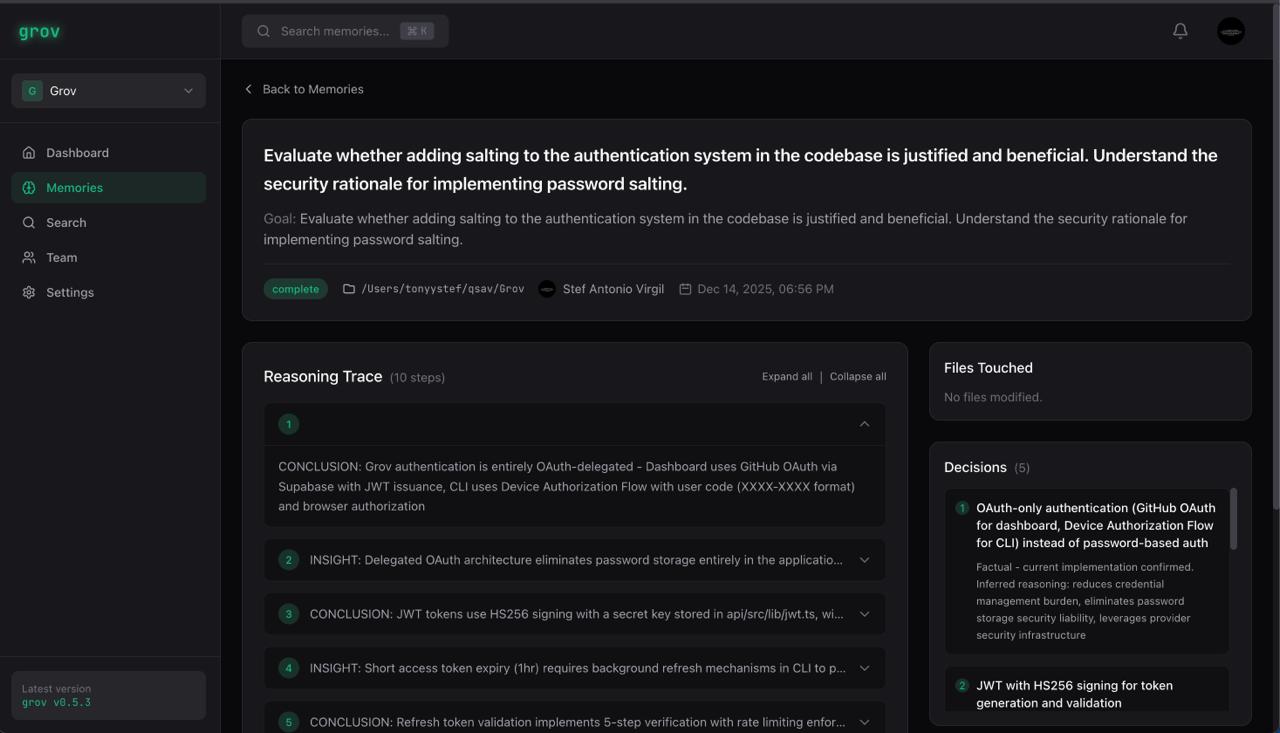
Architectural decisions, patterns, and rationale - automatically extracted and synced to your team.
Every captured memory includes:
When a teammate asks a related question, Claude already knows:
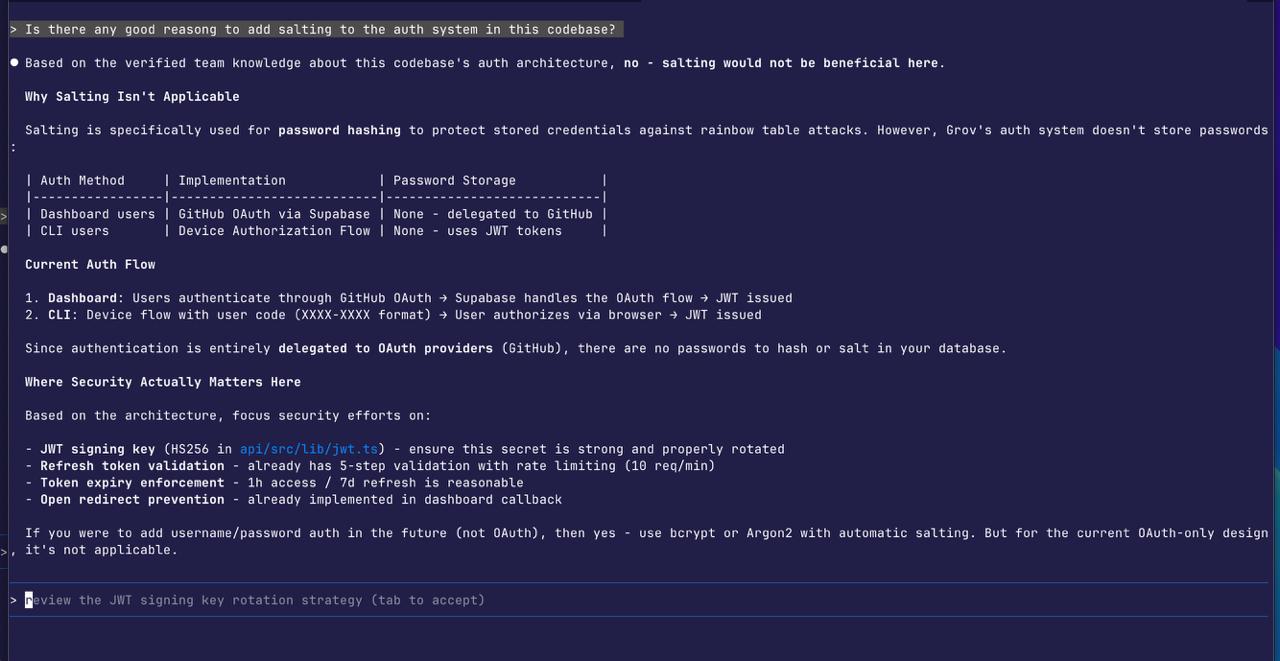
No exploration. No re-investigation. Instant expert answers from team memory.
Claude receives verified context and skips the exploration phase entirely - no "let me investigate" or "I'll need to look at the codebase."
The core value: what one dev's AI learns, everyone's AI knows.
Grov monitors what Claude does (not what you ask) and corrects when it goes off-track.
# Test drift detection
grov drift-test "refactor the auth system" --goal "fix login bug"
Anthropic's prompt cache expires after 5 minutes of inactivity. Grov keeps it warm.
grov proxy --extended-cache
Opt-in only. By using --extended-cache, you consent to Grov making API requests on your behalf.
When your context window fills up, Grov automatically compacts while preserving what matters.
No manual /compact needed. No lost reasoning.
# Setup
grov init             # Configure for Claude Code (proxy mode)
grov init cursor      # Configure for Cursor CLI
grov init antigravity # Configure for Antigravity
grov setup            # Interactive setup (Cursor, Zed, Codex)

# Proxy (CLI tools only)
grov proxy            # Start the proxy
grov proxy-status     # Show active sessions

# Memory & Sync
grov status           # Show captured tasks
grov login            # Login to cloud dashboard
grov sync             # Sync memories to team dashboard

# Utilities
grov doctor           # Diagnose setup issues
grov disable          # Disable grov
grov uninstall        # Remove all grov data and config
grov drift-test       # Test drift detection
┌─────────────────────────────────────────────────────────────┐
│  Claude Code                                                │
│       │                                                     │
│       ▼                                                     │
│  Grov Proxy (localhost:8080)                                │
│       │                                                     │
│       ├──► Inject team memory from past sessions            │
│       ├──► Forward to Anthropic API                         │
│       ├──► Monitor for drift, inject corrections            │
│       ├──► Track context usage, auto-compact if needed      │
│       └──► Capture reasoning when task completes            │
│                    │                                        │
│                    ▼                                        │
│              Team Dashboard (app.grov.dev)                  │
│                    │                                        │
│                    ▼                                        │
│              Available to entire team                       │
└─────────────────────────────────────────────────────────────┘
Local by default: Memories stay on your machine in ~/.grov/memory.db (SQLite) unless you enable team sync.
Browse, search, and manage your team's AI knowledge at app.grov.dev.
# Required for memory sync and drift detection
export ANTHROPIC_API_KEY=sk-ant-...

# Optional
export GROV_DRIFT_MODEL=claude-sonnet-4-20250514  # Override model
export PROXY_HOST=127.0.0.1                        # Proxy host
export PROXY_PORT=8080                             # Proxy port
Without an API key, Grov uses basic extraction and memories will not sync.
Run grov doctor to diagnose:
grov doctor
This checks your proxy, API key, login, sync status, and local database.
Using export ANTHROPIC_API_KEY=... directly in terminal only works in THAT terminal session. When you open a new terminal, the key is gone.
Fix: Add the key to your shell profile so it persists:
# For zsh (macOS default):
echo 'export ANTHROPIC_API_KEY=sk-ant-...' >> ~/.zshrc
source ~/.zshrc

# For bash:
echo 'export ANTHROPIC_API_KEY=sk-ant-...' >> ~/.bashrc
source ~/.bashrc
Then run grov doctor to verify:
✓ ANTHROPIC_API_KEY: Set
Get your API key at: https://console.anthropic.com/settings/keys
| Tool | Type | Proxy Required |
|---|---|---|
| Claude Code | CLI | Yes |
| Cursor | IDE | No (native MCP) |
| Cursor CLI | CLI | No |
| Zed | IDE | No (native MCP) |
| Antigravity | IDE | No (native MCP) |
| Codex | CLI | Yes |
Coming soon: VS Code, Gemini CLI
npm installnpm run buildnode dist/cli.js --helpnpm run dev # Watch mode
node dist/cli.js init # Test CLI
Found a bug? Open an issue.
Apache License 2.0 - see LICENSE file for details.
Sign in to join the discussion.
No comments yet. Be the first to say what this is good for.
🪨 why use many token when few token do trick — Claude Code skill that cuts 65% of tokens by talking like caveman

The best-benchmarked open-source AI memory system. And it's free.

Orca is the ADE for working with a fleet of parallel agents. Run any coding agent with your own subscription. Available on desktop, mobile and remote runtime.

A cross-platform desktop All-in-One assistant for Claude Code, Codex, OpenCode, OpenClaw, Grok Build & Hermes Agent. Only official website: ccswitch.io

Never stop coding. Free MIT AI gateway: one endpoint, 352 providers (150+ free), 1200+ models Kimi, Claude, GPT, Gemini, GLM, DeepSeek, MiniMax. Works with Claude Code, Codex, Cursor, OpenCode, Cline & Copilot. Quota-aware auto-fallback, RTK+Caveman compression saves 15-95% tokens, MCP/A2A, Desktop/PWA. Built by 550+ contributors

Compress tool outputs, logs, files, and RAG chunks before they reach the LLM. 20% fewer tokens for coding agents, 60-95% fewer tokens for JSON, same answers. Library, proxy, MCP server.