前往中文版本 »
日本語バージョン »
📖 Table of Contents
🦄 About Everywhere
Everywhere is an interactive AI assistant with context-aware capabilities, featuring a sleek, modern UI and powerful integrated functionality. Unlike traditional AI tools, Everywhere instantly perceives and understands anything on your screen. No need for screenshots, copying, or switching apps—just press a shortcut key to get the help you need right where you are, delivering seamless AI assistant support.

🌟 Experience Examples
🩺 Troubleshooting Expert
You encounter an error message while using your computer but are unsure how to resolve it. Bring up Everywhere next to the error message, simply type "What is this error? How to solve it?", and Everywhere will capture the message context in place and provide an accurate solution.
📰 Quick Web Summarization
Browsing a lengthy technical article but just need the key points? Bring up Everywhere over the webpage, ask "Give me a short summary", and instantly receive the main arguments without reading the entire content.
🌐 Instant Translation
Encounter a foreign word while researching literature? Highlight it or just bring up Everywhere against the text, tell it to "Translate to Chinese", and see an immediate translation without opening a secondary translation tool.
✉️ Email Draft Assistance
Unsure about the tone of an important business email? Bring up Everywhere over your draft, enter "Make this email more professional", and your casual text is transformed into polished, business-ready communication.
❔ Is it true?
Come across information of uncertain authenticity? Select the relevant text, bring up Everywhere, ask "Is this true?", and Everywhere will quickly search and verify the reliability of the information.
🛠️ Technical Features
| Category | ✅ Currently Supported | 🚧 Work in Progress |
|---|
| 🤖 Rich Model Ecosystem |
• Everywhere Cloud Service
•  OpenAI OpenAI
•  Anthropic (Claude) Anthropic (Claude)
•  Google (Gemini) Google (Gemini)
•  DeepSeek DeepSeek
•  Moonshot (Kimi) Moonshot (Kimi)
•  MiniMax MiniMax
•  Local Deployment (Ollama) Local Deployment (Ollama)
• Compatible with custom API endpoints
|
| ⚙️ Powerful Agent System |
• Web Browser
• Dispatch Sub-agents
• Local File System
• Terminal Script Execution
• MCP Tools
• Everything Fast Search (Windows)
• Integrated System Apps (macOS)
|
• Memory System
|
| 🫧 Seamless Interaction |
• Ultimate Modern Frosted Glass UI
• Intelligent Context Awareness
• Global System Hotkeys
• Text Selection Interaction
• Rich Markdown and Math Formula Rendering
|
• Mouse Shortcuts
• Voice Interaction
|
| 🖥️ Multi-Platform |
• 🪟 Windows
• 🍎 macOS
|
• 🐧 Linux
|
| 🌐 i18n Support |
• Simplified/Traditional Chinese
• English, Deutsch, Español
• Français, Italiano, 日本語
• 한국어, Русский, Türkçe
|
Partially AI-assisted translation.
Contributions and corrections are welcome!
|
⚙️ Core Technology & Architecture
- 👁️ Broad Context Awareness: In addition to supporting traditional screen multi-modality, we have deeply integrated underlying accessibility APIs and UI automation technologies. This allows the application to accurately extract active structured environment data across a huge variety of software with low intrusion.
- 🧠 Scenario Invocation & Strategy Engine: 🚧 The original intention was to completely end the workflow that disrupts your working rhythm. Previously, using LLMs often required: selecting & copying -> switching to the AI window -> pasting -> manually typing to complete your intention. With the advanced features powered by the strategy engine, Everywhere, invoked via shortcut, instantly perceives the scenario or app you are browsing. It pushes shortcut execution strategies tailored to your exact context without the need to explain your request, achieving a true state of flow.
- 🧱 Commitment to Core Quality: We emphasize software performance, code quality, and security. Starting from the system's core foundation, via modern architecture design and meticulous system engineering, we fundamentally reject pure reliance on "Vibe Coding" and blind agile piling. Every line of code is carefully written and meticulously polished.
📋 System Requirements
| Platform | Minimum System Requirements |
|---|
| 🪟 Windows | Windows 10 (10.0.19041.0) |
| 🍎 macOS | Monterey 12.0 |
| 🐧 Linux | 🚧 In Development |
🚀 Getting Started
Acquisition & Installation
[!TIP]
We recommend visiting our official website to directly download the appropriate version for your system.
Windows
Everywhere-Windows-x64-Setup-vx.x.x.exe: Full wizard installer package (Recommended).Everywhere-Windows-x64-vx.x.x.zip: Portable/install-free zip package.
macOS
Everywhere-macOS-arm64-vx.x.x.pkg: For Apple Silicon (M-series) Mac devices.Everywhere-macOS-x64-vx.x.x.pkg: For Intel Mac devices.
Help & Community
[!NOTE]
New here? Or looking for deep integration features like MCP? We highly recommend checking out our official guide first!
🤝 Contributing
We love open source and welcome your brilliant ideas and code contributions (Pull Requests)! Please see CONTRIBUTING.md for code styling guidelines and local compilation instructions.
Check our Build Guide for detailed instructions on how to set up the development environment and build the project locally.
A massive thanks to all of the outstanding contributors during our inception and growth phases:

📄 License
This project is released under the LICENSE file.
For Third-Party dependencies and open-source component licenses, see ThirdPartyNotices.txt.
💖 Sponsor
302.AI is a pay-as-you-go enterprise AI resource hub that offers the latest and most comprehensive AI models and APIs on the market, along with a variety of ready-to-use online AI applications.
🤩 Special Thanks
The Code Signing Certificate for this project is generously sponsored by Certum China, continuing their great contribution to the open-source community.
Thanks pasical for the banner kawaii logo design.
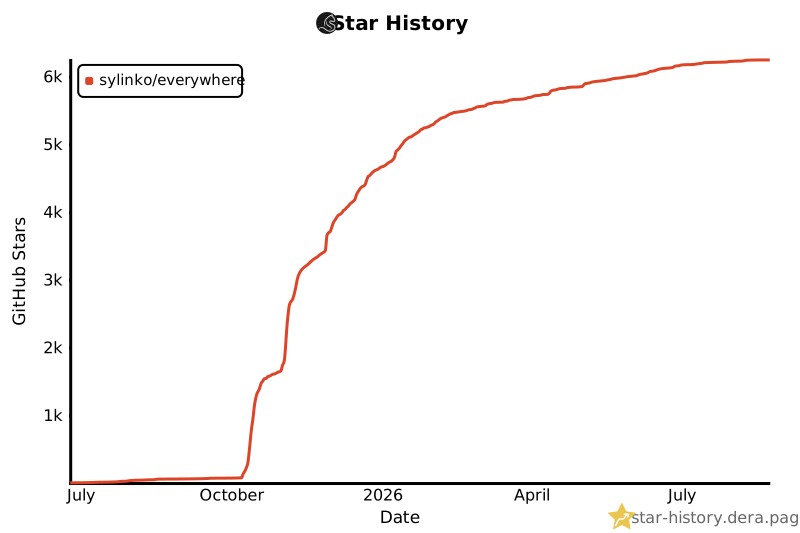
📈 Star History

⬆️ Back to top