

cbrock84/
headcount

cbrock84/headcountPlugins
An agent organization for Claude Code, structured as a company — 15+ departments, 125+ skills, each independently installable.
1.4k
This repo packages one image workflow in two forms: a standalone skill and a Codex Plugin. You can generate, edit, batch, QA, and deliver images through an OpenAI-compatible API, with focused canvas editing and result cards in Codex App.
Builders who use Codex or skill-based agents to make and edit images from prompts.
You can keep image generation, edits, batch runs, and review in one agent workflow instead of switching tools.
Create images from prompts and edit one or more reference images through OpenAI-compatible API routes or Atlas Cloud.
Run JSONL batch jobs, keep manifests, and track long-running image jobs with saved results.
Run checks for dimensions, alpha, edge contact, margins, and component placement before delivery.
Prepare transparency with native-alpha, chroma, emissive, mask, or verified prompt-alpha routes.
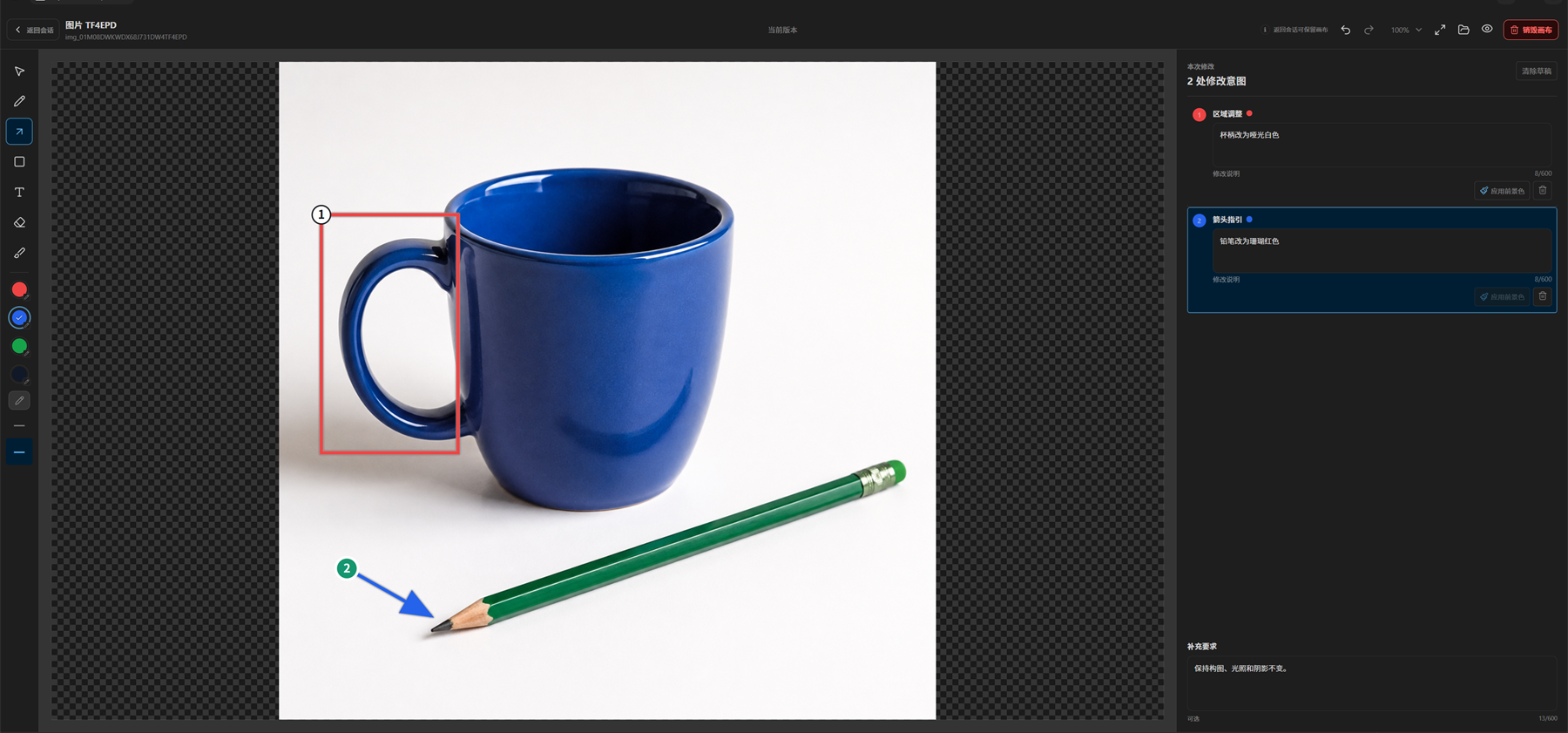
Open results in Codex App, mark regions, add instructions, and continue edits through the focused annotation canvas.
Preserve originals, handle local delivery failures, and keep safe error summaries while credentials stay local.
codex plugin marketplace add Syh1906/openai-compatible-imagegen
codex plugin add openai-compatible-imagegen@openai-compatible-imagegen
Generate, inspect, edit, and deliver images through an OpenAI-compatible API, Atlas Cloud, or the Codex App ChatGPT route.


English | 简体中文
OpenAI-Compatible Images ships one image core in two installation shapes. Use the portable Standalone Skill with Agent clients and command-line workflows, or install the Codex Plugin for result cards, focused canvas editing, annotations, immutable artifacts, and version history. API Key routes support the default OpenAI-compatible protocol and optional Atlas Cloud image generation.
| Package | Best for | Includes |
|---|---|---|
| Standalone Skill | Codex CLI, Claude Code, OpenCode, and other Agent Skills clients | Generation, editing, JSONL batches, transparency, delivery, and QA |
| Codex Plugin | Codex App users who want result cards and a focused canvas | API Key: full image workflow. ChatGPT: host generation and semantic canvas edits, with artifacts, delivery, and versions |
Choose one installation shape for each environment. The packages share code and versions but keep separate local configuration and artifact directories. Follow the migration guide when moving an existing configuration to the Codex Plugin.
API Key generation and edits use durable asynchronous jobs. Track long batches, recover confirmed results after a wait times out, and resume local processing with saved originals. See long-running generation and batches.
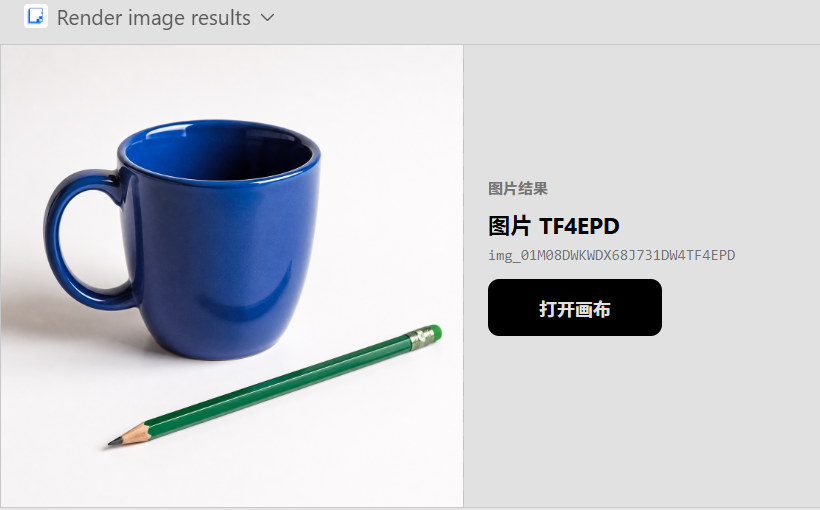
Generate an image in the conversation, then open its focused canvas to mark regions and add instructions for each change.
Conversation result
Focused editing canvas
Requirements: a Codex version with Plugin support, Git, Node.js 20+, and Python 3.12 or newer. The Plugin ZIP is platform-neutral and supports Windows, macOS, and Linux. Choose the API Key route with your own image API service, or choose the ChatGPT route when the Codex App host provides its image generation capability.
codex plugin marketplace add Syh1906/openai-compatible-imagegen
codex plugin add openai-compatible-imagegen@openai-compatible-imagegen
If the openai-compatible-imagegen marketplace is already registered, skip the first command. After installation, completely quit and restart Codex once so it loads the Plugin's Skill, MCP tools, and bundled dependencies.
The Plugin is prebuilt. Continue with configuration; see the installation guide for other installation methods and platform requirements.
Download openai-compatible-imagegen-skill-<version>.zip from GitHub Releases. Extract it into your client's skills directory so SKILL.md is at the package root, then start a new session.
Requires Python 3.12 or newer and an image-service credential. The installation guide covers client paths and the third-party Skills CLI; then complete Standalone configuration. Follow the update guide to preserve configuration when switching an existing installation.
Available operations depend on the selected route and model. Atlas Cloud currently supports text-to-image generation only. See configuration.
Describe the subject, composition, size, quantity, transparency, checks, and output you need:
Create a 16:9 product launch banner at 2K, then deliver a 1200x675 PNG.
Protect the notebook, recolor the mug, and open the result in the focused canvas for review.
Generate four editorial illustrations and keep a manifest of each batch result.
The Plugin presents results and canvas actions in Codex App. The Standalone Skill runs its bundled CLI and reports output and manifest paths.
Use the documentation index to find installation, configuration, migration, updating, rollback, troubleshooting, and architecture guides.
Credentials stay in user-controlled files or environment variables. The project does not run a hosted image service or collect prompts and outputs. See SECURITY.md for reporting and trust boundaries.
Sign in to join the discussion.
No comments yet. Be the first to say what this is good for.
An agent organization for Claude Code, structured as a company — 15+ departments, 125+ skills, each independently installable.
Context window optimization for AI coding agents. Sandboxes tool output (98% reduction), persists session memory, and enforces routing across 17 platforms via MCP + hooks.
Persistent file-based planning for AI coding agents and long-running tasks. Crash-proof markdown plans, session recovery after /clear and compaction, per-turn re-injection against context rot, deterministic completion gate. Manus-style. Install from npm, the Claude Code plugin marketplace, or npx skills. Codex, Cursor, OpenCode, 60+ agents.
Universal SEO skill for Claude Code. 25 sub-skills + 18 sub-agents covering technical SEO, E-E-A-T, schema, GEO/AEO, backlinks, local SEO, maps intelligence, semantic clustering, e-commerce SEO, international SEO, Google APIs, and PDF/Excel reporting. Optional DataForSEO, Firecrawl, and Banana extensions.

Skills that translate your coding agent's output into plain language: honest reports, straight verdicts, steps you can follow. MIT.

Open-source SEO, GEO, and marketing skills for AI agents.