

obra/
superpowers

obra/superpowersSkills
An agentic skills framework & software development methodology that works.
285k
1 add
This repo gives builders a native `.drawio` workflow for creating, exporting, and checking diagrams with agent help. It pairs assistant-friendly source files with export scripts, SVG linting, fixtures, and docs so diagrams stay editable and reviewable.
Builders who want their agent to create and check draw.io diagrams without leaving messy exports behind.
You can keep `.drawio` as the source of truth, export consistent images, and catch layout problems before diagrams ship.
Works with real `.drawio` XML so the editable source stays in sync with exports.
Scripts export diagrams to `png`, `svg`, `pdf`, and `jpg`, with cross-platform CLI lookup.
Checks for overlap, routing, label collisions, contrast, emphasis, and text overflow issues.
Bundled fixture diagrams cover common border, label, and text-fit failures for CI checks.
Includes layout guidance, AWS icon guidance, and a published docs site for the workflow.
npm ci
npm run verify
node scripts/export-drawio.mjs fixtures/basic/basic.drawio --format svg
node scripts/check-drawio-svg-overlaps.mjs fixtures/basic/basic.drawio.svg
uv run python scripts/find_aws_icon.py lambda
npm ci
npm run docs:build
git clone https://github.com/Sunwood-ai-labs/draw-io-skill.git D:\Prj\draw-io-skill
cmd /c mklink /J C:\Users\YOUR_NAME\.codex\skills\draw-io D:\Prj\draw-io-skill
git clone https://github.com/Sunwood-ai-labs/draw-io-skill.git ~/.claude/skills/drawio

English · 日本語




Native .drawio authoring, cross-platform export helpers, and SVG linting for Codex, Claude Code, and repository workflows.
draw-io-skill packages the most useful parts of three diagram workflows into one repository:
.drawio editing for assistant-driven diagram generationpng, svg, pdf, and jpgIt is meant to be practical in a real repository: editable source stays in .drawio, exports stay reproducible, and routing defects can be caught before a diagram lands in docs or a PR.
Install the local tooling, export a bundled fixture, then run the linter:
npm ci
npm run verify
node scripts/export-drawio.mjs fixtures/basic/basic.drawio --format svg
node scripts/check-drawio-svg-overlaps.mjs fixtures/basic/basic.drawio.svg
uv run python scripts/find_aws_icon.py lambda
npm run verify runs the syntax checks, every bundled lint regression fixture, and the docs build, so it is the fastest way to confirm that edge-terminal, edge-label, label-rect, text-contrast, text-emphasis, and text-overflow coverage still works end to end.
If you only want to rebuild the documentation site:
npm ci
npm run docs:build
.drawio source..drawio as the editable source of truth.png, svg, or pdf.

The repository also ships a Japanese-localized companion diagram:
assets/draw-io-skill-structure.ja.drawio,
assets/draw-io-skill-structure.ja.drawio.png,
and assets/draw-io-skill-structure.ja.drawio.svg.
If you want the repository to read more like a showcase, these bundled samples are the best starting points:
assets/draw-io-skill-structure.drawio* for repository structure onboardingassets/draw-io-skill-structure-shapes.drawio* for lint and visual review of non-rect shapesassets/draw-io-skill-structure-icons.drawio* for icon-rich presentation blocks that pair well with the AWS icon guide and uv run python scripts/find_aws_icon.pyassets/aesthetic-template-sample.drawio* for the default polished technical template baselineassets/aesthetic-sample-executive-dashboard.drawio* for executive KPI storytellingassets/aesthetic-sample-ai-pipeline.drawio* for AI workflow and model pipeline explanationsassets/aesthetic-sample-security-incident.drawio* for security response storytellingassets/purpose-board-brief-template.drawio* for one-page decision briefsassets/purpose-dependency-orbit-template.drawio* for dependency radius and impact boundariesassets/purpose-incident-timeline-template.drawio* for fact-based incident reconstructionassets/purpose-hypothesis-helix-template.drawio* for experiment design and evidence loopsassets/purpose-feature-value-matrix-template.drawio* for feature prioritization by impact, effort, and riskassets/purpose-value-conversion-sheet-template.drawio* for connecting user pain to measurable valueThese templates are deliberately separated by job, not just color palette:
| Template | Purpose | Excludes |
|---|---|---|
| Board Brief | Share decision premises on one page | implementation steps, dependency maps |
| Dependency Orbit Map | Show direct and indirect dependency radius | timelines, progress reporting |
| Incident Timeline | Reconstruct observed facts, impact, and response | speculative root causes, architecture maps |
| Hypothesis Helix | Turn uncertain ideas into experiments and decisions | implementation architecture, calendar timelines |
| Feature Value Matrix | Prioritize feature candidates by impact, effort, and risk | delivery schedules, dependency routes |
| Value Conversion Sheet | Convert user pain into touchpoints, interventions, and measurable value | dependency maps, incident chronology |
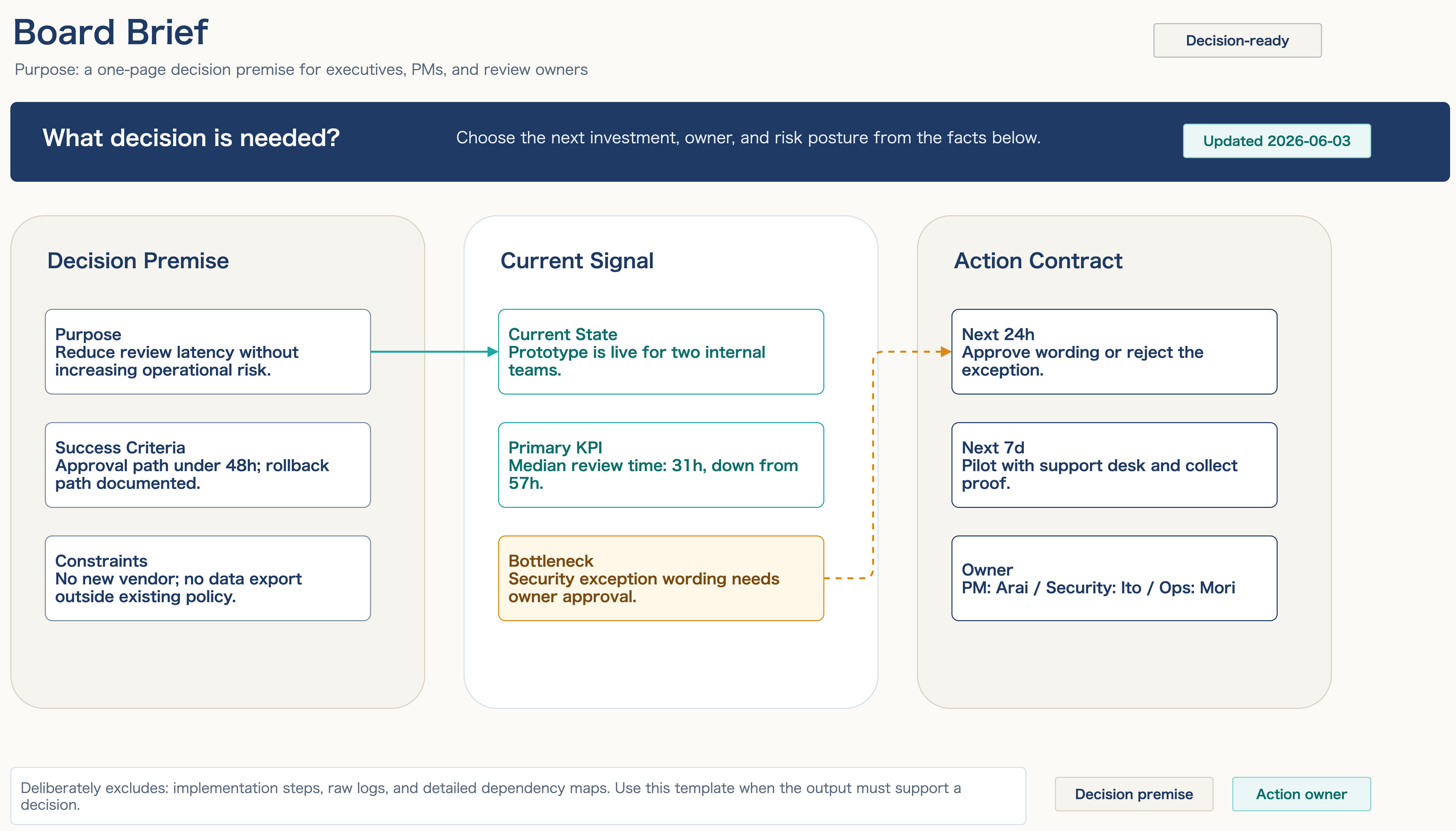
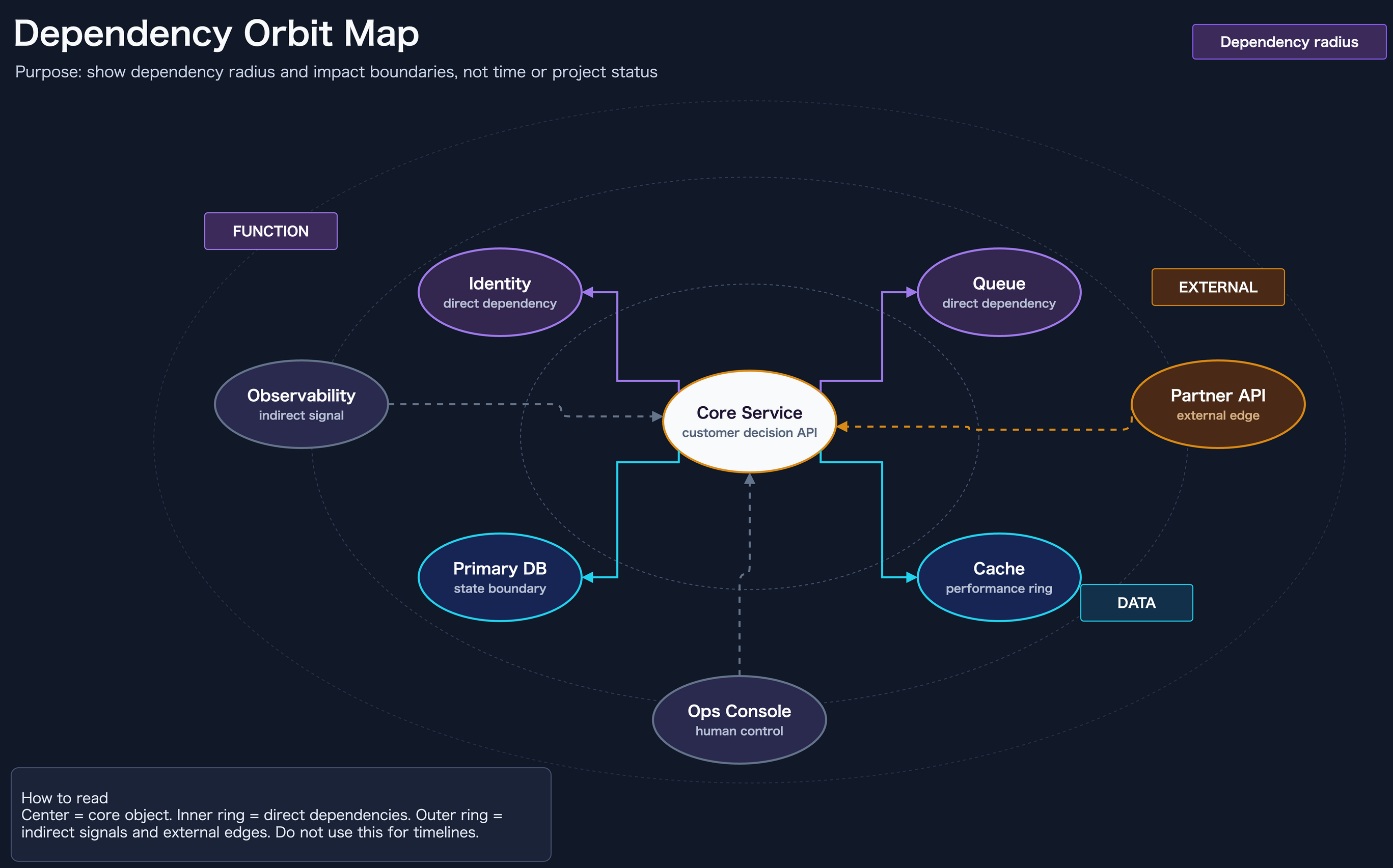
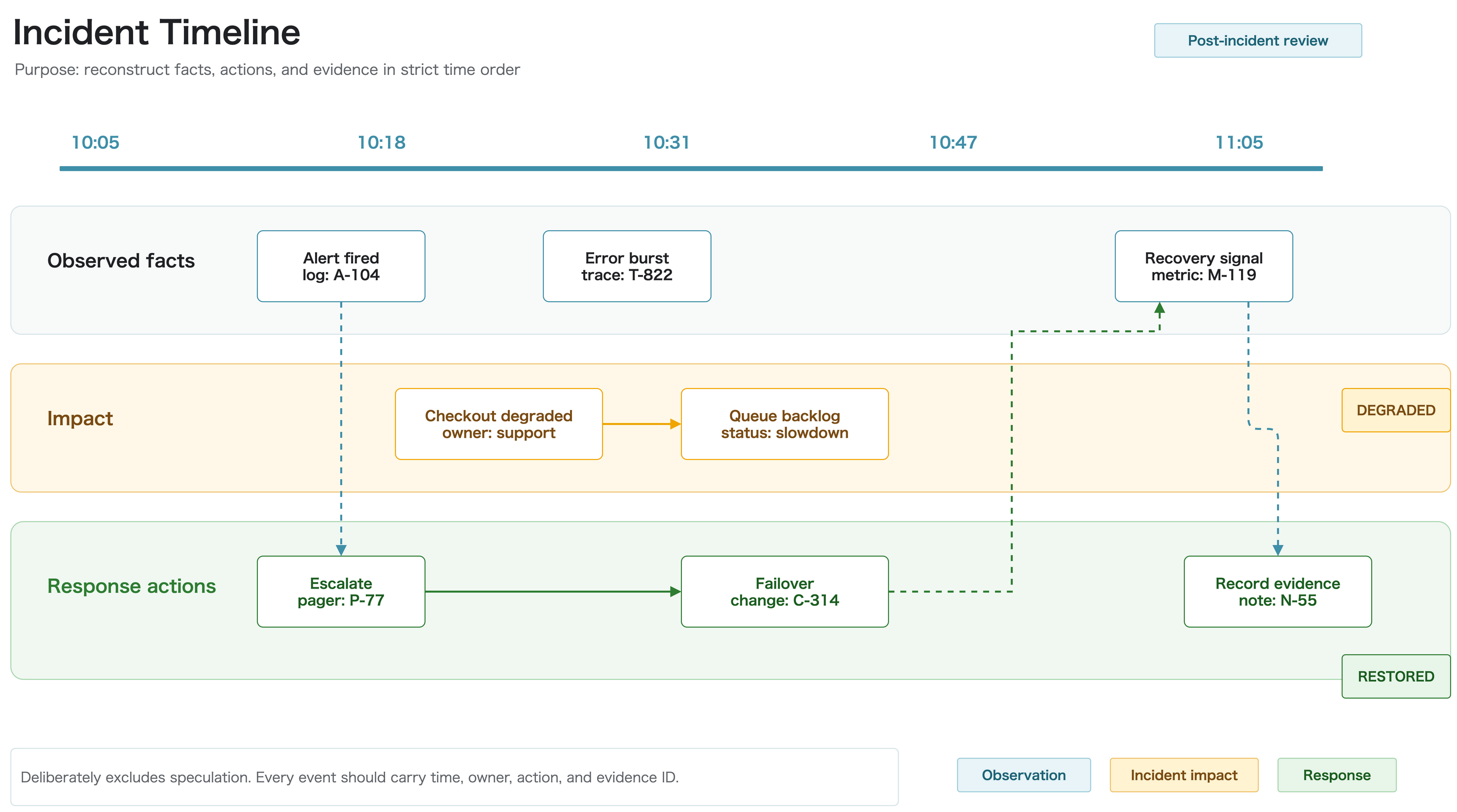
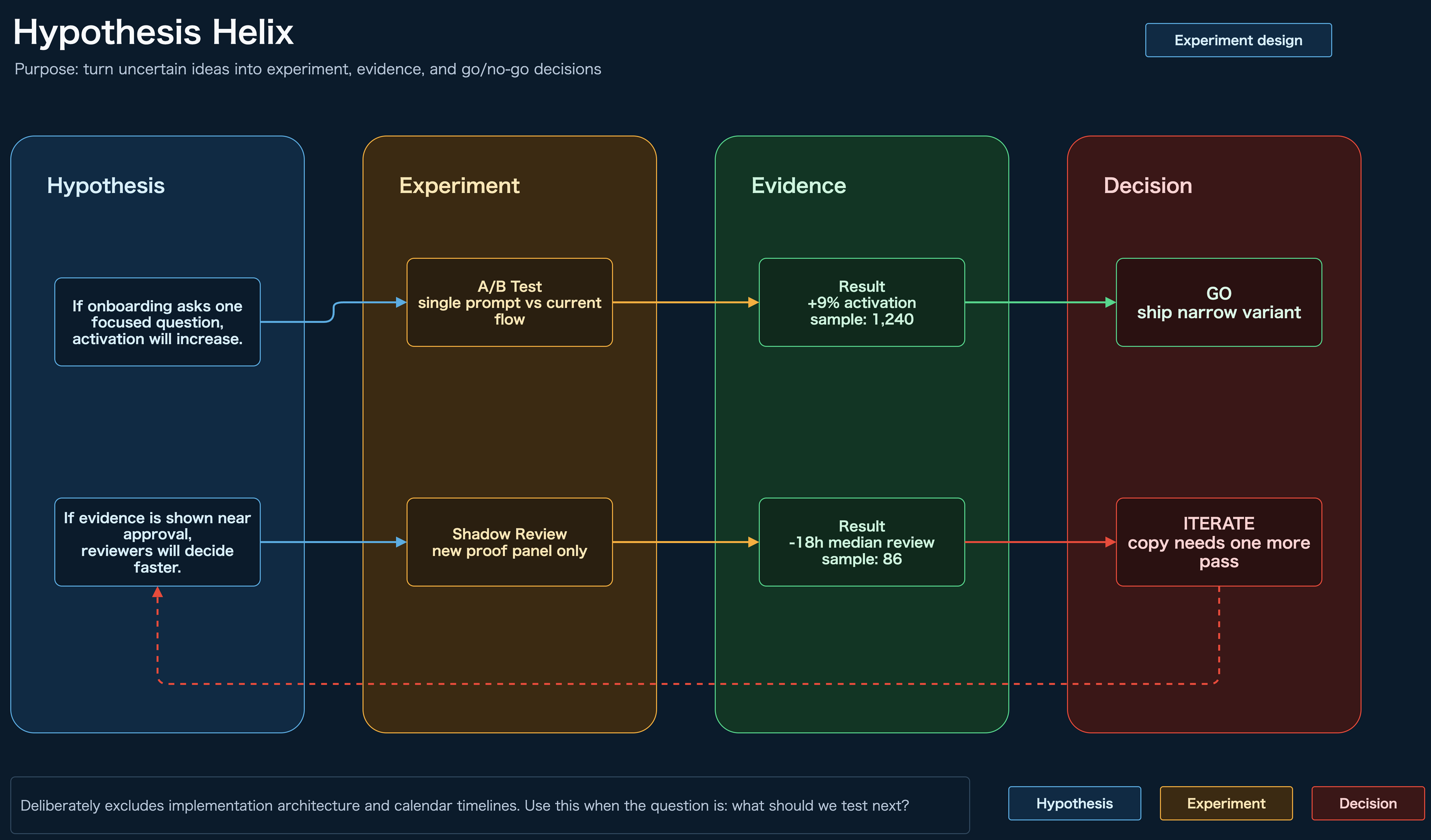
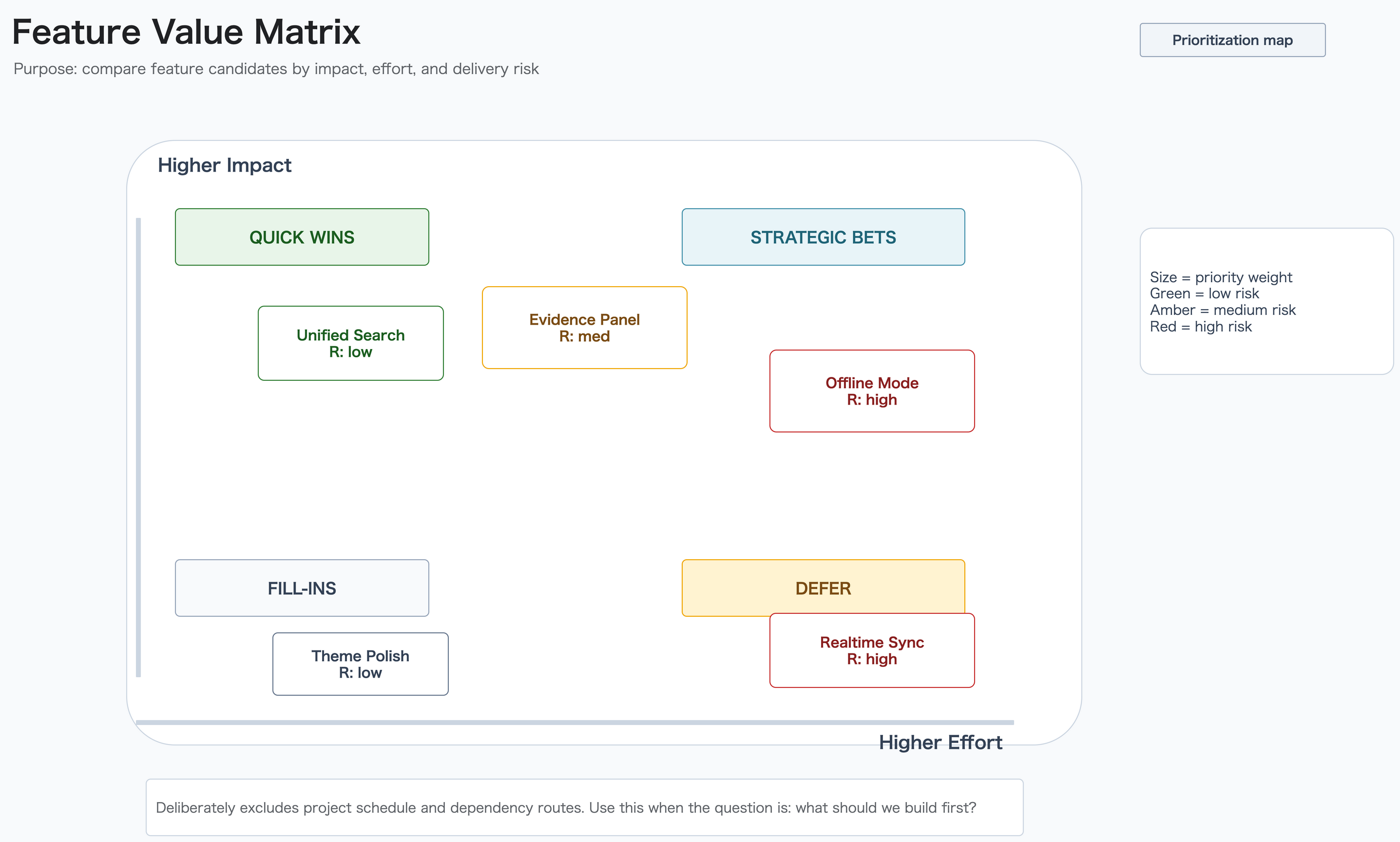
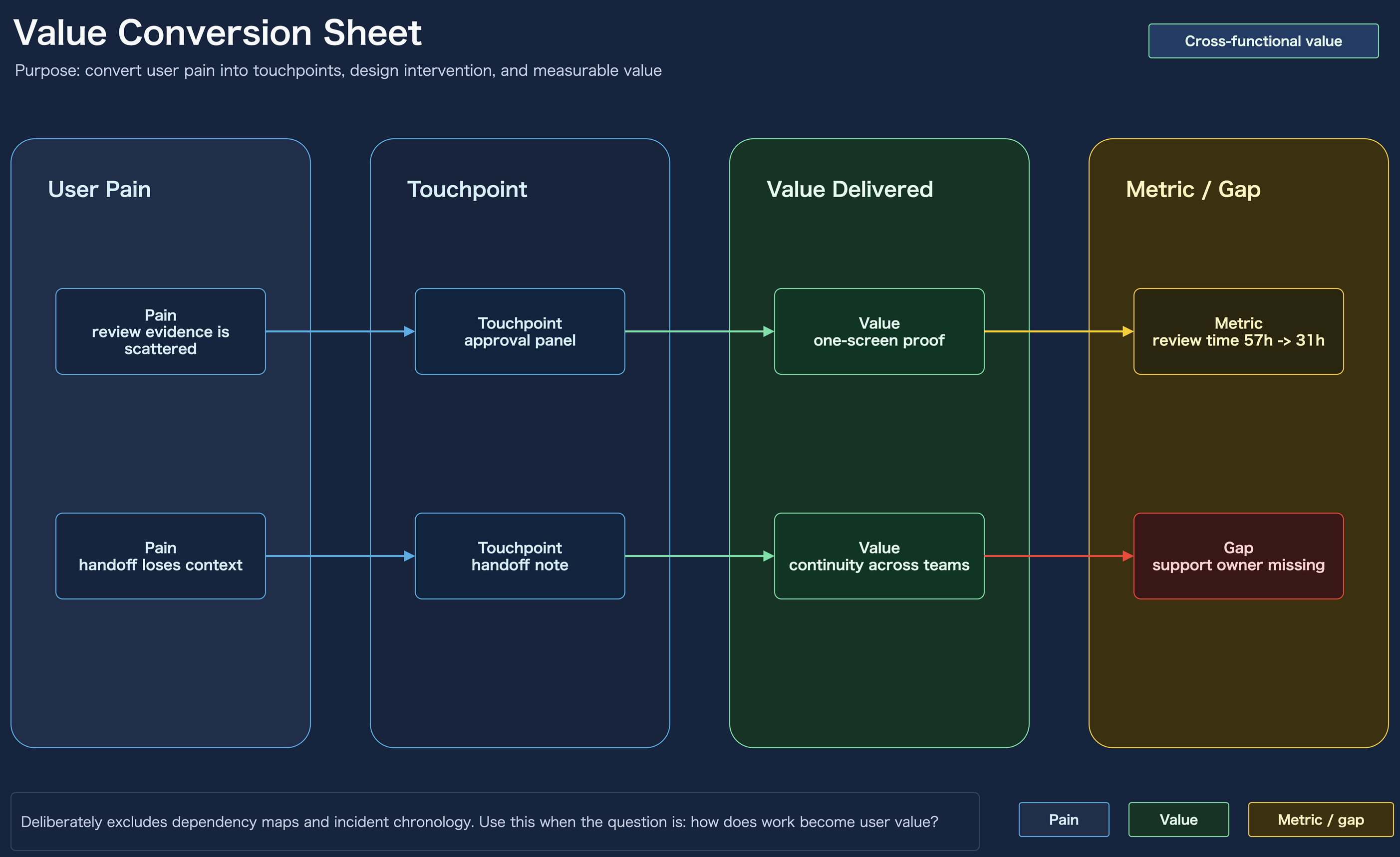
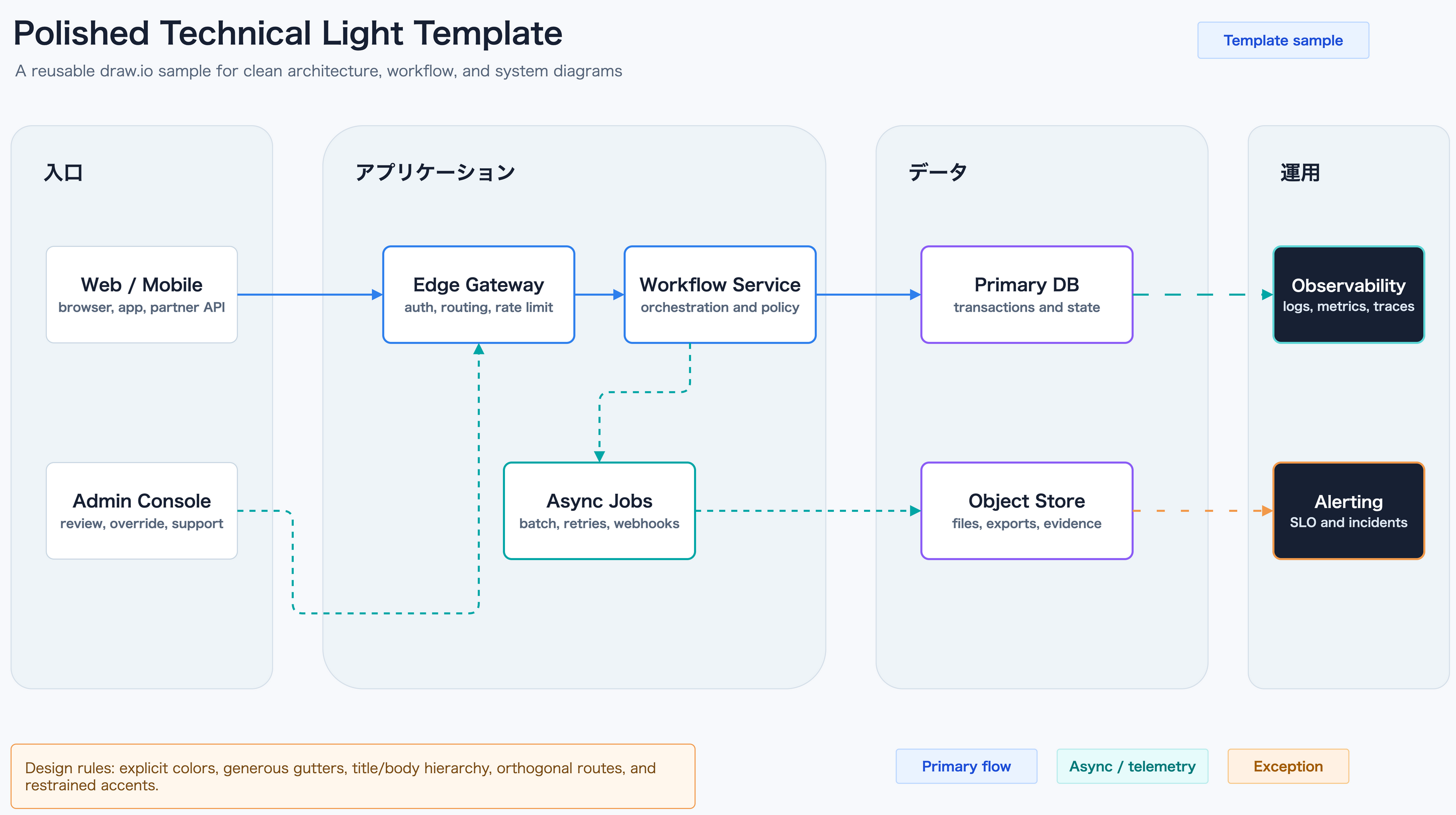
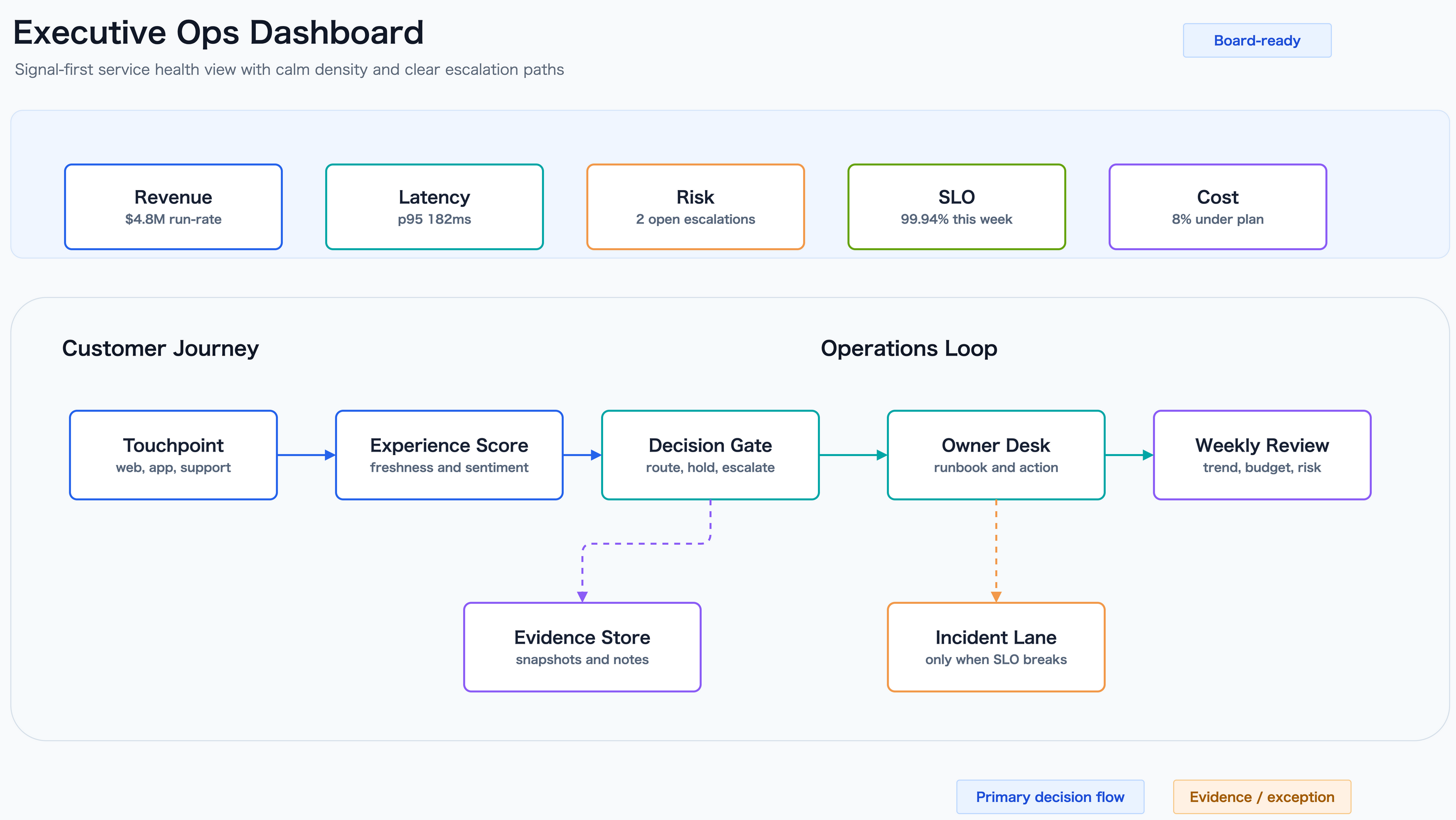
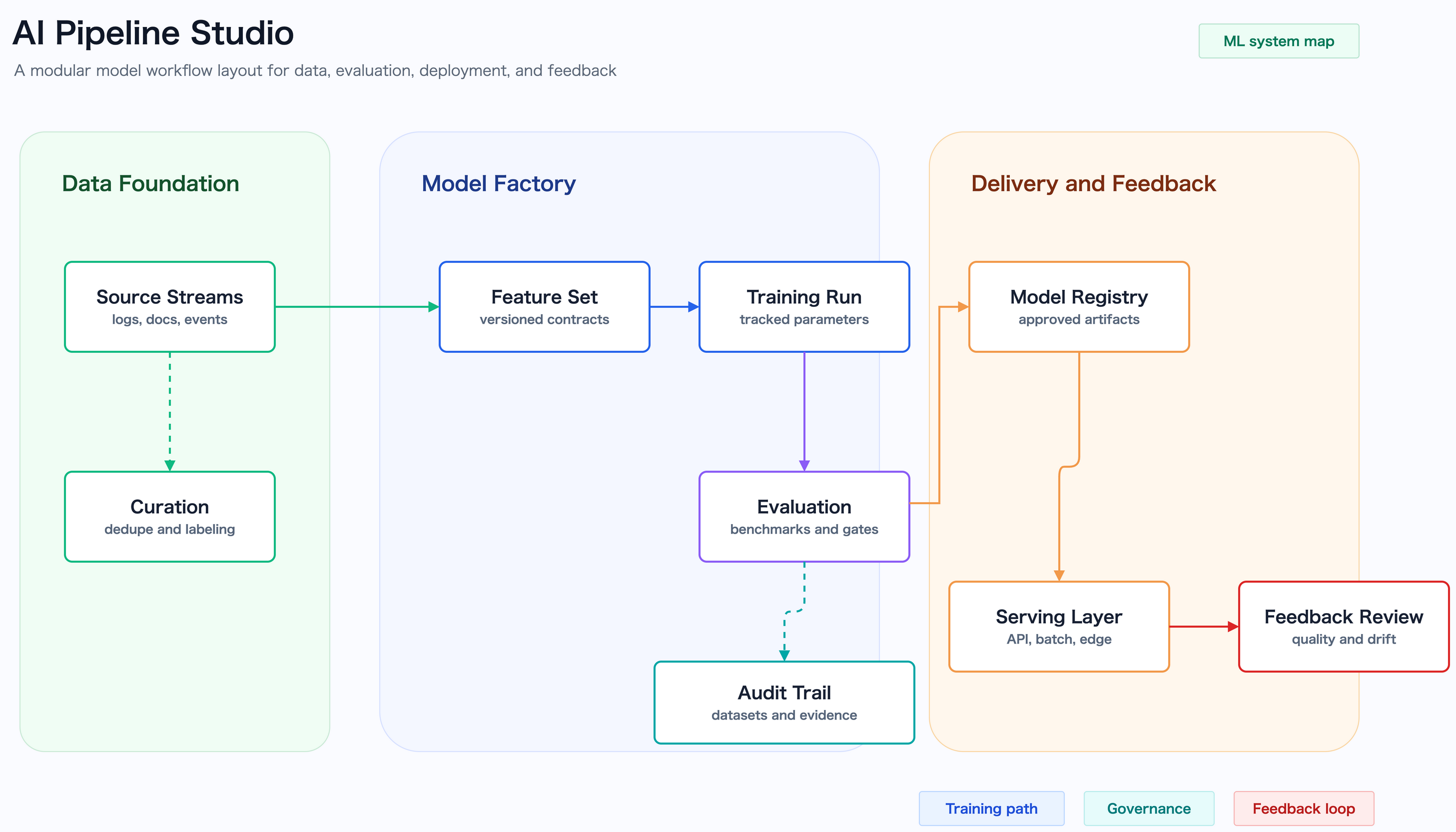
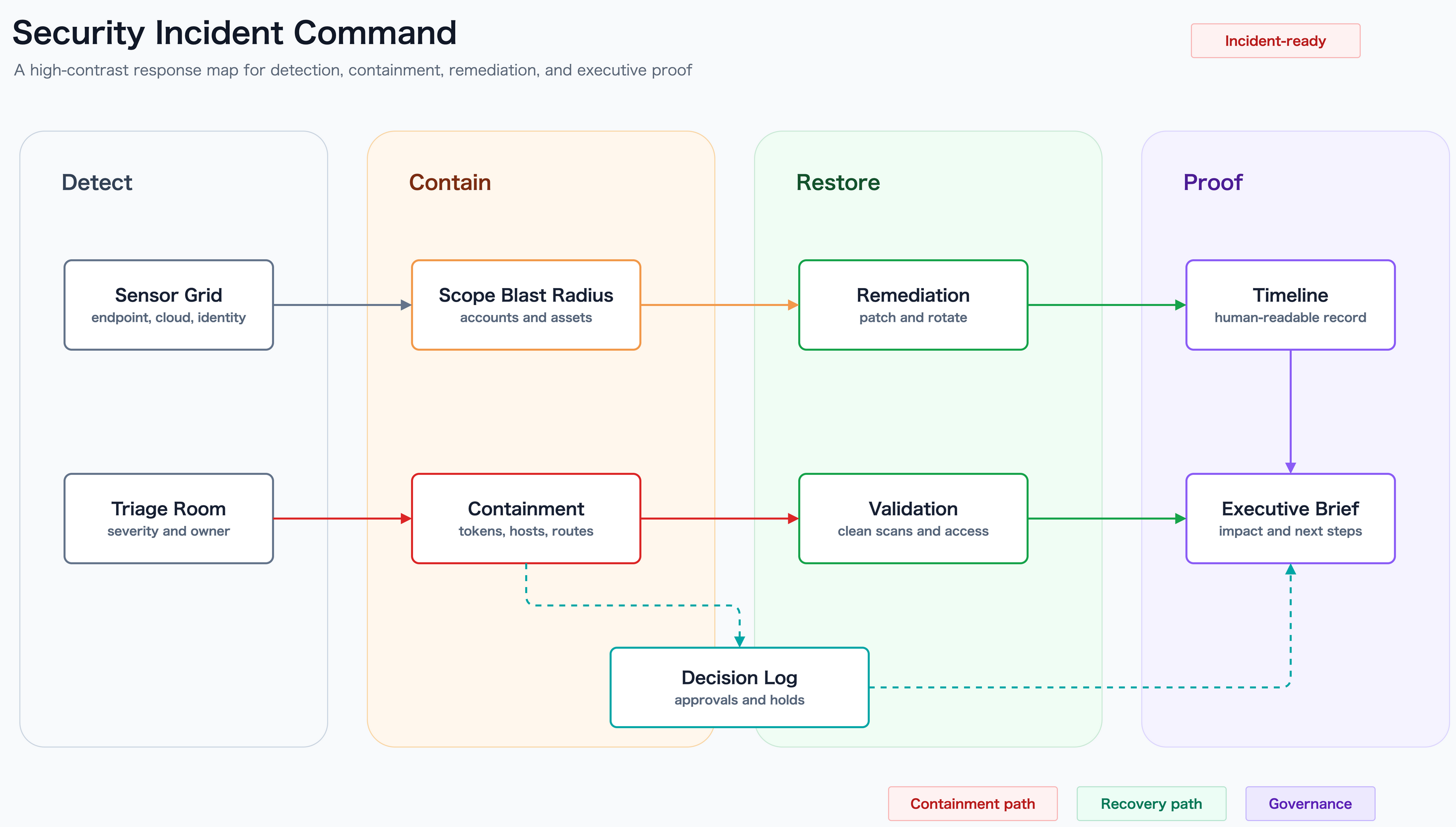
For a public AWS architecture example from another repository, see onizuka-game-agi-co:
onizuka-game-agi-aws-architecture.drawio for the editable sourceonizuka-game-agi-aws-architecture.drawio.svg for the published SVG exampleCreate a native draw.io diagram in an AWS reference-style icon view: light theme, dark navy title bar, cyan accents, white cards, official AWS icons, Noto Sans JP, orthogonal routing, and a note that AWS icons are visual references only for local/GitHub/workflow concepts.
The guided walkthrough lives in docs/guide/showcase.md.
mxGraphModel XML editing.drawio.<format> namingnode scripts/export-drawio.mjs architecture.drawio --format png --open
node scripts/export-drawio.mjs architecture.drawio --format svg
node scripts/export-drawio.mjs architecture.drawio --output architecture.drawio.pdf
The helper locates the draw.io CLI across Windows, macOS, and Linux, defaults PNG export to transparent 2x output, and supports optional --delete-source cleanup only when requested explicitly.
node scripts/check-drawio-svg-overlaps.mjs fixtures/basic/basic.drawio.svg
node scripts/check-drawio-svg-overlaps.mjs fixtures/border-overlap/border-overlap.drawio.svg
node scripts/check-drawio-svg-overlaps.mjs fixtures/large-frame-border-overlap/large-frame-border-overlap.drawio.svg
node scripts/check-drawio-svg-overlaps.mjs fixtures/shape-border-overlap/shape-border-overlap.drawio.svg
node scripts/check-drawio-svg-overlaps.mjs fixtures/label-rect-overlap/label-rect-overlap.drawio
node scripts/check-drawio-svg-overlaps.mjs fixtures/text-cell-overflow/text-cell-overflow.drawio
node scripts/check-drawio-svg-overlaps.mjs fixtures/text-contrast/text-contrast.drawio
node scripts/check-drawio-svg-overlaps.mjs fixtures/text-emphasis/text-emphasis.drawio
The linter checks:
edge-edgeedge-rect-border for lines that run along or visibly overlap a box or large frame borderedge-shape-border for lines that run along supported non-rect shape borders such as document, hexagon, parallelogram, and trapezoidedge-rectedge-terminal for final arrow runs that become too short after the last bendedge-label for routed lines that cross label text boxeslabel-rect for label text boxes that collide with another box or cardrect-shape-border for box or frame borders that run along those supported non-rect shape borderstext-contrast for text whose explicit font color is too close to its fill colortext-emphasis for compact dark cards whose title and body copy are still flattened into one dense blocktext-overflow(width)text-overflow(height)The checker accepts either .drawio or .drawio.svg input. When you point it at a .drawio source, it reads the companion draw.io geometry as well, which keeps label-rect and text-fit checks aligned with the editable source instead of relying only on exported SVG bounds.
The repository includes dedicated regression fixtures for simple box-border overlap, large frame-border overlap, supported non-rect shape border overlap, label-box collisions, text-cell overflow, low-contrast copy, dark-card hierarchy, and shape-aware text overflow so routing regressions can be caught in CI before a diagram lands in docs. edge-terminal, edge-label, label-rect, and text-emphasis are additional heuristics aimed at the common "tiny arrow tail", "line through label", "note card covering a label", and "dark card title/body blending together" failures that often need a second pass after export.
For a repository-local lint and visual review sample, use
assets/draw-io-skill-structure-shapes.drawio,
assets/draw-io-skill-structure-shapes.drawio.png,
and assets/draw-io-skill-structure-shapes.drawio.svg.
For a more presentation-oriented sample, use
assets/draw-io-skill-structure-icons.drawio,
assets/draw-io-skill-structure-icons.drawio.png,
and assets/draw-io-skill-structure-icons.drawio.svg.
When text-contrast fires, treat it like a legibility bug: increase the actual foreground/background delta instead of relying on texture, glow, or outlines.
When text-emphasis fires, treat it like a hierarchy bug: split the title from the body with a chip, independent text cell, stronger spacing, or a clearer surface split.
git clone https://github.com/Sunwood-ai-labs/draw-io-skill.git D:\Prj\draw-io-skill
cmd /c mklink /J C:\Users\YOUR_NAME\.codex\skills\draw-io D:\Prj\draw-io-skill
git clone https://github.com/Sunwood-ai-labs/draw-io-skill.git ~/.claude/skills/drawio
draw-io-skill/
├── README.md
├── README.ja.md
├── SKILL.md
├── LICENSE
├── assets/
│   ├── aesthetic-sample-ai-pipeline.drawio
│   ├── aesthetic-sample-ai-pipeline.drawio.png
│   ├── aesthetic-sample-ai-pipeline.drawio.svg
│   ├── aesthetic-sample-executive-dashboard.drawio
│   ├── aesthetic-sample-executive-dashboard.drawio.png
│   ├── aesthetic-sample-executive-dashboard.drawio.svg
│   ├── aesthetic-sample-security-incident.drawio
│   ├── aesthetic-sample-security-incident.drawio.png
│   ├── aesthetic-sample-security-incident.drawio.svg
│   ├── aesthetic-template-sample.drawio
│   ├── aesthetic-template-sample.drawio.png
│   ├── aesthetic-template-sample.drawio.svg
│   ├── draw-io-skill-hero.svg
│   ├── draw-io-skill-icon.svg
│   ├── draw-io-skill-penpen-header.webp
│   ├── draw-io-skill-structure.drawio
│   ├── draw-io-skill-structure.drawio.png
│   ├── draw-io-skill-structure.drawio.svg
│   ├── draw-io-skill-structure-icons.drawio
│   ├── draw-io-skill-structure-icons.drawio.png
│   ├── draw-io-skill-structure-icons.drawio.svg
│   ├── draw-io-skill-structure-icons.ja.drawio
│   ├── draw-io-skill-structure-icons.ja.drawio.png
│   ├── draw-io-skill-structure-icons.ja.drawio.svg
│   ├── draw-io-skill-structure-shapes.drawio
│   ├── draw-io-skill-structure-shapes.drawio.png
│   ├── draw-io-skill-structure-shapes.drawio.svg
│   ├── draw-io-skill-structure.ja.drawio
│   ├── draw-io-skill-structure.ja.drawio.png
│   ├── draw-io-skill-structure.ja.drawio.svg
│   ├── purpose-board-brief-template.drawio
│   ├── purpose-board-brief-template.drawio.png
│   ├── purpose-board-brief-template.drawio.svg
│   ├── purpose-dependency-orbit-template.drawio
│   ├── purpose-dependency-orbit-template.drawio.png
│   ├── purpose-dependency-orbit-template.drawio.svg
│   ├── purpose-feature-value-matrix-template.drawio
│   ├── purpose-feature-value-matrix-template.drawio.png
│   ├── purpose-feature-value-matrix-template.drawio.svg
│   ├── purpose-hypothesis-helix-template.drawio
│   ├── purpose-hypothesis-helix-template.drawio.png
│   ├── purpose-hypothesis-helix-template.drawio.svg
│   ├── purpose-incident-timeline-template.drawio
│   ├── purpose-incident-timeline-template.drawio.png
│   ├── purpose-incident-timeline-template.drawio.svg
│   ├── purpose-value-conversion-sheet-template.drawio
│   ├── purpose-value-conversion-sheet-template.drawio.png
│   └── purpose-value-conversion-sheet-template.drawio.svg
├── docs/
│   ├── .vitepress/
│   ├── guide/
│   ├── ja/
│   └── public/
├── fixtures/
│   ├── basic/
│   ├── border-overlap/
│   ├── label-rect-overlap/
│   ├── large-frame-border-overlap/
│   ├── shape-border-overlap/
│   ├── shape-text-overflow/
│   └── text-cell-overflow/
├── references/
│   ├── aws-icons.en.md
│   ├── aws-icons.md
│   ├── layout-guidelines.en.md
│   └── layout-guidelines.md
└── scripts/
    ├── check-drawio-svg-overlaps.mjs
    ├── convert-drawio-to-png.sh
    ├── export-drawio.mjs
    ├── find_aws_icon.py
    ├── verify-border-overlap-fixture.mjs
    ├── verify-label-rect-fixture.mjs
    └── verify-text-cell-overflow-fixture.mjs
This repository blends ideas from:
softaworks/agent-toolkit for layout and editing guidancejgraph/drawio-mcp for native draw.io assistant workflowsReferenced sources:
Sign in to join the discussion.
No comments yet. Be the first to say what this is good for.
An agentic skills framework & software development methodology that works.

Turn any codebase, with its docs, SQL schemas, configs, and PDFs, into a queryable knowledge graph. A /graphify skill for Claude Code, Cursor, Codex, and Gemini CLI: local deterministic AST parsing, every edge explained, no vector store.

Topic in, narrated explainer video out. A Claude Code / Codex skill that turns any topic into a black-canvas motion-graphics explainer video with TTS voiceover, subtitles and a chapter progress bar. Chinese or English; every frame drawn in code with Remotion.
Public repository for Agent Skills
Open-source AI job search: scan job portals, evaluate listings into a structured A-H report with a global 1-5 score, tailor your CV, track applications — runs locally in your AI coding CLI (Claude Code, Codex, OpenCode, Antigravity…)

Production-grade engineering skills for AI coding agents.