
DietrichGebert/ponytailPlugins
Makes your AI agent think like the laziest senior dev in the room. The best code is the code you never wrote.
138k
1 add
This plugin package adds Mac automation skills, commands, and agents for apps like Calendar, Notes, Mail, Keynote, Numbers, and Excel. It routes requests through Apple Events using AppleScript, JXA, and PyXA so your agent can carry out app tasks instead of only drafting them.
Builders who use Claude Code and want their agent to drive Mac apps, spreadsheets, mail, notes, and presentations.
You can turn natural-language requests into Mac app actions without manually clicking through each app.
Includes skills for Calendar, Notes, Mail, Keynote, Numbers, Excel, Reminders, Contacts, Messages, Chrome, and browser automation.
Provides commands such as `/csv-to-numbers`, `/csv-to-excel`, `/doc-to-deck`, `/meeting-setup`, `/meeting-start`, and `/meeting-end`.
Adds automation agents that combine several skills for workflows like meeting setup and document-to-deck creation.
Uses AppleScript for discovery, JXA for legacy support, and PyXA/Python as the preferred path.
Includes per-app setup scripts to trigger macOS Automation permission prompts before running automations.
/plugin marketplace add SpillwaveSolutions/automating-mac-apps-plugin
claude plugins install automating-mac-apps-plugin
cp -r plugins/automating-mac-apps-plugin ~/.claude/skills/
# List installed plugins
claude plugins list

# Or check the skills directory
ls ~/.claude/skills/
cd ~/.claude/skills/automating-mac-apps-plugin
./skills/automating-mac-apps/scripts/request_automation_permissions.sh
# Or use Python:
python3 ./skills/automating-mac-apps/scripts/request_automation_permissions.py
# Convert CSV to Numbers spreadsheet
/csv-to-numbers data.csv

# Create a Keynote presentation from a document
/doc-to-deck report.md

# Set up a meeting with calendar event, notes, and reminders
/meeting-setup "Project Kickoff" tomorrow 2pm
Automates macOS apps via Apple Events using AppleScript (discovery), JXA (legacy), and PyXA/Python (preferred). Includes skills for Calendar, Notes, Mail, Keynote, Numbers, Excel, Reminders, Contacts, and more.
Note: This is a plugin for Claude Code. It is not ready for prime time yet. Only use it if you are a developer and want to help test it. I have tested it with Reminders, Keynote, Numbers, Notes, Contactc, Calendar, Messenger (send only), and Mail. It is useful as-is but please report any issues or suggestions. Tested Pages and it did not go well. We could only add basic text. We could paste in images but could not predict where they would end up in the doc. Everything else is woefully short on testing.

Connect your favorite Mac applications to Claude Code through Apple Events automation. Control Calendar, Notes, Mail, Keynote, Numbers, and more with natural language commands.
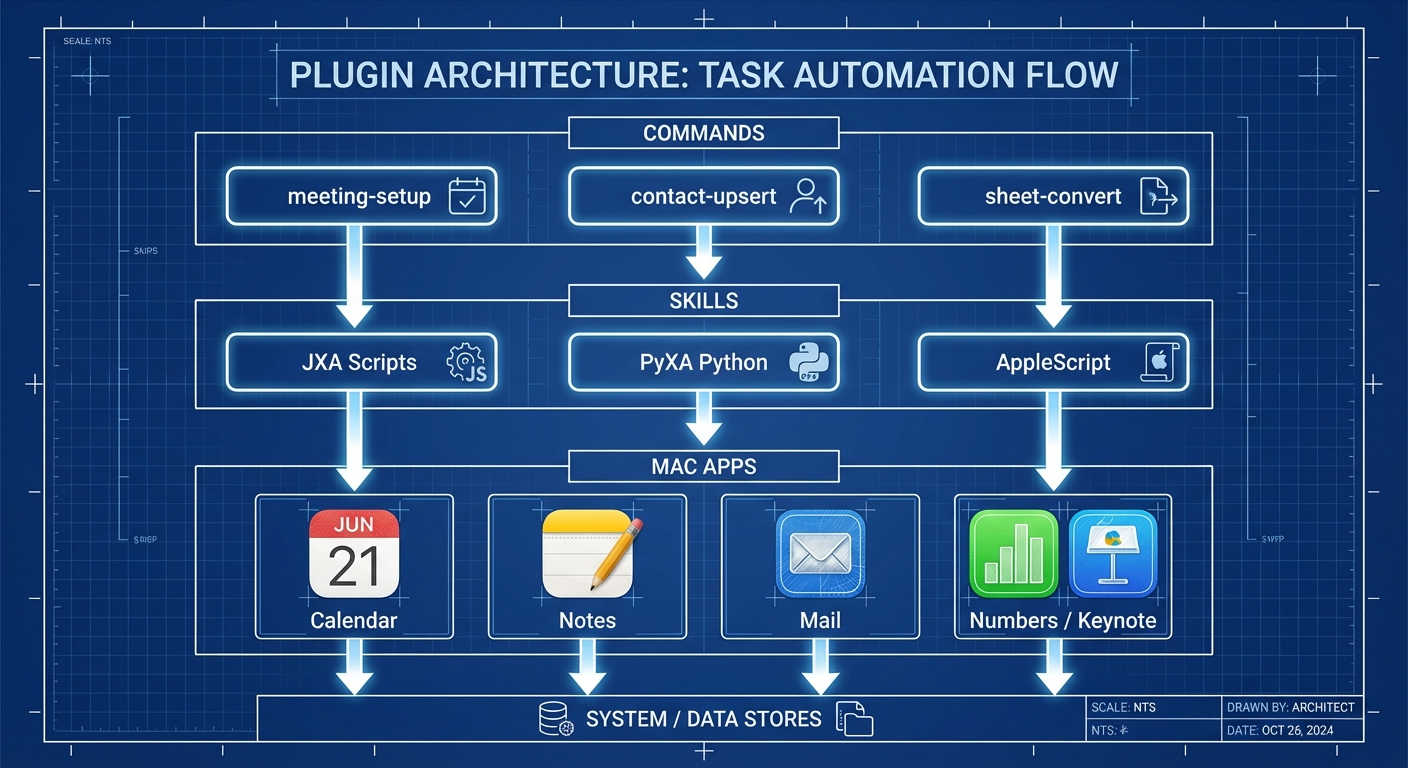
The plugin uses a three-layer architecture:
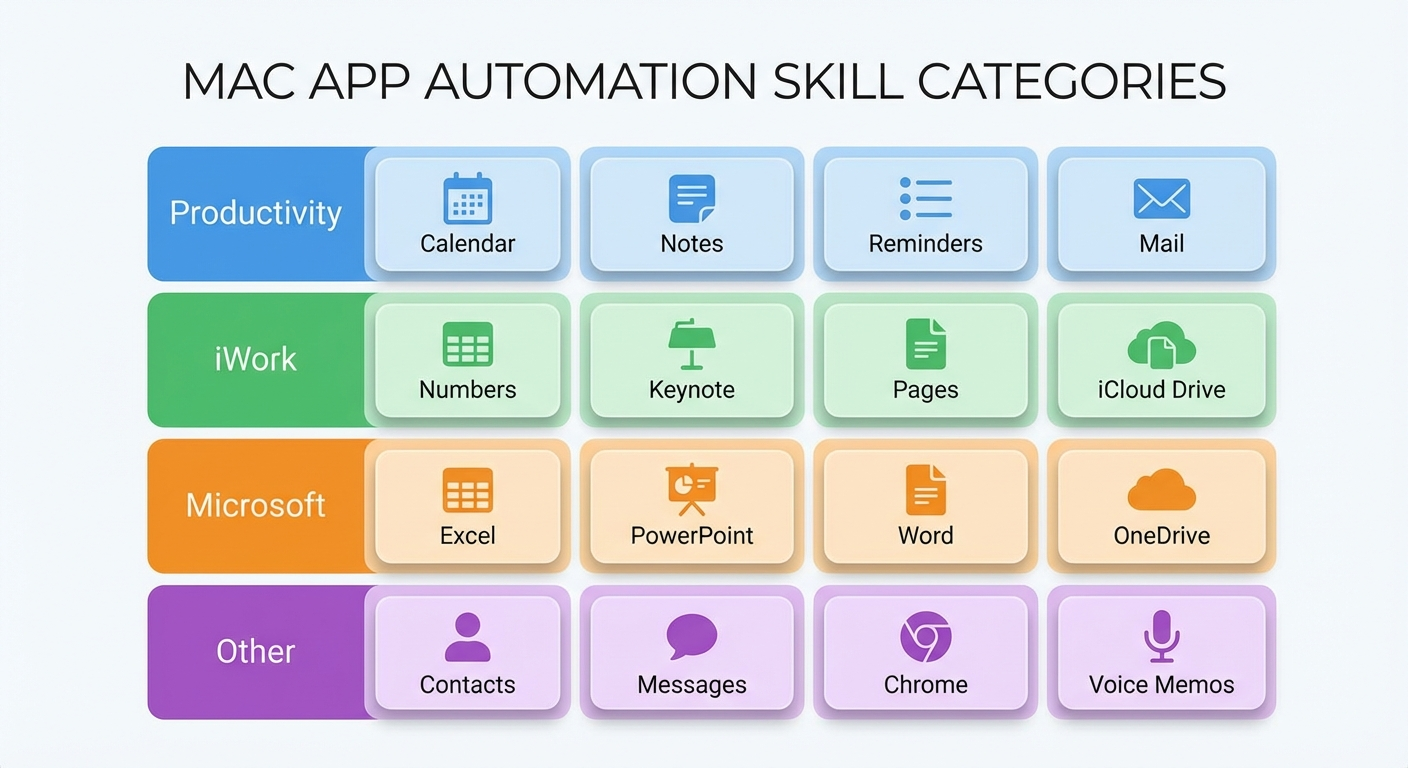
Comprehensive coverage across productivity, communication, and development apps:
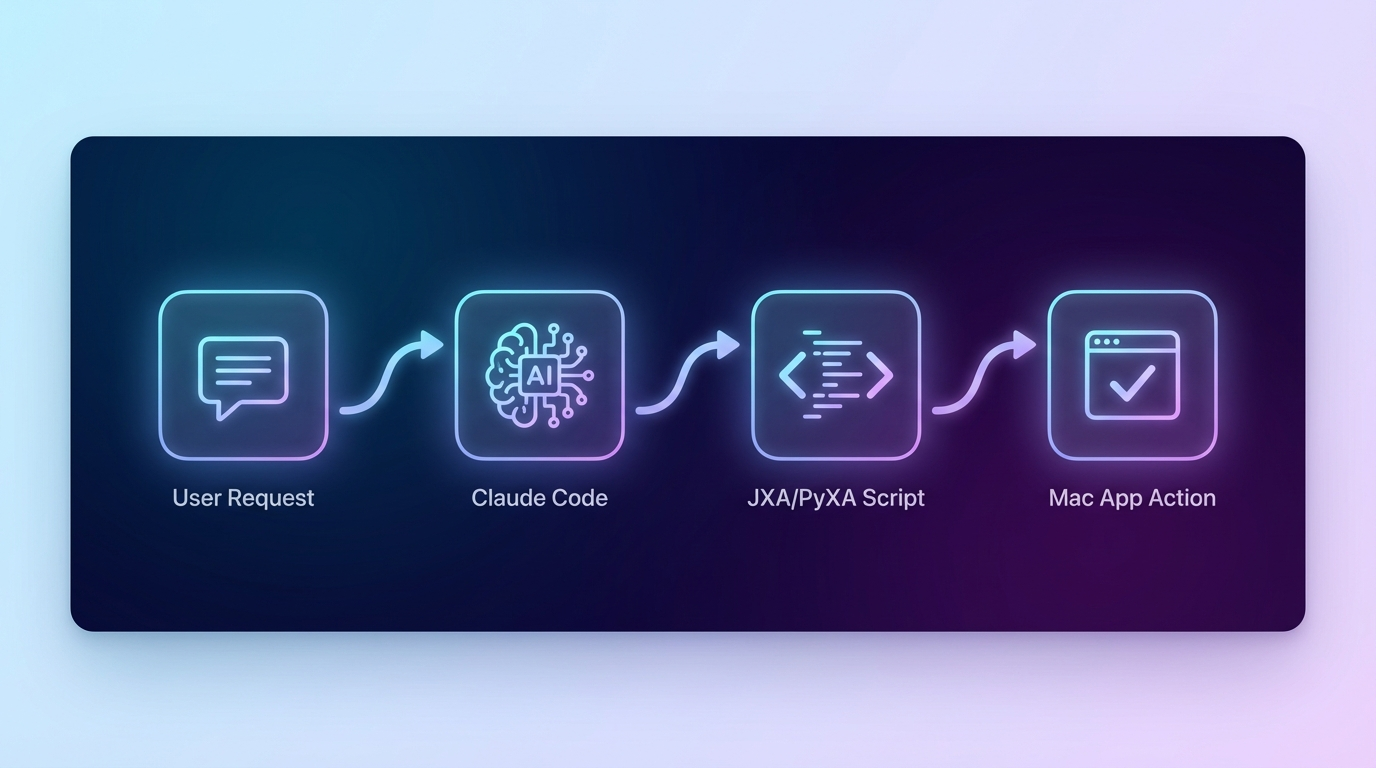
How automation flows from your request to app control:
/plugin marketplace add SpillwaveSolutions/automating-mac-apps-plugin
Once the plugin is available as a Claude Code marketplace:
claude plugins install automating-mac-apps-plugin
Clone directly into your Claude skills directory:
# Navigate to Claude skills directory
cd ~/.claude/skills

# Clone the repository
git clone https://github.com/SpillwaveSolutions/automating-mac-apps-plugin.git

# Or clone to a specific location and symlink
git clone https://github.com/SpillwaveSolutions/automating-mac-apps-plugin.git ~/projects/automating-mac-apps-plugin
ln -s ~/projects/automating-mac-apps-plugin ~/.claude/skills/automating-mac-apps-plugin
plugins/automating-mac-apps-plugin/ folder to ~/.claude/skills/cp -r plugins/automating-mac-apps-plugin ~/.claude/skills/
After installation, verify the plugin is recognized:
# List installed plugins
claude plugins list

# Or check the skills directory
ls ~/.claude/skills/
Before using the automation skills, you need to grant macOS Automation permissions. Run the setup scripts to trigger permission prompts:
cd ~/.claude/skills/automating-mac-apps-plugin
./skills/automating-mac-apps/scripts/request_automation_permissions.sh
# Or use Python:
python3 ./skills/automating-mac-apps/scripts/request_automation_permissions.py
Run individual setup scripts as needed:
| App | Script |
|---|---|
| Calendar | ./skills/automating-calendar/scripts/set_up_calendar_automation.sh |
| Notes | ./skills/automating-notes/scripts/set_up_notes_automation.sh |
./skills/automating-mail/scripts/set_up_mail_automation.sh | |
| Keynote | ./skills/automating-keynote/scripts/set_up_keynote_automation.sh |
| Numbers | ./skills/automating-numbers/scripts/set_up_numbers_automation.sh |
| Excel | ./skills/automating-excel/scripts/set_up_excel_automation.sh |
| Reminders | ./skills/automating-reminders/scripts/set_up_reminders_automation.sh |
| Contacts | ./skills/automating-contacts/scripts/set_up_contacts_automation.sh |
| Voice Memos | ./skills/automating-voice-memos/scripts/set_up_voice_memos_automation.sh |
Important: Run scripts from Terminal or the Python interpreter you intend to use for automation. This ensures the correct app (Terminal.app or Python) receives permission approval.
automating-mac-apps-plugin/
├── plugins/automating-mac-apps-plugin/   # Plugin payload
│   ├── .claude-plugin/
│   │   └── marketplace.json              # Plugin manifest
│   ├── skills/                           # 16 automation skills
│   │   ├── automating-mac-apps/          # Foundation + core patterns
│   │   ├── automating-calendar/
│   │   ├── automating-contacts/
│   │   ├── automating-excel/
│   │   ├── automating-keynote/
│   │   ├── automating-mail/
│   │   ├── automating-messages/
│   │   ├── automating-notes/
│   │   ├── automating-numbers/
│   │   ├── automating-pages/
│   │   ├── automating-powerpoint/
│   │   ├── automating-reminders/
│   │   ├── automating-voice-memos/
│   │   ├── automating-word/
│   │   ├── automating-chrome/
│   │   └── web-browser-automation/
│   ├── commands/                         # Slash commands
│   │   ├── /csv-to-numbers
│   │   ├── /csv-to-excel
│   │   ├── /excel-to-numbers
│   │   ├── /numbers-to-excel
│   │   ├── /sheet-report
│   │   ├── /doc-to-deck
│   │   ├── /contact-upsert
│   │   ├── /meeting-setup
│   │   ├── /meeting-start
│   │   └── /meeting-end
│   ├── agents/                           # Automation agents
│   ├── AGENTS.md
│   ├── README.md
│   └── LICENSE
├── tests/                                # Test suite (not shipped)
├── pyproject.toml                        # Poetry config for tests
└── README.md                             # This file
Once installed, Claude Code automatically loads relevant skills based on context. You can also invoke commands directly:
# Convert CSV to Numbers spreadsheet
/csv-to-numbers data.csv

# Create a Keynote presentation from a document
/doc-to-deck report.md

# Set up a meeting with calendar event, notes, and reminders
/meeting-setup "Project Kickoff" tomorrow 2pm
Or ask Claude naturally:
This workspace includes a test suite for contributors:
# Install test dependencies
poetry install --with test

# Run tests
poetry run pytest
See README-tests.md for detailed testing instructions.
MIT License - see LICENSE.
Contributions welcome! Please read the development section above and ensure tests pass before submitting PRs.
Sign in to join the discussion.
No comments yet. Be the first to say what this is good for.
Makes your AI agent think like the laziest senior dev in the room. The best code is the code you never wrote.

Graphs that teach > graphs that impress. Turn any code into an interactive knowledge graph you can explore, search, and ask questions about. Works with Claude Code, Codex, Cursor, Copilot, Gemini CLI, and more.

OmO: Just type "mass ulw" keyword with your prompt. Now you are the master of graph engineering.
Persistent Context Across Sessions for Every Agent – Captures everything your agent does during sessions, compresses it with AI, and injects relevant context back into future sessions. Works with Claude Code, OpenClaw, Codex, Gemini, Hermes, Copilot, OpenCode + More
Opinionated Oxlint rules for rejecting low-evidence TypeScript and JavaScript patterns
Teams-first Multi-agent orchestration for Claude Code