
obra/
superpowers

obra/superpowersSkills
An agentic skills framework & software development methodology that works.
285k
1 add
Autoprompt wraps a coding agent in a workflow that plans work, builds it, checks it, and retries when needed. It supports multiple providers and lets you choose paths and concurrency so the agent’s work stays coordinated.
Builders who use coding agents and want a repeatable loop for implementing, testing, and reviewing changes.
You can cut down failed agent runs by having the agent review, repair, and verify its own work.
Installs and configures supported providers such as Claude Code, Codex, OpenCode, Kilo, VS Code, Prime, Oh My Pi, DeepSeek, Reasonix, Hermes, and Grok.
Starts a task with `autoprompt activate PROVIDER --target /absolute/project -- "<goal>"` and supports optional path modes like `auto`, `direct`, `light`, and `roadmap`.
Lets you choose `tokensaver`, `wide`, or a custom subagent limit with `--concurrency custom --max-subs N`.
Provides `autoprompt configure` commands to pick provider models, effort levels, and model maps.
Separates coordination, execution, and checking so one agent does not approve its own work.
Includes benchmark results, comparison assets, and evidence notes showing fewer failures on Terminal-Bench tasks.
npm install -g https://github.com/Spielewoy/autoprompt-skill/releases/download/v2.0.0/autoprompt-skill-2.0.0.tgz
autoprompt
git clone https://github.com/Spielewoy/autoprompt-skill
cd autoprompt-skill
npm install -g .
autoprompt
Autoprompt is a coding-agent workflow that cuts failures by 45% by reviewing, fixing, and rechecking its work.




English | 中文 | 한국어 | Español | العربية
Install · Benchmarks · Invocation · Run controls · Workflow · Agents · Examples · FAQ · License
Use the CLI below, or download an installer from GitHub Releases.
npm install -g https://github.com/Spielewoy/autoprompt-skill/releases/download/v2.0.0/autoprompt-skill-2.0.0.tgz
autoprompt
Choose your coding agent, confirm its path, and install. N means enter another path.
For another CLI or IDE, choose Custom coding agent and use the compatibility guide.
git clone https://github.com/Spielewoy/autoprompt-skill
cd autoprompt-skill
npm install -g .
autoprompt
python3 or python, with PyYAML| Status | Coding agent | Tested version | Key |
|---|---|---|---|
| Working | Claude Code | 2.1.263 | claude |
| Working | Codex | 0.148.0 | codex |
| Working | OpenCode | 1.18.29 | opencode |
| Working | Kilo Code | 7.5.15 | kilo |
| Working | VS Code | 1.136.1 | vscode |
| Working | Prime Agent | 0.7.2 | prime |
| Working | Oh My Pi | 18.1.14 | omp |
| Working | DeepSeek Harness | 0.1.2-rc.1 | deepseek |
| Working | Reasonix | 1.30.0 | reasonix |
| Working | Hermes Agent | 0.21.1 | hermes |
| Working | Grok Build | 1.0.13 | grok |
These versions passed Linux runs. Model and platform availability varies by provider.
autoprompt doctor --strictautoprompt doctor PROVIDER --strictautoprompt, then choose an installed providerautoprompt uninstallautoprompt uninstall PROVIDERautoprompt helpReplace PROVIDER with a key from the support table, such as claude, codex, or prime.
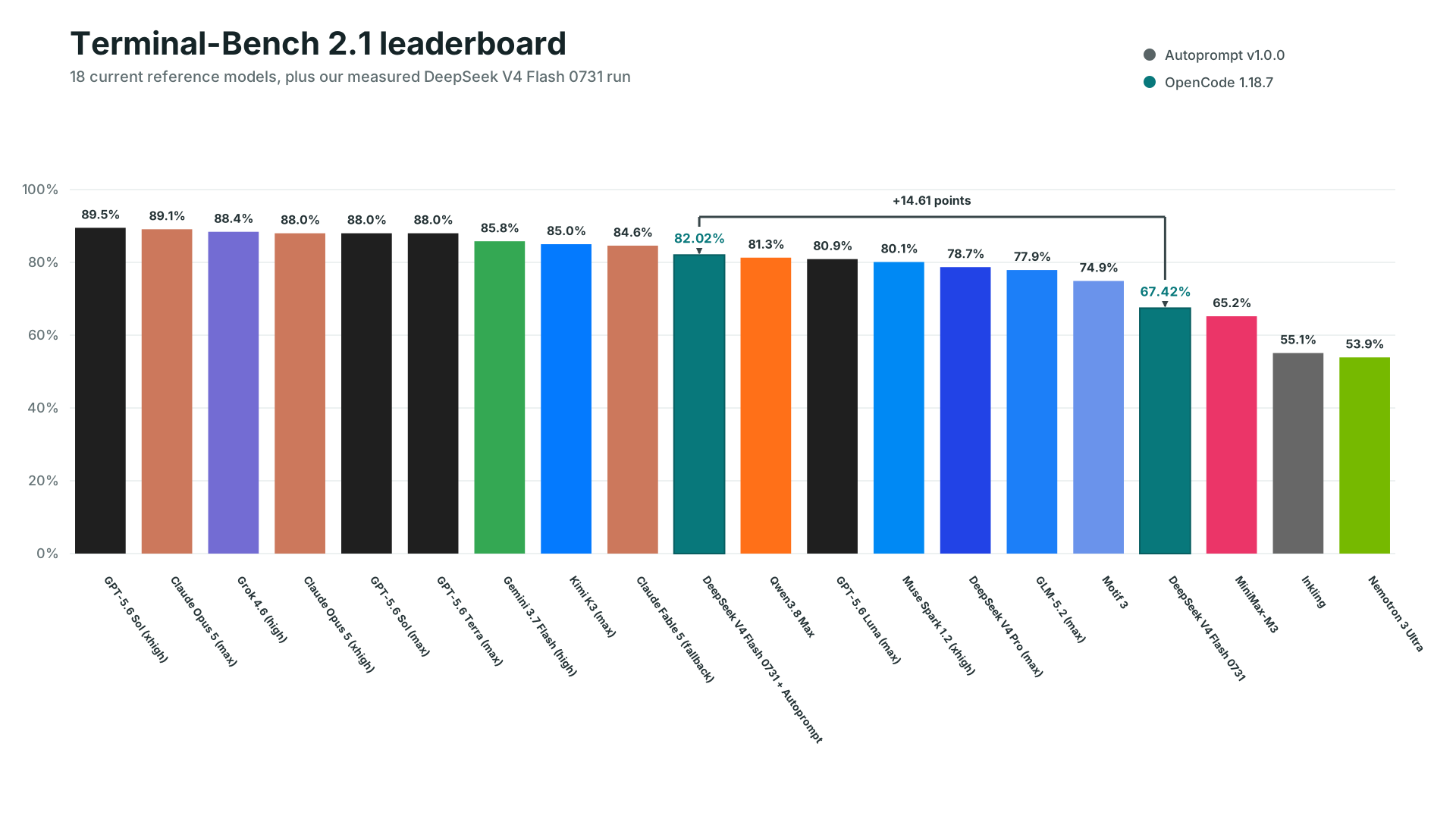
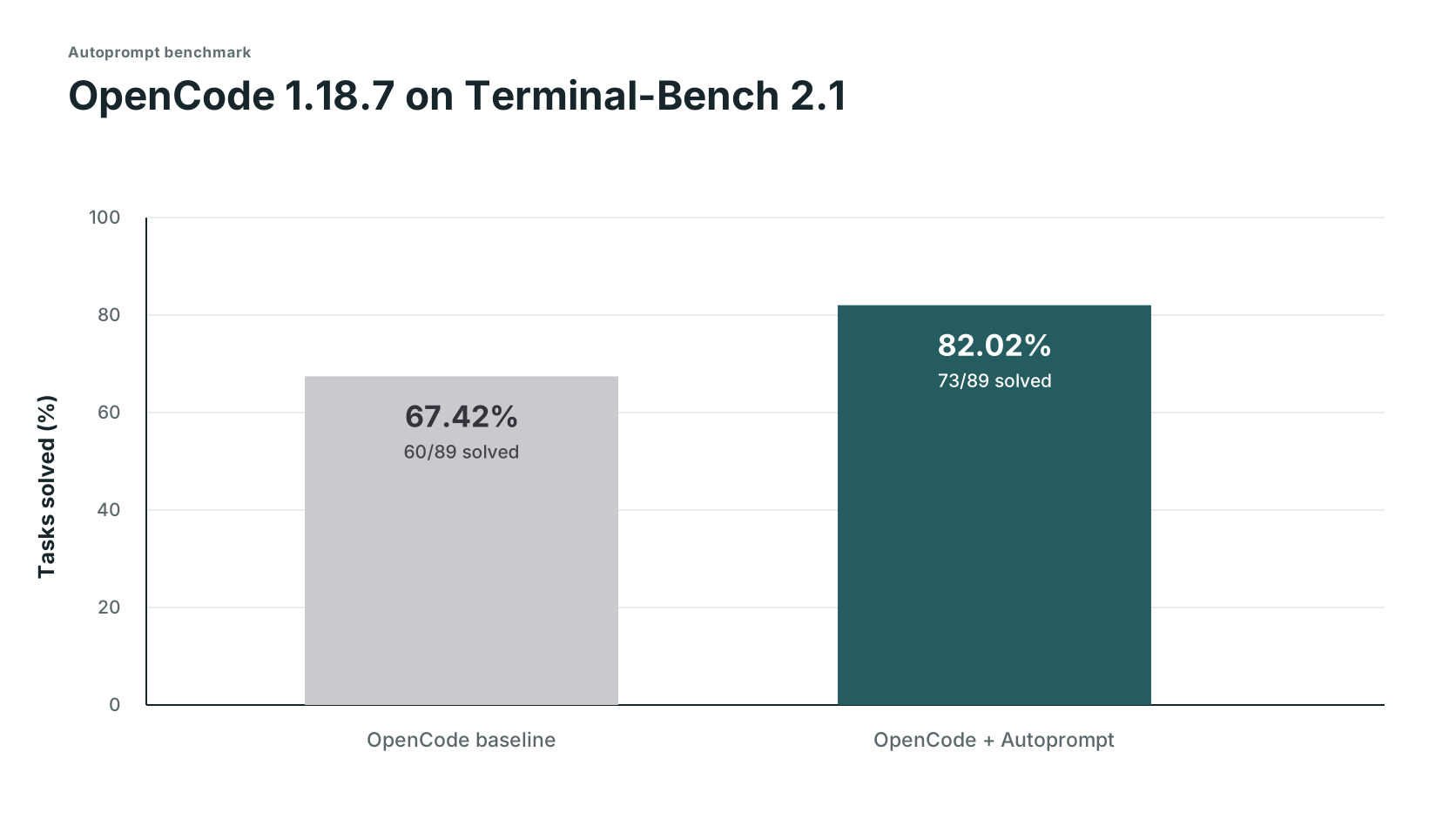
These are version 1 benchmarks. Version 2 benchmarks will follow.
| Track | Solved | Score | Failed |
|---|---|---|---|
| OpenCode | 60/89 | 67.42% | 29 |
| OpenCode + Autoprompt | 73/89 | 82.02% | 16 |
| Change | +13 solves | +14.61 points | 45% fewer |
DeepSeek's 82.7% used its own test setup, so it is a reference point, not a comparable third run. Read the setup and evidence boundaries, or request another benchmark.
Timing and token logs were not retained, so these are planning estimates based on user experience reports, not measured benchmark results. The measured result was 29 to 16 failures (45% fewer) in this run, which translates to about 2x fewer mistakes. Note: for very small tasks, this may differ significantly.
autoprompt activate PROVIDER --target /absolute/project -- "<goal>"
| Part | What it does |
|---|---|
PROVIDER | A key from the support table, such as claude, codex, or grok. |
--target | The project to work on. Omit it to use the current directory. |
-- | Separates launcher options from the request. |
<goal> | The result you want, constraints, and how to check success. |
path= | Optional auto, direct, light, or roadmap, before the quoted goal. See work paths. |
autoprompt activate codex -- path=light "add retries and test the edge cases"
The same controls apply to all eleven providers. Custom model setup
| Control | What it does |
|---|---|
--concurrency tokensaver | Runs at most six subagents at once. |
--concurrency wide | Starts ready, independent work up to the host limit. |
--concurrency custom --max-subs N | Sets your own concurrency limit. |
configure PROVIDER --agents off | Uses the provider's configured model. |
configure PROVIDER --agents MODEL | Selects one model. Add --effort LEVEL where supported. |
configure PROVIDER --agents auto --model-map FILE | Chooses from a measured model registry. A comma-separated model list also requires --model-map. |
Pass concurrency controls after --, before the quoted goal:
autoprompt activate codex -- --concurrency custom --max-subs 4 "add retries and tests"
autoprompt configure claude --agents provider/model --effort low


| Goal | Prompt |
|---|---|
| Fix | autoprompt activate claude -- "fix the registration race and add a regression test" |
| Build | autoprompt activate codex -- --concurrency wide "build the booking flow from API to checkout" |
| Research | autoprompt activate hermes -- "compare job queues against this codebase and recommend one" |
| Limit parallel work | autoprompt activate grok -- --concurrency custom --max-subs 4 "migrate every model" |
Run these commands from your project, or supply --target /absolute/project before --.
No. Give it a clear goal, constraints, and success criteria. Autoprompt handles the execution loop, so you do not have to prompt every step. Details
It can scope, implement, test, review, repair, and verify a goal. It stops for choices that change the result, actions that need your authority, or blockers it cannot safely resolve. Details
The layers separate coordination, management, execution, and independent judgment. That separation keeps one agent from planning, approving, and verifying its own work. Details
path=auto selects a route for the task. direct starts focused work, light adds a short plan, and roadmap organizes dependent work before execution. Every path includes independent verification. Details
--concurrency and --max-subs set parallel work limits. configure --agents selects models, and path= selects how work is planned and coordinated. Details
Because it changes cost, time, and workflow. Start it explicitly with autoprompt activate PROVIDER -- "<goal>".
MIT. Copyright 2026 Spielewoy.
Community: Contributors, Contributing, Code of Conduct, Security, and Support.
johnatag · rollingdice · AincradBot · lunar-me · fatinghenji · c8dhjp4tyv-bit · Alexis-Fiolleau-LaPoste-BGPN
Sign in to join the discussion.
No comments yet. Be the first to say what this is good for.
An agentic skills framework & software development methodology that works.

Turn any codebase, with its docs, SQL schemas, configs, and PDFs, into a queryable knowledge graph. A /graphify skill for Claude Code, Cursor, Codex, and Gemini CLI: local deterministic AST parsing, every edge explained, no vector store.

Topic in, narrated explainer video out. A Claude Code / Codex skill that turns any topic into a black-canvas motion-graphics explainer video with TTS voiceover, subtitles and a chapter progress bar. Chinese or English; every frame drawn in code with Remotion.
Public repository for Agent Skills
Open-source AI job search: scan job portals, evaluate listings into a structured A-H report with a global 1-5 score, tailor your CV, track applications — runs locally in your AI coding CLI (Claude Code, Codex, OpenCode, Antigravity…)

Production-grade engineering skills for AI coding agents.