
obra/
superpowers

obra/superpowersSkills
An agentic skills framework & software development methodology that works.
285k
1 add
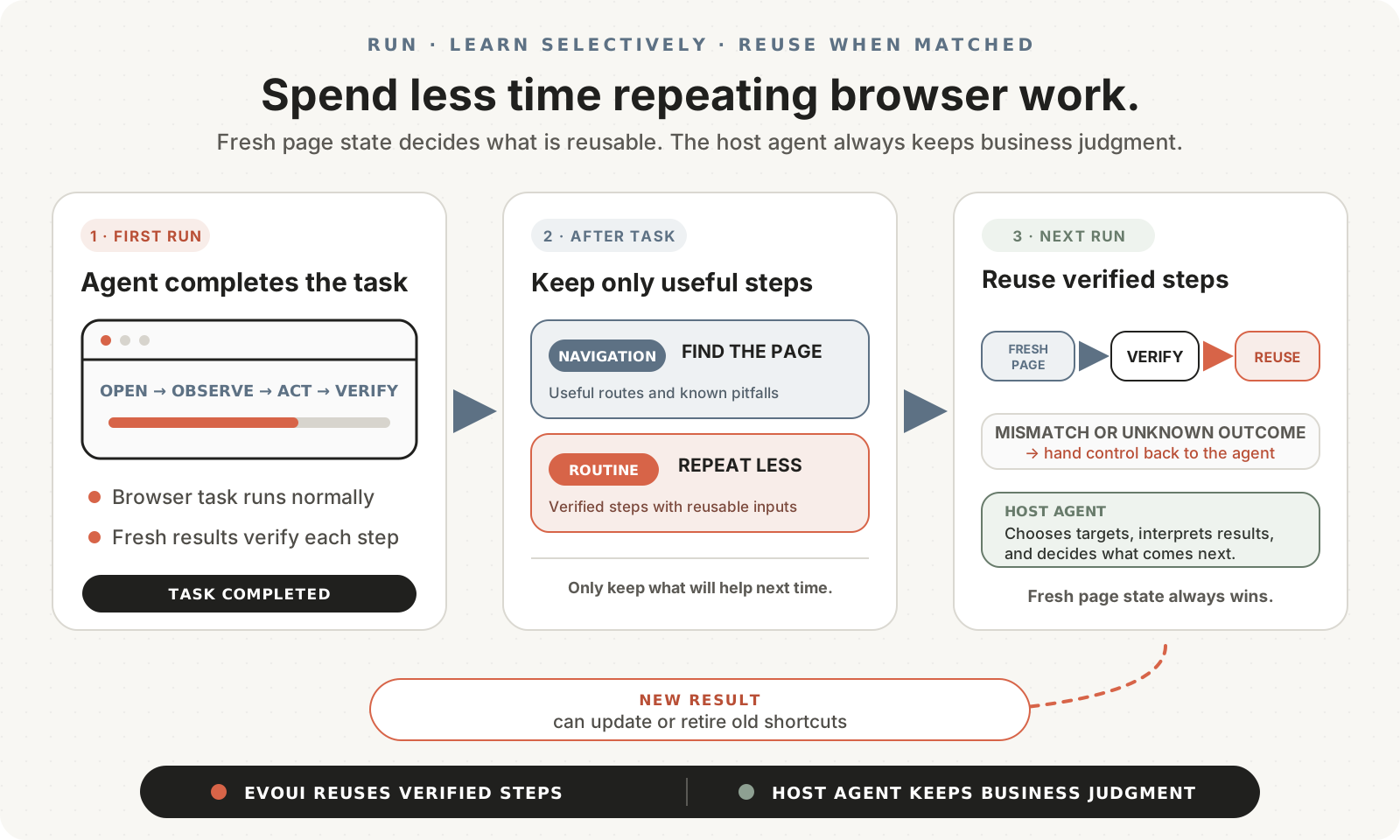
Evoui Browser plugs into agent-browser as a reusable skill for browser tasks. It lets the agent do a task normally the first time, captures evidence, and then replays only the verified mechanical parts when the same site and task match again. The host agent still handles judgment, targets, and next actions.
Builders who run Codex, Claude Code, or Cursor and want repeat browser work to be reused instead of re-explored.
You can reuse verified browser routines on later runs instead of making your agent rediscover the same pages and controls.
Learns navigation and routine actions only when there is enough evidence and a clear future use.
Agent-browser still chooses targets, interprets results, and decides what to do next.
Verifies the current page state before reusing any stored routine.
Returns control to the agent when a page changes, a target is missing, or a postcondition fails.
Pauses for login, CAPTCHA, permission, and confirmation steps in the browser window.
Keeps browser profiles, run evidence, and learned knowledge in `~/.evoui/` by default.
npx skills add Salmonbird/evoui-browser --skill evoui-browser -g
npm install -g agent-browser@0.33.1
agent-browser install
Use $evoui-browser to open <website> and complete <task>.   # Codex
Use /evoui-browser to open <website> and complete <task>.   # Claude Code / Cursor
Install Evoui Browser from https://github.com/Salmonbird/evoui-browser.
Use the README's Quick start, make it available to the supported host I am using,
keep agent-browser pinned to 0.33.1, and tell me when I can start a new session
and invoke the Skill.
Less repeated browser work. The agent keeps the judgment.
English · 简体中文



Evoui Browser is an optional Agent Skill for
agent-browser. Run a browser
task normally once; on later, similar tasks, Evoui can reuse verified navigation
and mechanical steps so the agent spends less time exploring and repeating
work. The host agent still chooses targets, interprets results, and decides what
to do next. The currently supported hosts are Codex, Claude Code, and Cursor.
[!WARNING] Evoui Browser is experimental. Start with non-critical tasks on non-sensitive websites.
▶ Watch the 71-second invoice-review demo
The first run explores the site step by step. On the next run, Evoui reuses the matching navigation and review routine while the agent still decides which invoices need attention. That avoids rediscovering the same invoice page and controls on every run.
Evoui does not promise that every task will be faster. It helps when a site and task contain repeatable work that can be verified. A first run may take the same amount of work—or more—because it also gathers evidence for possible reuse.
Requirements: macOS or Linux, Python 3.10 or newer, and Node.js 24 or newer with
npm. Evoui adds no third-party Python packages. Windows is not currently
supported because Evoui uses POSIX fcntl.
Install the Skill and its pinned browser runtime:
npx skills add Salmonbird/evoui-browser --skill evoui-browser -g
npm install -g agent-browser@0.33.1
agent-browser install
On Linux, use agent-browser install --with-deps if browser libraries are
missing. The skills CLI may ask which detected agents should receive the
Skill; choose the Codex, Claude Code, or Cursor hosts you use, then start a new
agent session. Some compatible agents share the CLI's global Skill directory,
so Evoui may also appear in other detected agents; only the three hosts named
above are supported.
[!NOTE] The third-party
skillsCLI collects anonymous usage telemetry for confirmed public skills. SetDISABLE_TELEMETRY=1before thenpxcommand to opt out.
Then give the agent a concrete website and goal:
Use $evoui-browser to open <website> and complete <task>.   # Codex
Use /evoui-browser to open <website> and complete <task>.   # Claude Code / Cursor
Prefer assisted setup? Send your agent this prompt:
Install Evoui Browser from https://github.com/Salmonbird/evoui-browser.
Use the README's Quick start, make it available to the supported host I am using,
keep agent-browser pinned to 0.33.1, and tell me when I can start a new session
and invoke the Skill.
agent-browser while
Evoui records evidence from the managed calls.
Evoui stores browser profiles, temporary Run evidence, and learned knowledge in
~/.evoui/ by default. Managed evidence may temporarily include command
arguments, non-empty stdin, page text, form input, or site-returned data. Normal
terminal cleanup deletes the content-bearing Run trace after the task and any
selected learning work finish; an interruption or cleanup failure may leave data
on disk.
Cleanup reduces retained data. It is not redaction, encryption, credential
protection, or a privacy boundary. Debug tracing retains additional data without
automatic rotation. See SECURITY.md for the full boundary, and
never attach credentials, cookies, browser profiles, or task traces to a public
issue.
By default, the selected Session and visible browser window remain open after a task for reuse, including their login state. Ask the agent to close the Session when you no longer want it running.
For a CLI-managed installation, update by running the install command again with the supported hosts you use. For example, to update Codex:
npx skills add Salmonbird/evoui-browser --skill evoui-browser -g -a codex
Use -a claude-code or -a cursor instead, or repeat -a for multiple
supported hosts.
Existing clone-and-symlink installations continue to update directly:
git -C ~/src/evoui-browser pull --ff-only
After either update method, start a new agent session.
To remove the global CLI-managed installation from all hosts:
npx skills remove evoui-browser -g
Removing the Skill does not delete ~/.evoui/ or the separately installed
agent-browser runtime. Inspect local state before deleting it.
If installation fails, first check agent-browser --version. Use
agent-browser doctor only to diagnose a browser or daemon startup problem; it
performs active checks and may clean stale daemon state.
Small fixes, docs, tests, reproducible cases, and focused pull requests are
welcome. The two local validation commands and the few changes worth discussing
first are in CONTRIBUTING.md. To inspect or modify Evoui,
clone the repository rather than relying only on the CLI-managed installation.
Evoui Browser is licensed under the Apache License 2.0. Third-party
notices are in NOTICE. Modified documentation derived from
agent-browser retains a separate
upstream license copy.
Sign in to join the discussion.
No comments yet. Be the first to say what this is good for.
An agentic skills framework & software development methodology that works.

Turn any codebase, with its docs, SQL schemas, configs, and PDFs, into a queryable knowledge graph. A /graphify skill for Claude Code, Cursor, Codex, and Gemini CLI: local deterministic AST parsing, every edge explained, no vector store.

Topic in, narrated explainer video out. A Claude Code / Codex skill that turns any topic into a black-canvas motion-graphics explainer video with TTS voiceover, subtitles and a chapter progress bar. Chinese or English; every frame drawn in code with Remotion.
Public repository for Agent Skills
Open-source AI job search: scan job portals, evaluate listings into a structured A-H report with a global 1-5 score, tailor your CV, track applications — runs locally in your AI coding CLI (Claude Code, Codex, OpenCode, Antigravity…)

Production-grade engineering skills for AI coding agents.