






affaan-m/
ECC

affaan-m/ECCHarnesses
The agent harness performance optimization system. Skills, instincts, memory, security, and research-first development for Claude Code, Codex, Opencode, Cursor and beyond.
258k
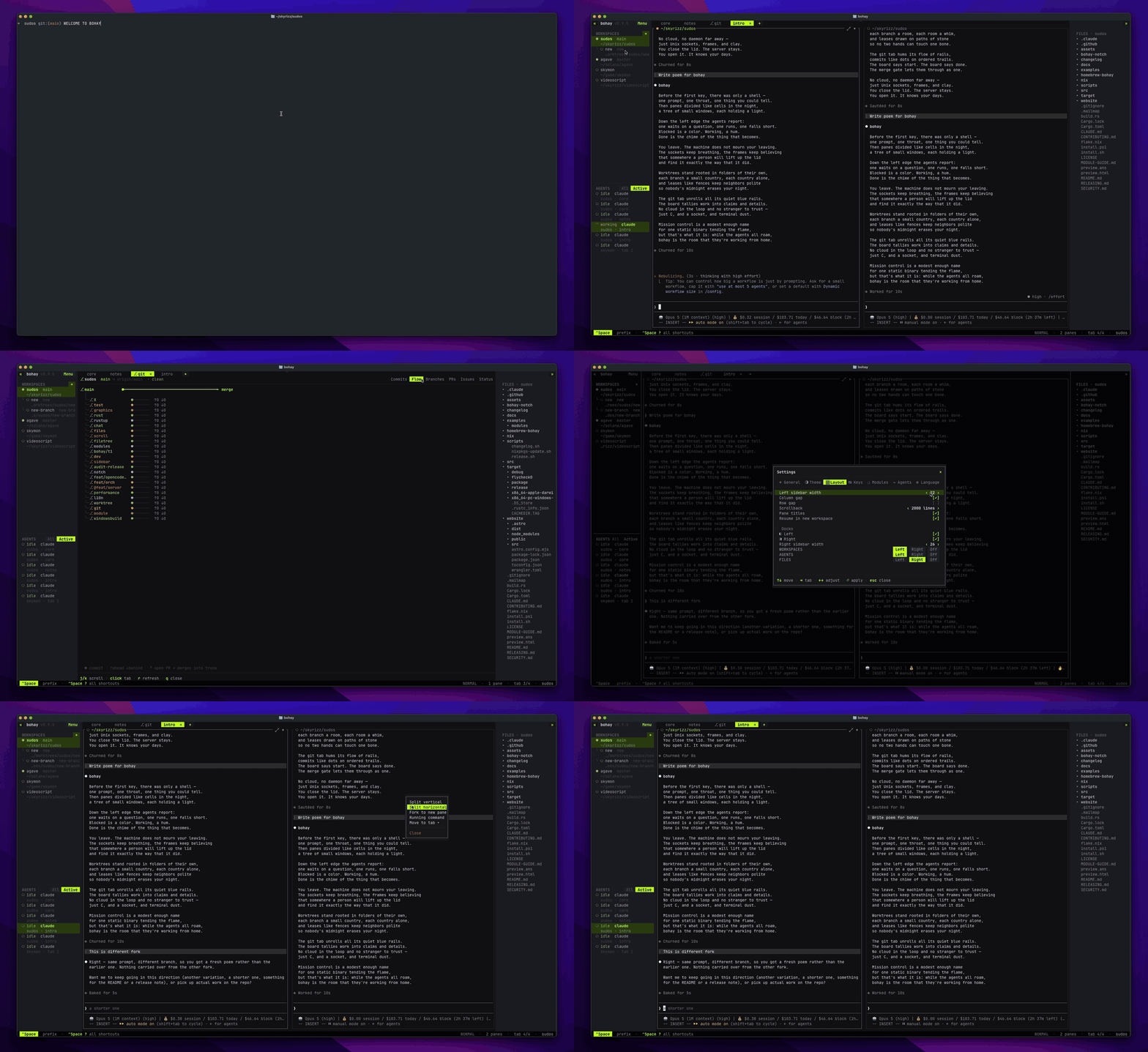
Luvus is a Rust terminal app for running and coordinating AI coding agents across persistent workspaces. It watches agent state, manages panes and tabs, handles worktrees, and exposes a UHP-based module system for extending workflows.
Builders who want their agent sessions, workspaces, and git tasks in one control room.
You can coordinate multiple agent runs, keep their context alive, and manage the surrounding work without leaving the terminal.
Keeps tabs, panes, layouts, terminal state, and named sessions alive across launches.
Starts, names, messages, resumes, waits for, and sends keys to supported agents, with live status and session details.
Shows a Git-aware file tree, diffs, branches, commits, issues, pull requests, and repository activity.
Creates worktrees, reserves file paths, assigns agents, schedules recurring work, and runs quality gates.
Loads modules with actions, events, settings, startup hooks, panes, docks, and UHP 1.0 support.
Supports SSH attachment and multiple clients with independent viewport sizes.
# macOS and Linux
curl -fsSL https://luvus.dev/install.sh | sh

# Homebrew
brew install RizRiyz/luvus/luvus
# Windows PowerShell
irm https://luvus.dev/install.ps1 | iex
luvus          # launch or reattach to your session
luvus doctor   # check your setup: git, gh, ssh
luvus update   # check for and install a newer release
luvus update, and inspect the environment with
luvus doctor.# macOS and Linux
curl -fsSL https://luvus.dev/install.sh | sh
# Homebrew
brew install RizRiyz/luvus/luvus
# Windows PowerShell
irm https://luvus.dev/install.ps1 | iex
luvus          # launch or reattach to your session
luvus doctor   # check your setup: git, gh, ssh
luvus update   # check for and install a newer release
Run Luvus in a project, split a pane, and start an agent. Luvus detects supported agents automatically.
macOS: Disable Select the previous input source under System Settings →
Keyboard → Keyboard Shortcuts → Input Sources to free Ctrl+Space.
| Agent | Live status | Session resume | Precise events (hook) |
|---|---|---|---|
| Claude Code | ✓ | ✓ | ✓ |
| GitHub Copilot CLI | ✓ | ✓ | ✓ |
| Codex | ✓ | ✓ | ✓ |
| Antigravity CLI | ✓ | ✓ | session only |
| opencode | ✓ | ✓ | ✓ |
| OpenCode 2 Preview | ✓ | exact-ID resume | No |
| Kimi | ✓ | ✓ | ✓ |
| Grok | ✓ | ✓ | ✓ |
| Hermes CLI | ✓ | ✓ with integration | session only |
| Pi | ✓ | ✓ | No |
| Oh My Pi (omp) | ✓ | ✓ | ✓ |
| Muse Code | ✓ | ✓ | No |
| Fx | ✓ | ✓ | No |
| Cursor | ✓ | resume command | No |
| Kilo Code | ✓ | exact-ID resume | No |
| Devin | ✓ | exact-ID resume | No |
| Gemini · Aider · Amp · Droid · Qwen · Kiro | ✓ | No | No |
Live status needs no agent integration. See the documentation for setup, keybindings, modules, and the complete CLI and API reference.
Read CONTRIBUTING.md for setup, tests, and pull request requirements. Native agent contributors should also read Adding Agent Support. Report vulnerabilities through SECURITY.md.
Sign in to join the discussion.
No comments yet. Be the first to say what this is good for.
The agent harness performance optimization system. Skills, instincts, memory, security, and research-first development for Claude Code, Codex, Opencode, Cursor and beyond.
from vibe coding to agentic engineering - practice makes claude perfect
🌊 The original agent meta-harness. Deploy intelligent multi-player swarms, coordinate autonomous workflows, and build conversational AI systems. Features adaptive memory, self-learning intelligence, RAG integration, and native Claude Code / Codex / Hermes and many more Integrated
Practical patterns, starters & CLI tools for loop engineering with AI coding agents. Design systems that prompt and orchestrate agents (inspired by Addy Osmani and Boris Cherny). Includes loop-audit, loop-init, loop-cost.

Git. Ship. Done - Core

The most RAM efficient harness