
DietrichGebert/ponytailPlugins
Makes your AI agent think like the laziest senior dev in the room. The best code is the code you never wrote.
138k
1 add
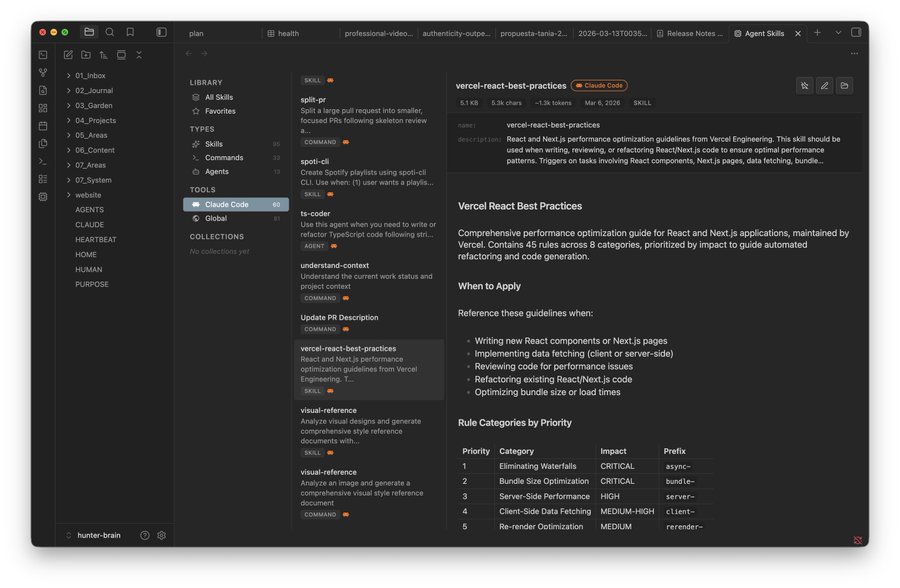
Agentfiles lets you browse, create, and edit agent-related files from Obsidian. It reads supported folders for tools like Claude Code, Cursor, Codex, Windsurf, and others, then gives you one place to search, manage, and install skills and agents.
Builders who want to manage agent skills, commands, and agents from Obsidian.
You can keep agent files organized and editable from one vault instead of jumping between tool-specific folders.
Shows skills, commands, rules, memories, and agents across 17 supported tools in one place.
Searches by file name or file content, with a deep search toggle.
Guides you through choosing a tool, type, and name for a new skill.
Lets you edit markdown with preview and save with Cmd+S.
Pulls skills from skills.sh and installs them into the right tool folder.
Browses session history, lets you search and tag it, and export it to the vault.
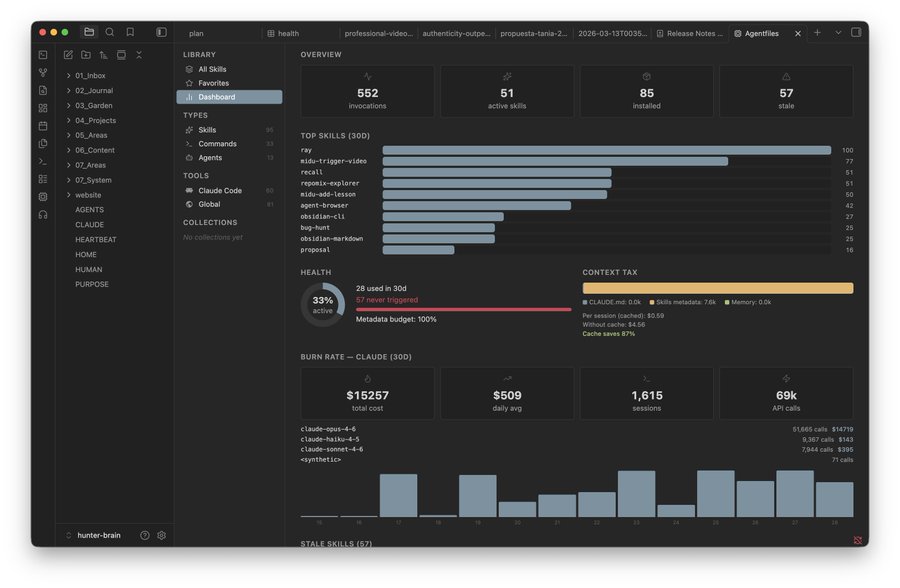
Displays dashboard metrics such as burn rate, context tax, and health using the optional skillkit snapshot.
obsidian://show-plugin?id=agentfiles
bunx @crafter/skillkit@latest scan
AI skills manager for Obsidian. Browse, create, and manage skills across Claude Code, Cursor, Codex, Windsurf, and 17 coding agents.
Open in Obsidian → · View on Obsidian Community · Website · Latest release
Open the deep link in your browser:
obsidian://show-plugin?id=agentfiles
Or open the community page first to see the scorecard and screenshots: community.obsidian.md/plugins/agentfiles.
You can also search Agentfiles in Settings → Community plugins inside Obsidian.
main.js, manifest.json, and styles.css from the latest release<vault>/.obsidian/plugins/agentfiles/bunx @crafter/skillkit@latest scan
npx -y @crafter/skillkit@latest scan also works when Bun is installed and available on PATH. Skillkit uses the Bun runtime, so npx does not remove that requirement.
| Tool | Skills | Commands | Rules / Memories | Agents |
|---|---|---|---|---|
| Claude Code | ~/.claude/skills/ | ~/.claude/commands/ | ~/.claude/agents/ | |
| Cursor | ~/.cursor/skills/ | ~/.cursor/rules/ | ~/.cursor/agents/ | |
| Windsurf | ~/.codeium/windsurf/skills/ | ~/.codeium/windsurf/memories/, ~/.windsurf/rules/ | ||
| Codex | ~/.codex/skills/ | ~/.codex/prompts/ | ~/.codex/memories/ | ~/.codex/agents/ |
| Copilot | ~/.copilot/skills/ | |||
| Amp | $XDG_CONFIG/amp/skills/ | |||
| OpenCode | $XDG_CONFIG/opencode/skills/ | |||
| Cline | detection only | |||
| Roo Code | ~/.roo/skills/ | |||
| Kilo Code | ~/.kilocode/skills/ | |||
| Continue | ~/.continue/skills/ | |||
| OpenHands | ~/.openhands/skills/ | |||
| Goose | $XDG_CONFIG/goose/skills/ | |||
| Pi | ~/.pi/agent/skills/ | |||
| Antigravity | ~/.gemini/antigravity/skills/ | |||
| Global | ~/.agents/skills/ | |||
| Claude Desktop | detection only | |||
| Aider | detection only |
Desktop only (macOS, Windows, Linux) — reads files outside your vault.
An AI skills manager for Obsidian. Browse, create, and manage skills, commands, and agents across 17 coding agents, all from your vault. Full docs: agentfiles.crafter.run/docs.
See What it does above. Full feature list and screenshots: agentfiles.crafter.run/docs.
See Supported tools above: 17 tools including Claude Code, Cursor, Codex, Windsurf, Copilot, Amp, OpenCode, Cline, Roo Code, Kilo Code, Continue, OpenHands, Goose, Pi, Antigravity, Claude Desktop, Aider, and a global ~/.agents/skills/ directory.
See Install above.
Optional local analytics for the Dashboard's usage metrics, burn rate, context tax, and health. Agentfiles imports Skillkit's portable API and reads a versioned snapshot. It never executes the Skillkit CLI.
bunx @crafter/skillkit@latest scan
# npx alternative, with Bun installed:
npx -y @crafter/skillkit@latest scan
Agentfiles is desktop-only because its core purpose requires direct access to skill files outside the current vault.
skills.sh, resolves the selected source through the GitHub API, pins downloads to a commit SHA, rejects path traversal, and limits each install to 200 files and 10 MB.~/.skillkit/agentfiles-snapshot.json through Skillkit's versioned programmatic API. The snapshot remains local.skills.sh and GitHub. Agentfiles sends no analytics or telemetry.The Obsidian scorecard can still identify direct filesystem access as a risk capability. That capability is required for Agentfiles to manage skills across desktop coding agents. It is disclosed here so users can review the exact scope.
Yes, MIT licensed. See LICENSE.
MIT
Sign in to join the discussion.
No comments yet. Be the first to say what this is good for.
Makes your AI agent think like the laziest senior dev in the room. The best code is the code you never wrote.

Graphs that teach > graphs that impress. Turn any code into an interactive knowledge graph you can explore, search, and ask questions about. Works with Claude Code, Codex, Cursor, Copilot, Gemini CLI, and more.

OmO: Just type "mass ulw" keyword with your prompt. Now you are the master of graph engineering.
Persistent Context Across Sessions for Every Agent – Captures everything your agent does during sessions, compresses it with AI, and injects relevant context back into future sessions. Works with Claude Code, OpenClaw, Codex, Gemini, Hermes, Copilot, OpenCode + More
Opinionated Oxlint rules for rejecting low-evidence TypeScript and JavaScript patterns
Teams-first Multi-agent orchestration for Claude Code