

MemPalace/
mempalace

MemPalace/mempalaceTools
The best-benchmarked open-source AI memory system. And it's free.
59k
Paper Claw fetches papers, groups them by configurable categories, and writes summaries in your chosen language. It can run locally or on GitHub Actions, and the `skill/` folder lets an agent apply presets and call the same pipeline through a standard tool interface.
Builders who want their agent to collect papers, classify them, and send a digest instead of re-reading arXiv by hand.
You can turn a custom research feed into a daily email digest with summaries and category labels.
Pulls papers from arXiv and supports category selection from `config/arxiv_categories.json`.
Uses a chosen provider such as DeepSeek, Kimi, OpenAI, Claude, Gemini, or DashScope with fallback handling.
Lets you define categories and keywords in `config/default.json` so papers are grouped for your field.
Renders HTML and Markdown digests and sends them to configured recipients through SMTP.
Provides preset setup, tool schemas, and Python examples in `skill/` for agent workflows.
Generates digests in multiple languages, including Chinese, English, Japanese, Korean, German, French, and Spanish.
# Edit crontab
crontab -e

# Add line for daily 9 AM run
0 9 * * * cd /path/to/paper_claw && python scripts/main.py
$Action = New-ScheduledTaskAction -Execute "python.exe" -Argument "scripts/main.py"
$Trigger = New-ScheduledTaskTrigger -Daily -At "09:00"
Register-ScheduledTask -TaskName "PaperClaw" -Action $Action -Trigger $Trigger
# Command line
python scripts/main.py --language ja  # Japanese

# Or set default in config/default.json
{"language": {"default": "zh"}}Intelligent Multi-Source Paper Digest Generator



Fetch, classify, and summarize papers from multiple sources with AI-powered digests
Paper Claw serves two types of users:
🧑💻 For Human UsersI want to set up daily paper digests for my research field
|
🤖 For AI AgentsI want to integrate Paper Claw into my agent workflow
|
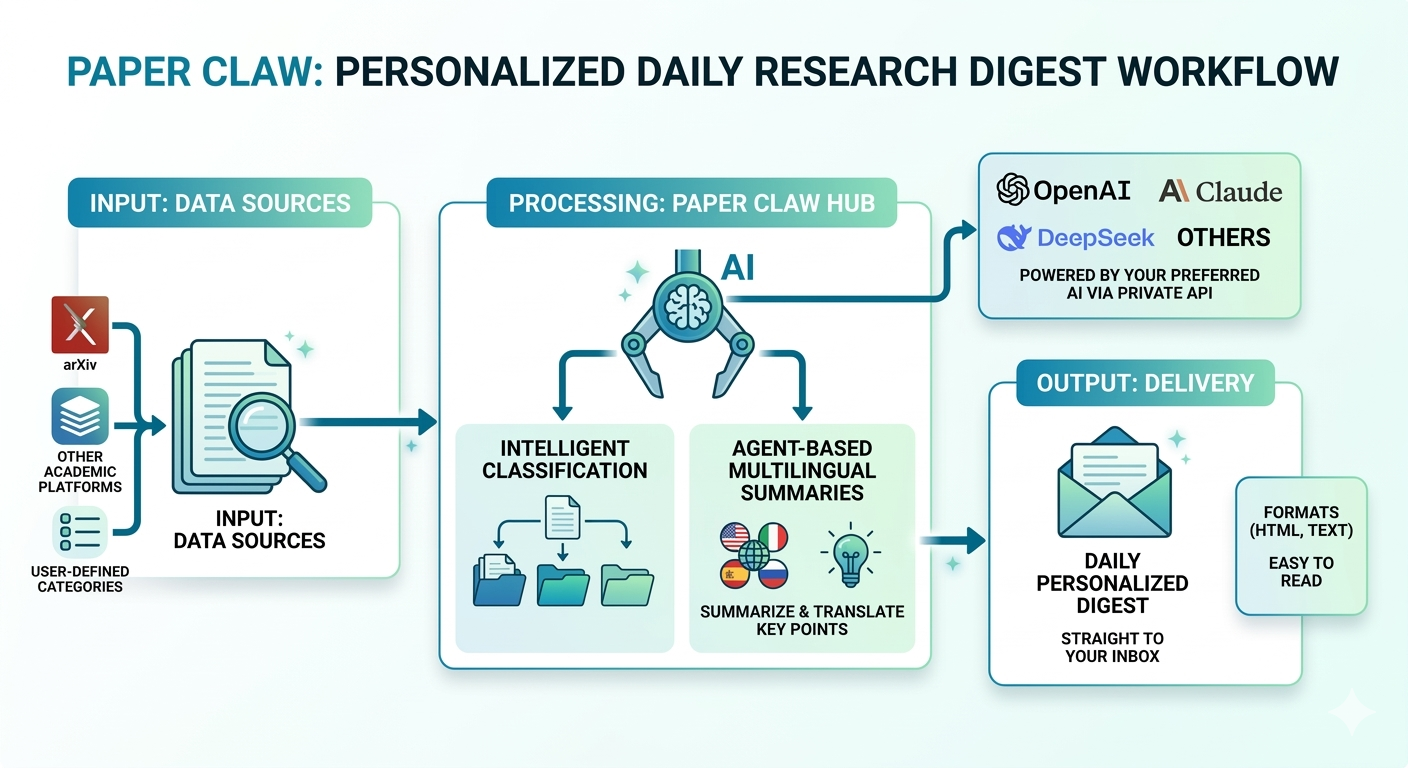
Paper Claw fetches from arXiv, classifies with AI, and delivers personalized digests
Daily Digest in Your Inbox
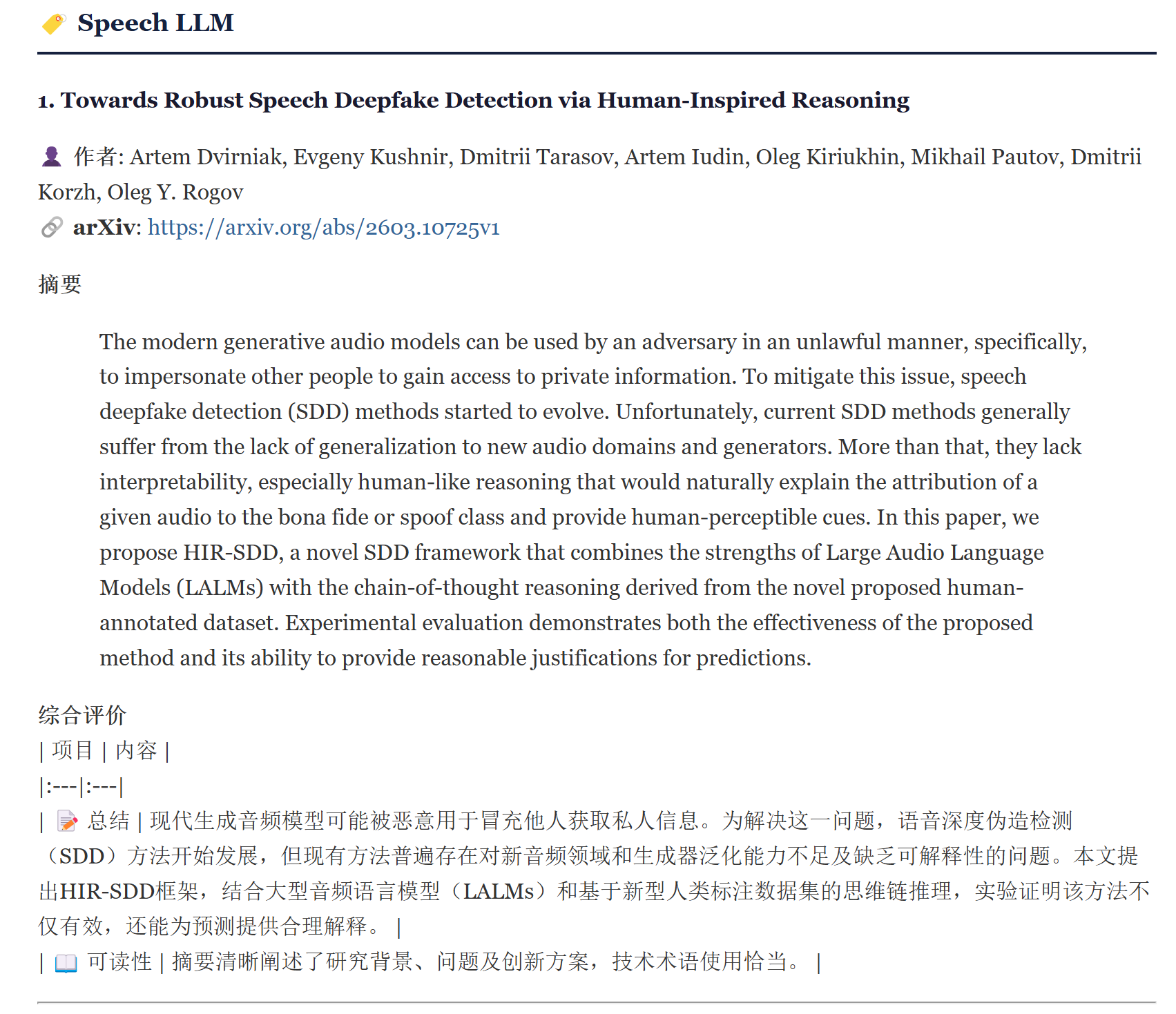
Categorized papers with AI summaries, ready to read
# 1. Clone repository
git clone https://github.com/PigeonDan1/paper_claw.git
cd paper_claw

# 2. Install dependencies
pip install -r requirements.txt

# 3. Configure environment
cp .env.example .env
cp config/recipients.example.json config/recipients.json

# 4. Edit config/default.json to select your research categories
# (See "ArXiv Categories" section below)

# 5. Run
python scripts/main.py --day 2026-03-11
Paper Claw provides 170+ arXiv categories in config/arxiv_categories.json. The default configuration is set for Speech & Audio research, but you can easily customize it for your field.
How to customize:
config/arxiv_categories.json to browse available categoriescs.CL for NLP, cs.CV for Computer Vision)config/default.json → sources.arxiv.categoriesExample configurations:
// For NLP Research
{
  "sources": {
    "arxiv": {
      "enabled": true,
      "categories": [
        {"id": "cs.CL", "name": "Computation and Language", "url": "https://arxiv.org/list/cs.CL/recent"},
        {"id": "cs.LG", "name": "Machine Learning", "url": "https://arxiv.org/list/cs.LG/recent"}
      ]
    }
  }
}

// For Computer Vision
{
  "sources": {
    "arxiv": {
      "enabled": true,
      "categories": [
        {"id": "cs.CV", "name": "Computer Vision", "url": "https://arxiv.org/list/cs.CV/recent"},
        {"id": "cs.MM", "name": "Multimedia", "url": "https://arxiv.org/list/cs.MM/recent"}
      ]
    }
  }
}
Popular combinations:
| Field | Categories |
|---|---|
| Speech & Audio (Default) | cs.SD, eess.AS |
| AI/ML | cs.AI, cs.LG, cs.CL, cs.CV |
| NLP | cs.CL, cs.LG |
| Computer Vision | cs.CV, cs.MM |
| Computational Biology | q-bio.BM, q-bio.GN, q-bio.NC |
Edit .env:
# QQ Mail Example
SMTP_HOST=smtp.qq.com
SMTP_PORT=465
SMTP_USER=your@qq.com
SMTP_PASS=your-auth-code  # Not your password!

# Gmail Example
# SMTP_HOST=smtp.gmail.com
# SMTP_PORT=465
# SMTP_USER=your@gmail.com
# SMTP_PASS=your-app-password
Edit config/recipients.json:
{
  "recipients": [
    {"email": "you@example.com", "name": "Your Name", "enabled": true},
    {"email": "colleague@lab.edu", "name": "Colleague", "enabled": true}
  ]
}
Personalized Greeting: Each recipient will see a personalized greeting in their email:
👋 Your Name, hello! This is PJ's paper assistant bringing you today's academic digest~
The name field is used for this greeting and is displayed in the email header.
Edit .env with at least one API key:
# Option 1: DeepSeek (Recommended for Chinese)
DEEPSEEK_API_KEY=sk-xxx
DEEPSEEK_API_BASE=https://models.sjtu.edu.cn/api/v1  # Optional: custom endpoint

# Option 2: Kimi (Moonshot)
MOONSHOT_API_KEY=sk-xxx

# Option 3: OpenAI
OPENAI_API_KEY=sk-xxx

# Option 4: Claude
ANTHROPIC_API_KEY=sk-xxx

# Option 5: Gemini
GOOGLE_API_KEY=xxx

# Option 6: DashScope (Aliyun)
DASHSCOPE_API_KEY=sk-xxx
Auto-fallback chain: DeepSeek → Kimi → OpenAI → Claude → Gemini → Rule-based
Edit config/default.json to set default:
{
  "llm": {
    "default_provider": "deepseek",
    "providers": {
      "deepseek": {
        "model": "deepseek-v3"
      }
    }
  }
}
Define how papers are categorized in your digest. The default is set for Speech & Audio research:
{
  "classification": {
    "categories": [
      {
        "name": "ASR",
        "labels": {"zh": "语音识别", "en": "Speech Recognition"},
        "keywords": ["asr", "speech recognition", "automatic speech"]
      },
      {
        "name": "TTS",
        "labels": {"zh": "语音合成", "en": "Speech Synthesis"},
        "keywords": ["tts", "text-to-speech", "speech synthesis"]
      }
    ]
  }
}
Structure explained:
name: Category ID (used internally)labels: Display names in different languages (zh, en, ja, ko, etc.)keywords: Keywords for automatic classification (case-insensitive matching)Example for NLP research:
{
  "classification": {
    "categories": [
      {
        "name": "LLM",
        "labels": {"zh": "大语言模型", "en": "Large Language Models"},
        "keywords": ["llm", "large language model", "gpt", "transformer"]
      },
      {
        "name": "RAG",
        "labels": {"zh": "检索增强", "en": "Retrieval-Augmented Generation"},
        "keywords": ["rag", "retrieval", "knowledge base", "embedding"]
      }
    ]
  }
}
# Today's papers (default language from config)
python scripts/main.py

# Specific date with language
python scripts/main.py --day 2026-03-11 --language zh

# Date range
python scripts/main.py --start-date 2026-03-01 --end-date 2026-03-11

# Generate digest without sending email
python scripts/main.py --day 2026-03-11 --no-email

# Preview recipients before sending
python scripts/main.py --day 2026-03-11 --preview
GitHub Actions (Recommended):
SMTP_HOST, SMTP_USER, SMTP_PASS, DEEPSEEK_API_KEY, etc.Local Cron (Linux/Mac):
# Edit crontab
crontab -e

# Add line for daily 9 AM run
0 9 * * * cd /path/to/paper_claw && python scripts/main.py
Windows Task Scheduler:
$Action = New-ScheduledTaskAction -Execute "python.exe" -Argument "scripts/main.py"
$Trigger = New-ScheduledTaskTrigger -Daily -At "09:00"
Register-ScheduledTask -TaskName "PaperClaw" -Action $Action -Trigger $Trigger
Paper Claw provides a standardized Skill interface for AI agents (OpenClaw, Kimi, etc.)
No manual configuration needed! Agents can instantly configure Paper Claw for any research field:
from skill.example import list_presets, apply_preset

# Step 1: Browse available presets
presets = list_presets()
# → [{"id": "nlp", "name": "NLP & LLM"},
#    {"id": "computer_vision", "name": "Computer Vision"}, ...]

# Step 2: Apply with one line
apply_preset("nlp")  # Automatically configures arXiv + classification
Available Presets:
| Preset | Research Field | ArXiv Categories | Paper Categories |
|---|---|---|---|
🎙️ speech_audio | Speech & Audio | cs.SD, eess.AS | Speech LLM, ASR, TTS... |
📝 nlp | NLP & LLM | cs.CL, cs.LG, cs.AI | LLM, RAG, Agents... |
👁️ computer_vision | Computer Vision | cs.CV, cs.MM | Image Gen, Detection... |
🧠 general_ai | General AI/ML | cs.AI, cs.LG... | Deep Learning, RL... |
Demo: Email Digest Preview
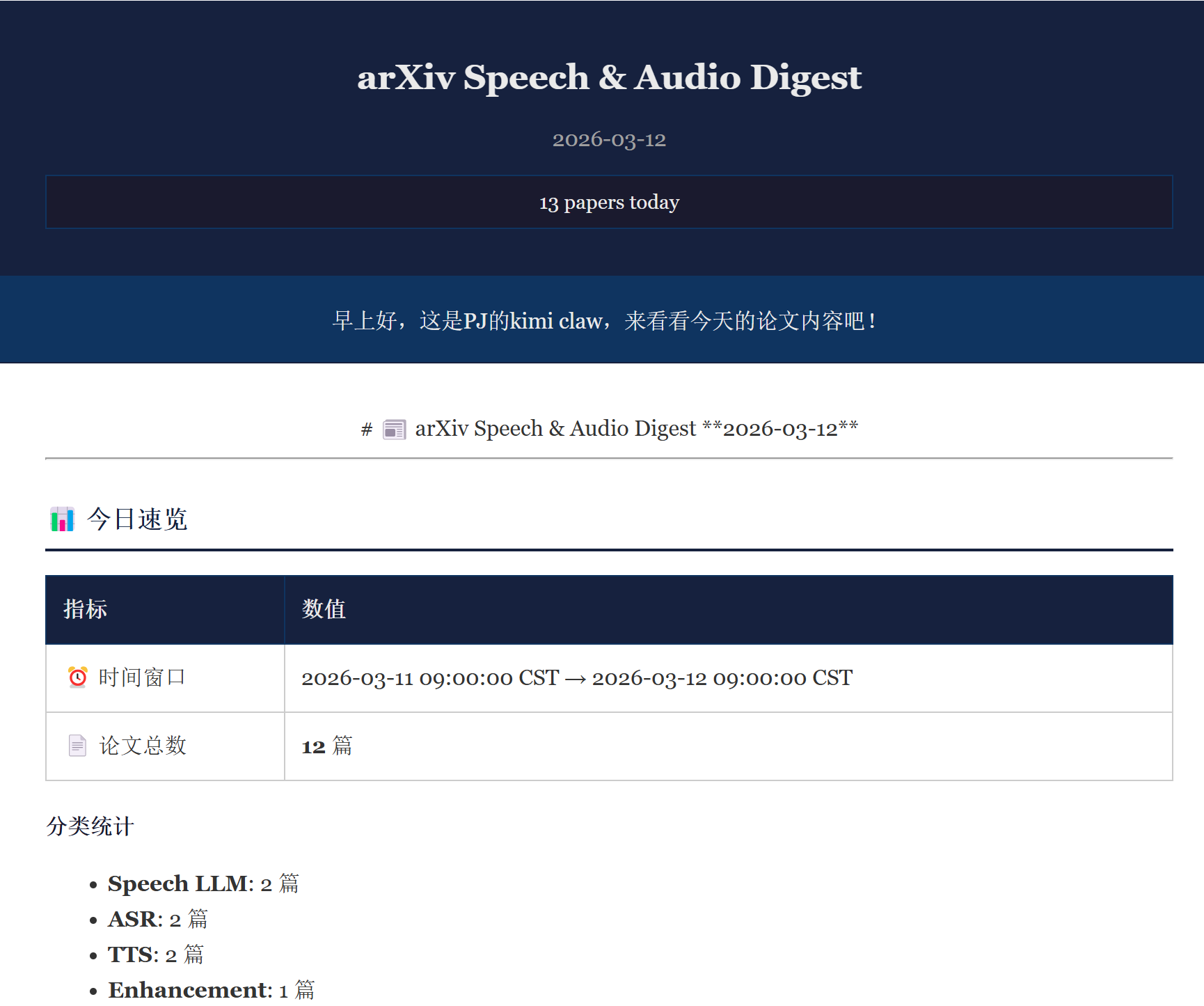
AI-generated summaries with Chinese translation, organized by category
from skill.example import fetch_papers, get_digest_content

# Fetch and summarize papers
result = fetch_papers(day="2026-03-11", language="zh")
content = get_digest_content("2026-03-11", format="summary")
| Tool | Purpose | Parameters |
|---|---|---|
list_presets | List available presets | - |
apply_preset | Apply preset configuration | preset_id |
preview_preset | Preview preset without applying | preset_id |
fetch_papers | Fetch from configured sources | day, language |
configure_sources | Update arXiv categories | sources |
configure_categories | Update classification | categories |
configure_recipients | Update email list | recipients |
configure_language | Set output language | language |
get_digest_content | Retrieve generated digest | date, format |
send_digest | Send email digest | date |
{
  "skill": "paper_claw",
  "version": "2.0.0",
  "config": {
    "preset": "nlp",
    "language": "zh",
    "llm": "deepseek"
  }
}
📖 skill/SKILL.md — Full integration guide
🔧 skill/tools.json — Tool schema definitions
💡 skill/example.py — Python usage examples
📋 skill/_meta.json — Agent metadata
We provide 170+ arXiv subject categories in config/arxiv_categories.json.
| Code | Name | Description |
|---|---|---|
| cs | Computer Science | AI, ML, NLP, CV, etc. |
| eess | Electrical Engineering | Signal Processing, Audio |
| physics | Physics | Optics, etc. |
| q-bio | Quantitative Biology | Genomics, etc. |
| q-fin | Quantitative Finance | Risk, Portfolio |
| stat | Statistics | ML, Methodology |
| math | Mathematics | Theory |
config/arxiv_categories.jsoncs.CL)config/default.json:{
"sources": {
"arxiv": {
"categories": [
{"id": "cs.CL", "name": "Computation and Language", "url": "https://arxiv.org/list/cs.CL/recent"}
]
}
}
}
Supported: 🇨🇳 中文 · 🇺🇸 English · 🇯🇵 日本語 · 🇰🇷 한국어 · 🇩🇪 Deutsch · 🇫🇷 Français · 🇪🇸 Español
# Command line
python scripts/main.py --language ja  # Japanese

# Or set default in config/default.json
{"language": {"default": "zh"}}
paper_claw/
├── config/
│   ├── default.json              # Main configuration
│   ├── arxiv_categories.json     # 170+ available categories
│   └── recipients.json           # Email recipients (git-ignored)
├── skill/                        # 🤖 Agent Skill interface
│   ├── SKILL.md                  # Agent integration guide
│   ├── tools.json                # Tool schema
│   └── example.py                # Usage examples
├── scripts/
│   ├── main.py                   # Entry point
│   ├── llm_client.py             # Multi-LLM client
│   └── process_papers.py         # Classification & summarization
├── templates/
│   └── email_template.html.j2    # Email HTML template
└── content/posts/                # Generated digests
New Features:
--no-email flag: Generate digest locally without sending emails--preview flag: Preview recipient list before sendingBug Fixes:
MIT License © 2026 Paper Claw Contributors
⭐ Star this repo if you find it helpful!
Sign in to join the discussion.
No comments yet. Be the first to say what this is good for.
The best-benchmarked open-source AI memory system. And it's free.

Never stop coding. Free MIT AI gateway: one endpoint, 352 providers (150+ free), 1200+ models Kimi, Claude, GPT, Gemini, GLM, DeepSeek, MiniMax. Works with Claude Code, Codex, Cursor, OpenCode, Cline & Copilot. Quota-aware auto-fallback, RTK+Caveman compression saves 15-95% tokens, MCP/A2A, Desktop/PWA. Built by 550+ contributors

Compress tool outputs, logs, files, and RAG chunks before they reach the LLM. 20% fewer tokens for coding agents, 60-95% fewer tokens for JSON, same answers. Library, proxy, MCP server.

Turn any technical book PDF into a Claude Code skill — ready to study, reference, and use while you work.

AAS Core is the local, agent-first control plane for complete catalog discovery, agent-owned selection, stack validation, and planning, backed by 2,115+ agentic skills. Includes CLI, local MCP, catalog, plugins, and Workbench.

OfficeCLI is the first and best Office suite purpose-built for AI agents to read, edit, and automate Word, Excel, and PowerPoint files. Free, open-source, single binary, no Office installation required.