Sandbox

MCP host desktop app for LLM tools

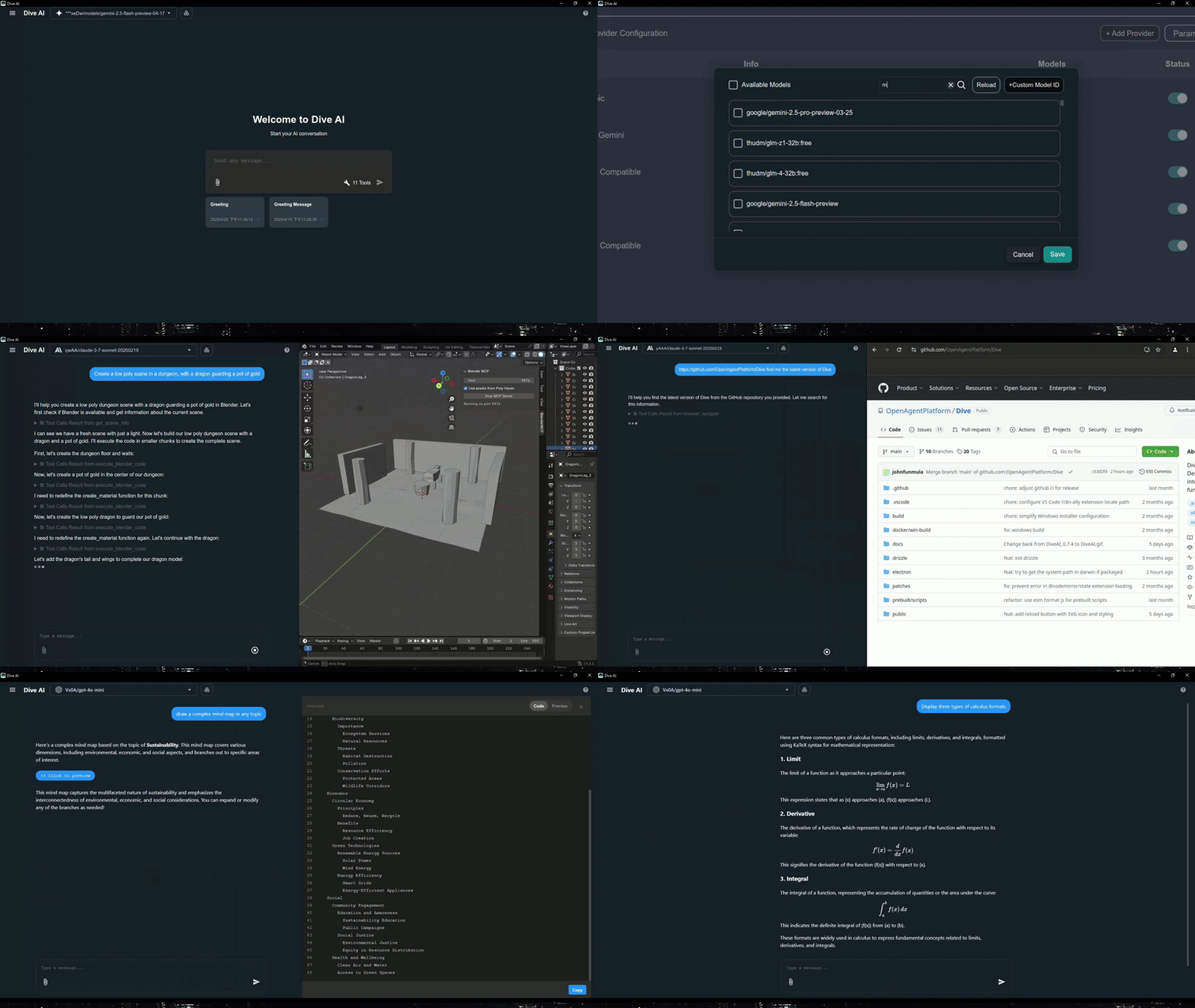
Dive is a desktop host for LLMs that can talk to MCP servers and built-in local tools. It wraps the connection, chat, and tool controls in a cross-platform app so you can use model tools from one place.

1,826 starsโ€ข174 forksโ€ขTypeScriptโ€ขUpdated 1mo ago
Who it's for

Builders who want one desktop app for chatting with LLMs and connecting them to MCP servers and local tools.

What it delivers

You can connect your agent chat to tools and servers from a single desktop app instead of stitching the workflow together yourself.

What it does

Universal LLM support

Works with ChatGPT, Anthropic, Ollama, and OpenAI-compatible models.

MCP server support

Connects to MCP servers over stdio and SSE.

Managed MCP access

Can connect to OAP cloud-hosted MCP servers with one-click setup.

Built-in local tools

Includes Fetch, File Manager, and Bash tools out of the box.

Tool control

Lets you enable or disable individual MCP tools.

Custom instructions

Supports personalized system prompts for the chat experience.

Cross-platform desktop app

Ships for Windows, macOS, and Linux with Tauri and Electron builds.

README

Dive

Dive AI Agent

GitHub stars GitHub forks GitHub watchers GitHub repo size GitHub language count GitHub top language GitHub last commit Discord Twitter Follow

Dive is an open-source MCP Host Desktop Application that seamlessly integrates with any LLMs supporting function calling capabilities. โœจ

Dive Demo

Features ๐ŸŽฏ

  • ๐ŸŒ Universal LLM Support: Compatible with ChatGPT, Anthropic, Ollama and OpenAI-compatible models
  • ๐Ÿ’ป Cross-Platform: Available for Windows, MacOS, and Linux
  • ๐Ÿ”„ Model Context Protocol: Enabling seamless MCP AI agent integration on both stdio and SSE mode
  • โ˜๏ธ OAP Cloud Integration: One-click access to managed MCP servers via OAPHub.ai - eliminates complex local deployments
  • ๐Ÿ—๏ธ Dual Architecture: Modern Tauri version alongside traditional Electron version for optimal performance
  • ๐ŸŒ Multi-Language Support: Supports 24+ languages including English, Traditional Chinese, Simplified Chinese, Spanish, Japanese, Korean, German, French, Italian, Portuguese, Russian, Thai, Vietnamese, Filipino, Indonesian, Polish, Turkish, Ukrainian, Swedish, Norwegian, Finnish, and Lao
  • โš™๏ธ Advanced API Management: Multiple API keys and model switching support with model_settings.json
  • ๐Ÿ› ๏ธ Granular Tool Control: Enable/disable individual MCP tools for precise customization
  • ๐Ÿ’ก Custom Instructions: Personalized system prompts for tailored AI behavior
  • โŒจ๏ธ Keyboard Shortcuts: Comprehensive hotkey support for efficient navigation and operations (rename, settings, reload, new chat, etc.)
  • ๐Ÿ“ Chat Draft Saving: Automatically saves chat input drafts to prevent data loss
  • ๐Ÿ”„ Auto-Update Mechanism: Automatically checks for and installs the latest application updates
  • ๐Ÿ” MCP Server Authentication: Added support for MCP server authentication

    โš ๏ธ Note: This feature is currently unstable and may require frequent re-authorization

  • ๐Ÿ› ๏ธ Built-in Local Tools: Pre-configured tools available out of the box - Fetch (web requests), File Manager (read/write files), and Bash (command execution)
  • ๐Ÿค– MCP Server Installer Agent: Intelligent agent that helps you install and configure MCP servers automatically
  • ๐Ÿ”” Multiple Elicitation Support: Handle multiple MCP elicitation requests simultaneously in the UI
  • ๐Ÿ“ @ File Path Search: Extended @ keyword in chat input to search file paths

Recent updates(2026/02/26) - v0.14.0+ ๐ŸŽ‰

  • ๐Ÿ› ๏ธ Skills & Slash Commands: Support skills and more slash commands
  • ๐Ÿ” Chat History Search: Support chat history search

Platform Availability

PlatformElectronTauri
Windowsโœ…โœ…
macOSโœ…๐Ÿ”œ
Linuxโœ…โœ…

Migration Note: Existing local MCP/LLM configurations remain fully supported. OAP integration is additive and does not affect current workflows.

Download and Install โฌ‡๏ธ

Get the latest version of Dive: Download

Windows users: ๐ŸชŸ

Choose between two architectures:

  • Tauri Version (Recommended): Smaller installer (<30MB), modern architecture
  • Electron Version: Traditional architecture, fully stable
  • Python and Node.js environments will be downloaded automatically after launching

MacOS users: ๐ŸŽ

  • Electron Version: Download the .dmg version
  • You need to install Python and Node.js (with npx uvx) environments yourself
  • Follow the installation prompts to complete setup

Linux users: ๐Ÿง

Choose between two architectures:

  • Tauri Version: Modern architecture with smaller installer size
  • Electron Version (Recommended): Traditional architecture with .AppImage format
  • You need to install Python and Node.js (with npx uvx) environments yourself
  • For Ubuntu/Debian users:
    • You may need to add --no-sandbox parameter
    • Or modify system settings to allow sandbox
    • Run chmod +x to make the AppImage executable
  • For Arch users:
    • If you are using Arch Linux, you can install dive using an AUR helper. For example: paru -S dive-ai

MCP Setup Options

For more detailed instructions, please see MCP Servers Setup.

The easiest way to get started! Access enterprise-grade MCP tools instantly:

  1. Sign up at OAPHub.ai
  2. Connect to Dive using one-click deep links or configuration files
  3. Enjoy managed MCP servers with zero setup - no Python, Docker, or complex dependencies required

Benefits:

  • โœ… Zero configuration needed
  • โœ… Cross-platform compatibility
  • โœ… Enterprise-grade reliability
  • โœ… Automatic updates and maintenance

Build ๐Ÿ› ๏ธ

See BUILD.md for more details.

Contributing ๐Ÿค

We welcome contributions from the community! Here's how you can help:

Development Setup

  1. Fork the repository
  2. Clone your fork: git clone https://github.com/YOUR_USERNAME/Dive.git
  3. Install dependencies: npm install
  4. Start development: npm run dev (Electron) or cargo tauri dev (Tauri)
  5. Make your changes and test thoroughly
  6. Submit a pull request

License ๐Ÿ“„

Dive is open-source software licensed under the MIT License.

Connect With Us ๐ŸŒ

Files in the repo

Repository payloadโ€ข39 top-level entries
  • .github
  • .vscode
  • build
  • docker
  • docs
  • electron
  • packages
  • patches
  • prebuilt
  • public
  • resources
  • scripts
  • shared
  • src
  • src-tauri
  • types
  • .dockerignore
  • .env.example
  • .gitignore
  • .gitmodules
  • BUILD.md
  • Cargo.lock
  • Cargo.toml
  • electron-builder.json
  • eslint.config.js
  • index.html
  • LICENSE
  • MCP_SETUP.md
  • mcp-host
  • package-lock.json
  • package.json
  • README.md
  • SECURITY.md
  • tsconfig.app.json
  • tsconfig.json
  • tsconfig.node.json
  • vite.config.electron.ts
  • vite.config.ts
  • vitest.config.ts

Discussion (0)

Ask about usage, or say what you built with it

Sign in to join the discussion.

No comments yet. Be the first to say what this is good for.

More tools

JuliusBrussee/
caveman

๐Ÿชจ why use many token when few token do trick โ€” Claude Code skill that cuts 65% of tokens by talking like caveman

105k
1 add
MemPalace/
mempalace

The best-benchmarked open-source AI memory system. And it's free.

59k
stablyai/
orca

Orca is the ADE for working with a fleet of parallel agents. Run any coding agent with your own subscription. Available on desktop, mobile and remote runtime.

66k

A cross-platform desktop All-in-One assistant for Claude Code, Codex, OpenCode, OpenClaw, Grok Build & Hermes Agent. Only official website: ccswitch.io

132k

Never stop coding. Free MIT AI gateway: one endpoint, 352 providers (150+ free), 1200+ models Kimi, Claude, GPT, Gemini, GLM, DeepSeek, MiniMax. Works with Claude Code, Codex, Cursor, OpenCode, Cline & Copilot. Quota-aware auto-fallback, RTK+Caveman compression saves 15-95% tokens, MCP/A2A, Desktop/PWA. Built by 550+ contributors

64k
headroomlabs-ai/
headroom

Compress tool outputs, logs, files, and RAG chunks before they reach the LLM. 20% fewer tokens for coding agents, 60-95% fewer tokens for JSON, same answers. Library, proxy, MCP server.

71k