








JuliusBrussee/
caveman

🪨 why use many token when few token do trick — Claude Code skill that cuts 65% of tokens by talking like caveman
105k
1 add
TokenClock is a native desktop clock that combines time with AI tool usage, session and model details, weather, and quota status. It reads local logs and account data from supported tools, then groups the results by session, model, or percent so you can inspect usage from the desktop.
Builders who use Claude Code, Codex, Cursor, Gemini CLI, or other local AI tools and want a live usage view.
You can check token spend, tool quotas, and session breakdowns without leaving your desktop.
Groups usage by session or model, with expandable rows and percent sorting.
Finds local usage data for 15+ AI coding tools and lets you fix paths in Settings.
Converts token usage into API-equivalent USD using public rates and manual proxy pricing.
Shows limits and reset times for Codex, Claude Code, Antigravity, Cursor, and Zhipu GLM when available.
Uses SwiftUI/AppKit on macOS, Win32 on Windows, and GTK3 on Linux.
Can expose read-only JSON on `127.0.0.1` for scripts and dashboards.
Offers multiple faces, sizes, transparency, city, timezone, language, and custom themes.
curl -fsSL https://raw.githubusercontent.com/Neo-Isshin/TokenClock/main/cli/install.sh | bash
tokenclock doctor
tokenclock restart
tokenclock update
tokenclock uninstall
& ([scriptblock]::Create((irm https://raw.githubusercontent.com/Neo-Isshin/TokenClock/windows-port/cli/install.ps1)))
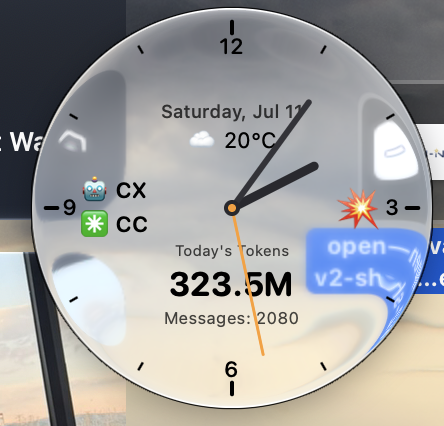 Liquid Glass · macOS 26+ | 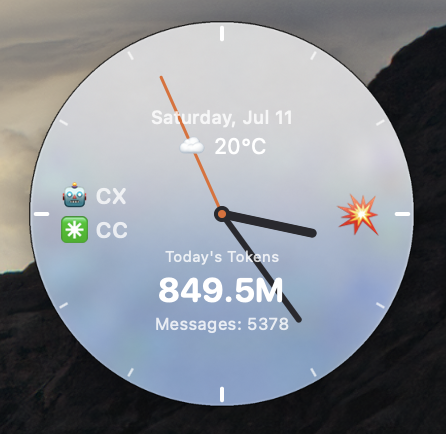 Normal · macOS, Windows, Linux |
TokenClock is a small, always-on-top clock for your desktop. It combines the time with today's token usage, message count, active AI tools, weather, and usage pace—without making you open several dashboards.
Click the clock for session and model details. Right-click it to change the face, size, city, timezone, language, transparency, and other preferences.
| Platform | Edition | Notes |
|---|---|---|
| macOS 26+ | Liquid Glass + Normal | Universal Apple Silicon/Intel build; supports macOS 27 Beta 5 |
| macOS 12–25 | Normal | Classic opaque desktop widget |
| Windows 11 x86_64 | Normal | Per-user install; no administrator rights required |
| Linux x86_64 | Normal | Prebuilt GTK3 AppImage; glibc 2.35+ |
Paste this into Terminal:
curl -fsSL https://raw.githubusercontent.com/Neo-Isshin/TokenClock/main/cli/install.sh | bash
The installer chooses the right edition, verifies downloaded builds, starts TokenClock, and installs the small tokenclock helper command.
Useful commands after installation:
tokenclock doctor
tokenclock restart
tokenclock update
tokenclock uninstall
On Linux, the installer automatically uses extraction mode when FUSE 2 is unavailable; no sudo dependency install is required.
Paste this into PowerShell:
& ([scriptblock]::Create((irm https://raw.githubusercontent.com/Neo-Isshin/TokenClock/windows-port/cli/install.ps1)))
TokenClock installs for the current user under %LOCALAPPDATA%\Programs\TokenClock. It verifies the release checksum and does not enable autostart or create shortcuts unless you ask it to.
Windows may show a reputation warning for an unsigned first release. Check that the publisher source is this repository before continuing.
# Install without starting, and add a Start Menu shortcut
& ([scriptblock]::Create((irm https://raw.githubusercontent.com/Neo-Isshin/TokenClock/windows-port/cli/install.ps1))) -NoStart -StartMenuShortcut

# Check the current installation
& ([scriptblock]::Create((irm https://raw.githubusercontent.com/Neo-Isshin/TokenClock/windows-port/cli/install.ps1))) -Action Check

# Uninstall while keeping your settings
& ([scriptblock]::Create((irm https://raw.githubusercontent.com/Neo-Isshin/TokenClock/windows-port/cli/install.ps1))) -Action Uninstall
Settings includes automatic detection, tool switches, custom data paths, rate thresholds, the local API, and custom clock faces. Available rows may differ slightly by platform.
| OpenClaw | Claude Code | Gemini CLI |
| Codex | Hermes | OpenCode |
| Qwen Code | GitHub Copilot CLI | Grok CLI |
| Aider | Antigravity | Cline |
| Continue | Cursor Agent | ZCode |
Most tools need no setup. If a tool stores data somewhere unusual, open Settings → Data Source Paths and choose its folder or file.
Windows also offers optional Kiro session-contract detection and experimental CodeBuddy current-session statistics.
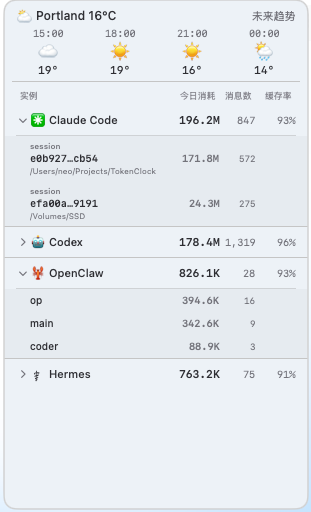 Usage details | 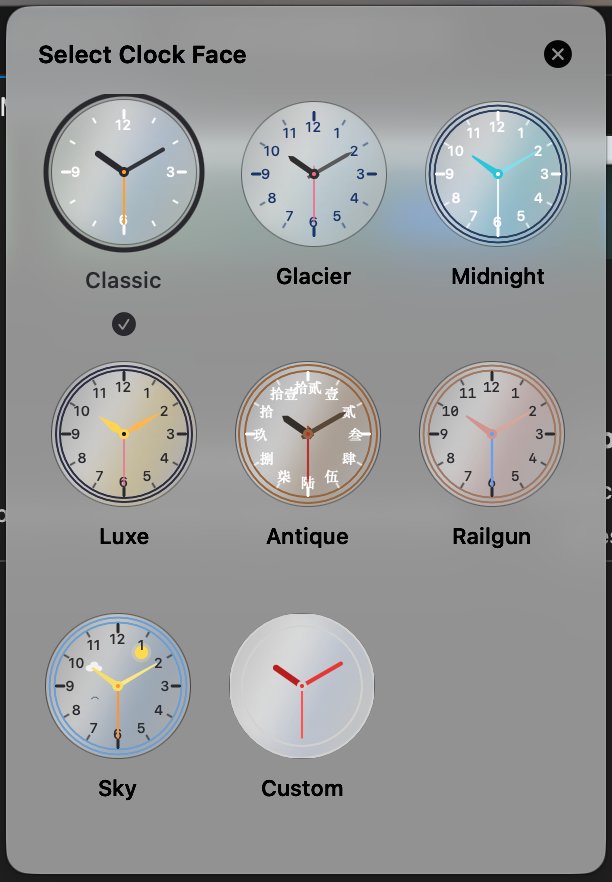 Clock face picker | 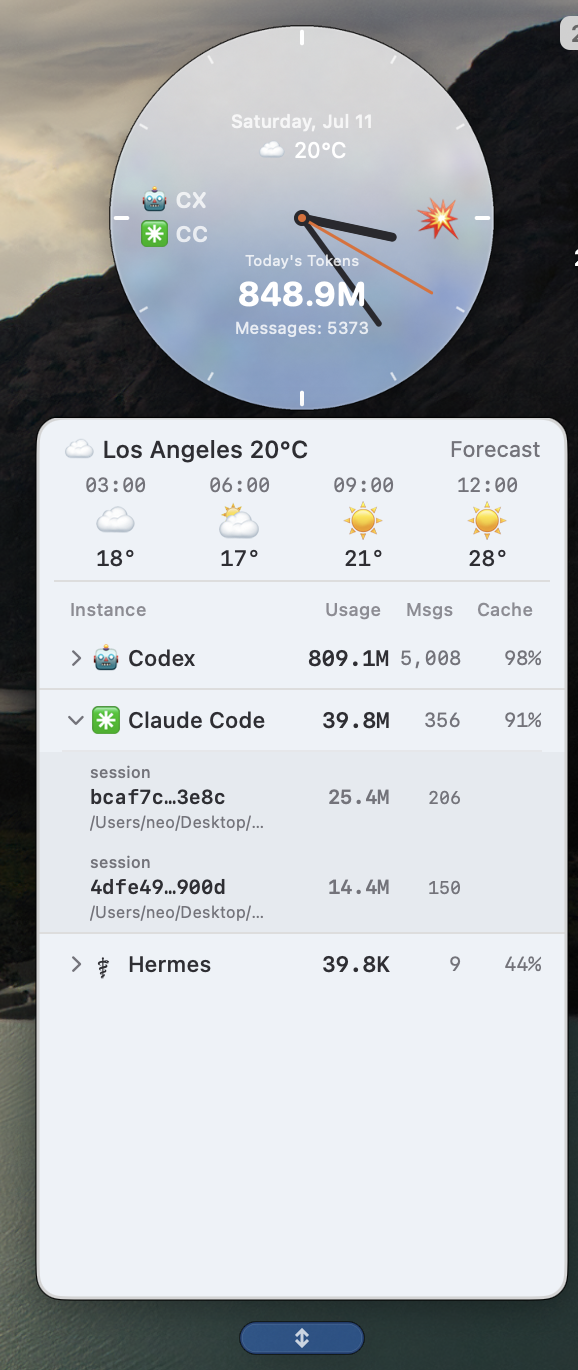 Normal edition |
127.0.0.1.TokenClock can expose read-only JSON for personal scripts and dashboards:
http://127.0.0.1:9988/api/usage
http://127.0.0.1:9988/api/history?days=30
The server is loopback-only, so other computers cannot connect to it directly.
Cost-bearing responses include "costBasis": "api_equivalent_public_list" so clients do not mistake estimates for subscription billing.
wttr.in is reachable from your network.tokenclock doctor, then reinstall. On systems without FUSE 2, the launcher automatically uses extraction mode and does not require sudo.tokenclock doctor on macOS/Linux, or open a GitHub issue with your platform and TokenClock version.Most people should use the installers above. For contributors:
git clone https://github.com/Neo-Isshin/TokenClock.git
cd TokenClock
swift build -c release
The Normal edition shares its features across macOS, Windows, and Linux while keeping native controls and platform-specific data paths. Liquid Glass remains a separate macOS presentation built on the same usage core.
TokenClock is open-sourced under the MIT License — © 2026 Neo-Isshin.
Sign in to join the discussion.
No comments yet. Be the first to say what this is good for.
🪨 why use many token when few token do trick — Claude Code skill that cuts 65% of tokens by talking like caveman

The best-benchmarked open-source AI memory system. And it's free.

Orca is the ADE for working with a fleet of parallel agents. Run any coding agent with your own subscription. Available on desktop, mobile and remote runtime.

A cross-platform desktop All-in-One assistant for Claude Code, Codex, OpenCode, OpenClaw, Grok Build & Hermes Agent. Only official website: ccswitch.io

Never stop coding. Free MIT AI gateway: one endpoint, 352 providers (150+ free), 1200+ models Kimi, Claude, GPT, Gemini, GLM, DeepSeek, MiniMax. Works with Claude Code, Codex, Cursor, OpenCode, Cline & Copilot. Quota-aware auto-fallback, RTK+Caveman compression saves 15-95% tokens, MCP/A2A, Desktop/PWA. Built by 550+ contributors

Compress tool outputs, logs, files, and RAG chunks before they reach the LLM. 20% fewer tokens for coding agents, 60-95% fewer tokens for JSON, same answers. Library, proxy, MCP server.