
obra/
superpowers

obra/superpowersSkills
An agentic skills framework & software development methodology that works.
285k
1 add
This repository packages a Timeline Studio skill that lets agents inspect, plan, validate, and apply edits to portable video projects. It works with the versioned command runner, browser compatibility path, and WebMCP integration so the project timeline stays the source of truth.
Builders who want their coding agent to reason about and edit a real video timeline instead of returning a flat render.
You can have an agent inspect a project, propose reversible edits, and apply them to the same `.timeline` file with validation.
`project.inspect`, `track.inspect`, `clip.inspect`, `project.diff`, `project.run`, and `project.render` operate on portable `.timeline` projects.
The skill is packaged for Skills.sh and GitHub CLI install, with support for Claude Code, Codex, Copilot, and Gemini CLI.
`docs/webmcp.md` describes structured reads and reviewed visual edits against the project already open in a compatible browser.
The command runner validates JSON plans, supports dry runs and idempotent operation IDs, and writes updated `.timeline` archives without rewriting media.
The runner can render the documented Visuals + Voiceover + Music subset to a verified H.264/AAC MP4.
git clone https://github.com/MartinDelophy/ai-video-editor.git
cd ai-video-editor
npm install
npm run dev
English | 中文 | 日本語 | 한국어 | Español | Français | Deutsch | Português | ไทย | Tiếng Việt | Русский




This tool uses deep-synthesis technology and is intended solely for technical research and learning.
Users must ensure that they:
Users are solely responsible for any legal liability arising from violations of these requirements.
.timeline projects, and support undo/redo in all 13 interface languages.See the public Roadmap for planned work, Releases for shipped changes, and Issues for focused tasks and bugs.
Explore reproducible before/after examples and editing recipes:
→ AI Video Editing Skills Handbook
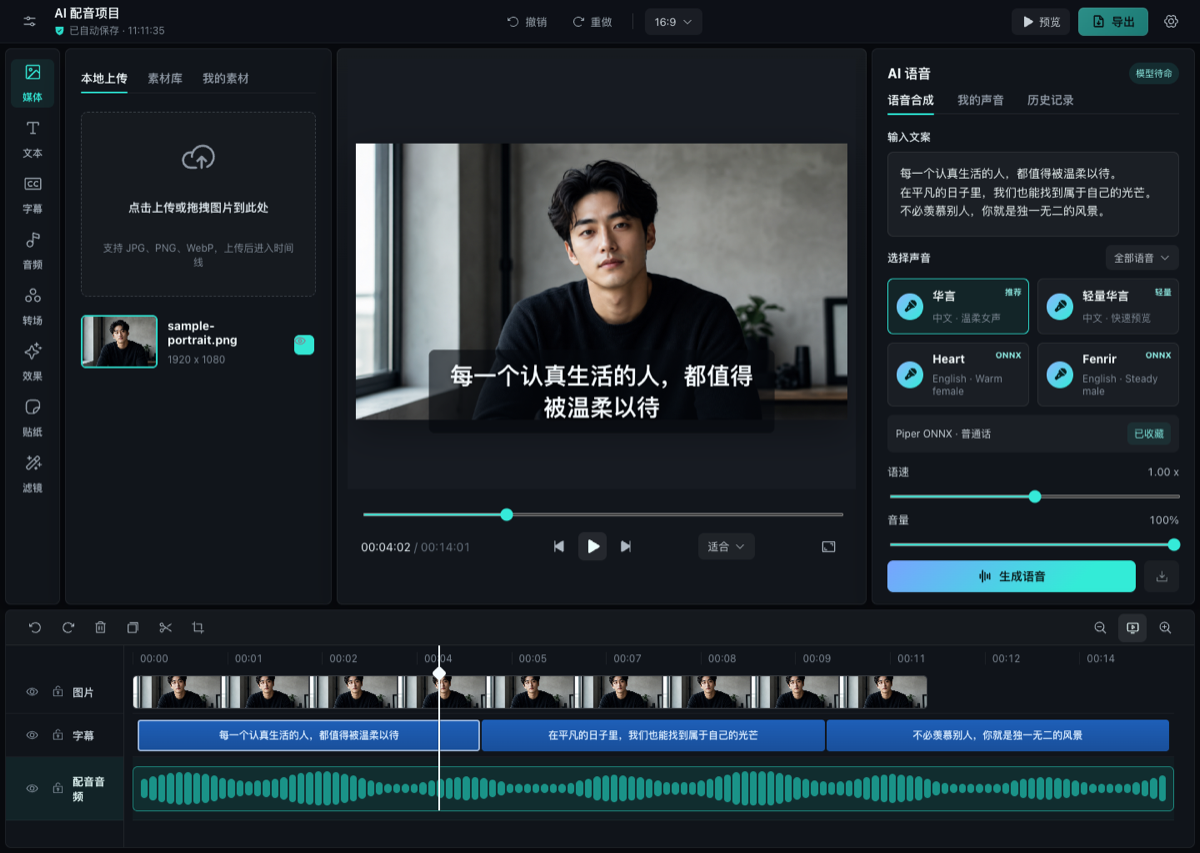
Timeline Studio is a local-first AI video editor that runs in the browser. It combines a CapCut-style multi-track timeline with WebGPU AI music and repair, multilingual voiceovers, automatic captions, talking-avatar generation, and deterministic offline export.
Open the editor · Watch on YouTube · Hugging Face Space
Visual analysis, keyframes, captions, and export.
https://github.com/user-attachments/assets/e8327caa-429e-40ff-a7fe-a59e6cf7a464
Timed watermark removal with before/after review.
https://github.com/user-attachments/assets/aea9f5b4-c720-4b0c-9067-5ec124eef982
https://github.com/user-attachments/assets/304a744e-d620-4380-9c17-19af3726f5a4
Browser AI models are mirrored on both Hugging Face and ModelScope. Timeline Studio uses ModelScope first for Chinese interfaces and domestic sessions, uses Hugging Face first elsewhere, remembers the first working source for the current runtime, and automatically falls back to the other source when needed. Cache identities are shared across both providers, so switching routes does not download the same revision twice.
.timeline projects.The repository includes the AI Video Editing Skill for Codex, Claude Code, Copilot and Gemini CLI, backed by edit-timeline-studio for planning, executing, and verifying editable video timelines.
It helps an agent:
skills/edit-timeline-studio/scripts/validate_edit_plan.mjs;.timeline project as the source of truth instead of returning only an opaque render.The versioned headless command runner loads and inspects portable projects, validates revisioned JSON plans, applies supported operations transactionally, supports dry runs and idempotent operation IDs, and writes a new .timeline archive without rewriting its media files. It also renders the documented portable Visuals + Voiceover + Music subset to a verified H.264/AAC MP4. Browser control remains the compatibility path for richer compositions and operations that are not in the command registry yet. The browser WebMCP integration adds structured reads and reviewed basic visual edits to the project already open in a compatible browser, with conflict checks and editor undo.
npm run agent -- project.inspect /absolute/path/project.timeline
npm run agent -- track.inspect /absolute/path/project.timeline visuals
npm run agent -- clip.inspect /absolute/path/project.timeline visual-123
npm run agent -- transcript.inspect /absolute/path/project.timeline voice-123
npm run agent -- project.diff /absolute/path/edit-plan.json
npm run agent -- project.run /absolute/path/edit-plan.json
npm run agent -- project.render /absolute/path/render-request.json
The legacy inspect and run aliases remain available. The write registry supports ffprobe-backed, hashed visual/audio import to Visuals, Music, or the portable Voiceover slot, plus transactional timed edits, captions, source-accurate Visuals/Overlays, transitions, validated properties, track state, and ratio changes. Read commands return project, track, clip, transcript, media-inventory, and field-level predicted diffs. See the command contract for the plan envelope.
Install through the public skills.sh directory (the current CLI requires Node.js 22.20.0 or later):
npx skills add MartinDelophy/ai-video-editor --skill edit-timeline-studio
Or install it with GitHub CLI 2.90.0 or later:
# Claude Code
gh skill install MartinDelophy/ai-video-editor edit-timeline-studio --agent claude-code --scope user

# Codex
gh skill install MartinDelophy/ai-video-editor edit-timeline-studio --agent codex --scope user
To install the tested release instead of following the latest release, add --pin v1.0.8. Preview the Skill before installing with:
gh skill preview MartinDelophy/ai-video-editor edit-timeline-studio
Roadmap priorities are shaped in GitHub Discussions. Feature requests and real-world workflow feedback are welcome.
Timeline Studio is looking for contributors interested in browser media, WebCodecs, WebGPU/ONNX, timeline UX, localization, testing, and documentation.
Requirements: Node.js 20+ and a modern Chromium browser. WebGPU is recommended for the heaviest AI workflows.
git clone https://github.com/MartinDelophy/ai-video-editor.git
cd ai-video-editor
npm install
npm run dev
Open the local URL printed by Vite. The first AI run may download model files; later runs reuse the browser cache.
npm run build
npm run preview
Run the complete repository check with:
npm run check
The included netlify.toml builds with npm run build, publishes dist, enables the cross-origin isolation headers required by browser AI/media workers, and provides the SPA fallback.
npx netlify-cli deploy --prod --dir=dist
If this project helps you, please consider giving it a ⭐ Star. If you encounter a problem, please open an Issue.
Join our Discord community to ask questions, share feedback, and connect with other users and contributors.
Timeline Studio's original source code is licensed under the MIT License.
The MIT License does not automatically apply to third-party models, model weights, datasets, fonts, stock media, or other bundled or remotely downloaded assets. Those materials remain subject to their respective upstream licenses and terms, regardless of where they are hosted or how they are downloaded or integrated. Review MODEL_LICENSES.md before redistribution or commercial use.
Sign in to join the discussion.
No comments yet. Be the first to say what this is good for.
An agentic skills framework & software development methodology that works.

Turn any codebase, with its docs, SQL schemas, configs, and PDFs, into a queryable knowledge graph. A /graphify skill for Claude Code, Cursor, Codex, and Gemini CLI: local deterministic AST parsing, every edge explained, no vector store.

Topic in, narrated explainer video out. A Claude Code / Codex skill that turns any topic into a black-canvas motion-graphics explainer video with TTS voiceover, subtitles and a chapter progress bar. Chinese or English; every frame drawn in code with Remotion.
Public repository for Agent Skills
Open-source AI job search: scan job portals, evaluate listings into a structured A-H report with a global 1-5 score, tailor your CV, track applications — runs locally in your AI coding CLI (Claude Code, Codex, OpenCode, Antigravity…)

Production-grade engineering skills for AI coding agents.