
JuliusBrussee/
caveman

🪨 why use many token when few token do trick — Claude Code skill that cuts 65% of tokens by talking like caveman
105k
1 add
designlang points a headless browser at a website and extracts design tokens, layout patterns, component anatomy, motion, voice, and accessibility data. It then writes usable outputs such as DTCG tokens, Tailwind config, Figma variables, shadcn theme files, and report cards.
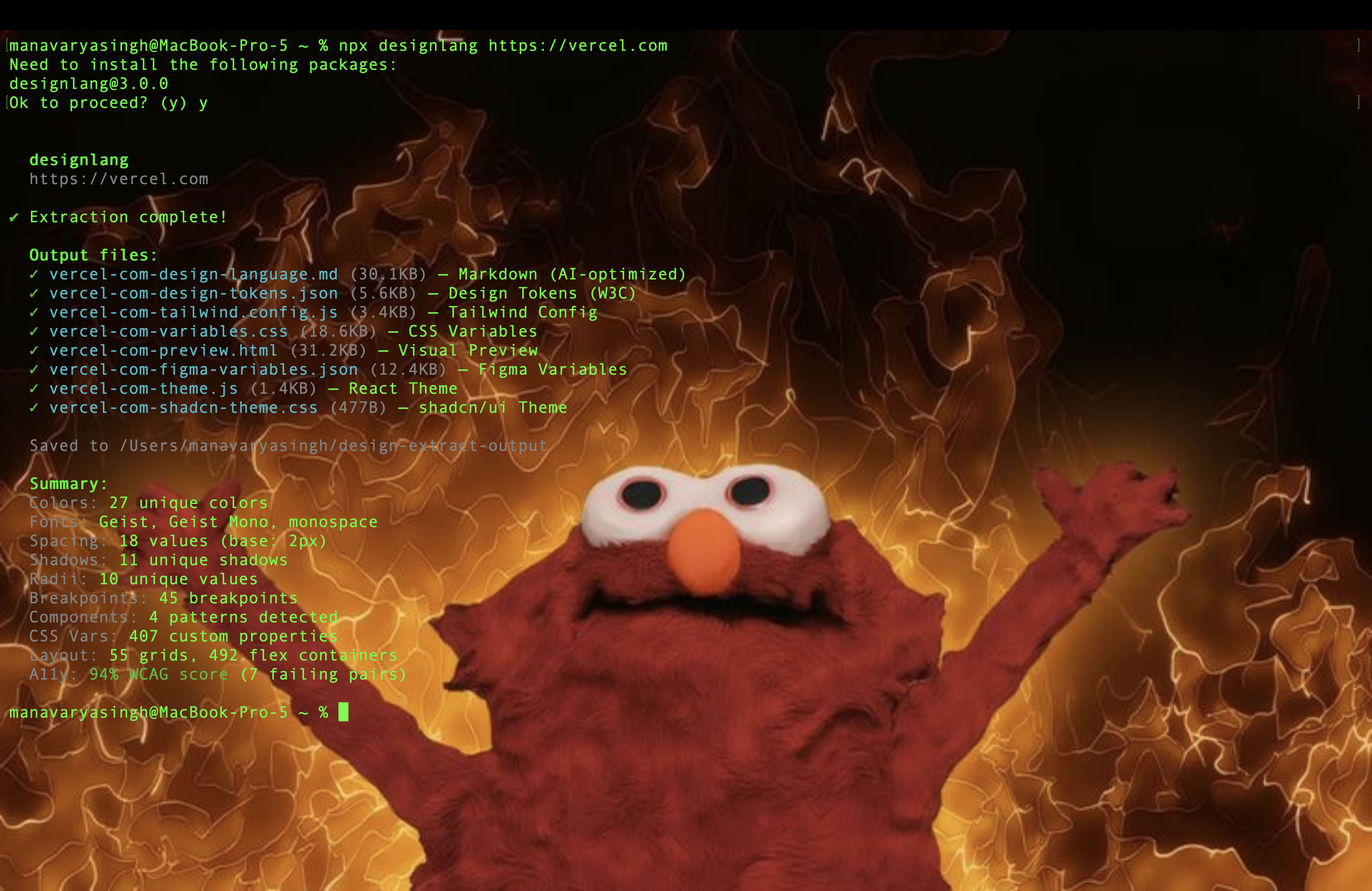
Builders who use Claude Code, Cursor, or Windsurf and want a website’s design system in reusable files.
You can turn a live site into tokens, themes, and audits instead of recreating the design by hand.
Crawls a live URL with Playwright and emits colors, typography, spacing, shadows, radii, components, breakpoints, and animations.
Writes W3C Design Tokens files with primitive, semantic, and composite layers.
Includes Claude Code plugin commands, an MCP server, and a shared skill pack for agent workflows.
Can emit outputs for iOS SwiftUI, Android Compose, Flutter, WordPress, Tailwind v4, Figma variables, and shadcn/ui.
Checks WCAG contrast, suggests remediation colors, and reports CSS health issues like specificity and unused styles.
Adds a browser extension for one-click extraction from the current tab.
npm i -g designlang                         # global
npx skills add Manavarya09/design-extract   # as an agent skill (40+ agents)



Atlas Cloud — powers OpenAI-compatible --smart classification. For AI coding workflows, try the Atlas Cloud coding plan.
Bloome — deploys your AI clone to handle every audience conversation, running in the cloud, 24/7.
Try designlang on Bloome.
designlang points a headless browser at any URL and reads the design system off the live DOM. One command emits 17+ files — DTCG tokens, Tailwind config, shadcn theme, Figma variables, motion tokens, typed component anatomy, brand voice, page-intent labels, and a paste-ready prompt pack for v0 / Lovable / Cursor / Claude Artifacts.
It also goes where extractors don't: layout patterns, responsive behavior across 4 breakpoints, hover / focus / active states, WCAG contrast scoring, multi-page consistency, drift checks against a live source-of-truth, visual-diffs, and a shareable graded report card.
npx designlang https://stripe.com                      # extract everything
npx designlang dna stripe.com                          # place it in the measured design space: neighbours + percentiles ← v13.1
npx designlang site stripe.com                         # whole-site: one canonical system + consistency grade ← v12.23
npx designlang fidelity stripe.com --clone localhost:3000  # score a clone vs the original (visual + motion) ← v12.24
npx designlang gallery                                 # static shareable gallery of measured clones      ← v12.24
npx designlang studio                                  # live token editor: edit, preview, export, share ← v12.19
npx designlang verify stripe.com                       # fidelity score: rebuild from tokens vs live ← v12.18
npx designlang pair stripe.com linear.app              # fuse two designs (visuals A × voice B)    ← v12.8
npx designlang brand stripe.com                        # full brand-guidelines book (13 chapters)  ← v12.7
npx designlang theme-swap stripe.com --primary "#ff4800"  # recolour around your brand        ← v12.6
npx designlang pack stripe.com                         # one polished design-system directory ← v12.4
npx designlang remix stripe.com --as cyberpunk         # restyle in another vocabulary       ← v12.3
npx designlang remix stripe.com --all                  # emit all 6 vocabs at once           ← v12.3
npx designlang grade https://stripe.com --badge        # report card + SVG badge             ← v12.2
npx designlang battle stripe.com vercel.com            # head-to-head graded fight           ← v12.2
npx designlang clone https://stripe.com                # working Next.js starter
npx designlang --full https://stripe.com               # screenshots + responsive + interactions
Drop a live design-score badge in any README:

v13)Don't take the output on faith — watch it happen. On designlang.app/watch you paste a URL and a real headless Chromium opens the page and reads its entire design system in real time: a split stage with the live browser on the left and the design system — palette, type, spacing, motion — assembling itself on the right as each token lifts off the page.
It's driven by the actual extraction (the browser's CDP screencast streamed frame-by-frame alongside the real token events), recorded so a shared link replays the exact run. No install, no account. Every gallery card can be watched the same way, and the gallery now spans 37 real-graded design systems.
site)Most extractors read a single URL. designlang site crawls a site's canonical
pages (home, pricing, docs, blog, about, product…) and synthesizes one
de-duplicated system. Every token is elected by coverage — the share of pages
that use it — so what's genuinely site-wide is separated from one-off,
page-local choices. Near-identical colours are merged in OKLab. It's fully
deterministic and free; no API key.
npx designlang site stripe.com --max-pages 8
You get, alongside the standard pack emitted from the canonical system:
| File | What it is |
|---|---|
*-site-system.json | canonical unified tokens + coverage + drift |
*-site-coverage.md | every token tagged 🟢 site-wide / 🟡 section / 🔴 page-local, with the pages using it |
*-site-consistency.md | a 0–100 consistency grade, per-category breakdown, and the off-system outliers to consolidate |
fidelity + gallery)Cloning tools all claim "pixel-perfect" — none of them measure it. designlang fidelity does. Point it at the original and your clone (often a local dev
server) and it returns one honest number, both halves of the clone:
extractMotion() on both, compared across feel, durations,
easings, springs, keyframe kinds, scroll-linked motion, and choreography/
stagger. (Most clones reproduce static pixels and drop the motion entirely;
this is where they lose.)The two blend into a 0–100 score + letter grade, and — the part competitors don't ship — a ranked correction plan: the exact next edits that will raise the score, hardest-hitting first. Measure → fix → re-run until it converges.
npx designlang fidelity https://stripe.com --clone http://localhost:3000
npx designlang fidelity https://stripe.com --clone http://localhost:3000 --min 90   # CI gate
Generating the clone with designlang clone? Add --fidelity and it grades the
clone's token basis against the live site the moment it's built — writing
FIDELITY.md + a correction plan straight into the project, no separate step:
npx designlang clone https://stripe.com --fidelity
You get fidelity.md (score + motion table + correction plan), fidelity.json,
a shareable fidelity-card.svg (88% · B · stripe.com), and a fidelity-diff.png
loss heatmap.
Then publish them. designlang gallery scans your reports and builds a
deployable static site — an index of score cards plus a permalink page per clone
(each with an OG card, so a shared link unfurls the number).
npx designlang gallery --title "Our clones" --base-url https://clones.example.com
dna)Every extractor on the market answers what a design uses. None of them answers
where it sits. designlang grade returns a letter — but a letter with no
reference frame is a thermometer with no scale on it.
designlang dna reduces a design to 30 deterministic features across five
axes — colour, type, space, shape, motion — and ranks it against a corpus of
real design systems:
npx designlang dna raycast.com
  Design DNA · https://raycast.com
  30 features, 100% measurable

  vs 8 systems (default)

  color    65th percentile
  type     56th percentile
  space    42th percentile
  shape    79th percentile
  motion   67th percentile

  Nearest
  0.14  https://railway.app
  0.15  https://linear.app
  0.19  https://notion.so
Distance is the mean absolute difference across the features both designs have,
so 0.14 reads as "the average feature is 14% of its range apart" — a number you
can reason about, unlike a Euclidean distance in 30 dimensions.
The report goes past similarity to what makes a design look the way it does: the features furthest from the middle of the corpus, in plain language ("corner radius — 100th percentile, far above the corpus").
Bring your own reference frame — your products, your competitors, a target look:
npx designlang dna-corpus acme.com acme.com/pricing competitor.com
npx designlang dna acme.com/new-page --corpus ./corpus.json
Three things it refuses to do, because a design score that overclaims is worse than no score at all:
null, never a substituted midpoint, and distance skips them instead of
comparing against an invented value.npm i -g designlang # global
npx skills add Manavarya09/design-extract # as an agent skill (40+ agents)
designlang ships as a Claude Code plugin — eleven slash commands that wrap the CLI. Install it from inside Claude Code:
/plugin marketplace add Manavarya09/design-extract
/plugin install designlang@designlang
The first command registers this repo as a plugin marketplace; the second
installs the designlang plugin from it. Restart Claude Code if prompted, then
the commands are available:
| Command | What it does |
|---|---|
/extract <url> | full design language → DTCG, Tailwind, Figma, motion, voice |
/site <url> | crawl a whole site → one canonical design system + consistency grade |
/grade <url> | shareable HTML report card + SVG badge |
/battle <a> <b> | head-to-head graded comparison |
/remix <url> --as <vocab> | restyle in 6 vocabularies (brutalist, swiss, art-deco, cyberpunk, soft-ui, editorial) |
/pack <url> | one downloadable design-system bundle |
/theme-swap <url> | OKLCH-correct recolour around a new brand primary |
/brand <url> | full editorial brand-guidelines book (13 chapters) |
/pair <a> <b> | fuse two designs across configurable axes |
/studio | live token editor — preview, dark mode, export, share |
/verify <url> | rebuild from tokens, pixel-diff vs live, fidelity score |
/fidelity <url> --clone <url> | score a clone vs the original (visual + motion) + correction plan |
/gallery [dir] | build a static shareable gallery of measured clones |
/dna <url> | place a design in the measured design space — nearest systems, per-axis percentiles, outliers |
Prefer the raw MCP tools? The CLI also ships an MCP server — run
designlang mcp --output-dir ./design-extract-outputto serve the latest extraction's tokens to any MCP client.
--smartdesignlang --smart can now use Atlas Cloud through its OpenAI-compatible chat API, so low-confidence classifiers can stay zero-dependency while routing to Atlas-hosted models.
export ATLASCLOUD_API_KEY="<atlascloud-api-key>"
export ATLASCLOUD_MODEL="deepseek-ai/deepseek-v4-pro"

npx designlang https://stripe.com --smart
ATLASCLOUD_API_KEY, ATLASCLOUD_MODEL, optional ATLASCLOUD_API_BASEATLAS_CLOUD_API_KEY, ATLAS_CLOUD_MODEL, ATLAS_CLOUD_API_BASEOPENAI_API_KEY and ANTHROPIC_API_KEY flows keep working unchangedEach run writes 17+ files to ./design-extract-output/. The headline outputs:
| File | What it is |
|---|---|
*-design-language.md | 19-section markdown — feed any LLM to recreate the design |
*-design-tokens.json | W3C DTCG tokens (primitive + semantic + composite layers) |
*-tailwind.config.js | Drop-in Tailwind theme |
*-shadcn-theme.css | shadcn/ui globals.css variables |
*-figma-variables.json | Figma Variables import (light + dark) |
*-variables.css | CSS custom properties |
*-anatomy.tsx | Typed React stubs for every detected component + variants |
*-motion-tokens.json | Durations, easings, springs, scroll-linked flag; with --motion-runtime also choreography (stagger) + scroll recipes + observed durations |
*-voice.json | Brand voice — tone, pronoun posture, CTA verbs |
*-prompts/ | Paste-ready prompts for v0, Lovable, Cursor, Claude Artifacts |
*-mcp.json | Disk-backed MCP server payload |
*-grade.html | v12.1 Shareable Design Report Card (letter grade + evidence) |
*-grade.svg | v12.2 Shields.io-style design-score badge (drop into any README) |
*-battle.html | v12.2 Head-to-head graded battle card from designlang battle |
*-remix.<vocab>.html | v12.3 Site restyled in another vocabulary — brutalist / swiss / art-deco / cyberpunk / soft-ui / editorial |
Multi-platform (--platforms web,ios,android,flutter,wordpress,all) adds ios/, android/, flutter/, and a WordPress block theme. --emit-agent-rules adds Cursor / Claude Code / generic agent rule files.
Other tools give you the paint. designlang reads the architecture:
--responsive).--interactions, --deep-interact).feel fingerprint (springy / smooth / mechanical / mixed).--motion-runtime) — drives the page (load / scroll / hover / focus) and reads document.getAnimations() to capture what actually animates: real durations, choreography/stagger sequences, and scroll recipes (parallax / reveal / pin). Folded into *-motion-tokens.json and previewable live in the studio's Motion tab..tsx.landing / pricing / docs etc., with semantic regions (hero, feature-grid, pricing-table, cta…).designlang drift, lint, visual-diff all CI-ready, exit non-zero on failure.designlang sync).designlang mcp exposes tokens, regions, components, and contrast pairs to any MCP-aware agent.designlang grade https://stripe.com # ← v12.1: shareable report card
designlang clone https://stripe.com # → working Next.js app
designlang apply https://stripe.com -d ./app # auto-detect framework, write tokens
designlang brands stripe.com vercel.com linear.app # N-brand matrix
designlang drift https://yourapp.com --tokens ./src/tokens.json
designlang lint ./src/tokens/design-tokens.json # CI-ready linter
designlang visual-diff https://staging.app https://app # single-file HTML diff
designlang mcp # stdio MCP server for Cursor / Claude Code
designlang doctor # sanity-check the local install
| Feature | Flag / Command | Description |
|---|---|---|
| Base extraction | designlang <url> | Colors, typography, spacing, shadows, radii, CSS vars, breakpoints, animations, components |
| Layout system | automatic | Grid patterns, flex usage, container widths, gap values |
| Accessibility | automatic | WCAG 2.1 contrast ratios for all fg/bg pairs |
| Design scoring | automatic | 7-category quality rating (A-F) with actionable issues |
| Gradients | automatic | Gradient type, direction, stops, classification |
| Z-index map | automatic | Layer hierarchy, z-index wars detection |
| SVG icons | automatic | Deduplicated icons, size/style classification, color palette |
| Font files | automatic | Source detection (Google/self-hosted/CDN/system), @font-face CSS |
| Image styles | automatic | Aspect ratios, shapes, filters, pattern classification |
| Dark mode | --dark | Extracts dark color scheme + light/dark diff |
| Auth pages | --cookie, --cookie-file, --header | Extract from authenticated/protected pages; cookie files in JSON / Playwright storageState / Netscape formats |
| Self-signed / dev TLS | --insecure | Ignore HTTPS/SSL certificate errors |
| User-Agent override | --user-agent <ua> | Set a custom User-Agent string |
| Chrome extension | chrome-extension/ | One-click handoff from any tab, MV3, activeTab only |
| Multi-page | --depth <n> | Crawl N internal pages; emits shared-vs-per-route token reconciliation (*-tokens-shared.json, *-tokens-routes/<slug>.json, *-routes-report.md) |
| Screenshots | --screenshots | Capture buttons, cards, inputs, nav, hero, full page |
| Responsive | --responsive | Crawl at 4 viewports, map breakpoint changes |
| Interactions | --interactions | Capture hover/focus/active state transitions |
| Auto-interact | --deep-interact | Scroll, open menus/modals/accordions, hover CTAs before extraction |
| Runtime motion | --motion-runtime | Capture real motion via document.getAnimations() — durations, stagger/choreography, scroll recipes |
| Everything | --full | Enable screenshots + responsive + interactions + deep-interact + motion-runtime |
| Apply | designlang apply <url> | Auto-detect framework and write tokens to your project |
| Clone | designlang clone <url> | Generate a working Next.js starter with extracted design |
| Score | designlang score <url> | Rate design quality with visual bar chart breakdown |
| Grade (v12.1) | designlang grade <url> | Shareable HTML "Design Report Card" — letter grade, 8 dimensions, evidence, strengths + fixes |
| Battle (v12.2) | designlang battle <A> <B> | Head-to-head graded battle card with verdict, dimension table, palette comparison |
| Badge (v12.2) | designlang grade --badge | Shields.io-style SVG badge — design · B · 87 — drop into any README. Live endpoint: designlang.app/badge/<host>.svg |
| Remix (v12.3) | designlang remix <url> --as <vocab> | Restyle the audited page in another vocabulary (brutalist / swiss / art-deco / cyberpunk / soft-ui / editorial). --all emits all 6 |
| Pack (v12.4) | designlang pack <url> | Bundle every output (tokens / components / Storybook / starter / prompts) into one polished design-system directory |
| Theme-swap (v12.6) | designlang theme-swap <url> --primary <hex> | Recolour the extracted design around a new brand primary. OKLCH hue rotation, neutrals preserved, type/spacing/motion untouched |
| Brand book (v12.7) | designlang brand <url> | Full editorial brand-guidelines document (13 chapters: cover, about, logo, colour, type, spacing, shape, iconography, motion, components, voice, a11y, tokens, how-to-use). Print-ready, dark-mode toggle, hand-off-ready |
| Pair (NEW v12.8) | designlang pair <urlA> <urlB> | Fuse two designs across 7 axes (colours/type/spacing/shape/motion/voice/components). Defaults to "visuals from A, voice + type from B". --brand also emits a brand book of the fused identity |
| Design DNA (NEW v13.1) | designlang dna <url> | Reduce a design to a 30-feature vector (colour / type / space / shape / motion) and rank it against a corpus of real design systems — nearest neighbours, per-axis percentiles, outlier features |
| DNA corpus (NEW v13.1) | designlang dna-corpus <urls...> | Build your own reference frame — your products, your competitors — for dna to measure against |
| Watch | designlang watch <url> | Monitor for design changes on interval |
| Diff | designlang diff <A> <B> | Compare two sites (MD + HTML) |
| Multi-brand | designlang brands <urls...> | N-site comparison matrix |
| Sync | designlang sync <url> | Update local tokens from live site |
| History | designlang history <url> | Track design changes over time |
| MCP server | designlang mcp | Expose extraction as MCP resources + tools |
| Multi-platform | --platforms <csv> | Emit iOS / Android / Flutter / WordPress outputs |
| Agent rules | --emit-agent-rules | Cursor, Claude Code, generic agent rule files |
| Stack fingerprint | automatic | Framework + Tailwind + analytics detection |
| CSS health | automatic | Specificity, !important, unused CSS, keyframes |
| A11y remediation | automatic | Nearest palette color passing AA / AAA for every failing pair |
| Semantic regions | automatic | nav / hero / pricing / testimonials / cta / footer classification |
| Reusable components | automatic | DOM subtree + style-vector clustering with variants |
| DTCG tokens | default | W3C Design Tokens v1 with semantic + composite layers (--tokens-legacy for pre-v7) |
designlang <url> [options]

Options:
  -o, --out <dir>         Output directory (default: ./design-extract-output)
  -n, --name <name>       Output file prefix (default: derived from URL)
  -w, --width <px>        Viewport width (default: 1280)
  --height <px>           Viewport height (default: 800)
  --wait <ms>             Wait after page load for SPAs (default: 0)
  --dark                  Also extract dark mode styles
  --depth <n>             Internal pages to crawl (default: 0)
  --screenshots           Capture component screenshots
  --responsive            Capture at multiple breakpoints
  --interactions          Capture hover/focus/active states
  --deep-interact         Auto-interact pass (scroll, menus, modals, accordions, hover CTAs)
  --motion-runtime        Capture runtime motion via getAnimations() (durations, choreography, scroll recipes)
  --full                  Enable all captures (implies --deep-interact + --motion-runtime)
  --cookie <cookies...>   Cookies for authenticated pages (name=value)
  --cookie-file <path>    Load cookies from JSON / storageState / Netscape cookies.txt
  --header <headers...>   Custom headers (name:value)
  --user-agent <ua>       Override the browser User-Agent string
  --insecure              Ignore HTTPS/SSL certificate errors (self-signed, dev, proxies)
  --selector <css>        Only extract from elements matching this CSS selector (e.g. ".pricing-card")
  --system-chrome         Use the system Chrome install instead of the bundled Chromium (skips 150MB download)
  --json                  Print full extraction as JSON to stdout (for piping into other tools)
  --framework <type>      Only generate specific theme (react, shadcn)
  --platforms <csv>       Additional platforms: web,ios,android,flutter,wordpress,all (additive)
  --emit-agent-rules      Emit Cursor / Claude Code / CLAUDE.md / agents.md rule files
  --tokens-legacy         Emit pre-v7 flat design-tokens.json shape (backward compat)
  --no-history            Skip saving to history
  --verbose               Detailed progress output

Commands:
  apply <url>                       Extract and apply design directly to your project
  clone <url>                       Generate a working Next.js starter from extracted design
  score <url>                       Rate design quality (7 categories, A-F, bar chart)
  grade <url>                       Generate a shareable HTML Design Report Card (--format html|md|json|svg|all, --badge, --open)
  battle <urlA> <urlB>              Head-to-head graded battle card (--format html|md|json|all, --open)
  remix <url>                       Restyle in another vocabulary (--as brutalist|swiss|art-deco|cyberpunk|soft-ui|editorial, --all, --list, --open)
  pack <url>                        Bundle every output into one design-system directory (--with-clone, --open)
  theme-swap <url> --primary <hex>  Recolour around a new brand primary (--from, --format html|md|json|tokens|all, --open)
  brand <url>                       Generate a full editorial brand-guidelines book (--format html|md|json|all, --open)
  pair <urlA> <urlB>                Fuse two designs across 7 axes (--colors-from, --typography-from, --spacing-from, --shape-from, --motion-from, --voice-from, --components-from, --brand)
  watch <url>                       Monitor for design changes on interval
  diff <urlA> <urlB>                Compare two sites' design languages
  brands <urls...>                  Multi-brand comparison matrix
  sync <url>                        Sync local tokens with live site
  history <url>                     View design change history
  mcp                               Launch stdio MCP server (--output-dir <dir>)
  lint <file>                       (v9) Audit a local token file (.json/.css) — CI-ready
  drift <url> --tokens <file>       (v9) Check local tokens for drift against a live site
  visual-diff <before> <after>      (v9) Side-by-side HTML diff of two URLs
  fidelity <original> --clone <url> Score a clone vs the original — visual pixel-diff + motion fidelity → one grade + ranked correction plan (--min, --motion-runtime)
  gallery [dir]                     Build a shareable static gallery of measured clones (--title, --base-url)
designlang https://vercel.com --full →
Colors: 27 · Fonts: Geist + Geist Mono · Spacing: 18 (base 2px)
Shadows: 11 · Radii: 10 · CSS vars: 407 · Layout: 55 grids / 492 flex
Responsive: 4 viewports, 3 breakpoint changes · Interactions: 8 transitions
A11y: 94% WCAG · Score: 68/100 (D) · 4 issues

→ 17 files written to ./design-extract-output/
→ Run `designlang grade https://vercel.com` for a shareable report card
page.evaluate() walks up to 5,000 DOM elements, collecting 25+ computed properties, inline SVGs, font sources, and image metadatadesignlang ships surfaces beyond the CLI:
| Surface | Path | Description |
|---|---|---|
| CLI | npx designlang <url> | Main entry point. |
| VS Code extension | vscode-extension/ | "Extract design from URL" command + auto-inject into workspace. |
| Raycast extension | raycast-extension/ | Extract, score, and "copy CLI command" from Raycast. |
| Figma plugin | figma-plugin/ | Paste a URL inside Figma, get a full Variables collection. |
| GitHub Action | github-action/ | "Design regression guard" — diffs tokens on every PR and comments. |
| Chrome extension | chrome-extension/ | One-click handoff from any tab (MV3, activeTab only). |
| Doctor | designlang doctor | One-screen health check of the local install — Node, playwright, Chromium binary, output dir, network. Exits 1 if anything fails. |
| MCP server | npx designlang mcp | Exposes the extracted design as MCP resources + tools for Cursor, Claude Code, Windsurf, etc. See docs/MCP-REGISTRY.md. |
| Claude Code plugin | .claude-plugin/ | Five slash commands inside Claude Code — /extract, /grade, /battle, /remix, /pack. |
Drop designlang straight into Claude Code as a plugin. Every CLI command becomes a slash command:
/plugin install Manavarya09/design-extract
Then inside any Claude Code session:
| Slash command | What it does |
|---|---|
/extract <url> | Full extraction → DTCG tokens, Tailwind, Figma vars, motion, voice |
/grade <url> | Shareable HTML "Design Report Card" (+ --badge for an SVG) |
/battle <urlA> <urlB> | Head-to-head graded battle card |
/remix <url> --as <vocab> | Restyle in brutalist / swiss / art-deco / cyberpunk / soft-ui / editorial |
/pack <url> | Bundle every output into one design-system directory |
Manifest: .claude-plugin/plugin.json · marketplace: .claude-plugin/marketplace.json · commands: commands/ · skills: skills/.
Works with Cursor, Codex, and 40+ AI coding agents via the skills ecosystem:
npx skills add Manavarya09/design-extract
In Cursor / Codex / etc., use /extract-design <url>.
See CONTRIBUTING.md. PRs welcome!
MIT - Manav Arya Singh !!
Sign in to join the discussion.
No comments yet. Be the first to say what this is good for.
🪨 why use many token when few token do trick — Claude Code skill that cuts 65% of tokens by talking like caveman

The best-benchmarked open-source AI memory system. And it's free.

Orca is the ADE for working with a fleet of parallel agents. Run any coding agent with your own subscription. Available on desktop, mobile and remote runtime.

A cross-platform desktop All-in-One assistant for Claude Code, Codex, OpenCode, OpenClaw, Grok Build & Hermes Agent. Only official website: ccswitch.io

Never stop coding. Free MIT AI gateway: one endpoint, 352 providers (150+ free), 1200+ models Kimi, Claude, GPT, Gemini, GLM, DeepSeek, MiniMax. Works with Claude Code, Codex, Cursor, OpenCode, Cline & Copilot. Quota-aware auto-fallback, RTK+Caveman compression saves 15-95% tokens, MCP/A2A, Desktop/PWA. Built by 550+ contributors

Compress tool outputs, logs, files, and RAG chunks before they reach the LLM. 20% fewer tokens for coding agents, 60-95% fewer tokens for JSON, same answers. Library, proxy, MCP server.