

Hire a private AI tutor for anything you want to learn.
Your AI reads how you actually learn — and teaches the next lesson just for you.
Built on Bloom's 2-Sigma research: 1-on-1 tutoring = top 2%.





🌐 Website · Chinese · English
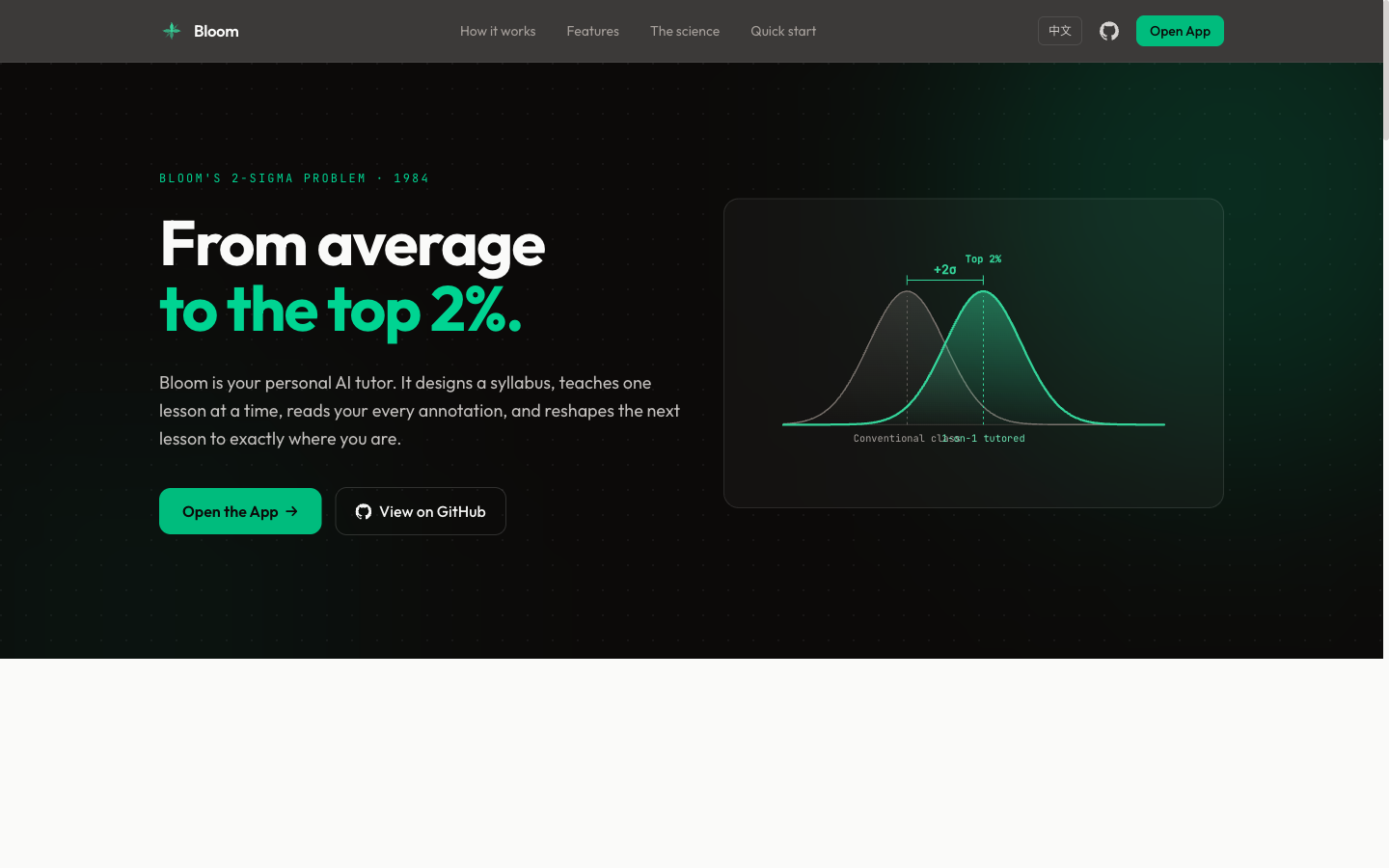
In 1984, educational psychologist Benjamin Bloom discovered that students receiving one-on-one tutoring scored 2 standard deviations (+2σ) above the classroom average — jumping to the top 2%. Bloom called this the "2 Sigma Problem": the effect is proven, but personal tutors don't scale.
Bloom solves this with AI. It generates a structured syllabus, delivers lessons one at a time, reads your annotations and feedback, then tailors the next lesson to your exact understanding level — just like a real tutor would.
Two Ways to Use
| Mode | Setup | Best for |
|---|
| CLI | Claude Code + terminal | Power users who like Markdown editors |
| Web | Browser (React + FastAPI) | Visual learners, shareable setup |
Both follow the same flow: syllabus → lesson → annotate → feedback → next lesson → evaluation → summary.
Quick Start: CLI Mode
Requires only Claude Code. No backend.
git clone https://github.com/Li-Evan/Bloom.git
cd Bloom

# Install the tutor skill locally for this clone
mkdir -p .claude/skills
cp -R skills/bloom-tutor .claude/skills/

claude
Then say: Create a new folder and help me learn [any topic]
Or install it as a plugin (bundles bloom-tutor plus the learn-* skills) — in Claude Code:
/plugin marketplace add Li-Evan/Bloom
/plugin install bloom@li-evan
See GUIDE.md for the full walkthrough.
Quick Start: Web Mode
Prerequisites
- Python 3.11+ with uv
- Node.js 18+
- An OpenAI-compatible LLM API key (e.g. DashScope, OpenAI, etc.)
Setup
git clone https://github.com/Li-Evan/Bloom.git
cd Bloom
# Configure
cp .env.example .env
# Edit .env — fill in LLM_API_KEY
# Backend
cd backend && uv sync && uv run uvicorn app.main:app --reload --port 8000
# Frontend (new terminal)
cd frontend && npm install && npm run dev
Open http://localhost:5173. Click New Course, choose Topic, Source Upload, or Project Files, and start learning.
Docker
cp .env.example .env   # fill in API key
docker compose up -d   # visit http://localhost:3000
How It Works
Topic Mode
Create course → AI generates syllabus + lesson 01
                        ↓
        Read lesson → highlight text → add annotations
                        ↓
        Write feedback → answer thought questions
                        ↓
        Click "Done Reading" → AI generates next lesson
        (answer review + annotation responses + new content)
                        ↓
        Repeat until all mastery items checked ✅
                        ↓
        Auto-generate evaluation → then summary
Source Mode
Upload PDF / TXT / MD → AI generates syllabus + source-reading chapter
                          ↓
       Read source → highlight text → ask and get an immediate answer
                          ↓
       Click "Done Reading" → AI reads the full source + Q&A, then generates the next lesson
                          ↓
       Continue with the normal adaptive lesson flow
Project Files
Upload a file / multiple files / a whole folder → each file renders directly as one page
                          ↓
       Read each file → highlight text → ask and get an immediate answer
                          ↓
       No syllabus, no next-lesson generation; the files and highlight Q&A feed next-step recommendations
Features
- Three course modes — generate from a topic, upload a PDF/TXT/MD source, or Project Files (upload files/a folder, render each directly, highlight-ask anytime, no syllabus or next-lesson generation)
- Learning depth — choose simple, standard, or deep syllabus expansion when creating a course; shown as a badge on each course card
- Reference material — paste textbook chapters, papers, or notes when creating a topic course
- Next-topic recommendations — generate 3 course-ready topics from your full learning history, refresh the set, save ideas to a learning queue, or start one directly through the normal syllabus → lesson flow
- Highlight Q&A sessions — select any text in any lesson (or source) and a small icon pops up; click it to ask. The highlighted text stays marked in yellow, the AI answers instantly, and you can keep asking follow-ups in the same thread. The window is draggable and collapses into a margin dot you can reopen anytime. Each session sees the full lesson + the highlighted span + its own conversation, and your questions still feed the next lesson.
- Adaptive lessons — each lesson addresses your specific gaps from the previous one
- Chapter sidebar — quick-jump between lessons while reading
- Collapsible syllabus — track mastery progress without clutter
- Streaming generation — watch AI write the next lesson in real-time
- Personal center & learning calendar — open the profile from the header to see a month calendar shaded by daily activity; click any day to see which courses, lessons, and highlights you studied, alongside overview stat cards and a six-month contribution heatmap (streaks and grouping use your local date)
Skills
Bloom ships a set of portable Claude Code skills in skills/ — self-contained capability packs you can copy into ~/.claude/skills/ (global) or any project's .claude/skills/ and use anywhere.
| Skill | What it does |
|---|
| bloom-tutor | The full interactive tutoring system as one skill — syllabus → adaptive lessons → ??? annotations → evaluation → summary. CLI mode, packaged and portable. |
| learn-deep | Default deep-dive entry — runs all five lenses below in one pass, then helps you pick a direction |
| learn-crossover | Learn a new concept by leveraging what you already know (structural analogies) |
| learn-occam | Decide whether / how deeply something is worth learning (ROI, just-enough) |
| learn-graph | Build a knowledge-graph map of a field plus a learning path |
| learn-prototype | Learn by building the crappiest working prototype, then iterating |
| learn-feynman | Verify true understanding by explaining it back |
Each folder is dependency-free: copy it into a skills directory, then just talk to Claude Code (e.g. "help me learn X", "I'm done reading").
Tech Stack
| Layer | Technology |
|---|
| Backend | Python, FastAPI, SQLAlchemy, SQLite |
| Frontend | React, Vite, Tailwind CSS |
| AI | Any OpenAI-compatible LLM API |
| Container | Docker, docker-compose |
| Font | Outfit, JetBrains Mono |
Commands
make dev-backend      # backend with hot reload
make dev-frontend     # frontend dev server
make test             # run pytest
make up / make down   # docker start / stop
Project Structure
├── GUIDE.md               # CLI usage guide
├── .env.example           # env template
├── backend/
│   └── app/
│       ├── courses.py     # course, lesson, annotation, feedback, stats, summary APIs
│       ├── recommendations.py # next-topic recommendation APIs
│       ├── models.py      # Course, Lesson, Annotation, Feedback, Recommendation
│       └── config.py      # reads .env
├── frontend/
│   └── src/pages/
│       ├── DashboardPage  # course list + create form
│       ├── CoursePage     # syllabus + lesson list
│       └── LessonPage     # reader + annotations + feedback + AI gen
├── example/               # pre-built topics for CLI mode
├── site/                  # marketing website (standalone Astro static build, decoupled from the app)
└── skills/                # portable Claude Code skills (bloom-tutor + learn-*)
The Science
| Concept | What it means |
|---|
| Bloom's 2 Sigma | 1-on-1 tutoring = +2σ performance over classroom |
| Mastery Learning | Don't move on until the concept is truly understood |
| Socratic Method | Ask questions, don't hand answers |
| Spaced Retrieval | Thought question reviews at lesson start reinforce memory |
| Adaptive Path | Content adjusts to individual feedback in real-time |
Star History
License
MIT




