

JuliusBrussee/
caveman

🪨 why use many token when few token do trick — Claude Code skill that cuts 65% of tokens by talking like caveman
105k
1 add
Kong Gateway sits between your clients and services so you can route, secure, balance, and observe traffic in one place. It works through a REST admin API or declarative config, and it extends with plugins for API and AI traffic policy.
Builders who want one gateway for APIs, LLM providers, and MCP traffic.
You can put routing, auth, security, and observability in front of services and agent tools without wiring each one by hand.
Routes traffic across APIs and multiple LLM providers through one gateway layer.
Adds MCP traffic controls, security, observability, and MCP generation from REST APIs.
Lets you add rate limiting, transforms, logging, monitoring, and custom plugin logic.
Runs natively on Kubernetes with Kong's ingress controller.
Supports declarative DB-less and hybrid control-plane/data-plane deployments.
$ git clone https://github.com/Kong/docker-kong
  $ cd docker-kong/compose/
$ KONG_DATABASE=postgres docker-compose --profile database up






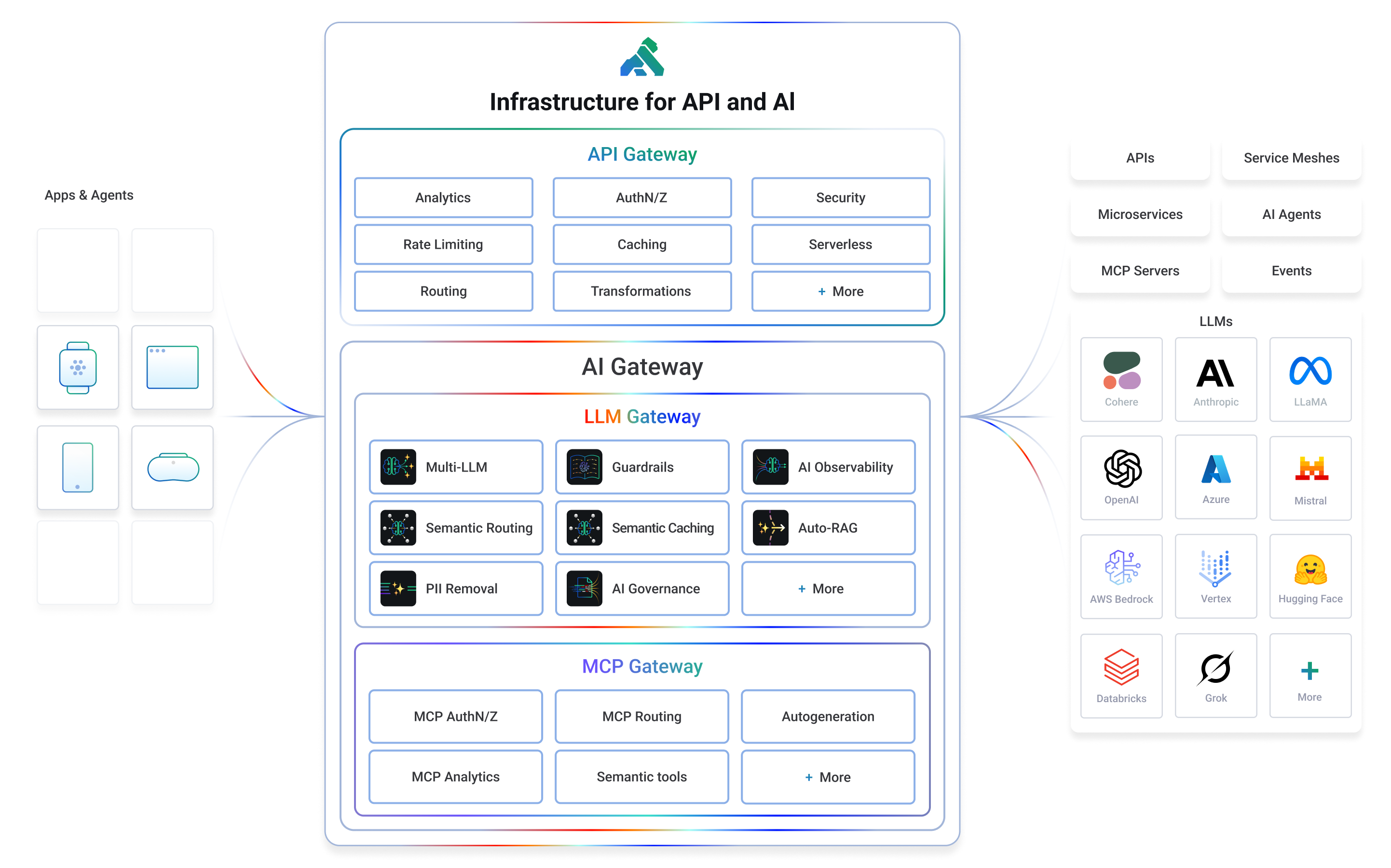
Kong or Kong Gateway is a cloud-native, platform-agnostic, scalable API 𖧹 LLM 𖧹 MCP Gateway distinguished for its high performance and extensibility via plugins. It also provides advanced AI traffic capabilities with multi-LLM support, semantic security, MCP traffic security and analytics, and more.
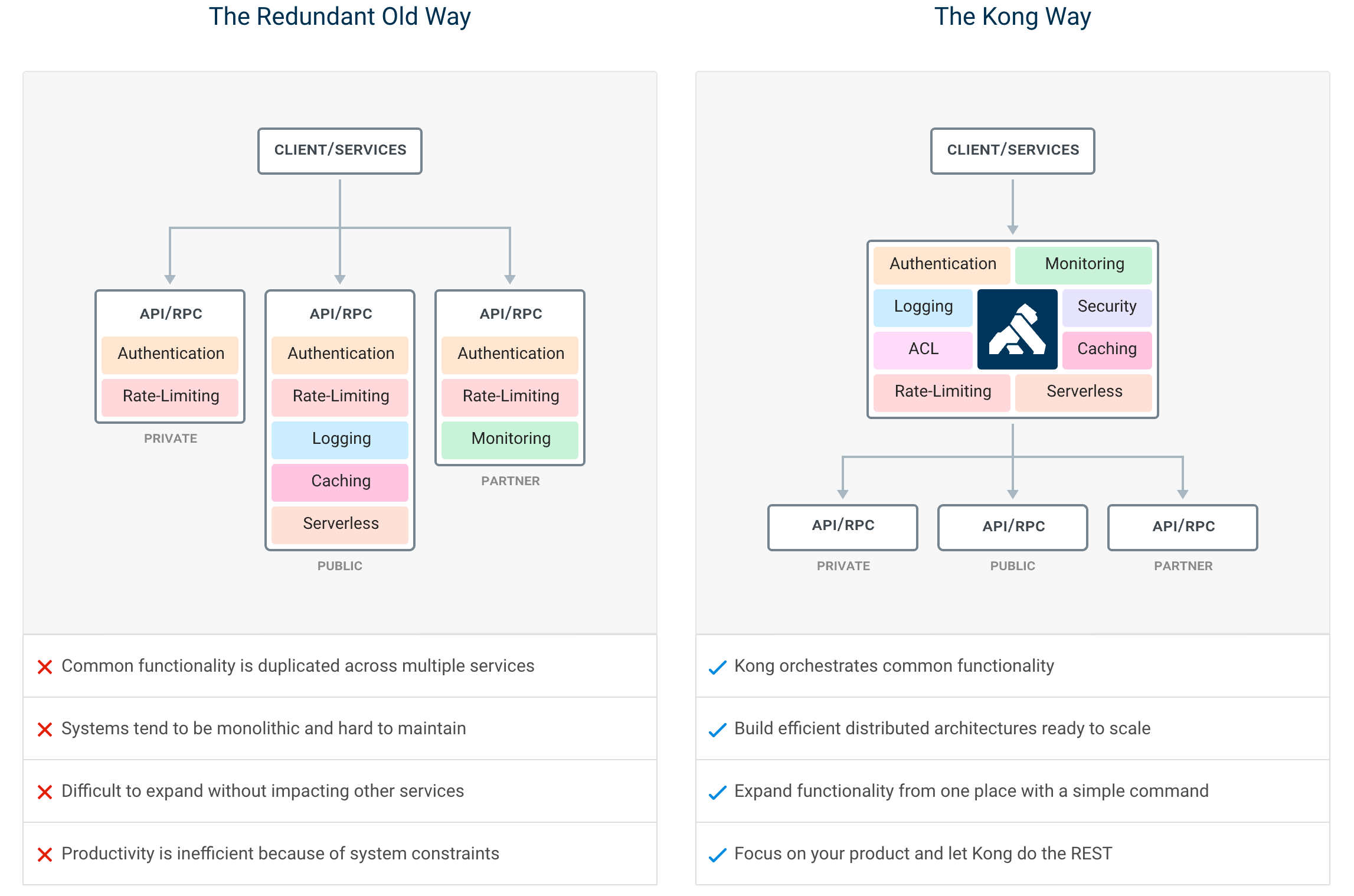
By providing functionality for proxying, routing, load balancing, health checking, authentication (and more), Kong serves as the central layer for orchestrating microservices or conventional API traffic - and agentic LLM and MCP as well - with ease.
Kong runs natively on Kubernetes thanks to its official Kubernetes Ingress Controller.
Installation | Documentation | Discussions | Forum | Blog | Builds | AI Gateway | Cloud Hosted Kong
If you prefer to use a cloud-hosted Kong, you can sign up for a free trial of Kong Konnect and get started in minutes. If not, you can follow the instructions below to get started with Kong on your own infrastructure.
Let’s test drive Kong by adding authentication to an API in under 5 minutes.
We suggest using the docker-compose distribution via the instructions below, but there is also a docker installation procedure if you’d prefer to run the Kong Gateway in DB-less mode.
Whether you’re running in the cloud, on bare metal, or using containers, you can find every supported distribution on our official installation page.
  $ git clone https://github.com/Kong/docker-kong
  $ cd docker-kong/compose/
$ KONG_DATABASE=postgres docker-compose --profile database up
The Gateway is now available on the following ports on localhost:
:8000 - send traffic to your service via Kong:8001 - configure Kong using Admin API or via decK:8002 - access Kong's management Web UI (Kong Manager) on localhost:8002Next, follow the quick start guide to tour the Gateway features.
If you would like to get started with Kong AI Gateway capabilities including LLM and MCP features, please refer to the official AI documentation.
By centralizing common API, AI and MCP functionality across all your organization's services, Kong Gateway creates more freedom for engineering teams to focus on the challenges that matter most.
The top Kong features include:
Plugins provide advanced functionality that extends the use of the Gateway. Many of the Kong Inc. and community-developed plugins like AWS Lambda, Correlation ID, and Response Transformer are showcased at the Plugin Hub.
Contribute to the Plugin Hub and ensure your next innovative idea is published and available to the broader community!
We ❤️ pull requests, and we’re continually working hard to make it as easy as possible for developers to contribute. Before beginning development with the Kong Gateway, please familiarize yourself with the following developer resources:
Use the Plugin Development Guide for building new and creative plugins, or browse the online version of Kong's source code documentation in the Plugin Development Kit (PDK) Reference. Developers can build plugins in Lua, Go or JavaScript.
Please see the Changelog for more details about a given release. The SemVer Specification is followed when versioning Gateway releases.
Kong Inc. offers commercial subscriptions that enhance the Kong Gateway in a variety of ways. Customers of Kong's Konnect Cloud subscription take advantage of additional gateway functionality, commercial support, and access to Kong's managed (SaaS) control plane platform. The Konnect Cloud platform features include real-time analytics, a service catalog, developer portals, and so much more! Get started with Konnect Cloud.
Copyright 2016-2026 Kong Inc.

Licensed under the Apache License, Version 2.0 (the "License");
you may not use this file except in compliance with the License.
You may obtain a copy of the License at

   https://www.apache.org/licenses/LICENSE-2.0

Unless required by applicable law or agreed to in writing, software
distributed under the License is distributed on an "AS IS" BASIS,
WITHOUT WARRANTIES OR CONDITIONS OF ANY KIND, either express or implied.
See the License for the specific language governing permissions and
limitations under the License.
Sign in to join the discussion.
No comments yet. Be the first to say what this is good for.
🪨 why use many token when few token do trick — Claude Code skill that cuts 65% of tokens by talking like caveman

The best-benchmarked open-source AI memory system. And it's free.

Orca is the ADE for working with a fleet of parallel agents. Run any coding agent with your own subscription. Available on desktop, mobile and remote runtime.

A cross-platform desktop All-in-One assistant for Claude Code, Codex, OpenCode, OpenClaw, Grok Build & Hermes Agent. Only official website: ccswitch.io

Never stop coding. Free MIT AI gateway: one endpoint, 352 providers (150+ free), 1200+ models Kimi, Claude, GPT, Gemini, GLM, DeepSeek, MiniMax. Works with Claude Code, Codex, Cursor, OpenCode, Cline & Copilot. Quota-aware auto-fallback, RTK+Caveman compression saves 15-95% tokens, MCP/A2A, Desktop/PWA. Built by 550+ contributors

Compress tool outputs, logs, files, and RAG chunks before they reach the LLM. 20% fewer tokens for coding agents, 60-95% fewer tokens for JSON, same answers. Library, proxy, MCP server.