
HKUDS/
Vibe-Trading

HKUDS/Vibe-TradingOther
"Vibe-Trading: Your Personal Trading Agent"
33k
Taskdog gives you a local task manager you can use from the terminal or through a REST API. It keeps data in SQLite and includes scheduling, time tracking, dependency checks, search, and Gantt-style views. It also ships an MCP server for Claude Desktop.
Builders who want a local terminal task manager with API and MCP access.
You can track and reschedule work from the terminal without juggling separate tools.
Use the same task data from the CLI, the full-screen TUI, or the REST API.
Run several scheduling algorithms, including greedy, genetic, and Monte Carlo approaches.
Use fzf-style search, progressive filter chains, and multi-field sorting.
Compare planned time with actual time and track task progress automatically.
Link tasks and detect circular dependencies.
Attach notes with editor integration and Rich rendering.
Connect Claude Desktop through a Model Context Protocol server.
docker run --rm -it ghcr.io/kohei-wada/taskdog:demo
docker run --rm -d -p 8000:8000 --name taskdog-demo ghcr.io/kohei-wada/taskdog:demo

# Wait for the server and demo data to be ready (~15s)
docker logs -f taskdog-demo 2>&1 | grep -m1 "Server ready"

uvx --from taskdog-ui taskdog tui
git clone https://github.com/Kohei-Wada/taskdog.git
cd taskdog
make install
yay -S taskdog
pip install taskdog-ui[server]
taskdog add "My first task" --priority 10
taskdog list
taskdog gantt
taskdog tui


A task management system with CLI/TUI interfaces and REST API server, featuring time tracking, schedule optimization, and beautiful terminal output.
Designed for individual use. Stores tasks locally in an SQLite database.
https://github.com/user-attachments/assets/2c0de3ec-fa3d-4f41-ae01-acbff04931e3
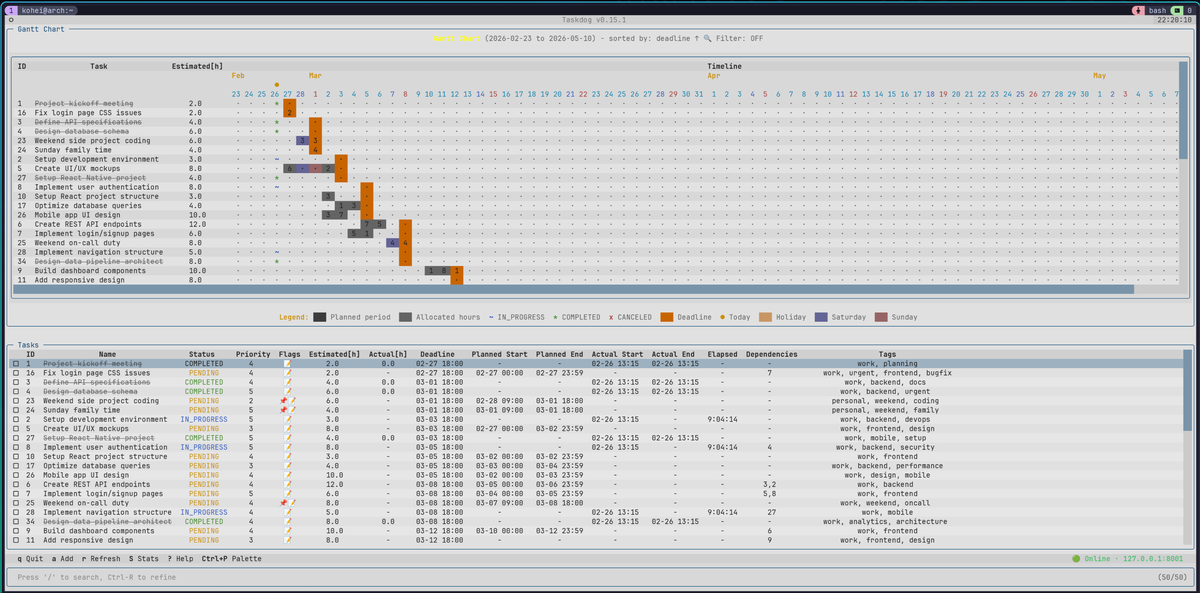
TUI (Textual)
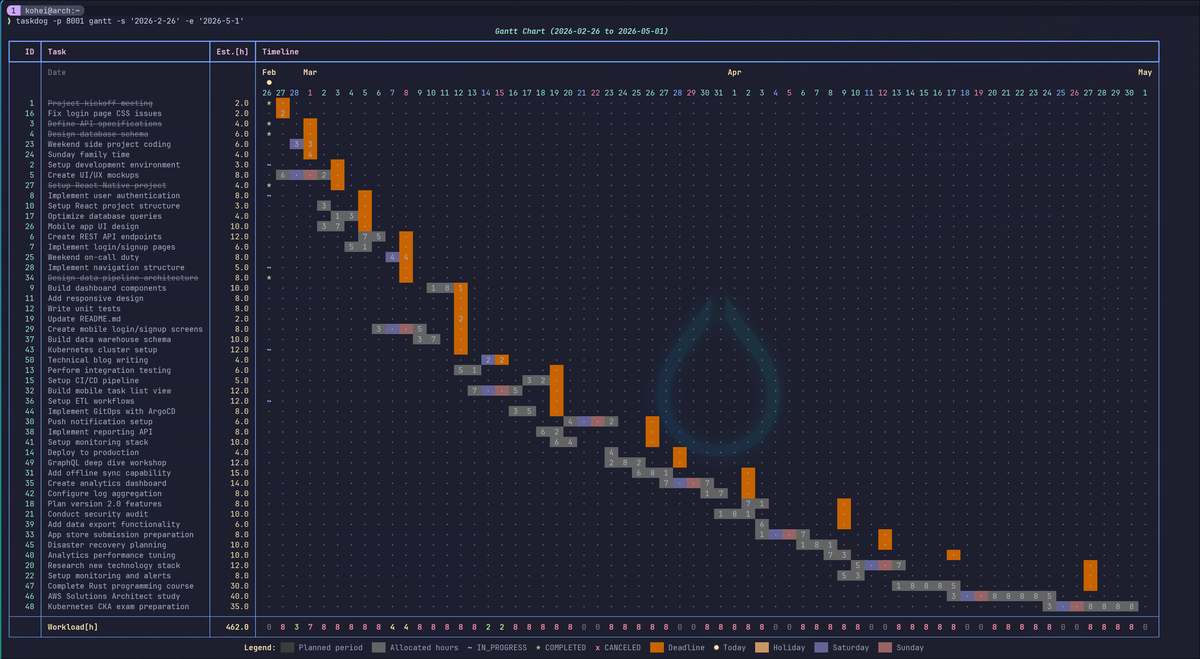
Gantt Chart (CLI)
Try taskdog with ~50 sample tasks. No installation required — just Docker:
docker run --rm -it ghcr.io/kohei-wada/taskdog:demo
The TUI works inside the container, but some keybindings (e.g., Ctrl+P for command palette) may conflict with Docker's key sequences. For the best experience, run the server in a container and connect from your host:
docker run --rm -d -p 8000:8000 --name taskdog-demo ghcr.io/kohei-wada/taskdog:demo

# Wait for the server and demo data to be ready (~15s)
docker logs -f taskdog-demo 2>&1 | grep -m1 "Server ready"

uvx --from taskdog-ui taskdog tui
uvxcomes with uv. It runs the command in a temporary environment without installing anything.
Requirements: Python 3.12+, uv
Supported Platforms: Linux, macOS
Experimental: Windows (WSL2 recommended; native support is still being hardened)
git clone https://github.com/Kohei-Wada/taskdog.git
cd taskdog
make install
This installs the CLI/TUI and server, and sets up a systemd (Linux) or launchd (macOS) service so the server starts automatically.
yay -S taskdog
Installs the CLI/TUI, server, and MCP binaries plus the systemd user service
(enable per-user with systemctl --user enable --now taskdog-server). See
contrib/aur/ for packaging details.
pip install taskdog-ui[server]
You'll need to manage the server process yourself (e.g., taskdog-server &).
%LOCALAPPDATA%\taskdog and configuration under %APPDATA%\taskdog.%EDITOR% first, then falls back to code,
notepad, and vim.taskdog add "My first task" --priority 10
taskdog list
taskdog gantt
taskdog tui
For complete setup including API key configuration, see Quick Start Guide.
Maximize the task list, sort it from the command palette, then narrow it down with / search, Ctrl+U to re-search, and Ctrl+R to build a progressive filter chain (substring + status/tag exclusion):
https://github.com/user-attachments/assets/dcb44390-7b10-49a0-bdfc-01a03d7751f9
UV workspace monorepo with five packages:
| Package | Description | PyPI |
|---|---|---|
| taskdog-core | Core business logic and SQLite persistence |  |
| taskdog-client | HTTP API client library |  |
| taskdog-server | FastAPI REST API server |  |
| taskdog-ui | CLI and TUI interfaces | |
| taskdog-mcp | MCP server for Claude Desktop |  |
Contributions are welcome! See CONTRIBUTING.md for guidelines.
MIT License - see LICENSE for details.
Sign in to join the discussion.
No comments yet. Be the first to say what this is good for.
"Vibe-Trading: Your Personal Trading Agent"

OpenHuman is an open source personal AI for Mac, Windows and Linux — local-first memory, agent orchestration, and deep research.

Your Personal AI Assistant; easy to install, deploy on your own machine or on the cloud; supports multiple chat apps with easily extensible capabilities.

macOS video editor built for AI
Open-source Claude Design alternative. One-click import your Claude Code / Codex API key. Prompt → prototype / slides / PDF. Multi-model (Claude, GPT, Gemini, Kimi, GLM, Ollama). BYOK, local-first, MIT.
🤯 LobeHub is your Chief Agent Operator, organizing your agents into 7×24 operations by hiring, scheduling, and reporting on your entire AI team.