

obra/
superpowers

obra/superpowersSkills
An agentic skills framework & software development methodology that works.
285k
1 add
codex-collab lets Claude Code delegate work to Codex, track progress, and resume threads later. It uses a TypeScript CLI plus a broker that speaks JSON-RPC, manages approvals, streams events, and can register Codex as a peer in Claude Code's messaging system.
Builders who use Claude Code and want Codex to handle tasks, reviews, and follow-up turns from the same workspace.
You can send work to Codex from Claude Code and pick up the thread later instead of re-explaining the task.
Starts a Codex thread with `run`, lets you resume it with `--resume`, and keeps the conversation history.
Runs read-only reviews for pull requests, uncommitted changes, or a specific commit with `review`.
Registers Codex as a Claude Code peer so Claude sessions can message it directly and receive replies back.
Supports mid-turn questions with `ask` and `answer`, plus `approve` and `decline` for tool-call requests.
Streams progress while Codex works and provides `follow --watch` for a live terminal view.
Includes shell and PowerShell installers, plus `update`, `health`, and `skill sync` for maintenance.
git clone https://github.com/Kevin7Qi/codex-collab.git
cd codex-collab
./install.sh
powershell -ExecutionPolicy Bypass -File install.ps1
codex-collab update            # show the latest release and changelog, confirm, then install
codex-collab update --check    # report only, install nothing
git pull
./install.sh    # Windows: powershell -ExecutionPolicy Bypass -File install.ps1
codex-collab health
# Linux / macOS
./install.sh --dev

# Windows (may require Developer Mode or an elevated terminal for symlinks)
powershell -ExecutionPolicy Bypass -File install.ps1 -Dev



Collaborate with Codex from Claude Code. Run tasks, get code reviews, do parallel research, all without leaving your Claude session.
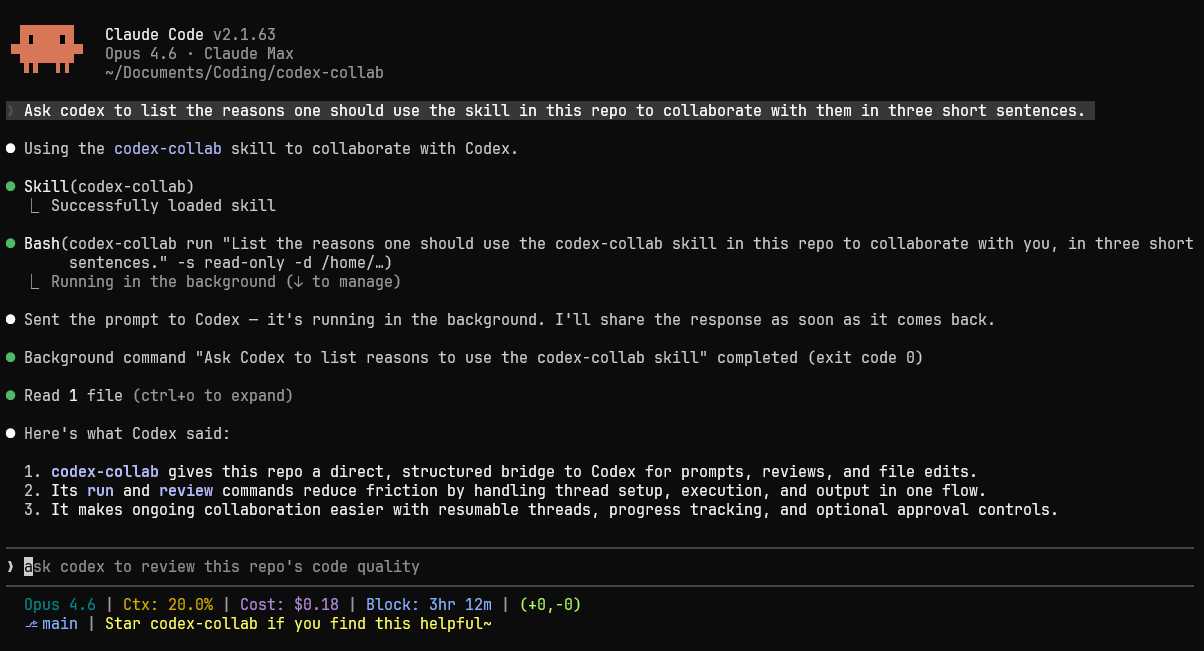
codex-collab is a Claude Code skill that drives Codex through its app server JSON-RPC protocol. It manages threads, streams structured events, handles tool-call approvals, and lets you resume conversations.
SendMessage) and Codex answers back — including asking Claude questions mid-task via a collab.consult tool. No CLI in the hot path.--approval auto).ask) and keep working once the answer arrives (answer); next blocks until something needs attention. Fail-open: an unanswered question never stalls a run.run --detach hands a long task to a detached runner; follow --watch is a purpose-built live view that tracks every run in a terminal pane.--memory (see Options for details).Requires Bun >= 1.0 and Codex CLI (npm install -g @openai/codex) on your PATH. Tested on Linux (Ubuntu 22.04), macOS, and Windows 10.
git clone https://github.com/Kevin7Qi/codex-collab.git
cd codex-collab
./install.sh
powershell -ExecutionPolicy Bypass -File install.ps1
After installation, run codex-collab health to verify. If the command is not found, ~/.local/bin is not on your PATH yet: reopen your terminal, add the export line the installer prints, or use the full path ~/.local/bin/codex-collab health.
[!TIP] You can hand the install to an agent. Running it outside Claude Code, for example from Codex, means the skill is ready the next time you start Claude. It will ask permission to write outside the repository.
The installer builds a self-contained bundle plus a binary shim. On Linux and macOS these go to ~/.claude/skills/codex-collab/ and ~/.local/bin. On Windows they go to %USERPROFILE%\.claude\skills\codex-collab\, and install.ps1 adds the shim to your PATH.
Claude discovers the skill automatically, including in a session that is already running. The exception is your first skill: if ~/.claude/skills/ did not exist before, restart Claude Code once so the new directory is watched.
An installed codex-collab can update itself — no manual git pull needed:
codex-collab update            # show the latest release and changelog, confirm, then install
codex-collab update --check    # report only, install nothing
update fetches the latest release, rebuilds it locally, and reinstalls. Nothing is installed without your confirmation: an interactive y/N prompt, or an explicit --yes when there is no terminal to ask. run, review, and health print a one-line notice when a newer release exists, but never install anything themselves.
Upgrading manually still works, and is the only way to update a dev install (install.sh --dev):
git pull
./install.sh    # Windows: powershell -ExecutionPolicy Bypass -File install.ps1
codex-collab health
update --skip mutes notices for one release, and CODEX_COLLAB_NO_UPDATE_CHECK=1 turns the release check off entirely. The local skill-drift check is offline and stays on regardless.
If the installed SKILL.md falls out of step with the binary or your template set, codex-collab skill sync shows the pending diff and applies it once you confirm.
Both upgrade paths replace the skill bundle and the binary shim. Everything under ~/.codex-collab/ is preserved: configuration, templates, thread history, and run logs. Treat ~/.claude/skills/codex-collab/ as installer-managed, since manual edits there can be overwritten on upgrade.
Use --dev to symlink source files for live-reloading instead of building a bundle:
# Linux / macOS
./install.sh --dev

# Windows (may require Developer Mode or an elevated terminal for symlinks)
powershell -ExecutionPolicy Bypass -File install.ps1 -Dev
# Run a prompted task
codex-collab run "what does this project do?" -s read-only --content-only

# Code review
codex-collab review --content-only

# Resume a thread
codex-collab run --resume <id> "now check error handling" --content-only

# Long task: detach it, watch it live in another pane
codex-collab run "large refactor" --detach --approval auto
codex-collab follow --watch
On macOS/Linux with a messaging-capable Claude Code, the workspace broker registers Codex in Claude Code's session registry:
codex-collab peer up # start the broker + peer; `peer` alone shows status
From then on, any Claude session's ListAgents shows a codex(myproject-a1b2c3) peer — message it and Codex picks up the task, replying as a peer message when done. Each conversation also appears as its own peer. A topic: first line selects one — topic: auth refactor continues the conversation named codex(auth-refactor-a1b2c3) or starts it if new, so several conversations can run in parallel and you switch between them by topic (the line is stripped before Codex sees the message). Further header lines set the conversation's model:, effort:, timeout: (seconds per turn; an overdue turn is stopped and the sender told), sandbox: and approval:. With no topic line you continue your most recent conversation, and an unnamed conversation takes its name from the message text plus the thread's short ID. Replies come from that conversation's address, and replying to it continues that conversation.
Mid-task, Codex can ask its Claude peer a question through a collab.consult tool call; the question arrives as a [consult] message, and the next reply from that session is delivered back into Codex's running turn. Consults are fail-open: unanswered questions time out and Codex proceeds on its own judgment.
Claude Code gates inbound peer messages on the sender's attested permission class. A conversation attests bypass only when it runs with sandbox: danger-full-access, otherwise prompting — so a Claude session running with bypassPermissions holds Codex's replies for review unless its crossSessionInbound setting is accept. A held reply is still readable with codex-collab output <id> --last. A CLI turn on a messaged conversation with an explicit -s changes the sandbox that conversation runs and attests from then on, since Codex keeps a per-turn override for the turns that follow.
The peer degrades cleanly: on Windows, without a session registry, or with CODEX_COLLAB_PEER=off, everything below works exactly as before (CODEX_COLLAB_PEER=on insists on the peer for one invocation, as config mode peer does persistently). The broker stays resident while any Claude session is running and retires on its usual idle timeout once the last one exits.
| Command | Description |
|---|---|
run "prompt" [opts] | Start a thread, send a prompt, wait, print the output (run - reads the prompt from stdin) |
review [opts] | Code review (PR, uncommitted, or a specific commit) |
threads [--json] [--all] | List threads (--discover scans the server, --session limits to this session) |
follow [id] | Live view of a running thread in your own terminal pane. Without an ID it attaches to the active run; --watch keeps following each new run |
output <id> [--last] | Full log for a thread (--last: only the latest turn's output) |
kill <id> [--clear] | Stop a running thread. An active goal is paused first; --clear abandons it |
peer [up] | Show the native-messaging peer's status; peer up starts the broker (and with it the peer) |
| Command | Description |
|---|---|
ask "question" | Invoked by Codex mid-turn to ask a question and wait for the answer. --timeout <sec> sets the deadline (default 600). Fails open: on expiry it tells Codex to proceed on its own judgment and exits 0 |
answer <id> "text" | Answer a pending question (answer <id> - reads from stdin) |
questions [id] | List pending questions in this workspace; with an ID, show the full text |
next | Block until something needs attention, print it in full with how to respond, then exit |
approve <id> | Approve a pending request |
decline <id> | Decline a pending request |
| Command | Description |
|---|---|
progress <id> | Recent activity (tail of the log) |
peek <id> | Recent conversation slice from the server |
config [key] [value] | Show or set persistent defaults |
models | List available models |
templates | List available prompt templates |
| Command | Description |
|---|---|
delete <id> [--purge] | Archive a thread (recoverable via codex unarchive) and delete local files; --purge deletes it server-side instead |
clean | Delete old logs and stale mappings |
skill sync [--yes] | Regenerate the installed SKILL.md when it drifts from the binary or template set. Prints the diff, applies only on confirmation |
update | Check for a newer release and install it with confirmation. See Upgrading |
health | Check dependencies and authentication |
version | Print version (also -v/--version before a command) |
General
| Flag | Description |
|---|---|
-d, --dir <path> | Working directory |
-m, --model <model> | Model name (default: auto — latest available) |
-r, --reasoning <level> | none, minimal, low, medium, high, xhigh, max, ultra (default: auto — highest the model supports, up to xhigh) |
-s, --sandbox <mode> | read-only, workspace-write, danger-full-access (default: workspace-write). review rejects this flag: reviews always run read-only |
--resume <id> | Resume existing thread |
--approval <policy> | Approval policy: never, on-request, on-failure, untrusted, auto (default: never). auto: Codex's Guardian reviewer approves or denies each request autonomously — never blocks on a human; decisions stream as Guardian lines. review rejects this flag: Codex locks review sub-agents to never, so it could never take effect |
--memory | Let Codex's memory feature learn from threads this run creates. Default: created threads get thread/memoryMode/set mode=disabled; resumed threads are never touched (the flag is persistent per-thread, and a thread you created yourself should keep feeding your memory). Governs Codex's local memory consolidation (~/.codex/memories) only — the personality feature is explicit user config (not learned) and unaffected. Persistent form: config memory true |
--timeout <sec> | Turn timeout (default: 3600, max 2147483). When a goal is active it scopes the whole goal, and expiry pauses the goal before exiting. For ask: answer deadline (default: 600); for next: wait deadline (default: wait indefinitely) |
-- | End of options; remaining arguments are treated as prompt text |
run
| Flag | Description |
|---|---|
--detach | Return once the turn is running; watch with follow <id>. Turn lifetime is decoupled from the invoking shell |
--template <name> | Prompt template (user ~/.codex-collab/templates/ or built-in) |
--goal <objective> | Create the thread's goal before the first turn (replaces the objective on --resume); requires goals = true in ~/.codex/config.toml. A prompt is still required — it is turn one, while the goal is the standing objective. With --template collab the objective also gets a one-line ask-channel note — re-injected into every continuation turn, so channel awareness survives long goals. review rejects this flag: a review is a single turn on an ephemeral thread |
--budget <tokens> | Token budget for --goal. Size generously — usage counts each turn's full context, so a single small turn can consume ~60k. review rejects this flag |
- | Read the prompt from stdin |
review
| Flag | Description |
|---|---|
--mode <mode> | Review mode: pr, uncommitted, commit, custom |
--ref <hash> | Commit ref for --mode commit |
--base <branch> | Base branch for PR review (default: auto-detected default branch) |
follow
| Flag | Description |
|---|---|
-w, --watch | Don't exit when the run finishes — keep following each new run (Ctrl-C to stop) |
skill & update
| Flag | Description |
|---|---|
--yes | Apply without prompting — the explicit consent flag for non-interactive sessions |
--check | (update) Show the latest release and changelog without installing |
--skip | (update) Mute update notices for the latest release; a later release notifies again |
Listing & output
| Flag | Description |
|---|---|
--json | JSON output for supported commands (threads, peek) |
--all | List all threads with no display limit |
--discover | Query Codex server for threads not in the local index |
--limit <n> | Limit items shown by threads or peek |
--full | Include all item types in peek output (default shows messages only) |
--content-only | Suppress progress lines; with output, return only extracted content |
--last | (output) Only the latest turn's output instead of the whole thread history (implies --content-only) |
--session | (threads) Only threads the current session has run |
run and review:
| Code | Meaning |
|---|---|
0 | Completed |
1 | Failed |
3 | Timed out — an active goal is paused first (resumable) |
4 | Interrupted (kill) |
5 | Died blocked on an approval — the request is void; resume with a longer --timeout, or use --approval auto |
6 | Broker busy and fallback unavailable — transient, retry |
7 | Goal ended blocked or usage/budget-limited — steer with run --resume, or abandon with kill --clear |
next: 0 event delivered (printed in full on stdout) · 3 --timeout elapsed with no event · 10 workspace idle (nothing running, nothing pending).
With goals = true in ~/.codex/config.toml, a goal — created by Codex mid-turn, or explicitly with run "first-turn prompt" --goal "objective" [--budget <tokens>] — makes the server keep starting continuation turns until the objective is done, and a run follows the whole goal in one run record and log; its exit code reflects the goal's end. The objective is re-injected into every continuation turn; one too big to state in a sentence can point at a spec or plan file in the repo. threads shows each thread's latest goal state ([goal active: 45k/100k tokens]).
By default, codex-collab auto-selects the latest model (the server's default, followed up its upgrade chain, preferring a -codex variant where one exists) and the highest reasoning effort that model supports, up to xhigh. No configuration needed — it stays current as new models are released.
The max and ultra tiers are opt-in rather than auto-selected: reach for them with -r max / -r ultra on a single run, or make one the standing default with codex-collab config reasoning.
To override defaults persistently, use codex-collab config:
# Show current config
codex-collab config

# Set a preferred model
codex-collab config model gpt-5.6-sol

# Set default reasoning effort
codex-collab config reasoning high

# Unset a key (return to auto-detection)
codex-collab config model --unset

# Unset all keys
codex-collab config --unset
Available keys: model, mode, reasoning, sandbox, approval, timeout, memory
The mode key controls how codex-collab communicates with Claude: auto (the default) uses peer messaging when the platform supports it and falls back to the CLI path otherwise, peer insists on peer messaging, and cli disables peer mechanisms entirely — no agent-registry entry, no per-conversation addresses, no consult tool — routing everything through the command line. Peer messaging requires macOS or Linux with Claude Code 2.1.224 or newer; on Windows or older versions, auto falls back to the CLI path automatically without any configuration. A broker reads the mode when it starts and keeps its peer state until it restarts, so after changing the mode run codex-collab peer up in the workspace to apply it — the broker is replaced only when no turn is running.
CLI flags always take precedence over config, and config takes precedence over auto-detection:
CLI flag > config file > auto-detected
Config is stored in ~/.codex-collab/config.json.
See CONTRIBUTING.md for development setup and guidelines. This project follows the Contributor Covenant code of conduct.
For simpler interactions, you can also check out the official Codex MCP server. OpenAI also ships an official Codex plugin for Claude Code, built around slash commands you invoke yourself. codex-collab asks less of you. Tell Claude what you want in your own words and it handles the rest, running Codex in the background and coming back with what it found.
Thanks to the LINUX DO community for the feedback and support.
Sign in to join the discussion.
No comments yet. Be the first to say what this is good for.
An agentic skills framework & software development methodology that works.

Turn any codebase, with its docs, SQL schemas, configs, and PDFs, into a queryable knowledge graph. A /graphify skill for Claude Code, Cursor, Codex, and Gemini CLI: local deterministic AST parsing, every edge explained, no vector store.

Topic in, narrated explainer video out. A Claude Code / Codex skill that turns any topic into a black-canvas motion-graphics explainer video with TTS voiceover, subtitles and a chapter progress bar. Chinese or English; every frame drawn in code with Remotion.
Public repository for Agent Skills
Open-source AI job search: scan job portals, evaluate listings into a structured A-H report with a global 1-5 score, tailor your CV, track applications — runs locally in your AI coding CLI (Claude Code, Codex, OpenCode, Antigravity…)

Production-grade engineering skills for AI coding agents.