
JuliusBrussee/
caveman

🪨 why use many token when few token do trick — Claude Code skill that cuts 65% of tokens by talking like caveman
105k
1 add
Markdy turns text into animated architecture diagrams that explain how a system works step by step. It uses a diagram DSL, layout engines, and Web Animations API rendering, with editor, CLI, docs, and MCP integrations around the core.
Builders who write system diagrams in Claude Code, Cursor, VS Code, or a terminal workflow and want them to stay in sync with code and docs.
You can describe a system once in text and reuse it as an animated diagram in your editor, docs, or agent workflow.
Write `.markdy` scenes with nodes, flows, beats, themes, and layout rules.
Render diagrams with Web Animations API motion in the browser and in generated output.
Use `markdy render`, `markdy lint`, `markdy format`, `markdy import`, and `markdy diff` from the terminal.
Connect agents to validation, repair, and transpilation tools through Model Context Protocol.
Use the VS Code and Cursor extension for live preview, formatting, completion, and diagnostics.
Embed diagrams in Astro sites and MDX content with package support.
Import Mermaid, Docker Compose, Kubernetes, Terraform state, and Draw.io into Markdy.
Browse and reuse the included `.markdy` examples for common architecture patterns.
npx @markdy/cli render system.markdy --out diagram.html
claude mcp add markdy -- npx -y @markdy/mcp-server
agy mcp add markdy -- npx -y @markdy/mcp-server

Turn architecture diagrams into step-by-step explanations of how your system works.
Markdy turns text into animated diagrams for system design, documentation, and walkthroughs.
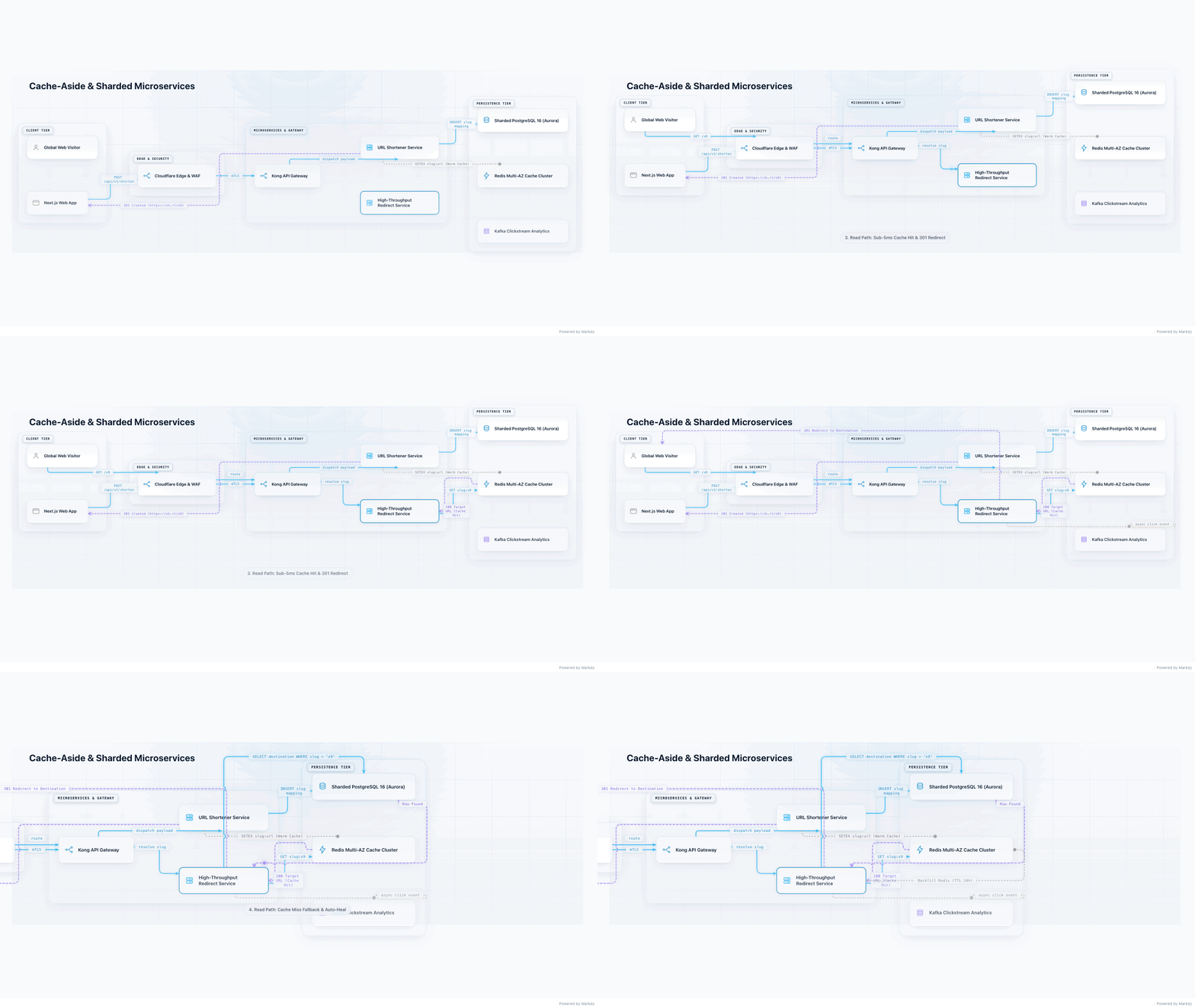
Cache hit: return from Redis. Cache miss: query PostgreSQL and refill the cache.
Try this example → •
View the source
Open in your browser. No installation or AI account required.
Documentation • Examples • VS Code Extension • AI & Agent Guide • Sponsor & Pro Blueprints


💼 Sponsorship & Commercial Use: Markdy is free and open source under the MIT license. If you use Markdy in commercial projects or want to support ongoing engineering, consider sponsoring on GitHub.
.markdy files you can review and version in Git.Open the cache-aside walkthrough. Play it or step through the timeline to follow the cache hit and miss paths.
Edit the example in the studio, or start with the smaller script below. Write MarkdyScript yourself, or ask your coding agent to generate it.
"Follow the canonical Markdy specification (https://markdy.com/AGENT.md) and generate a
.markdyscene:
Explain a Cache-Aside Architecture with a Web Client, API Gateway, URL Service, Redis Cluster, and PostgreSQL database. Include two animated storyboard beats: 1. Cache Hit Path and 2. Cache Miss & Async Warm."
(Tip: If you have the official Markdy MCP Server installed, just ask: "Create an animated Markdy architecture diagram for our cache-aside service.")
system.markdy)scene "Cache-Aside Architecture" theme=auto
layout LR
browser Client "Web Client"
gateway Gateway "API Gateway"
service Svc "URL Service"
cache Redis "Redis Cluster"
database Postgres "PostgreSQL 16"
beat cache_hit "1. Cache Hit Path":
show $nodes stagger=60ms
frame Client Gateway Svc Redis zoom=1.12
Client -> Gateway "GET /link" -> Svc "resolve"
Svc -> Redis "GET key:link"
Svc <- Redis "200 Target URL"
Client <- Gateway "301 Redirect"
beat cache_miss "2. Cache Miss & Async Warm":
frame Svc Redis Postgres zoom=1.15
Svc -> Postgres "SELECT destination WHERE key = 'link'"
Svc <- Postgres "Row Found"
Svc ~> Redis "SETEX key:link (Warm Cache)"
glow Postgres color=#38bdf8 & glow Redis color=#22c55e
Prefer your own editor or terminal? Save the script as system.markdy:
VS Code / Cursor Extension — hoangyell.markdy-vscode:
Press Cmd+K V (macOS) or Ctrl+K V (Windows/Linux) for live side-by-side animated preview.
Terminal CLI — @markdy/cli:
npx @markdy/cli render system.markdy --out diagram.html
Choose the package that fits your stack:
Web Apps (Vanilla JS, React, Vue, Svelte) — @markdy/renderer-dom:
npm install @markdy/renderer-dom
import { createDiagram } from "@markdy/renderer-dom";

// Mount and render interactive 60fps WAAPI diagram directly from code
const diagram = createDiagram({
  container: document.getElementById("diagram-container")!,
  code: markdyScriptCode,
});
Astro Sites & Blogs — @markdy/astro:
npm install @markdy/astro
(Zero-CLS SSR island: <Markdy code={code} client:visible /> — see Astro Guide ↓)
Next.js / MDX Docs — @markdy/mdx:
npm install @markdy/mdx
(Auto-renders fenced ```markdy blocks — see MDX Guide ↓)
👉 DOM Renderer Guide ↗ • Astro Guide ↗ • MDX Guide ↗ • Core Compiler ↗
Static boxes and arrows fail to capture distributed systems in action. Markdy turns text into choreographed 60fps motion graphics directly in your browser.
->), responses (<-), and events (~>) across sequential beat timelines with auto-zooms and glow cues.@src="src/auth.ts#L10-L50") with automated in-tree Git verification.Markdy goes beyond basic diagram drawing into a comprehensive Architecture Intelligence Platform:
scene "Cloud Native Microservices Mesh" theme=paper
layout LR

gateway ApiGateway "API Gateway" icon=nginx @src="src/gateway/router.ts#L20"
service OrderSvc "Order Service" icon=nodejs @src="src/orders/service.ts#L45"
service UserSvc "User Service" icon=golang @src="src/users/handler.go#L30"
cache Redis "Redis Cluster" icon=redis
database Postgres "PostgreSQL 16" icon=postgresql

beat workflow:
  show $nodes stagger=60ms
  ApiGateway -> OrderSvc "POST /orders" & ApiGateway -> UserSvc "GET /profile"
  OrderSvc -> Postgres "Write Order" & UserSvc -> Postgres "Read User"
  OrderSvc ~> Redis "Cache Invalidation"
| Superpower | Syntax / API | Developer Impact |
|---|---|---|
| Dynamic Port Multiplexing | Auto-calculated | Perfectly balanced multi-lane fan-in/fan-out with smooth fillet curves |
| Code Provenance Anchors | @src="path/file.ts#L10" | Guaranteed synchronization between architecture diagrams and real Git code |
| Evolution Git-Diff | diffDiagramASTs(v1, v2) | Automated visual diffing and animated migration timeline generation |
| Blast Radius Lens | calculateBlastRadius(node, ast) | Real-time upstream impact and downstream failure cascade isolation |
| Contextual Share Cards (1200×630) | exportRouteShareCard(), exportReachShareCard() | High-impact social & README cards with active route/blast-radius telemetry |
| 9-Point Showcase Quality Gate | markdy verify <file> --quality showcase | Deterministic SHA-256 integrity receipt & responsive viewport validation |
| Architecture Recipe Guidance | markdy guide "<query>" | Instant AI scenario pattern matching for cache-aside, EDA, zero-trust, and lakehouse |
| Native Vector Symbols | icon=redis, icon=kafka | Zero-CDN, lightweight vector badges embedded directly in the artifact |
Extend Markdy across your favorite AI agents, editors, frameworks, and deployment workflows:
Equip Claude, Cursor, Antigravity, VS Code, Cline, Windsurf, or Zed with self-healing syntax diagnostics, auto-repair, and transpilers:
# Claude Code / CLI
claude mcp add markdy -- npx -y @markdy/mcp-server

# Google Antigravity & Gemini CLI
agy mcp add markdy -- npx -y @markdy/mcp-server
👉 1-Click Install for Cursor ↗ • 1-Click Install for VS Code ↗ • Full JSON Configs for 6 IDEs ↓ • AI Agent Guide (AGENT.md) ↗
Live side-by-side animated preview (Cmd+K V), syntax highlighting, auto-completion, error squiggles, and SVG/PNG export:
# Visual Studio Code
code --install-extension hoangyell.markdy-vscode

# Cursor / VSCodium (Open VSX Registry)
cursor --install-extension hoangyell.markdy-vscode
👉 VS Code Marketplace ↗ • Open VSX Registry ↗ • Extension Docs ↗
Zero-CLS, SSR-placeholder islands with viewport-triggered lazy hydration for Astro documentation sites and blogs:
pnpm add @markdy/astro
---
import { Markdy } from "@markdy/astro";
import code from "./diagram.markdy?raw";
---

<Markdy code={code} client:visible />
Render fenced ```markdy code blocks directly inside .mdx files with automatic lazy loading:
pnpm add @markdy/mdx react react-dom
// mdx.config.js
import { remarkMarkdy } from "@markdy/mdx";

export default {
  remarkPlugins: [[remarkMarkdy, { componentName: "MarkdyDiagram" }]],
};
Render standalone HTML diagrams or run architecture linting in CI/CD pipelines:
# Global install
npm install -g @markdy/cli

# Render diagram to animated HTML or SVG
markdy render system.markdy --out diagram.html

# Lint Markdy architecture scenes in CI/CD
markdy lint **/*.markdy
@markdy/stdlib-systems: Standard library of semantic cloud and distributed systems node kinds.@markdy/language-server: Headless LSP for custom editor integrations (Neovim, Helix, Emacs).| Capability | Mermaid / PlantUML | Excalidraw / Draw.io | Markdy |
|---|---|---|---|
| Animation & Timing | ❌ Static SVG / PNG | ❌ Static canvas | ✅ 60fps WAAPI motion & step-by-step narrative beats |
| Authoring Style | Text DSL | Manual drag-and-drop | ✅ Declarative text DSL + Live Editor Preview |
| Return Flows & Cycles | ⚠️ Rank distortion / tangling | Manual curve placement | ✅ Cycle-safe returns (<-) & async event arcs (~>) |
| AI Agent Reliability | ⚠️ High hallucination | ❌ Coordinate hallucination | ✅ Strict grammar AST + Self-healing MCP Server |
| Architecture Linter | ❌ None | ❌ None | ✅ Built-in rules (e.g. anti-pattern detection) |
| Universal Ingestion | ❌ Manual rewrite | ❌ Manual export | ✅ 1-Click Transpiler for Mermaid, Compose, K8s, Terraform |
| Core Footprint | ~2 MB+ runtime | Heavy web app | ✅ ~14 kB core parser, zero dependencies |
Markdy is architected as a modular monorepo where each package fulfills a focused responsibility:
| Package | Responsibility | Primary Exports |
|---|---|---|
@markdy/core | Compiler Core & AST Engine | parse(), compile(), formatScene(), diagnoseMarkdyCode(), validateArchitecture(). Zero dependencies (~14 kB). |
@markdy/renderer-dom | Motion Graphics & Rendering | createDiagram(), exportDiagramAsVectorSvg(), exportDiagramAsPng(), exportDiagramAsGif(). 60fps WAAPI timeline. |
markdy-vscode | IDE Extension (VS Code & Cursor) | Side-by-side live animated preview, document formatter (Shift+Alt+F), QuickFix lightbulbs (💡 Fix), Universal Ingestion, CodeLens. |
@markdy/compat | Universal Ingestion Suite | Transpilers for Mermaid, Docker Compose, Kubernetes YAMLs, Terraform state, and Draw.io XML. |
@markdy/cli | Terminal Tool & CI/CD | markdy lint, markdy render, markdy format, markdy import, markdy diff. |
@markdy/mcp-server | AI Agent Integration (MCP) | Model Context Protocol server exposing validation, auto-healing, and transpilation tools for Claude, Cursor, Antigravity, Cline, Windsurf. |
@markdy/astro & @markdy/mdx | Docs & Blog Integrations | Zero-CLS, SSR-placeholder islands with viewport hydration for content sites. |
@markdy/language-server | Headless LSP Server | Diagnostic publishing, hover docs, formatting, and completions for language clients. |
@markdy/stdlib-systems | Domain Vocabulary | Semantic primitives for cloud, infrastructure, and distributed systems. |
Markdy provides topological layout algorithms tailored to specific system patterns:
architecture, flowchart, tree, state, sequencelayers, nested, swimlane, quadrant, pyramidmedallion, timeline, gantt, flywheel, constellation, radar, vennThemes: midnight (dark modern), paper (light technical), blueprint (CAD cyan), editorial (serif publication), graphite (minimal dark), nebula (cosmic violet), terminal (CLI retro), sketchy (hand-drawn), ink (blue ballpoint & fountain pen ink), doodle (playful doodle).
Convert existing diagrams and infrastructure configs into animated MarkdyScript scenes:
markdy import flow.mmd            --out flow.markdy        # Mermaid.js Flowcharts & Sequences
markdy import docker-compose.yml  --out compose.markdy     # Docker Compose Services & Networks
markdy import k8s-manifests/      --out cluster.markdy     # Kubernetes Ingress, Pods & Services
markdy import terraform.tfstate   --out infra.markdy       # Terraform Provisioned State
markdy import architecture.drawio --out diagram.markdy     # Draw.io / diagrams.net XML
Equip your favorite AI Coding Agent with native Markdy tools (validate_markdy_code, diagnose_markdy_syntax, fix_markdy_code, transpile_to_markdy) and live specification resources (markdy://spec/agent-reference).
| AI Environment | Setup Action | Method |
|---|---|---|
| Cursor |  | 1-Click Install ↗ or JSON Config |
| VS Code / Copilot |  | 1-Click Install ↗ or JSON Config |
| Claude Code & Desktop |  | CLI (claude mcp add) & JSON |
| Google Antigravity |  | 1-Command CLI (agy mcp add) |
| Cline / Roo Code |  | Config File (cline_mcp_settings.json) |
| Windsurf / Cascade |  | Config File (mcp_config.json) |
| Zed Editor |  | Config File (settings.json) |
Claude Code (Anthropic CLI):
claude mcp add markdy -- npx -y @markdy/mcp-server
Claude Desktop GUI (claude_desktop_config.json):
{
  "mcpServers": {
    "markdy": {
      "command": "npx",
      "args": ["-y", "@markdy/mcp-server"]
    }
  }
}
.cursor/mcp.json or .vscode/mcp.json){
"mcpServers": {
"markdy": {
"command": "npx",
"args": ["-y", "@markdy/mcp-server"]
}
}
}
Via 1-Command CLI:
agy mcp add markdy -- npx -y @markdy/mcp-server
Or via Config File (~/.gemini/antigravity/mcp_config.json or .agents/mcp_config.json):
{
  "mcpServers": {
    "markdy": {
      "command": "npx",
      "args": ["-y", "@markdy/mcp-server"]
    }
  }
}
cline_mcp_settings.json){
"mcpServers": {
"markdy": {
"command": "npx",
"args": ["-y", "@markdy/mcp-server"]
}
}
}
~/.codeium/windsurf/mcp_config.json){
"mcpServers": {
"markdy": {
"command": "npx",
"args": ["-y", "@markdy/mcp-server"]
}
}
}
settings.json){
"context_servers": {
"markdy": {
"command": {
"path": "npx",
"args": ["-y", "@markdy/mcp-server"]
}
}
}
}
validate_markdy_code: Check syntax, unresolved node references, and cycle rules.diagnose_markdy_syntax: Detailed diagnostics with exact line numbers and remediation steps.fix_markdy_code: Self-healing code repair that fixes common syntax mistakes and formats AST.transpile_to_markdy: Convert Mermaid, Docker Compose, Kubernetes, Terraform, or Draw.io into valid MarkdyScript.markdy://spec/agent-reference: Full AST grammar reference and token catalog.markdy://governance/rules: Architecture rules (Well-Architected, cycle bounds, layer separation).markdy://templates/catalog: 33 production-grade architecture blueprints.Every pull request and build must pass the automated full-cycle verification pipeline:
| Command | Verification Gate | Focus Area |
|---|---|---|
pnpm test | Unit & Integration Suite | AST parser, compiler math, layout solvers, CLI |
pnpm test:visual | Automated Visual Gate | Headless Chrome + Pixelmatch against golden baselines (tests/visual-baselines/) |
pnpm test:perf | Sub-Frame Performance Gate | Chrome DevTools Protocol tracing (sub-40ms render, <25MB JS heap) |
pnpm verify:examples | Canonical Showcase Gate | 33 production blueprints compile with zero warnings |
cleanroom-guard check | Anti-Leak & Clean-Room | Pre-commit secret scanning and clean-room zero-footprint protection |
| Guide | Description |
|---|---|
| Syntax Reference (SYNTAX.md) | Full DSL grammar, flow operators, selectors, cues, and player settings |
| Step-by-Step Tutorial (TUTORIAL.md) | Step-by-step guide from basic flows to multi-beat kinetic scenes |
| **[AI Agent Guide (AGENT.md)](AGENT.md |
Sign in to join the discussion.
No comments yet. Be the first to say what this is good for.
🪨 why use many token when few token do trick — Claude Code skill that cuts 65% of tokens by talking like caveman

The best-benchmarked open-source AI memory system. And it's free.

Orca is the ADE for working with a fleet of parallel agents. Run any coding agent with your own subscription. Available on desktop, mobile and remote runtime.

A cross-platform desktop All-in-One assistant for Claude Code, Codex, OpenCode, OpenClaw, Grok Build & Hermes Agent. Only official website: ccswitch.io

Never stop coding. Free MIT AI gateway: one endpoint, 352 providers (150+ free), 1200+ models Kimi, Claude, GPT, Gemini, GLM, DeepSeek, MiniMax. Works with Claude Code, Codex, Cursor, OpenCode, Cline & Copilot. Quota-aware auto-fallback, RTK+Caveman compression saves 15-95% tokens, MCP/A2A, Desktop/PWA. Built by 550+ contributors

Compress tool outputs, logs, files, and RAG chunks before they reach the LLM. 20% fewer tokens for coding agents, 60-95% fewer tokens for JSON, same answers. Library, proxy, MCP server.