
obra/
superpowers

obra/superpowersSkills
An agentic skills framework & software development methodology that works.
285k
1 add
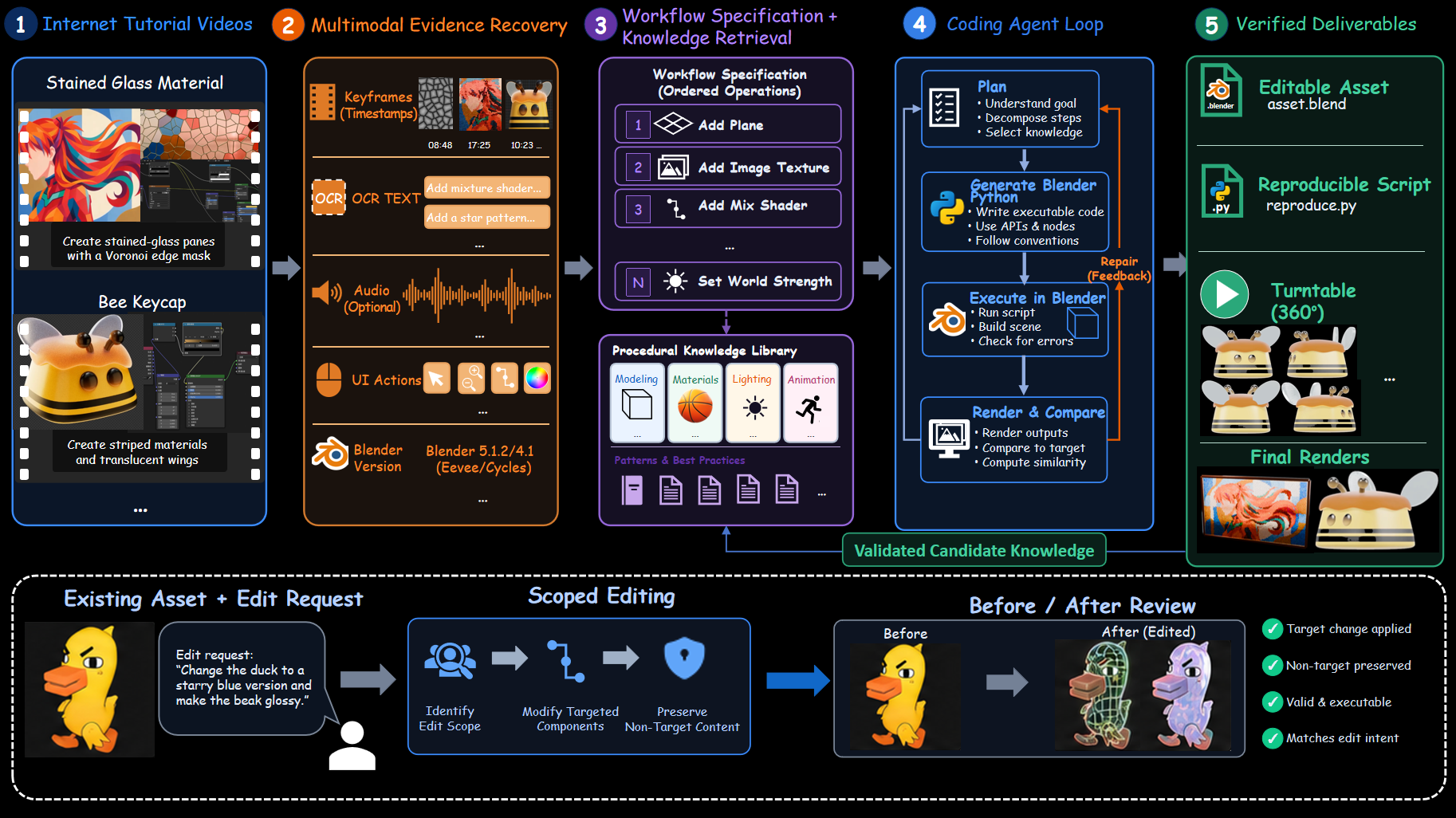
BlenderLore turns Blender tutorial videos or markdown tutorials into timestamped evidence, workflow steps, Blender Python, and rendered validation outputs. It runs a code-and-repair loop, then keeps validated patterns so future scenes can reuse them.
Builders who want Codex to reconstruct Blender tutorials into editable 3D projects and reusable procedural steps.
You can turn tutorial videos into editable Blender assets instead of rebuilding the workflow by hand.
Aligns visual keyframes, OCR, narration, timestamps, interface actions, and Blender version cues from a tutorial.
Converts the evidence into ordered operations and retrieves related procedural knowledge.
Generates Blender Python, executes it, renders the scene, compares the result, and repairs failures.
Produces `tutorial.md`, `reproduce.py`, `asset.blend`, renders, multi-view images, and review results.
Retains successful reconstructions so later tasks can reuse the same construction patterns.
git clone https://github.com/FreedomIntelligence/BlenderLore.git
cd BlenderLore
python3 -m venv .venv
source .venv/bin/activate
python -m pip install -r requirements.txt
mkdir -p "$HOME/.agents/skills"
ln -s "$PWD/skills/blender-pipeline" "$HOME/.agents/skills/blender-pipeline"
export BLENDER_PIPELINE_BLENDER=/path/to/blender
export VIDEO2BLENDER_CYCLES_BACKEND=CPU
run_001/
  tutorial.md             # Illustrated tutorial
  reproduce.py            # Blender Python code
  asset.blend             # Editable project
  render.png              # Rendered image
  six_views/              # Static multi-view renders, when applicable
  final_effect.mp4        # Animation or turntable video, when applicable
  pipeline_review.json    # Review results
python run_api.py --configure --config "$HOME/.config/blender-pipeline/pipeline.json"
python run_api.py --config "$HOME/.config/blender-pipeline/pipeline.json" \
  --video-file /path/to/input/tutorial.mp4 --output-dir /path/to/data/run_api
English | 简体中文
If you like our project, please give us a star ⭐ on GitHub for the latest update.




Internet Blender tutorials contain rich, real-world creation knowledge, but that knowledge is difficult for an agent to use directly. Important instructions may appear in narration, on-screen captions, changing interface states, or brief node-graph operations. BlenderLore converts tutorial videos into timestamped multimodal evidence, reconstructs the demonstrated workflow, and generates executable Blender Python. Each run delivers an editable Blender project, a reproduction script, renders, and validation results.
Generalization is central to BlenderLore. Successful reconstructions are retained as candidate procedural knowledge. When facing an unfamiliar generation or editing task, the agent decomposes the target into reusable construction patterns, retrieves relevant procedural knowledge, and recombines it into task-specific Blender code.
01 · An End-to-End Agent PipelineEach run recreates a tutorial workflow and delivers an editable Blender project, a reproduction script, renders, and validation results.
|
02 · A High-Quality 3D DatasetThrough collection, repair, and reconstruction, we built a high-quality dataset of 23K procedural 3D assets. |
03 · A Reusable Procedural Knowledge LibrarySuccessful workflows are retained as reusable procedural knowledge. For unfamiliar targets, the agent decomposes the task, retrieves relevant patterns, and recombines them into task-specific Blender code. |
Install Python 3.10+, Blender, and FFmpeg (including ffprobe), with Blender and FFmpeg on PATH. Commands below target macOS/Linux; on Windows, use Linux Python and Blender in WSL. Replace example paths with your own.
git clone https://github.com/FreedomIntelligence/BlenderLore.git
cd BlenderLore
python3 -m venv .venv
source .venv/bin/activate
python -m pip install -r requirements.txt
For Codex, install and sign in to Codex CLI using the official documentation, and ensure the client can run codex.
Run from the repository root to install the Skill into the current user's Codex environment:
mkdir -p "$HOME/.agents/skills"
ln -s "$PWD/skills/blender-pipeline" "$HOME/.agents/skills/blender-pipeline"
Cycles uses the CPU by default. Omit the Blender path setting if Blender is already on PATH.
export BLENDER_PIPELINE_BLENDER=/path/to/blender
export VIDEO2BLENDER_CYCLES_BACKEND=CPU
For GPU rendering, replace CPU with the appropriate backend: OPTIX or CUDA for NVIDIA, METAL for Apple Silicon, HIP for AMD, or ONEAPI for Intel.
Keep input files on your computer. For API mode, enter their paths in the terminal launch command in step 5; for Codex, provide paths or links directly in the client's chat composer.
| Input | API argument | Provide in Codex |
|---|---|---|
| Local video | --video-file | Absolute path to the video |
| Video URL | --video-url | Full HTTPS video URL |
| Markdown tutorial | --tutorial | Absolute path to the .md file |
Markdown tutorials need numbered operations and their referenced images. Text-only tutorials also require a final reference image.
Choose a new or empty output directory outside the repository: use --output-dir in API mode, or specify it in the Codex conversation. Output formats are fixed; main files appear as their corresponding stages complete:
run_001/
  tutorial.md             # Illustrated tutorial
  reproduce.py            # Blender Python code
  asset.blend             # Editable project
  render.png              # Rendered image
  six_views/              # Static multi-view renders, when applicable
  final_effect.mp4        # Animation or turntable video, when applicable
  pipeline_review.json    # Review results
Open a terminal at the repository root and run this command for first-time setup:
python run_api.py --configure --config "$HOME/.config/blender-pipeline/pipeline.json"
At the terminal prompts, enter an HTTPS API endpoint ending in /chat/completions and your API key. The endpoint is saved in the endpoint field of ~/.config/blender-pipeline/pipeline.json; the key is saved in model_api_key in the same directory. Edit these files to change the configuration later.
Launch from the same terminal, replacing the input path and output directory with your own. Use the corresponding argument from step 4 for other input types:
python run_api.py --config "$HOME/.config/blender-pipeline/pipeline.json" \
  --video-file /path/to/input/tutorial.mp4 --output-dir /path/to/data/run_api
For a tutorial with a starting project, append --asset /path/to/starter.blend; for a text-only tutorial, append --target-image /path/to/target.png.
Type /blender-pipeline in the chat composer:
/blender-pipeline
Input: /path/to/input/tutorial.mp4
Output: /path/to/data/run_skill
You can replace the input with a full video URL or a Markdown tutorial path. Include paths to any supporting project or reference images in the same message.
@misc{blenderlore2026,
  title        = {BlenderLore: Learning 3D Coding from Internet Tutorial Videos},
  author       = {FreedomAI Team},
  year         = {2026},
  publisher    = {GitHub},
  journal      = {GitHub repository},
  howpublished = {\url{https://github.com/FreedomIntelligence/BlenderLore}},
}
This project is built upon Blender, the free and open-source 3D creation suite.
This project is released under the Apache 2.0 license.
For questions and feedback, please contact us at: minghaowu@link.cuhk.edu.cn
Sign in to join the discussion.
No comments yet. Be the first to say what this is good for.
An agentic skills framework & software development methodology that works.

Turn any codebase, with its docs, SQL schemas, configs, and PDFs, into a queryable knowledge graph. A /graphify skill for Claude Code, Cursor, Codex, and Gemini CLI: local deterministic AST parsing, every edge explained, no vector store.

Topic in, narrated explainer video out. A Claude Code / Codex skill that turns any topic into a black-canvas motion-graphics explainer video with TTS voiceover, subtitles and a chapter progress bar. Chinese or English; every frame drawn in code with Remotion.
Public repository for Agent Skills
Open-source AI job search: scan job portals, evaluate listings into a structured A-H report with a global 1-5 score, tailor your CV, track applications — runs locally in your AI coding CLI (Claude Code, Codex, OpenCode, Antigravity…)

Production-grade engineering skills for AI coding agents.