
JuliusBrussee/
caveman

🪨 why use many token when few token do trick — Claude Code skill that cuts 65% of tokens by talking like caveman
105k
1 add
SkillCompass scores agent skills across structure, trigger, security, function, comparison, and uniqueness. It then points to the weakest dimension, applies a targeted fix, and re-evaluates to confirm the change improved the skill.
Builders who manage Claude Code or OpenClaw skills and want a repeatable way to judge and improve them.
You can turn skill maintenance into a checked loop: find the weakest link, fix it, and verify the result before moving on.
Rates a skill for structure, trigger quality, security, function, comparison value, and uniqueness.
Targets the lowest-scoring dimension, applies a fix, and re-runs evaluation before saving.
Uses hooks to track skill usage locally and surface stale, unused, or risky skills.
Provides commands like `/eval-audit`, `/eval-compare`, and `/eval-improve` for single skills or whole folders.
Scans for injection, secrets, shell misuse, regressions, and recoverable version snapshots.
Supports JSON schemas and `--ci` output for pipeline use.
npx skills add Evol-ai/SkillCompass
git clone https://github.com/Evol-ai/SkillCompass.git
cd SkillCompass && npm install

# User-level (all projects)
rsync -a --exclude='.git'  . ~/.claude/skills/skill-compass/

# Or project-level (current project only)
rsync -a --exclude='.git'  . .claude/skills/skill-compass/
git clone https://github.com/Evol-ai/SkillCompass.git
cd SkillCompass && npm install
# Follow OpenClaw skill installation docs for your setup
rsync -a --exclude='.git'  . <your-openclaw-skills-path>/skill-compass/
/skillcompass                              → see what needs attention
/skillcompass evaluate my-skill            → six-dimension quality report
"improve the nano-banana skill"            → fix weakest dimension, verify, next
"what skills haven't I used recently?"     → usage-based insights
"security scan this skill"                 → D3 security deep-dive
Evaluate quality. Find the weakest link. Fix it. Prove it worked. Repeat.
GitHub · SKILL.md · Schemas · Changelog




| What it is | A local-first skill quality evaluator and management tool for Claude Code / OpenClaw. Six-dimension scoring, usage-driven suggestions, guided improvement, version tracking. |
| Pain it solves | Turns "tweak and hope" into diagnose → targeted fix → verified improvement. Turns "install and forget" into ongoing visibility over what's working, what's stale, and what's risky. |
| Use in 30 seconds | /skillcompass — see your skill health at a glance. /eval-skill {path} — instant quality report showing exactly what's weakest and what to improve next. |
Evaluate → find weakest link → fix it → prove it worked → next weakness → repeat. Meanwhile, Skill Inbox watches your usage and tells you what needs attention.
|
For
|
Not For
|
Prerequisites: Claude Opus 4.6 / 4.7 (complex reasoning + consistent scoring) · Node.js v18+ (local validators)
npx skills add Evol-ai/SkillCompass
Supports 45+ agents including Claude Code, Codex, Cursor, Cline, Gemini CLI, GitHub Copilot, and more. The CLI auto-detects installed agents and sets up the skill in the right location.
git clone https://github.com/Evol-ai/SkillCompass.git
cd SkillCompass && npm install

# User-level (all projects)
rsync -a --exclude='.git'  . ~/.claude/skills/skill-compass/

# Or project-level (current project only)
rsync -a --exclude='.git'  . .claude/skills/skill-compass/
First run: SkillCompass auto-triggers a brief onboarding — scans your installed skills (~5 seconds), offers statusLine setup, then hands control back. Claude Code will request permission for
nodecommands; select "Allow always" to avoid repeated prompts.
git clone https://github.com/Evol-ai/SkillCompass.git
cd SkillCompass && npm install
# Follow OpenClaw skill installation docs for your setup
rsync -a --exclude='.git'  . <your-openclaw-skills-path>/skill-compass/
If your OpenClaw skills live outside the default scan roots, add them to skills.load.extraDirs in ~/.openclaw/openclaw.json:
{
  "skills": {
    "load": {
      "extraDirs": ["<your-openclaw-skills-path>"]
    }
  }
}
/skillcompass is the single entry point. Use it with a slash command or just talk naturally — both work:
/skillcompass                              → see what needs attention
/skillcompass evaluate my-skill            → six-dimension quality report
"improve the nano-banana skill"            → fix weakest dimension, verify, next
"what skills haven't I used recently?"     → usage-based insights
"security scan this skill"                 → D3 security deep-dive
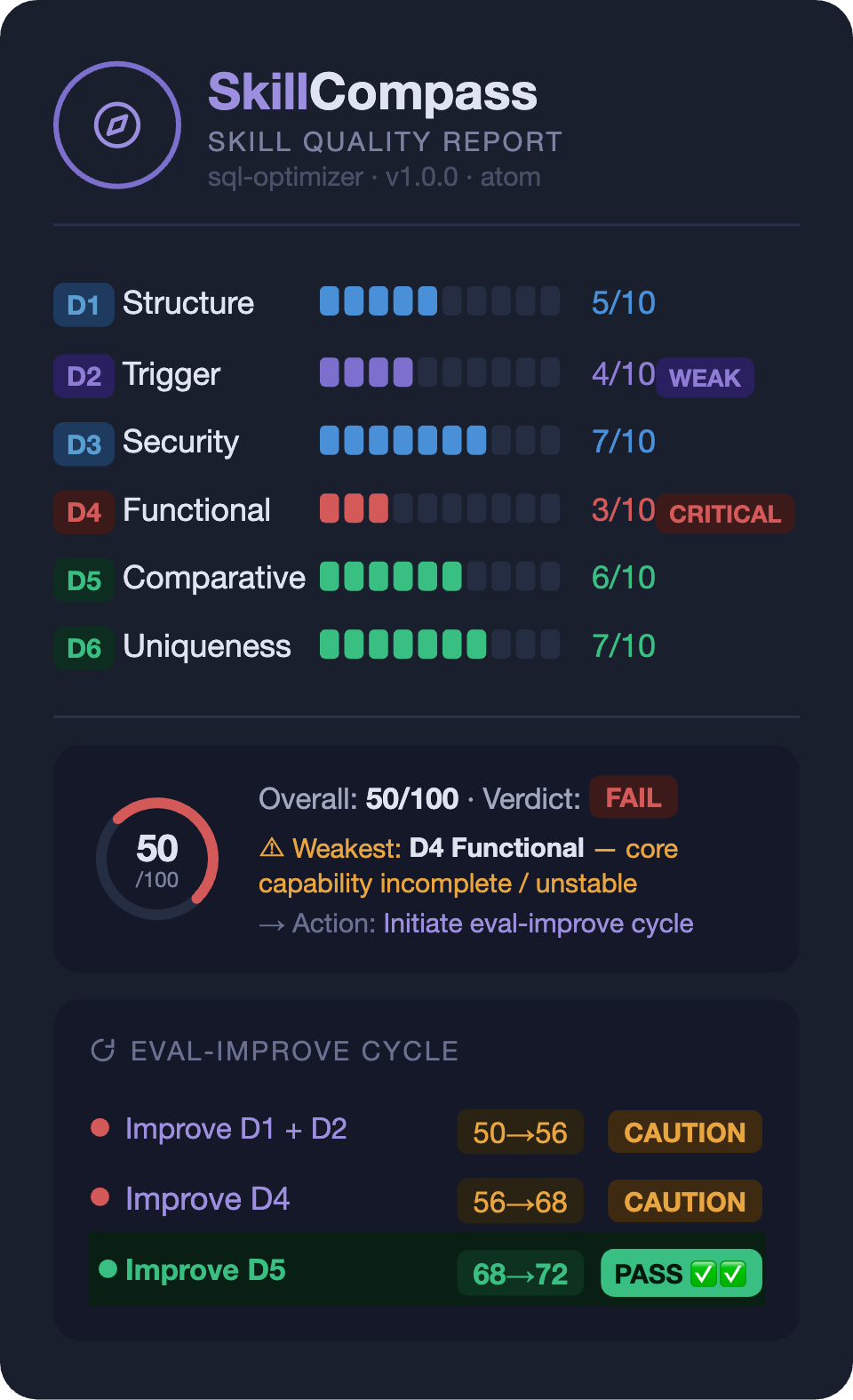
The score isn't the point — the direction is. You instantly see which dimension is the bottleneck and what to do about it.
Each /eval-improve round follows a closed loop: fix the weakest → re-evaluate → verify improvement → next weakest. No fix is saved unless the re-evaluation confirms it actually helped.
| ID | Dimension | Weight | What it evaluates |
|---|---|---|---|
| D1 | Structure | 10% | Frontmatter validity, markdown format, declarations |
| D2 | Trigger | 15% | Activation quality, rejection accuracy, discoverability |
| D3 | Security | 20% | Secrets, injection, permissions, exfiltration, embedded shell |
| D4 | Functional | 30% | Core quality, edge cases, output stability, error handling |
| D5 | Comparative | 15% | Value over direct prompting (with vs without skill) |
| D6 | Uniqueness | 10% | Overlap with similar skills, model supersession risk |
overall_score = round((D1×0.10 + D2×0.15 + D3×0.20 + D4×0.30 + D5×0.15 + D6×0.10) × 10)
| Verdict | Condition |
|---|---|
| PASS | score >= 70 AND D3 pass |
| CAUTION | 50–69, or D3 High findings |
| FAIL | score < 50, or D3 Critical (gate override) |
SkillCompass passively tracks which skills you actually use and surfaces suggestions when something needs attention — unused skills, stale evaluations, declining usage, available updates, and more. 9 built-in rules, all based on real invocation data.
/eval-skill scores six dimensions and pinpoints the weakest. /eval-improve targets that dimension, applies a fix, and re-evaluates — only saves when the target dimension improved and security/functionality didn't regress. Then move to the next weakness.
SkillCompass covers the full lifecycle of your skills — not just one-time evaluation.
Install — auto-scans your inventory, quick-checks security patterns across packages and sub-skills.
Ongoing — usage hooks passively track every invocation. Skill Inbox turns this into actionable insights: which skills are never used, which are declining, which are heavily used but never evaluated, which have updates available.
On edit — hooks auto-check structure + security on every SKILL.md write through Claude. Catches injection, exfiltration, embedded shell. Warns, never blocks.
On change — SHA-256 snapshots ensure any version is recoverable. D3 or D4 regresses after improvement? Snapshot restored automatically.
On update — update checker reads local git state passively; network only when you ask. Three-way merge preserves your local improvements region-by-region.
One skill or fifty — same workflow. /eval-audit scans a whole directory and ranks results worst-first so you fix what matters most. /eval-evolve chains multiple improve rounds automatically (default 6, stops at PASS or plateau). --ci flag outputs machine-readable JSON with exit codes for pipeline integration.
No point-to-point integration needed. The Pre-Accept Gate intercepts all SKILL.md edits regardless of source.
| Tool | How it works together | Guide |
|---|---|---|
| Claudeception | Extracts skill → auto-evaluation catches security holes + redundancy → directed fix | guide |
| Self-Improving Agent | Logs errors → feed as signals → SkillCompass maps to dimensions and fixes | guide |
SkillCompass defines an open feedback-signal.json schema for any tool to report skill usage data:
/eval-skill ./my-skill/SKILL.md --feedback ./feedback-signals.json
Signals: trigger_accuracy, correction_count, correction_patterns, adoption_rate, ignore_rate, usage_frequency. The schema is extensible (additionalProperties: true) — any pipeline can produce or consume this format.
This open-source project is affiliated with and endorsed by the LINUX DO community.
MIT — Use, modify, distribute freely. See LICENSE for details.
Sign in to join the discussion.
No comments yet. Be the first to say what this is good for.
🪨 why use many token when few token do trick — Claude Code skill that cuts 65% of tokens by talking like caveman

The best-benchmarked open-source AI memory system. And it's free.

Orca is the ADE for working with a fleet of parallel agents. Run any coding agent with your own subscription. Available on desktop, mobile and remote runtime.

A cross-platform desktop All-in-One assistant for Claude Code, Codex, OpenCode, OpenClaw, Grok Build & Hermes Agent. Only official website: ccswitch.io

Never stop coding. Free MIT AI gateway: one endpoint, 352 providers (150+ free), 1200+ models Kimi, Claude, GPT, Gemini, GLM, DeepSeek, MiniMax. Works with Claude Code, Codex, Cursor, OpenCode, Cline & Copilot. Quota-aware auto-fallback, RTK+Caveman compression saves 15-95% tokens, MCP/A2A, Desktop/PWA. Built by 550+ contributors

Compress tool outputs, logs, files, and RAG chunks before they reach the LLM. 20% fewer tokens for coding agents, 60-95% fewer tokens for JSON, same answers. Library, proxy, MCP server.