
JuliusBrussee/
caveman

🪨 why use many token when few token do trick — Claude Code skill that cuts 65% of tokens by talking like caveman
105k
1 add
TurboMCP Studio is a native desktop tool for developing, testing, and debugging Model Context Protocol servers. It connects to MCP servers over several transports, shows live protocol traffic, and lets you inspect tools, resources, prompts, and server health. It also includes an MCP proxy, benchmarking, OAuth 2.1 login flows, sampling approval, and a workflow engine. The app stores profiles, history, and execution data locally with SQLite.
Builders who need to inspect, test, and debug MCP servers from a desktop app.
You can test MCP behavior in one place instead of wiring together separate clients, logs, and ad hoc scripts.
Connect to MCP servers over STDIO, HTTP/SSE, WebSocket, TCP, or Unix sockets.
Explore MCP tools, browse resources, and design prompts with schema validation and variable interpolation.
Trace requests and responses in real time with latency tracking, correlation, and filtering.
Place the app between an MCP client and server to inspect traffic or expose one transport through another.
Run instrumented sessions, capture latency and byte metrics, and compare runs with JSON reports.
Handle OAuth 2.1 flows, token refresh, and human-in-the-loop approval for MCP sampling requests.
Run multi-step workflows against MCP servers with saved execution history.
# Install frontend dependencies
pnpm install

A native desktop application for developing, testing, and debugging Model Context Protocol servers.


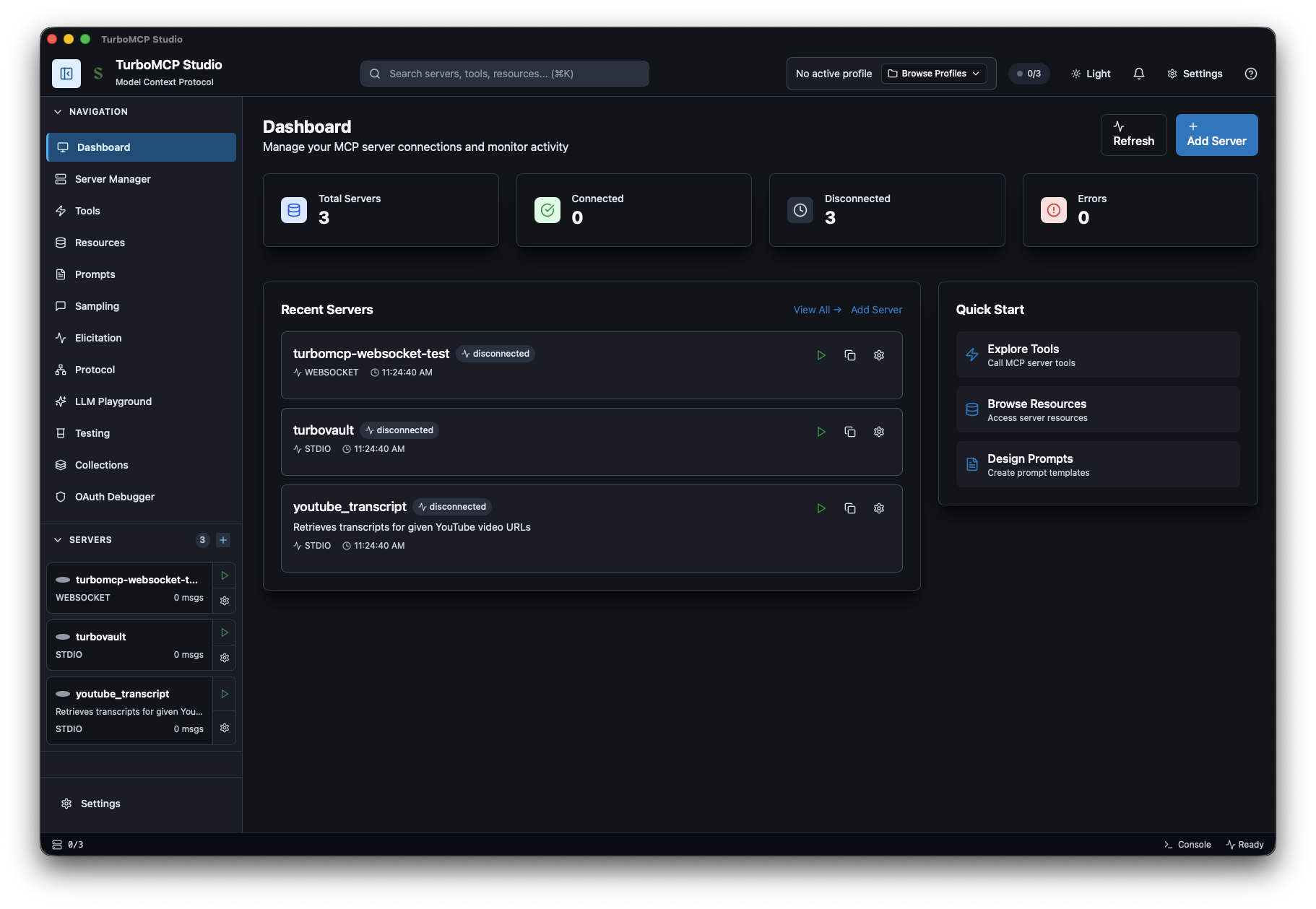
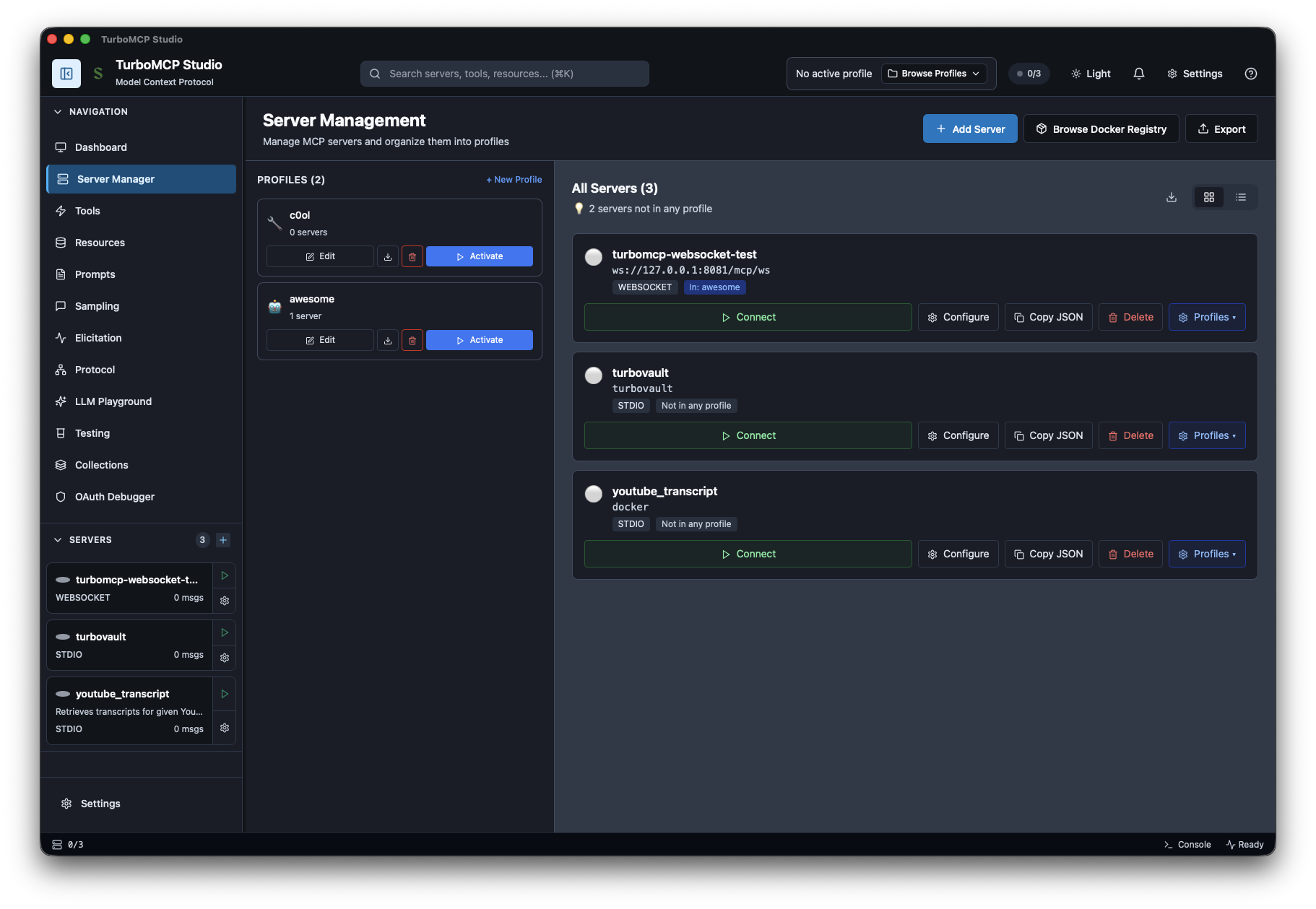
Download the latest release for your platform from GitHub Releases:
| Platform | Format |
|---|---|
| macOS (Apple Silicon) | .dmg or .app (signed + notarized) |
| macOS (Intel) | .dmg or .app (signed + notarized) |
| Windows | .msi installer |
| Linux | .AppImage or .deb |
npm install -g pnpm
curl --proto '=https' --tlsv1.2 -sSf https://sh.rustup.rs | sh
xcode-select --install
sudo apt-get update
sudo apt-get install -y \
  libwebkit2gtk-4.1-dev \
  build-essential \
  curl \
  wget \
  file \
  libxdo-dev \
  libssl-dev \
  libayatana-appindicator3-dev \
  librsvg2-dev
sudo dnf install -y \
  webkit2gtk4.1-devel \
  openssl-devel \
  curl \
  wget \
  file \
  libappindicator-gtk3-devel \
  librsvg2-devel
git clone https://github.com/Epistates/turbomcpstudio.git
cd turbomcpstudio
# Install frontend dependencies
pnpm install
TurboMCP v3.1.5 is published to crates.io and fetched automatically during the build process. No additional setup required.
# Start development server with hot-reload
pnpm run tauri dev

# This will:
# 1. Start Vite dev server (frontend) on http://localhost:1420
# 2. Compile Rust backend
# 3. Launch desktop app with hot-reload enabled
For local testing without creating installers:
# macOS: Build app bundle only (faster, no DMG)
pnpm run tauri:build

# All platforms: Build executable without installers
pnpm run tauri build -- --no-bundle

# Executable location: src-tauri/target/release/turbomcpstudio(.exe)
# Build for your current architecture
pnpm run tauri build

# Build for specific architecture
pnpm run tauri build -- --target aarch64-apple-darwin  # Apple Silicon
pnpm run tauri build -- --target x86_64-apple-darwin   # Intel

# Output locations:
# - App Bundle: src-tauri/target/[arch]/release/bundle/macos/TurboMCP Studio.app
# - DMG Installer: src-tauri/target/[arch]/release/bundle/dmg/TurboMCP Studio_*.dmg
Note: Unsigned builds will show a Gatekeeper warning. To bypass:
# Right-click app → "Open" → "Open"
# Or remove quarantine attribute:
xattr -d com.apple.quarantine "TurboMCP Studio.app"
# Build installers (MSI and NSIS)
pnpm run tauri build

# Build MSI only
pnpm run tauri build -- --bundles msi

# Build NSIS installer only
pnpm run tauri build -- --bundles nsis

# Output locations:
# - MSI: src-tauri/target/release/bundle/msi/TurboMCP Studio_*.msi
# - NSIS: src-tauri/target/release/bundle/nsis/TurboMCP Studio_*-setup.exe
# - Executable: src-tauri/target/release/turbomcpstudio.exe
Requirements:
Installation via Package Manager:
# Using Chocolatey
choco install wixtoolset nsis

# Using Scoop
scoop install wixtoolset nsis
# Build all Linux formats (AppImage, DEB, RPM)
pnpm run tauri build

# Build specific format
pnpm run tauri build -- --bundles appimage  # Universal format
pnpm run tauri build -- --bundles deb       # Debian/Ubuntu
pnpm run tauri build -- --bundles rpm       # Fedora/RHEL

# Output locations:
# - AppImage: src-tauri/target/release/bundle/appimage/turbomcp-studio_*.AppImage
# - DEB: src-tauri/target/release/bundle/deb/turbomcp-studio_*.deb
# - RPM: src-tauri/target/release/bundle/rpm/turbomcp-studio-*.rpm
Running AppImage:
chmod +x turbomcp-studio_*.AppImage
./turbomcp-studio_*.AppImage
Installing DEB:
sudo dpkg -i turbomcp-studio_*.deb
# If dependencies missing:
sudo apt-get install -f
Installing RPM:
sudo rpm -i turbomcp-studio-*.rpm
# Or with dnf:
sudo dnf install turbomcp-studio-*.rpm
# Run type checker once
pnpm run check

# Run in watch mode (during development)
pnpm run check:watch
# Run Rust tests
cd src-tauri && cargo test --all-features

# Run with output
cargo test -- --nocapture

# Run specific test
cargo test test_name

# Run integration tests that require external binaries
TURBOMCP_DEMO_PATH=/path/to/binary cargo test --ignored

# Lint and format
cargo clippy --all-targets --all-features -- -D warnings
cargo fmt --check
Note: Some integration tests are
#[ignore]d by default because they require external MCP server binaries. Set theTURBOMCP_DEMO_PATHenvironment variable to run them locally.
turbomcpstudio/
├── src/                            # SvelteKit frontend
│   ├── routes/                     #   Page routes (+layout.svelte, +page.svelte)
│   └── lib/
│       ├── components/             #   Svelte 5 components (runes mode)
│       │   ├── layout/             #     Shell: Sidebar, MasterLayout, StatusBar
│       │   ├── ui/                 #     Reusable: Button, JsonViewer, FormField, etc.
│       │   └── sampling/           #     Sampling approval UI
│       ├── stores/                 #   Svelte stores (server, profile, sampling, OAuth, etc.)
│       ├── types/                  #   TypeScript type definitions
│       ├── utils/                  #   Helpers: logger, schema validation, cost estimation
│       └── constants/              #   App-wide constants and timeouts
├── src-tauri/                      # Rust backend (Tauri 2.0)
│   ├── src/
│   │   ├── commands/               #   Tauri IPC command handlers
│   │   ├── mcp_client/             #   MCP client: transport, health, sampling, rate limiting
│   │   ├── oauth/                  #   OAuth 2.1: flows, tokens, callback server, DPoP
│   │   ├── proxy/                  #   MCP proxy, benchmarking, metrics
│   │   ├── types/                  #   Shared Rust type definitions
│   │   ├── database.rs             #   SQLite via sqlx (migrations, queries)
│   │   ├── hitl_sampling.rs        #   Human-in-the-loop sampling manager
│   │   ├── workflow_engine.rs      #   Multi-step workflow execution
│   │   ├── error.rs                #   Structured error types
│   │   └── lib.rs                  #   App setup, state, plugin registration
│   ├── tests/                      #   Integration tests
│   ├── Cargo.toml
│   └── tauri.conf.json             #   Tauri config, CSP, capabilities
├── .github/workflows/ci.yml       # CI: fmt, clippy, test, audit, build
├── static/                         # Static assets (logos, screenshots)
└── package.json
| Layer | Stack |
|---|---|
| Frontend | SvelteKit 5 (runes mode) + TypeScript (strict) + Tailwind CSS |
| Backend | Rust + Tauri 2.0 + tokio async runtime |
| MCP Client | TurboMCP — multi-transport, protocol-compliant |
| Database | SQLite via sqlx (local-first, migrations) |
| Auth | OAuth 2.1 with PKCE, OS keyring for credential storage |
| Build | Vite + pnpm + cargo |
| CI | GitHub Actions — fmt, clippy, test, cargo audit, cross-platform build |
┌─────────────────────────────────────────────────────────────────┐
│  Frontend (SvelteKit 5 + TypeScript + Tailwind)                │
│  • Svelte 5 runes for reactive state                           │
│  • Store-per-concern (server, profile, sampling, OAuth, UI)    │
│  • Real-time protocol visualization and message history        │
└──────────────────────────┬──────────────────────────────────────┘
                           │ Tauri IPC (structured JSON, typed commands)
┌──────────────────────────┴──────────────────────────────────────┐
│  Rust Backend (Tauri 2.0 + tokio)                              │
│  ┌──────────────┐ ┌──────────────┐ ┌─────────────────────────┐ │
│  │ MCP Client   │ │ OAuth 2.1    │ │ Workflow Engine          │ │
│  │ • Transport  │ │ • PKCE (S256)│ │ • Step execution         │ │
│  │ • Health mon │ │ • Keyring    │ │ • Variable interpolation │ │
│  │ • Rate limit │ │ • Callback   │ │ • DB persistence         │ │
│  │ • Interceptor│ │ • Refresh    │ │                          │ │
│  └──────┬───────┘ └──────────────┘ └─────────────────────────┘ │
│         │          ┌──────────────┐ ┌─────────────────────────┐ │
│         │          │ MCP Proxy    │ │ HITL Sampling           │ │
│         │          │ • Bridging   │ │ • Approve / reject      │ │
│         │          │ • Benchmark  │ │ • Cost estimation       │ │
│         │          │ • Metrics    │ │ • History tracking      │ │
│         │          │ • Comparison │ │                         │ │
│         │          └──────────────┘ └─────────────────────────┘ │
│         │                           ┌─────────────────────────┐ │
│         │                           │ SQLite (sqlx)           │ │
│         │                           │ • Servers & profiles    │ │
│         │                           │ • Message history       │ │
│         │                           │ • Workflow executions   │ │
│         │                           └─────────────────────────┘ │
└─────────┼───────────────────────────────────────────────────────┘
          │ STDIO / HTTP / WebSocket / TCP / Unix
┌─────────┴───────────────────────────────────────────────────────┐
│  MCP Servers                                                    │
└─────────────────────────────────────────────────────────────────┘
Start dev environment:
pnpm run tauri dev
Make changes:
src/ (hot-reload automatic)src-tauri/src/ (auto-recompile)Type check:
pnpm run check
Test:
cd src-tauri && cargo test
Build for production:
pnpm run tauri build
VS Code with extensions:
Settings (.vscode/settings.json):
{
  "editor.formatOnSave": true,
  "rust-analyzer.cargo.features": "all",
  "svelte.enable-ts-plugin": true
}
TurboMCP Studio is a developer tool. Like Postman, it allows connecting to arbitrary servers including local development instances over plaintext HTTP. Security controls are calibrated accordingly:
wss:/https: for remote origins; ws:/http: are scoped to localhost onlyTo report a security issue, please open a GitHub Issue with the security label.
Contributions are welcome! Please:
git checkout -b feature/amazing-feature)git commit -m 'feat: Add amazing feature')git push origin feature/amazing-feature)We follow Conventional Commits:
feat: New featuresfix: Bug fixesdocs: Documentation changesstyle: Code style changes (formatting)refactor: Code refactoringtest: Test additions or changeschore: Maintenance tasksBefore submitting:
pnpm run check                                        # TypeScript type checking
cd src-tauri && cargo fmt --check                      # Rust formatting
cd src-tauri && cargo clippy --all-features -- -D warnings  # Rust linting
cd src-tauri && cargo test --all-features              # Rust tests
cd src-tauri && cargo audit                            # Dependency vulnerabilities
Error: "could not find turbomcp crates"
cargo clean and rebuild. TurboMCP v3.1.5 is automatically fetched from crates.io during build.Error: "webkit2gtk not found" (Linux)
# Debian/Ubuntu
sudo apt-get install libwebkit2gtk-4.1-dev build-essential libssl-dev librsvg2-dev

# Fedora/RHEL
sudo dnf install webkit2gtk4.1-devel openssl-devel
Error: "VCRUNTIME140.dll was not found" (Windows)
Error: "DMG bundling failed" (macOS)
pnpm run tauri:build instead, which builds the .app bundle without DMGError: "WiX Toolset not found" (Windows)
# Chocolatey
choco install wixtoolset

# Or download from https://wixtoolset.org/
Error: "Failed to bundle project" (Linux)
Error: "Permission denied" building AppImage (Linux)
# Install FUSE for AppImage
sudo apt-get install fuse libfuse2

# Or use DEB/RPM format instead:
pnpm run tauri build -- --bundles deb
Issue: App won't start on macOS
Issue: "App is damaged and can't be opened" (macOS)
xattr -cr /Applications/MCP\ Studio.appIssue: Database errors
~/.config/turbomcpstudio/ directory and restartMIT License - see LICENSE file for details.

TurboMCP Studio is powered by TurboMCP, a Rust implementation of the Model Context Protocol with multi-transport support, OAuth 2.1, rate limiting, and health monitoring.
Status: v0.1.1 — Actively developed. Contributions welcome.
Sign in to join the discussion.
No comments yet. Be the first to say what this is good for.
🪨 why use many token when few token do trick — Claude Code skill that cuts 65% of tokens by talking like caveman

The best-benchmarked open-source AI memory system. And it's free.

Orca is the ADE for working with a fleet of parallel agents. Run any coding agent with your own subscription. Available on desktop, mobile and remote runtime.

A cross-platform desktop All-in-One assistant for Claude Code, Codex, OpenCode, OpenClaw, Grok Build & Hermes Agent. Only official website: ccswitch.io

Never stop coding. Free MIT AI gateway: one endpoint, 352 providers (150+ free), 1200+ models Kimi, Claude, GPT, Gemini, GLM, DeepSeek, MiniMax. Works with Claude Code, Codex, Cursor, OpenCode, Cline & Copilot. Quota-aware auto-fallback, RTK+Caveman compression saves 15-95% tokens, MCP/A2A, Desktop/PWA. Built by 550+ contributors

Compress tool outputs, logs, files, and RAG chunks before they reach the LLM. 20% fewer tokens for coding agents, 60-95% fewer tokens for JSON, same answers. Library, proxy, MCP server.