
obra/
superpowers

obra/superpowersSkills
An agentic skills framework & software development methodology that works.
285k
1 add
AgentFigureGallery gives coding agents a visual reference pool for scientific plots. You can browse styles in a local gallery, mark examples you like, and export a bundle the agent can use when writing plotting code.
Builders who want their agent to make publication-style scientific figures from visual references instead of guessing from a prompt.
You can guide plotting work with concrete visual references, then hand the agent a selected bundle instead of re-explaining style choices.
Searches a large pool of scientific figure candidates by plot type and opens them in a browser gallery.
Lets you like, reject, and select references, then reuses those preferences in later sessions.
Writes a reference bundle for the coding agent from a saved session.
Installs wrappers for Codex, Claude Code, and Cursor, plus a Cursor project rule.
Downloads the `full-public` pack from Hugging Face or a GitHub API manifest fallback.
Provides schemas and docs for contributing and releasing new public reference packs.
git clone https://github.com/Dsadd4/AgentFigureGallery.git
cd AgentFigureGallery
python -m venv .venv
source .venv/bin/activate
pip install -e .
agentfiguregallery doctor
agentfiguregallery install-skill --target codex




AgentFigureGallery brings together beautiful scientific figures primarily from Nature and its sister journals, complemented by plotting code from high-quality open-source projects, to serve as visual templates and code references for you and your AI coding agent.
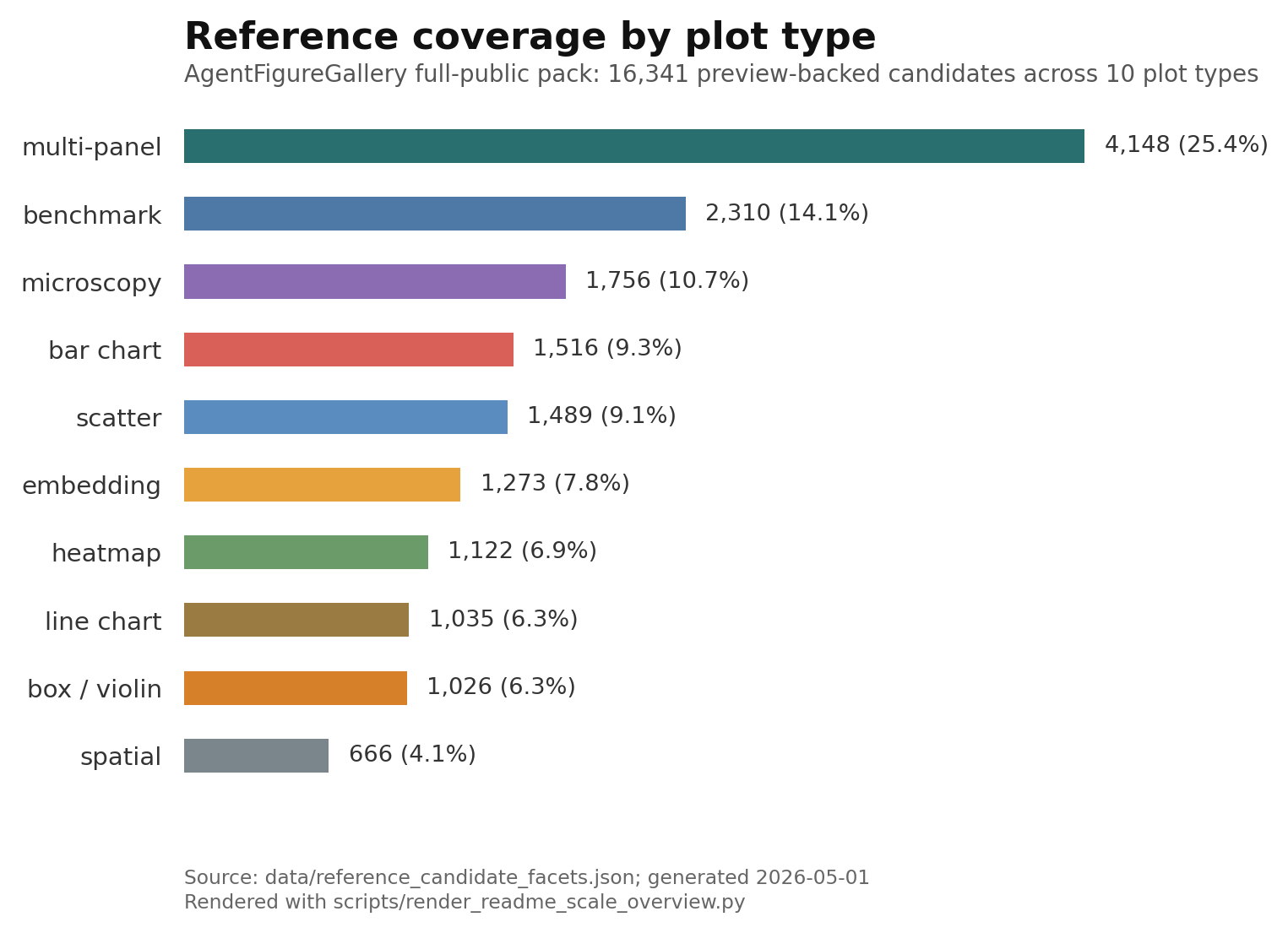
The full public reference pool contains 16,341 visual candidates across 10 common scientific plot types (see collection statistics). Choose the colors, layouts, and presentation styles you like, then let Codex, Claude Code, Cursor, or another coding agent use those references and available source code to build figures for your own data.
Quick install for Codex:
curl -fsSL https://raw.githubusercontent.com/Dsadd4/AgentFigureGallery/main/scripts/install.sh | bash
The script clones or updates the repository at $HOME/AgentFigureGallery, creates a Python virtual environment, installs the package, and installs the Codex skill wrapper. After this bootstrap install, run the CLI as ~/AgentFigureGallery/.venv/bin/agentfiguregallery, or activate the environment first:
source ~/AgentFigureGallery/.venv/bin/activate
For an editable manual install, see Manual Install.
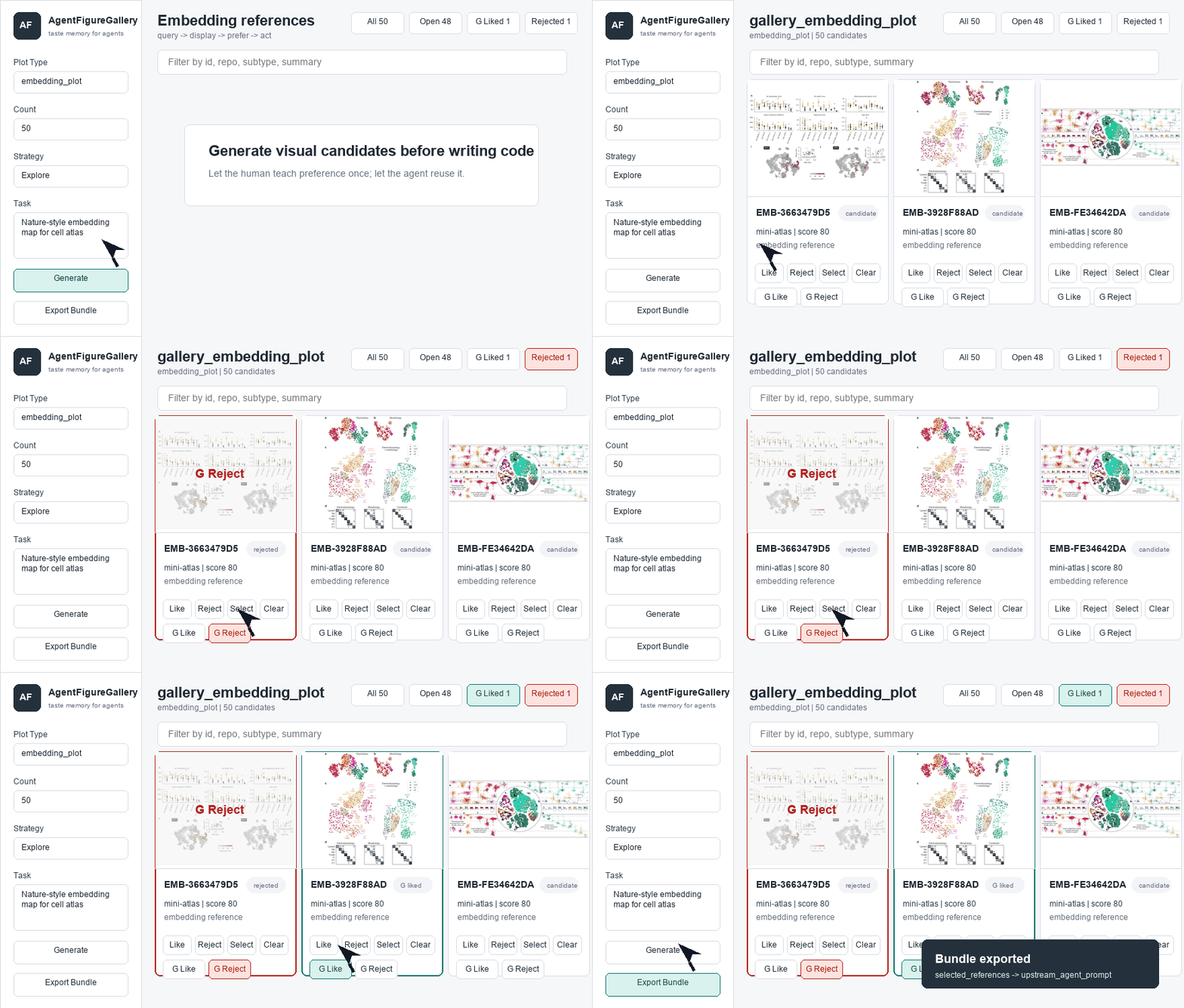
agent query -> browser gallery -> human like/reject/select -> reference bundle -> plotting code
Before generating plotting code, the agent queries visual references, the user selects preferred examples in the browser, and AgentFigureGallery exports the selected references for the final plotting task.
| Goal | Command or link |
|---|---|
| First successful local run after install | ~/AgentFigureGallery/.venv/bin/agentfiguregallery first-run --open |
| Bootstrap the Codex skill | curl -fsSL https://raw.githubusercontent.com/Dsadd4/AgentFigureGallery/main/scripts/install.sh | bash |
| Install through Awesome Skills | npx add-skill Dsadd4/AgentFigureGallery |
| Review install behavior first | Trust and Install Notes |
| Open the Hugging Face showcase | AgentFigureGallery Space |
| Contribute a reference pack | Community Packs |
git clone https://github.com/Dsadd4/AgentFigureGallery.git
cd AgentFigureGallery
python -m venv .venv
source .venv/bin/activate
pip install -e .
agentfiguregallery doctor
agentfiguregallery install-skill --target codex
The default install is enough for smoke tests and the small built-in reference pack. To use the full 16k+ public reference pool, run the setup command below.
Install the complete full-public pack from Hugging Face:
agentfiguregallery setup --pack full-public --manifest-url https://huggingface.co/datasets/dsadd4/AgentFigureGallery/resolve/main/resource_manifest.json
If Hugging Face is blocked, use the GitHub API manifest fallback:
agentfiguregallery setup --pack full-public --manifest manifests/resource_manifest.github-api.json
You can also download the full pack during bootstrap:
curl -fsSL https://raw.githubusercontent.com/Dsadd4/AgentFigureGallery/main/scripts/install.sh | env AFG_INSTALL_FULL_PUBLIC=1 bash
Create a reference session and open the browser gallery:
agentfiguregallery gallery --plot-type embedding_plot --limit 50 --serve
# Then open http://127.0.0.1:8765/
The command prints a session id before starting the local server. In the browser, mark references as liked, rejected, or selected. Those saved preferences are reused by later sessions.
After selecting references, export the bundle for the coding agent:
agentfiguregallery bundle --session <session_id>
The bundle is written to:
outputs/reference_sessions/<session_id>/export_bundle/reference_bundle.json
To reopen the frontend later without creating a new reference session:
agentfiguregallery serve --host 127.0.0.1 --port 8765
After installing the Codex skill, Codex can discover AgentFigureGallery as a local skill.

Then ask your coding agent to run a plot-type smoke test:
Use AgentFigureGallery to test your installed plotting skill. Generate one Nature-style example for each supported plot type, then export PNG/PDF/SVG and a combined preview.
The result should look like this: one Nature-style example for every supported plot type.
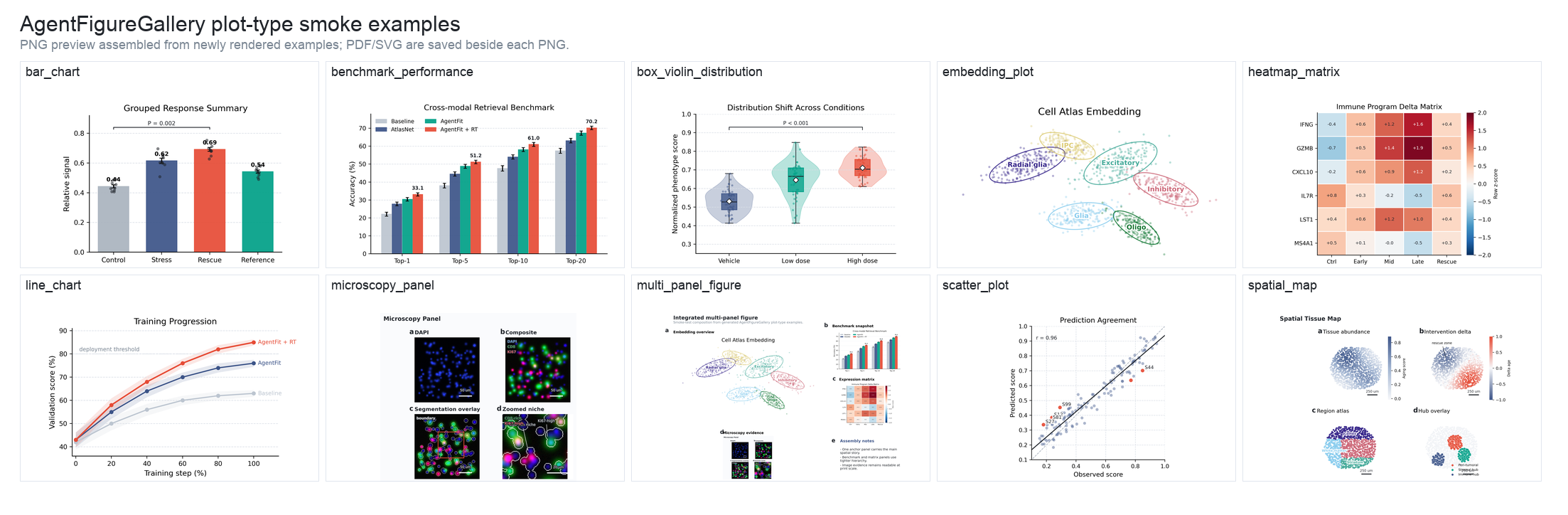
See examples/plot_type_examples/ for the runnable script, source data, and PNG/PDF/SVG outputs.
After pip install -e . finishes, tell your Codex, Claude Code, Cursor, or other coding agent:
Read skills/agent-figure-gallery/SKILL.md, then use AgentFigureGallery before writing publication figure code.
You can install personal skill wrappers for multiple agents:
curl -fsSL https://raw.githubusercontent.com/Dsadd4/AgentFigureGallery/main/scripts/install.sh | env AFG_AGENT_TARGETS="codex claude-code cursor" bash
Cursor project rules need a project path, so pass it explicitly:
curl -fsSL https://raw.githubusercontent.com/Dsadd4/AgentFigureGallery/main/scripts/install.sh | env AFG_AGENT_TARGETS="cursor" AFG_CURSOR_PROJECT=/path/to/your-cursor-project bash
Or install wrappers manually:
agentfiguregallery install-skill --target codex
agentfiguregallery install-skill --target claude-code
agentfiguregallery install-skill --target cursor
agentfiguregallery install-cursor-rule --project /path/to/your-cursor-project
Codex installs to ~/.codex/skills, Claude Code installs to ~/.claude/skills, Cursor-compatible skill installs write to ~/.cursor/skills, and Cursor project rules write to .cursor/rules/agent-figure-gallery.mdc. See docs/AGENT_QUICKSTART.md and examples/agent_prompt.md.
End-to-end examples:
examples/end_to_end_embedding.mdexamples/generated_embedding_plot/README.mdexamples/before_after_benchmark/README.mdUse the browser gallery to browse candidates by plot type, reject unsuitable references, save plot-type preferences, and export selected examples for the agent. With the full-public pack installed, the gallery can draw from 16,341 public visual candidates across common scientific plot types.
agentfiguregallery query --task "Nature-style embedding map for cell atlas"
agentfiguregallery gallery --plot-type embedding_plot --limit 100 --serve
AgentFigureGallery can grow after install. You can ask an agent to follow the expansion guide, or add a small local reference pack yourself, then inspect the new candidates in the browser gallery.
Tell your coding agent:
Read ExtendAgent/README.md, then expand AgentFigureGallery for <plot type or style>. Discover high-quality public scientific plotting sources, render every useful reference as a visible preview, preserve stable candidate IDs and source license metadata, rebuild the candidate index, and report candidate counts plus private-path scan results.
For manual expansion, the important rules are:
candidate_id, plot_type, preview path, source metadata, and license attribution when available.See ExtendAgent/README.md for the full expansion contract and quality gates.
Community packs are the public contribution path for reusable plotting references. The base full-public pack remains the canonical 16k+ pool maintained by Dsadd4; community contributions land first in community_pool/, then accepted material is periodically released as installable asset packs.
Contribution routes:
community_pool/packs/<pack_name>/ using the documented schema.After a community release manifest is published, users can selectively install a community pack:
agentfiguregallery setup --pack community-latest --manifest-url <community_resource_manifest_url>
agentfiguregallery gallery --plot-type embedding_plot --limit 50 --serve
See docs/COMMUNITY_PACKS.md and community_pool/README.md for contribution rules, schemas, review gates, and install patterns.
Completed:
User docs:
docs/AGENT_QUICKSTART.md: minimal instructions for coding agents.docs/COMMUNITY_PACKS.md: community contribution rules and release model.community_pool/: staging area and schema examples for community packs.ExtendAgent/: instructions for agents that expand the gallery.docs/REMOTE_FULL_VALIDATION.md: first remote full-public validation and current mirror-speed caveat.Maintainer docs:
docs/DISCOVERY_PLAYBOOK.md: launch and star-growth checklist.docs/releases/v0.1.0.md: first public release notes.docs/HF_SYNC.md: Hugging Face dataset card and asset sync commands.docs/PYPI_RELEASE.md: Python package release path.docs/HF_DATASET_CARD.md: Hugging Face dataset card draft.docs/LAUNCH.md: public launch copy and channels.docs/FULL_KB_DISTRIBUTION.md: public asset-pack strategy.Sign in to join the discussion.
No comments yet. Be the first to say what this is good for.
An agentic skills framework & software development methodology that works.

Turn any codebase, with its docs, SQL schemas, configs, and PDFs, into a queryable knowledge graph. A /graphify skill for Claude Code, Cursor, Codex, and Gemini CLI: local deterministic AST parsing, every edge explained, no vector store.

Topic in, narrated explainer video out. A Claude Code / Codex skill that turns any topic into a black-canvas motion-graphics explainer video with TTS voiceover, subtitles and a chapter progress bar. Chinese or English; every frame drawn in code with Remotion.
Public repository for Agent Skills
Open-source AI job search: scan job portals, evaluate listings into a structured A-H report with a global 1-5 score, tailor your CV, track applications — runs locally in your AI coding CLI (Claude Code, Codex, OpenCode, Antigravity…)

Production-grade engineering skills for AI coding agents.