Spotkit
A Claude Code skill that turns a feature description into a clean, abstract
product illustration — as real SVG, not a picture of one.
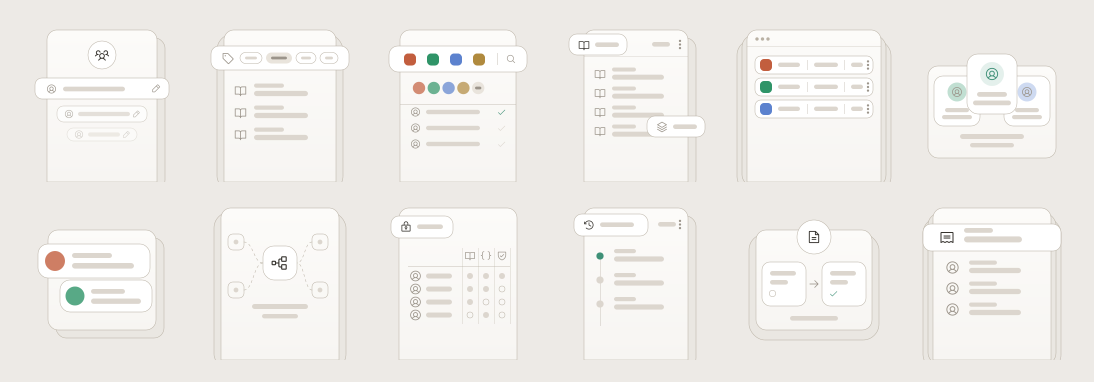
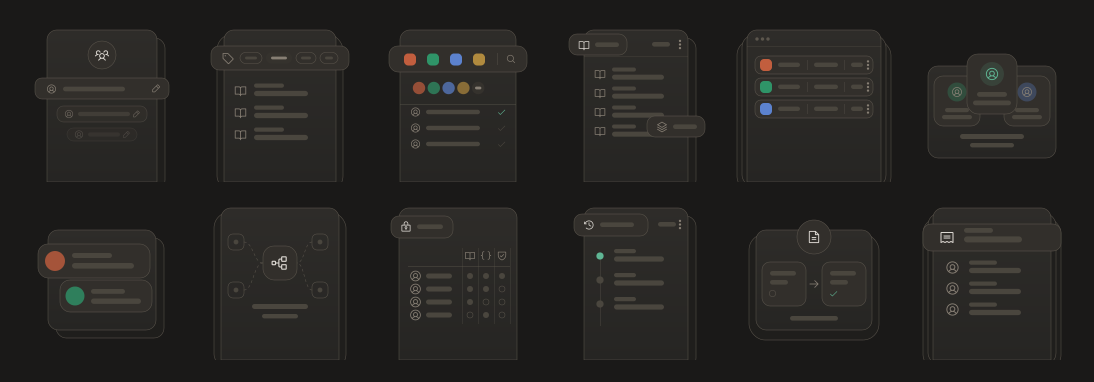
Twelve features, twelve layouts, one set of rules —
and the same twelve files in both themes, from twelve CSS variables.
What it does
You say:
Create an illustration for API version management.
You get a concept, a metaphor, and a production-ready SVG that looks like it
belongs to everything else you've made.
These aren't marketing illustrations. They're abstractions of an interface —
what a feature looks like if you keep its most recognisable parts and throw away
the other 90%.
Abstract the interface, not the idea.
A good one makes someone think "I understand what this feature does." Never
"that's a screenshot of the product."
Install
Claude Code
git clone https://github.com/Devesh-Shirsath/spotkit.git \
  ~/.claude/skills/spotkit
Restart Claude Code and just ask. The skill picks itself up whenever you mention
feature illustrations, spot illustrations, empty states, or an illustration set
for a product.
Codex
git clone https://github.com/Devesh-Shirsath/spotkit.git \
  ~/.agents/skills/spotkit
Restart Codex, then ask — or call it by name: $spotkit an illustration for audit logs.
Any other agent — clone the repo into your project and ask it to follow
SKILL.md. AGENTS.md tells it what to read and what to skip.
No install at all (ChatGPT, or any chat that can open links) — paste this:
Make a Spotkit illustration for [your feature]. Follow the spec at
https://raw.githubusercontent.com/Devesh-Shirsath/spotkit/main/SPEC.md
and take icon paths from
https://raw.githubusercontent.com/Devesh-Shirsath/spotkit/main/references/icons.md
Link the raw files, not the GitHub page — they load in one fetch, and SPEC.md
alone holds every rule and number. Sharing the repo URL instead makes the model
crawl the whole repository first.
No dependencies. Python 3 only — to regenerate, or to run check.py.
Try it without installing
Open examples/gallery.html in a browser — twelve
illustrations, light and dark, from the same twelve files.
Why SVG and not an image model
This style is pure geometry: hairline strokes, exact radii, repeated placeholder
bars, one icon family. Diffusion models are weak at all of it, and weakest at the
thing that matters most — twenty illustrations that look like one family.
The model writes the SVG directly instead. The output is exact, themeable, editable,
diffable, and identical in treatment across a whole set. A prompt-based fallback
is included if you want it anyway.
How it works
your feature description
      ↓
what does it actually do?
      ↓
what relationship is it about?      grouping · connecting · gating
      ↓                             packaging · reviewing · sequencing
2–5 UI primitives that carry it
      ↓
a layout — chosen from the prompt, not from habit
      ↓
SVG, themed by CSS custom properties
      ↓
a quality checklist
Twelve layouts
Picked by meaning and by how many elements the idea needs — never by rotation.
| Layout | Reads as |
|---|
| Header + rows | many of one thing |
| Cascade | a group, receding |
| Tab bar | one option chosen from several |
| Toolbar | tools and the people using them |
| Corner chips | a thing with parts attached |
| Window | a real surface, more off-screen |
| Fanned | a set with one chosen |
| Notifications | events arriving |
| Constellation | systems converging |
| Matrix | who can do what |
| Timeline | sequence, newest first |
| Split | moving through stages |
They come from independent choices — where the floating element sits, what it is,
how content is arranged, how the panel is framed — so the real space is much
larger than twelve.
Monotony is the failure mode of this style. A set where every piece is
"header card, then rows" reads as one image twelve times, however clean each one
is. The skill budgets layout reuse, caps full-width headers at two per twelve,
and checks each illustration against its neighbours.
Theming
Twelve CSS custom properties. One file serves light and dark — never ship two.
:root {
  --il-canvas:  #EDEAE6;   --il-ghost:   #EAE7E2;   --il-panel: #F7F5F2;
  --il-surface: #FFFFFF;   --il-line:    #B9B1A4;   /* every stroke, width 0.5 */
  --il-stroke:  #35322D;   --il-fill:    #DCD6CE;   --il-accent: #3E9077;
}
Change three values, rerun build.py, the whole set rethemes.
Inline the SVG to theme it. CSS custom properties don't cross into
<img src="…"> or <object> — those show the fallback palette forever and
never follow dark mode. If you must use <img>, use the pre-flattened files in
examples/flat/.
If several illustrations share a page, suffix every id in each
(fade-teams → fade-teams-1) or their masks and filters cross-apply.
Using these in Figma
Copy the contents of any file in examples/flat/light/
and paste onto a Figma canvas — you get editable vector layers. Use the flat
files, not the themed ones; Figma doesn't run CSS either, so a themed file pastes
as black shapes.
Figma discards SVG filters on import, so the drop shadow won't come across —
re-apply it as a Figma effect on the one floating layer.
Check an illustration
python3 check.py my-feature.svg
Catches the defects that fail silently: a second stroke width or colour, more
than one shadow, a background rect, text, unsuffixed ids, a moved fade line.
Works on output from any model.
Regenerate
python3 build.py         # rewrites examples/, the gallery and references/icons.md
python3 flatten.py       # rewrites the flat exports and contact sheets
python3 check.py --docs  # fails if any doc disagrees with build.py
Every constant lives in the GEO dict at the top of build.py. Change one and
all twelve move together — which is the operation you'll want most, and the one
that's most error-prone by hand.
What's in the box
SKILL.md                  entry point and workflow
SPEC.md                   every number, the template, one full example — start here
AGENTS.md                 what an AI agent should read, and skip
references/
  icons.md                paste-ready Phosphor paths (generated)
  metaphor.md             feature → concept, ~24 worked SaaS examples
  archetypes.md           the twelve layouts and the choices behind them
  primitives.md           verified geometry + copy-paste SVG library
  theme.md                tokens, light/dark, accent rules
  scaling.md              96px icon through 720px hero
  screenshots.md          abstracting a real product screenshot
  sets.md                 producing and extending a family
  checklist.md            pre-delivery quality gate
  image-prompt.md         fallback path for image models
assets/illustration.css   drop-in token definitions
examples/                 twelve illustrations, flat exports, contact sheet
build.py · flatten.py     generators — every constant in one place
check.py                  linter for illustrations and for the docs
icons.py                  embedded Phosphor geometry
Known limitations
Worth stating rather than having you discover:
- The metaphor test isn't enforced. The checklist says cover the icon — can
a stranger still describe the relationship? Nothing forces a run to apply it.
In testing, two prompts in ten produced illustrations that lean on their icon
to be legible.
- One style preset. The dial system — elevation, edge treatment, overhang,
corner language, stroke weight, icon style, palette, density — is documented,
but only one combination ships. A second is additive; nothing in the method
changes.
- The 0.5 stroke has a floor. Below roughly 96px display width it drops under
half a device pixel and antialiases away. At those sizes, drop the hairlines
and let fills carry the composition.
- Figma import loses shadows. See above.
Who it's for
Product and UX designers, frontend developers, SaaS founders, design system and
docs teams — anyone who needs feature illustrations, empty-state graphics or a
coherent illustration family for a whole product, and doesn't want to draw twenty
of them by hand.
Author
Spotkit was built by Devesh Shirsath, a product
designer working on developer tools and API documentation.
Portfolio ·
LinkedIn ·
GitHub ·
Instagram
Credits
Icons are Phosphor (MIT), regular weight — filled
paths on a 256 grid, so fill them rather than stroking.
The shipped style was derived by measuring a real production illustration family,
rebuilding it from first principles, and verifying by rendering and comparison.
Aesthetic direction was informed by contemporary bento-grid layouts. Your own
direction can differ on every visual dial — the method is what transfers.
MIT licensed. Contributions welcome, especially new layouts and new style presets.


