
JuliusBrussee/
caveman

🪨 why use many token when few token do trick — Claude Code skill that cuts 65% of tokens by talking like caveman
105k
1 add
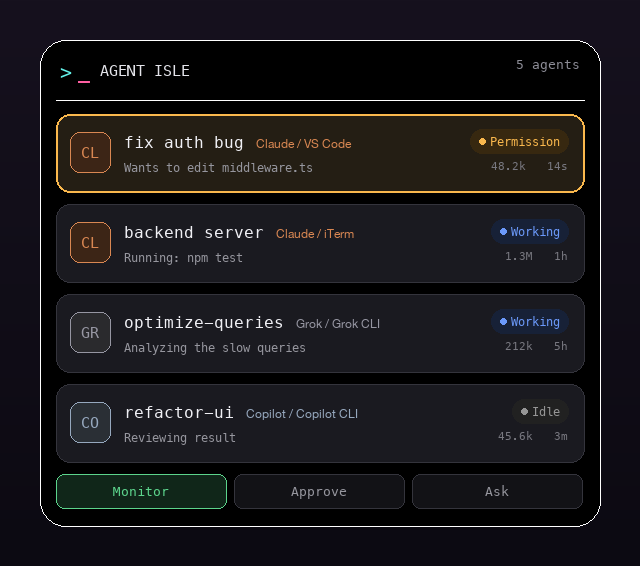
Agent Isle is a macOS app that lives in the notch and shows live agent sessions, approvals, questions, and status updates. It reads Claude Code, Cursor, Grok, and Copilot session history directly, and it can also receive events from other tools through a local HTTP server.
Builders who want to keep an eye on agent sessions, approve actions, and return to the right workspace without leaving their flow.
You can monitor and approve coding-agent work from the notch instead of switching between terminals and windows.
Shows a collapsed pill in the notch and expands into a full session panel on hover or click.
Reads session history from Claude Code, Cursor CLI, Grok CLI, and GitHub Copilot CLI without a separate server for each tool.
Shows permission requests with a diff and lets you allow or deny them from the island.
Surfaces multiple-choice agent questions and returns the selected answer back to the session.
Focuses the exact terminal, editor, or Claude Desktop conversation for the selected session.
Plays chiptune alerts or spoken callouts when a session finishes or needs a decision.
Accepts POST events on `localhost:4711` for tools that are not built in.
Adds and removes Claude Code and Cursor hook files from the `Scripts/` folder.
brew install --cask DevLab-Technologies/tap/agent-isle
xattr -dr com.apple.quarantine "/Applications/Agent Isle.app"



A Dynamic Island for your coding agents. Agent Isle is a native macOS app that lives in the notch and lets you monitor, approve, and jump back to your AI coding agents — Claude Code, Grok, Copilot and more — without leaving your flow.
Pure Swift, no Electron. Runs as a lightweight menu-bar accessory under 100 MB RAM.
Icon: a neon terminal prompt —
>and a block cursor.
cursor-agent) — read straight from its ~/.cursor/chats storeTERM_PROGRAM): editors focus the window already open on the workspace
(via the bundled code/cursor CLI), and Claude Desktop deep-links to the conversation..wav / .aiff / .mp3 in Settings → Sound.localhost event
server; nothing leaves your machine unless you opt into a cloud voice/summary provider
with your own API key.brew install --cask DevLab-Technologies/tap/agent-isle
Homebrew downloads the latest release, verifies it, and drops Agent Isle.app in
/Applications. Upgrade with brew upgrade --cask agent-isle (the in-app updater also
keeps it current).
The cask formula lives in
Casks/agent-isle.rb. Publishing it to theDevLab-Technologies/homebrew-taprepository is a pending follow-up; until that tap is live, use the direct download below.
Grab the latest prebuilt app from the Releases page
(see the version and total-downloads badges above). Download Agent-Isle.zip, unzip it,
and drag Agent Isle.app to /Applications.
If the release isn't notarized, macOS Gatekeeper blocks the first launch. Either right-click the app and choose Open, or clear the quarantine flag once:
xattr -dr com.apple.quarantine "/Applications/Agent Isle.app"
Prefer to build from source? See Build & run below.
swift build                     # compile
bash Scripts/bundle.sh          # build "build/Agent Isle.app"
open "build/Agent Isle.app"     # launch (appears in the notch + menu bar)
On first launch it shows demo mode — simulated sessions so you can see it work. It switches to real sessions automatically as soon as any are detected. Quit and toggle demo/sound from the gear menu in the expanded island.
Claude Code — monitoring works with no setup (Agent Isle reads
~/.claude/projects/ transcripts). To also approve permissions from the notch:
bash Scripts/install-hooks.sh   # adds hooks to ~/.claude/settings.json
bash Scripts/uninstall-hooks.sh # remove them (monitoring still works)
Claude Desktop sessions running over SSH are monitored too. They're discovered from Desktop's own session store, and their transcript — which Claude Code writes on the remote host — is mirrored here over SSH, incrementally, so those cards carry the same activity line, token total, todo list, pending questions and live chat history as a local session. Nothing to install on the remote host: it reuses the host, port and key Desktop already connects with.
Notch approvals are the one thing SSH sessions don't get. Those need the hook running
on the remote host, and it posts to localhost:4711, which there isn't this app.
Cursor CLI (cursor-agent) — monitoring works with no setup (Agent Isle reads the
per-session SQLite store.db under ~/.cursor/chats). To also approve shell, MCP, and
file-edit calls from the notch:
bash Scripts/install-cursor-hooks.sh   # adds hooks to ~/.cursor/hooks.json (preserves others)
bash Scripts/uninstall-cursor-hooks.sh # remove them (monitoring still works)
Grok CLI / GitHub Copilot CLI — detected automatically from ~/.grok/sessions
and ~/.copilot/history-session-state. Nothing to configure.
Any other tool — POST to the event server. Every request needs
X-Agent-Isle-Token, matching the file Agent Isle writes on first launch at
~/.agent-isle/token (directory 0700, file 0600). Missing or wrong token
returns 401 {"ok":false,"error":"unauthorized"}.
curl -X POST http://localhost:4711/event \
  -H 'Content-Type: application/json' \
  -H "X-Agent-Isle-Token: $(cat ~/.agent-isle/token)" \
  -d '{
  "type": "status", "session": "my-session", "agent": "codex",
  "title": "build api", "terminal": "iTerm",
  "status": "working", "message": "Writing routes/users.ts"
}'
type | Behavior |
|---|---|
status | Create/update a session (status, message, title). |
permission | Show an approval card; blocks until you decide, then replies {"decision":"allow"|"deny"}. |
question | Show options; blocks until chosen, replies {"decision":"<option>"}. |
done | Mark the session finished. |
remove | Drop the session. |
Agent Isle can speak a short line when an agent finishes a turn or needs a decision — "Claude finished: fix auth bug", "Codex wants permission to edit middleware.ts" — so you can keep working in another window. Turn it on in Settings → Voice. Each agent gets a distinct, stable voice.
Two tiers, both opt-in and off by default:
On-device (default). Uses macOS's built-in speech synthesizer and composes the line locally. Free, offline, and nothing leaves your Mac.
Bring your own key (optional). For higher-quality voices or AI-written summaries, add your own provider key:
| Purpose | Providers | Key |
|---|---|---|
| Voice | OpenAI, ElevenLabs | your OpenAI / ElevenLabs API key |
| Summary | OpenAI, Anthropic | your OpenAI / Anthropic API key |
You're billed by that provider directly — Agent Isle runs no backend and takes no cut. Keys are stored in the macOS Keychain (never in plists or diagnostic exports). Only the short line to be spoken is sent, and only to the provider you selected. If a request fails, Agent Isle falls back to the on-device voice so you still hear the callout.
Voice callouts respect the same quiet scenes (Focus, screen-lock, screen-sharing) as sounds and notifications.
Sources/AgentIsle/
  main.swift              App entry (NSApplication, accessory policy)
  AppDelegate.swift       Notch window + menu-bar item + watcher/server wiring
  Notch/
    NotchGeometry.swift   Detects the physical notch (falls back to a centered pill)
    NotchWindow.swift     Fixed-size floating panel + click-through hit region
    PassthroughView.swift Passes clicks through everywhere except the island
  Views/
    IslandRootView.swift  Collapsed <-> expanded switch, spring animations
    CollapsedIsland.swift  Resting pill (focus session + count badge)
    ExpandedIsland.swift   Full panel: header, session list, filter tabs, gear menu
    SessionRow.swift       Per-session row (badge, status, tokens); click to jump
    PermissionCard.swift   Inline diff + Allow/Deny; QuestionCard for choices
    AppMark.swift          The terminal-prompt logo, drawn in SwiftUI
  Model/
    Models.swift          AgentKind, SessionStatus, AgentSession, PermissionRequest
    SessionStore.swift    Observable state + demo generator + filters
  Server/
    EventServer.swift     Localhost HTTP listener; parks blocking requests
    IdeWatcher.swift      Hook-free Claude Code session discovery (transcripts)
    TranscriptReader.swift Tails transcripts for activity + token totals
    ExternalAgents.swift  Adapters for Cursor / Grok / Copilot
    CursorStore.swift     Reads Cursor's SQLite store.db (meta + blob DAG)
    HookInstaller.swift   Register/remove Claude Code hooks from the app
    CursorHookInstaller.swift  Same for Cursor's ~/.cursor/hooks.json
    Jumper.swift          Focus a session's terminal/IDE
  Sound/
    SoundPlayer.swift     Runtime-synthesized square-wave alerts + custom-file playback
    SoundPack.swift       Pure event -> custom-audio-file resolution
Casks/
  agent-isle.rb           Homebrew cask (points at the GitHub release zip)
Scripts/
  bundle.sh               Package the binary into a .app
  release.sh              Universal build + (optional) notarization + zip + cask sha256
  install-hooks.sh        Register Claude Code hooks
  uninstall-hooks.sh      Remove them
  agent-isle-hook.py      Claude Code -> island bridge (approvals from the notch)
  install-cursor-hooks.sh Register Cursor hooks
  uninstall-cursor-hooks.sh Remove them
  agent-isle-cursor-hook.py Cursor -> island bridge (approvals from the notch)
  make_icon.py            Generate the app icon
Contributions are welcome — especially new agent adapters. Each adapter is a small
addition to ExternalAgents.swift that reads a tool's session history and returns
ExternalSession values. Open an issue or PR.
MIT — see LICENSE.
Sign in to join the discussion.
No comments yet. Be the first to say what this is good for.
🪨 why use many token when few token do trick — Claude Code skill that cuts 65% of tokens by talking like caveman

The best-benchmarked open-source AI memory system. And it's free.

Orca is the ADE for working with a fleet of parallel agents. Run any coding agent with your own subscription. Available on desktop, mobile and remote runtime.

A cross-platform desktop All-in-One assistant for Claude Code, Codex, OpenCode, OpenClaw, Grok Build & Hermes Agent. Only official website: ccswitch.io

Never stop coding. Free MIT AI gateway: one endpoint, 352 providers (150+ free), 1200+ models Kimi, Claude, GPT, Gemini, GLM, DeepSeek, MiniMax. Works with Claude Code, Codex, Cursor, OpenCode, Cline & Copilot. Quota-aware auto-fallback, RTK+Caveman compression saves 15-95% tokens, MCP/A2A, Desktop/PWA. Built by 550+ contributors

Compress tool outputs, logs, files, and RAG chunks before they reach the LLM. 20% fewer tokens for coding agents, 60-95% fewer tokens for JSON, same answers. Library, proxy, MCP server.