
obra/
superpowers

obra/superpowersSkills
An agentic skills framework & software development methodology that works.
285k
1 add
This skill helps an agent find a game's active mouse settings, match sensitivity across games, and review gameplay to suggest adjustments. It works through local Python scripts, evidence exports, and structured files rather than a hosted service.
Builders who want Codex, Claude Code, or another skill host to handle mouse sensitivity tuning from files and gameplay evidence.
You can keep a familiar sensitivity when you switch games and test changes with recorded evidence.
Finds the active profile, reads native settings, and records where each sensitivity value came from.
Establishes each game's scaling and matches a chosen metric such as turn distance.
Captures a bounded session, exports frames and input logs, and uses them to assess aim issues.
Prepares a patch, backs up the original file, applies the change with the game closed, and can roll it back.
Creates frame exports and session evidence from recorded gameplay for image-based review.
git clone https://github.com/DenisSergeevitch/game-sensitivity-coach.git ~/.agents/skills/game-sensitivity-coach


An agent skill that discovers your mouse settings, carries a familiar sensitivity into another game, and reviews ordinary gameplay to recommend adjustments. You play; your agent handles recording, image inspection, evidence, and calculations.
Built from practical work with THE FINALS, Battlefield 6, and Holdfast. The workflow is game-independent; capture support, file formats, and each game's sensitivity math still need verification.
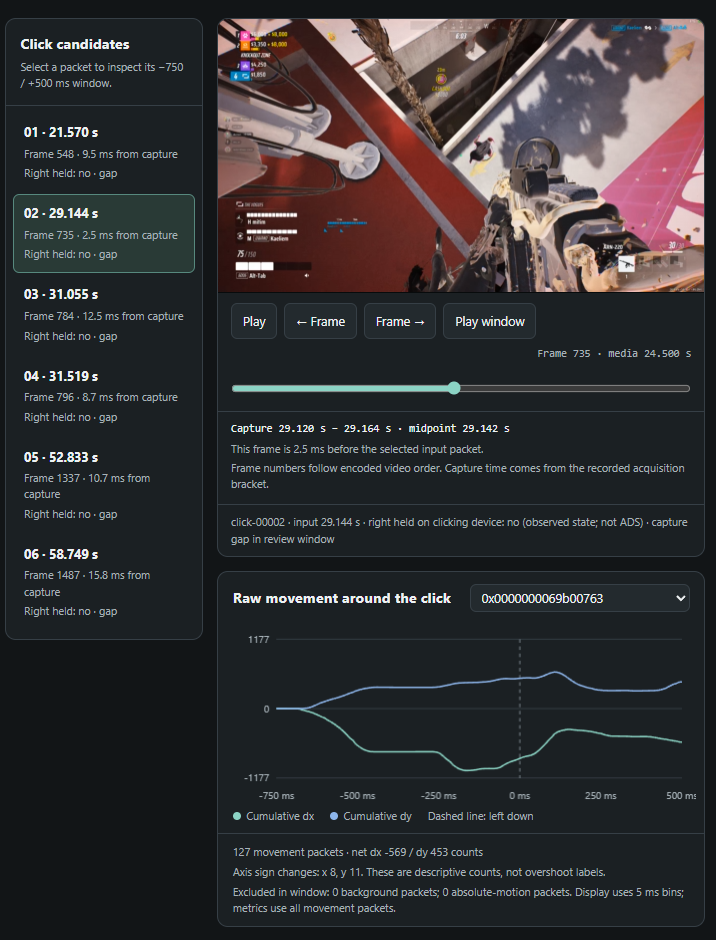
An example from THE FINALS. The agent reviews the frames and input logs itself. This optional viewer lets you inspect its evidence; you do not need to label shots or fill in forms.
| Ask your agent to… | What happens |
|---|---|
| Understand your current setup | Find the active profile, read native settings, distinguish hip fire from scoped/ADS values, and record where each value came from. |
| Transfer sensitivity between games | Establish each game's scaling and match a stated metric, such as turn distance. Optical matching is handled separately. |
| Improve aim from gameplay | Record a bounded session, inspect actual frames and mouse movement, distinguish sensitivity problems from timing/recoil/target movement, and propose a setting to retain or test. |
When you authorize a change, the agent prepares an exact patch, backs up the original, applies it with the game closed, and verifies the result. It can then compare another sample and keep or roll back the change within your agreed limits. There is no universal “best” number: retaining a well-supported baseline is a valid verdict.
Download the latest skill ZIP, then extract it. Keep the entire game-sensitivity-coach folder together, including scripts, references, and assets. Each release also includes a SHA-256 checksum.
| Agent | Personal installation | Project installation |
|---|---|---|
| Codex | ~/.agents/skills/game-sensitivity-coach/ | .agents/skills/game-sensitivity-coach/ |
| Claude Code | ~/.claude/skills/game-sensitivity-coach/ | .claude/skills/game-sensitivity-coach/ |
| Another Agent Skills host | Copy the folder into that host's documented skill directory. | The folder containing SKILL.md is the skill. |
Alternatively, clone directly into your agent's skill directory. For a personal Codex installation:
git clone https://github.com/DenisSergeevitch/game-sensitivity-coach.git ~/.agents/skills/game-sensitivity-coach
On Windows, ~ means your user home directory. Follow the current Codex skill documentation or Claude Code skill documentation if your host uses a different setup. The package follows the Agent Skills format; agents/openai.yaml supplies optional Codex display metadata.
You need:
PATH, or pass its location with --ffmpeg. Use a build with libx264, H.264 decoding, and PNG output; see the FFmpeg download page.In Codex, mention $game-sensitivity-coach. In Claude Code, invoke /game-sensitivity-coach, then describe the task. For example:
Find my current THE FINALS mouse settings. I will play normally for eight minutes; record that session, inspect my sniper aim, and tell me which sensitivity to keep or test. Handle the analysis yourself.
Transfer my current THE FINALS sensitivity into Battlefield 6. Find both profiles and explain the exact target value and assumptions. Prepare the patch for me to review.
Apply the proposed scoped setting after I close the game. Back up the file, then compare another five-minute session. Ask before making any further change.
The agent discovers what it can instead of presenting a setup form. It may need one essential clarification if neither files nor images establish a required fact. A request for a recommendation alone does not authorize a settings change; an explicit application request does.
At launch, the recorder chooses the monitor most covered by a visible matching game window, unless the agent supplies --monitor. It records that selected monitor while the matching game is foreground and receives Windows mouse Raw Input. It saves video, frame acquisition times, mouse counts/buttons, metadata, and an integrity manifest. Capture pauses when that game loses focus; monitor selection does not follow later window moves. Visible overlays and notifications can appear in a full-monitor recording.
The report aligns click candidates with actual encoded frames. Your agent exports those images, inspects target-to-crosshair motion and weapon state, and writes an assessment with frame references. It also samples combat beyond clicks, since holding fire can produce multiple shots. Pixel estimates and raw mouse counts remain distinct.
The scripts organize evidence; your active host agent supplies the visual reasoning. They do not launch an unattended AI service or automatically detect every enemy. Without an image-capable agent, the report remains descriptive and has no invented sensitivity verdict.
A recommendation records its baseline, proposed value, relevant weapon/optic, supporting observations, exclusions, and limitations. New settings are tested one at a time under comparable conditions. The original recordings and previous settings remain traceable throughout the loop.
These commands are primarily for the agent. Run them from this folder, or use absolute script paths. Use python3 or py -3 if that is your Python command.
python scripts/discover_settings.py --game "THE FINALS"
python scripts/capture_gameplay.py --game "THE FINALS" --seconds 480 --wait-for-game 60 --output-root "../GameSensitivity/sessions" --review-on-stop
python scripts/review_session.py "SESSION" --verify-manifest
python scripts/export_evidence.py "SESSION" --overview-count 12
The agent can pass an automatically discovered profile with --profile. Unknown settings stay unknown. The recorder prints the actual session path; SESSION above is a placeholder for that path. --review-on-stop generates descriptive evidence; the agent still needs to inspect it and author the recommendation.
By default, the exporter selects up to 12 overview frames and six click candidates spread across recorded-frame/candidate positions, with six actual frames before and after each selected click where available. Overview images do not screen every candidate or every combat interval. To screen all candidates, the agent reads their count/IDs from analysis.json and supplies that count with --click-count or selects every ID with --click. It then expands useful sequences with --before-frames and --after-frames. Each export requires a fresh --output directory; the default is SESSION/evidence. For example, after selecting a valid candidate ID:
python scripts/export_evidence.py "SESSION" --click click-00003 --before-frames 12 --after-frames 6 --output "SESSION/evidence-click-00003"
After visual analysis:
python scripts/review_session.py "SESSION" --assessment "ASSESSMENT.json" --verify-manifest
To change the duration of a running recording, use its existing control file:
python scripts/capture_gameplay.py control "SESSION/control.json" --extend-seconds 120
python scripts/capture_gameplay.py control "SESSION/control.json" --stop
--extend-seconds adds to the existing deadline; --total-seconds sets the total duration from the original start. Send changes before that deadline expires and check for control_applied or the updated capture-status.json. Extensions honor the fixed --max-total-seconds cap set at launch: 3,600 seconds by default, at most 14,400. Initial --seconds must be at least one second and no greater than that cap. The run timer includes initialization and focus pauses. Optional --wait-for-game adds a separate foreground wait of up to 3,600 seconds before the session starts. The recorder never silently restarts to extend a run.
The conversion example is synthetic test data, not a preset for a real game:
python scripts/convert_sensitivity.py examples/conversion.synthetic.json
It yields target sensitivity 5 from source 10 under the example's explicit calibration. Real transfers need documented or measured angular scaling; identical slider percentages do not establish equivalence. Unknown DPI can support a stated same-DPI assumption, but cannot establish absolute cm/360.
For a supported active configuration, the application flow is:
python scripts/settings_file.py inspect "ACTIVE.ini" --section Controls --key Sensitivity
python scripts/settings_file.py plan "ACTIVE.ini" --section Controls --change Sensitivity 3.00 5.00 --output "PLAN.json"
python scripts/settings_file.py apply "PLAN.json" --reviewed --game-closed
python scripts/settings_file.py rollback "RECEIPT.json" --game-closed
Those values and filenames are illustrative. The agent generates the real plan from discovered settings. It supplies the check flags only after verifying authorization and that the game/config writer is closed. See application and recovery for receipts, interruption handling, and guarded rollback.
| Capability | Included implementation |
|---|---|
| Live passive recording | Windows desktop screen capture, foreground gating, mouse Raw Input, bounded control, CPU H.264 encoding; optional NVENC. |
| Visual review | Portable HTML report and exact-frame export; host agent performs image analysis. |
| Settings discovery | Bounded read-only filesystem discovery, with path hints for THE FINALS, Battlefield 6, and Holdfast. Active profiles must be verified. |
| Settings patching | Exact INI fields, Frostbite text fields, and a narrow same-length THE FINALS GVAS string layout. Backup, source-hash guards, byte preservation, readback, rollback. |
| Conversion | Explicit affine angular calibration, turn-distance matching, and an optional one-axis monitor-distance model. No hardcoded personal presets or unverified game constants. |
| Other games/formats | The same discovery and analysis workflow; the agent must establish scaling and add/test an adapter when the built-in helper cannot parse the file. |
The recorder does not inspect game memory, inject input, hook rendering, or aim for you. Settings inspection reads on-disk configuration separately. Capture availability and game rules still vary; the skill does not bypass capture restrictions or claim approval from any game's anti-cheat system.
Session artifacts stay in your chosen output directory. Images consumed by the host agent follow that host's model and privacy settings. Captures, real saves, account profiles, and private backup files are excluded from the release package.
scripts/: capture, reports, evidence export, discovery, conversion, configuration changes, and release packaging.tests/: synthetic fixtures and regression tests; running the suite does not record your desktop or change game settings.python -m unittest discover -s tests -v
python scripts/package_release.py --output ../dist/game-sensitivity-coach.zip
The package builder includes only distributable source, documentation, examples, tests, and the supplied screenshot. It writes a reproducible ZIP with one top-level skill folder, an internal file/hash manifest, and an adjacent SHA-256 file. Runtime outputs and caches are excluded. Use --replace to replace a previous release deliberately.
The synthetic encoder test runs when FFmpeg is available and otherwise reports a skip. Real gameplay quality, game-version compatibility, and any proposed performance improvement require a fresh observation on the target computer.
Found a bug or want to add support for a game? Open an issue and see CONTRIBUTING.md for the development workflow. Share minimal, redacted examples; keep personal recordings, account details, and real save files private. Report security issues through the process in SECURITY.md.
See CHANGELOG.md for release notes. The skill's code and documentation are available under the MIT License. Game names and third-party content in the illustrative gameplay screenshot remain the property of their respective owners. This is an independent project, with no affiliation or endorsement implied.
Sign in to join the discussion.
No comments yet. Be the first to say what this is good for.
An agentic skills framework & software development methodology that works.

Turn any codebase, with its docs, SQL schemas, configs, and PDFs, into a queryable knowledge graph. A /graphify skill for Claude Code, Cursor, Codex, and Gemini CLI: local deterministic AST parsing, every edge explained, no vector store.

Topic in, narrated explainer video out. A Claude Code / Codex skill that turns any topic into a black-canvas motion-graphics explainer video with TTS voiceover, subtitles and a chapter progress bar. Chinese or English; every frame drawn in code with Remotion.
Public repository for Agent Skills
Open-source AI job search: scan job portals, evaluate listings into a structured A-H report with a global 1-5 score, tailor your CV, track applications — runs locally in your AI coding CLI (Claude Code, Codex, OpenCode, Antigravity…)

Production-grade engineering skills for AI coding agents.