
HKUDS/
Vibe-Trading

HKUDS/Vibe-TradingOther
"Vibe-Trading: Your Personal Trading Agent"
33k
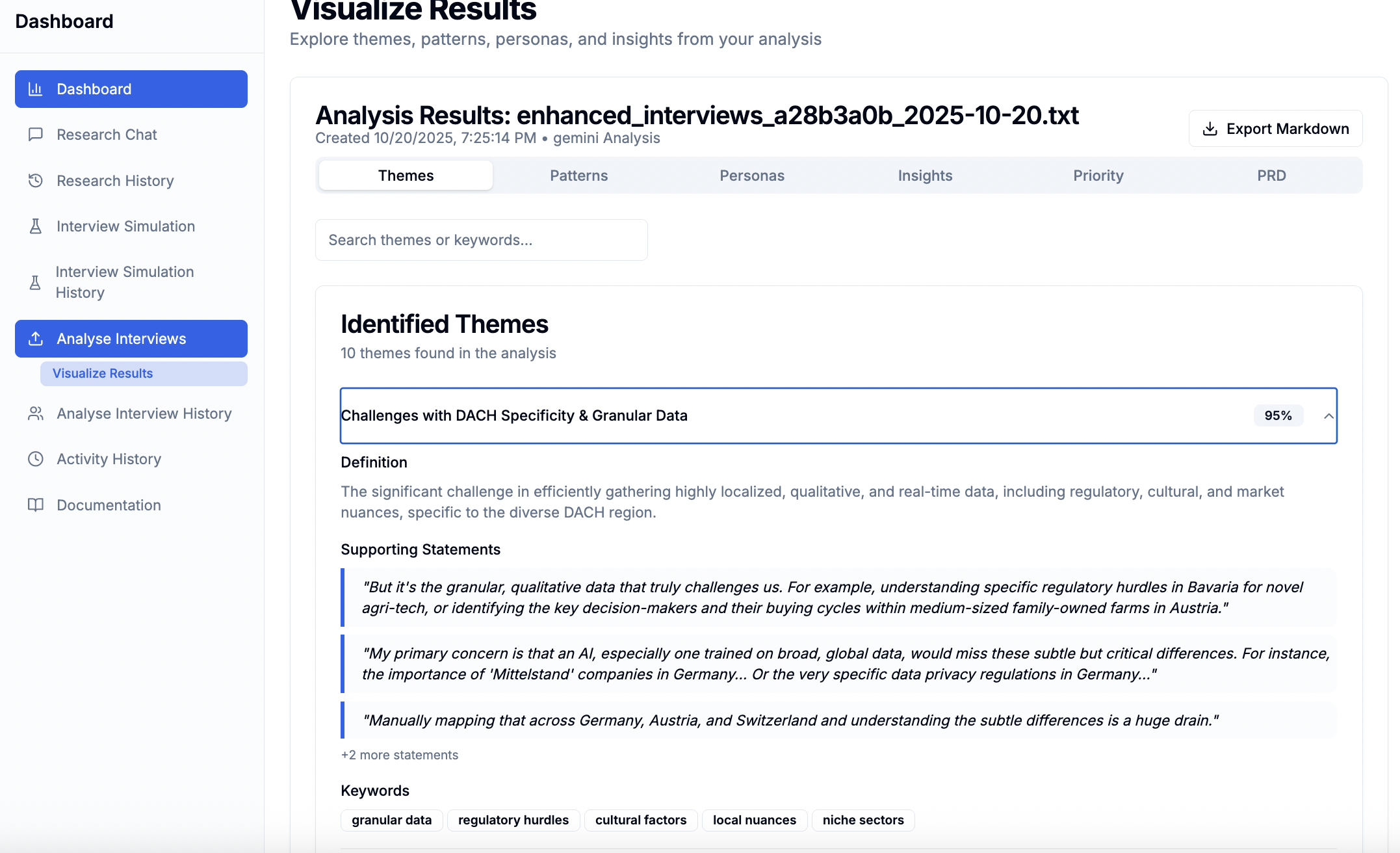
AxWise Flow is an end-to-end application for research chat, synthetic interviews, multimodal analysis, persona generation, and PRD export. It keeps evidence links through the pipeline so each insight, persona, and requirement traces back to quotes, speakers, and timestamps.
Builders who want to turn customer input into traceable personas, insights, and product requirements.
You can move from raw research material to evidence-linked personas and PRDs without rebuilding the workflow yourself.
Takes business context from a conversational prompt and turns it into stakeholder questions and analysis inputs.
Generates AI personas and simulated interviews to fill research gaps before analysis.
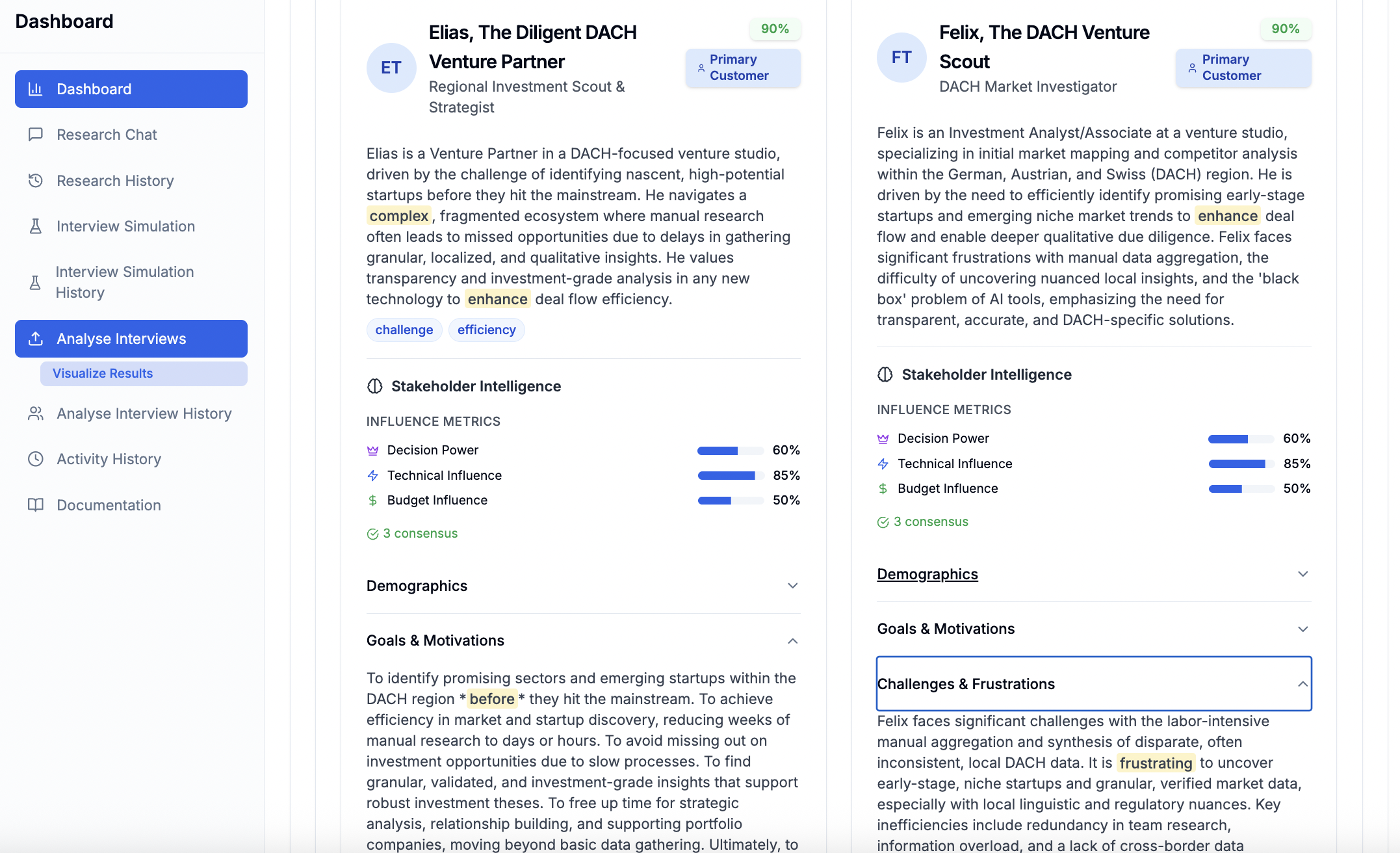
Runs theme extraction, pattern recognition, stakeholder analysis, sentiment analysis, persona generation, and insight synthesis.
Stores links from insights back to quotes, speakers, timestamps, and source interviews.
Creates user stories and acceptance criteria from analyzed research with evidence chains.
Builds synthetic persona datasets for downstream use cases like matching, recommendations, and training data.
Generates call prep materials, objections, coaching, and stakeholder views from prospect data.
Ingests longer videos and extracts behavioral annotations for the persona pipeline.
git clone https://github.com/AxWise-GmbH/axwise-flow.git
cd axwise-flow
cp .env.example .env
# Edit .env → add your GEMINI_API_KEY (get one free at https://aistudio.google.com/app/api_keys)
docker compose up
git clone https://github.com/AxWise-GmbH/axwise-flow.git
cd axwise-flow
createdb axwise
# Get your API key from: https://aistudio.google.com/app/api_keys
GEMINI_API_KEY=your_gemini_api_key_here
DATABASE_URL=postgresql://postgres:postgres@localhost:5432/axwise
DB_USER=postgres
DB_PASSWORD=postgres
cd backend
python3.11 -m venv venv
source venv/bin/activate  # On Windows: venv\Scripts\activate
pip install --upgrade pip
pip install -r requirements.txt
cd ..





Your automated design thinking engine for generating sophisticated synthetic persona datasets.
AxWise Flow transforms raw customer input, video analysis, and automated research simulations into evidence-linked synthetic personas and behavioral datasets through a context-engineered workflow. Every insight, persona, and demographic trait traces back to verbatim quotes, real-time interviews, speakers, and timestamps.
Most tools dump all your data into an LLM and hope for the best. AxWise Flow actively assembles, compresses, and evolves context across a multi‑agent pipeline to generate robust datasets:
Research Scope & Video Data → Synthetic Interviews → Analysis → Themes → Patterns → Personas → Insights & Datasets
Every step maintains complete evidence traceability:
PRD Requirement
     ↓ traces to
Insight ("CFOs need 18-month ROI")
     ↓ traces to
Persona + Pattern ("Enterprise CFO archetype")
     ↓ traces to
Themes ("Budget approval concerns")
     ↓ traces to
Verbatim Quote ("Our board asked for...")
     ↓ traces to
Interview + Speaker + Timestamp
AxWise Flow implements context engineering through a unified analysis pipeline that maintains evidence traceability at every step:
A single Analysis Agent performs 6 stages of progressive compression:
Every layer preserves the evidence chain:
The PRD Agent synthesizes requirements with complete evidence chains:
/docs—integrate without the UI.| Feature | Description |
|---|---|
| Evidence Traceability | Every insight links back to interview + speaker + timestamp via the Evidence Intelligence validation engine. |
| Context Engineering | LLM-based context extraction + progressive compression pipeline |
| Unified Analysis Agent | Single PydanticAI agent with 6 typed stages (themes → patterns → stakeholders → sentiment → personas → insights) |
| Live Research & Synthetic Interviews | AI-generated personas and conversational routines that fill research gaps dynamically. |
| Multimodal Video Processing | Long-form video ingestion producing technical and navigational behavior analysis. |
| Evidence Chain | Synthetic Datasets → Insights → Personas → Patterns → Themes → Quotes → Sources |
| Hyper-Local Demographics | Specialized AI models that inject hyper-realistic local data (likes, food traits, behaviors) into personas. |
| API-First Design | FastAPI backend with interactive /docs |
| Self-Hosted | PostgreSQL + Python 3.11 + Node.js 18+ |
| OSS Mode | Authentication disabled for simplified local setup |
git clone https://github.com/AxWise-GmbH/axwise-flow.git
cd axwise-flow
cp .env.example .env
# Edit .env → add your GEMINI_API_KEY (get one free at https://aistudio.google.com/app/api_keys)
docker compose up
Open http://localhost:3000 — that's it! 🎉
Requires: Docker Desktop and a Gemini API Key
Clone the repository
git clone https://github.com/AxWise-GmbH/axwise-flow.git
cd axwise-flow
Set up PostgreSQL database
createdb axwise
Configure environment variables
Edit backend/.env.oss and add your Gemini API key:
# Get your API key from: https://aistudio.google.com/app/api_keys
GEMINI_API_KEY=your_gemini_api_key_here
The default database configuration is:
DATABASE_URL=postgresql://postgres:postgres@localhost:5432/axwise
DB_USER=postgres
DB_PASSWORD=postgres
Install Python dependencies
cd backend
python3.11 -m venv venv
source venv/bin/activate  # On Windows: venv\Scripts\activate
pip install --upgrade pip
pip install -r requirements.txt
cd ..
Run the backend
scripts/oss/run_backend_oss.sh
Verify the backend is running
# In another terminal
curl -s http://localhost:8000/health
Expected response:
{
  "status": "healthy",
  "timestamp": "2025-10-20T..."
}
The frontend provides a web UI for the AxWise Flow platform.
# From repository root
cd frontend

# Install dependencies
npm install

# Copy OSS environment configuration
cp .env.local.oss .env.local

# Start the development server
npm run dev
Open http://localhost:3000 in your browser to access:
All configuration is managed through environment files - no per-file edits required.
Backend (backend/.env.oss):
OSS_MODE=true
DATABASE_URL=postgresql://postgres:postgres@localhost:5432/axwise
DB_USER=postgres
DB_PASSWORD=postgres
GEMINI_API_KEY=your_gemini_api_key_here
ENABLE_CLERK_VALIDATION=false
Frontend (frontend/.env.local.oss):
NEXT_PUBLIC_API_URL=http://localhost:8000
NEXT_PUBLIC_ENABLE_CLERK_AUTH=false
NEXT_PUBLIC_ENABLE_ANALYTICS=false
NEXT_PUBLIC_OSS_MODE=true
NEXT_PUBLIC_DEV_AUTH_TOKEN=dev_test_token_local
Notes:
dev_test_token_Export your PRD directly to Jira with rich descriptions and evidence context.
Notes:
Example: test connection
curl -X POST "http://localhost:8000/api/export/jira/test-connection" \
  -H "Authorization: Bearer dev_test_token_local" \
  -H "Content-Type: application/json" \
  -d '{
    "credentials": {
      "jira_url": "https://your-domain.atlassian.net",
      "email": "user@example.com",
      "api_token": "your-api-token",
      "project_key": "PROJ"
    }
  }'
Example: export PRD
curl -X POST "http://localhost:8000/api/export/jira" \
  -H "Authorization: Bearer dev_test_token_local" \
  -H "Content-Type: application/json" \
  -d '{
    "result_id": 123,
    "credentials": {
      "jira_url": "https://your-domain.atlassian.net",
      "email": "user@example.com",
      "api_token": "your-api-token",
      "project_key": "PROJ"
    },
    "epic_name": "Customer Research PRD",
    "include_technical": true,
    "include_acceptance_criteria": true,
    "update_existing": true
  }'
Expected success response (example):
{
  "success": true,
  "message": "Export successful: 1 created, 3 updated",
  "total_issues_created": 4,
  "stories_created": 3,
  "tasks_created": 5,
  "errors": []
}
AxWise Flow provides three distinct workflows for different use cases:
For: Product teams conducting user research and generating requirements
The core workflow with conversational research, simulation, and analysis:
Research Chat → Context Extraction → Stakeholder Questions → Synthetic Interviews → Analysis → PRD
Research Chat (/api/research/conversation-routines/chat)
Simulation Bridge (/api/research/simulation-bridge/simulate)
Analysis Agent (Single agent, 6 stages)
PRD Generation (/api/prd/{result_id})
Alternative: Upload → Analysis → PRD
Upload Transcripts → Theme Extraction → Pattern Recognition → Persona Formation → PRD
/api/upload) - Upload real interview transcripts (TXT, DOCX, PDF)/api/analyze) - Same 6-stage analysis pipeline/api/prd/{result_id}) - Evidence-linked requirementsFor: Teams building downstream applications (CV matching, recommenders, marketing, training data)
A complete pipeline that generates canonical synthetic persona datasets:
Business Context → Questionnaire → Simulation → Analysis → Persona Dataset Export
API Endpoints:
POST /api/axpersona/v1/pipeline/start - Start dataset generation pipelineGET /api/axpersona/v1/pipeline/status/{job_id} - Check pipeline progressGET /api/axpersona/v1/pipeline/result/{job_id} - Get completed datasetPOST /api/axpersona/v1/export-persona-dataset - Export dataset from analysisWhat it produces:
Example Request:
curl -X POST "http://localhost:8000/api/axpersona/v1/pipeline/start" \
  -H "Authorization: Bearer dev_test_token_local" \
  -H "Content-Type: application/json" \
  -d '{
    "business_idea": "AI-powered meal planning app",
    "target_customer": "Busy professionals who want healthy eating",
    "problem": "No time to plan meals and grocery shop",
    "industry": "Health & Wellness",
    "location": "Berlin, Germany"
  }'
Frontend Access: Navigate to /axpersona/scopes to manage persona datasets through the UI.
For: Sales professionals preparing for customer calls
Generates comprehensive call intelligence from prospect data (CRM exports, meeting notes, or AxPersona output):
Prospect Data → Intelligence Agent → Call Guide + Personas + Objections + Coaching
API Endpoints:
POST /api/precall/v1/generate - Generate call intelligence from prospect dataPOST /api/precall/v1/coach - Get real-time coaching responsesPOST /api/precall/v1/generate-persona-image - Generate persona avatarPOST /api/precall/v1/search-local-news - Search location-specific news for rapport buildingWhat it produces:
Example Request:
curl -X POST "http://localhost:8000/api/precall/v1/generate" \
  -H "Authorization: Bearer dev_test_token_local" \
  -H "Content-Type: application/json" \
  -d '{
    "prospect_data": {
      "company_name": "Acme Corp",
      "industry": "Manufacturing",
      "stakeholders": [
        {"name": "John Smith", "role": "CFO", "concerns": ["ROI", "budget approval"]}
      ],
      "pain_points": ["Manual processes", "Lack of visibility"]
    }
  }'
Coaching Chat: After generating intelligence, use /api/precall/v1/coach to get real-time guidance based on the prospect context.
Frontend Access: Navigate to /precall to use the Precall Intelligence dashboard.
For: UX Researchers, Behavioral Analysts, and Product Designers.
A powerful multimodal pipeline extending the main engine. It ingests video content (e.g., recorded behavior, usability tests, or video interviews) and uses Gemini's multimodal capabilities to chunk, analyze, and map behavioral blueprints.
Long-Form Video Upload → Technical/Navigational Chunking → Multimodal Analysis → Behavioral Personas & Annotations
API Endpoints:
POST /api/axpersona/video-analysis - Triggers the automated long-running chunked Gemini job.What it produces:
Frontend Access: The Video Simulation Panel allows you to watch the simulation run, view extracted UI/environment insights, and see the synthesis of the video data.
| Principle | Implementation |
|---|---|
| Evidence Traceability | Every insight stores source_interview_id, speaker_id, timestamp, verbatim_quote |
| Context Engineering | LLM-based context extraction in conversation routines; progressive compression in analysis |
| Unified Analysis Agent | One PydanticAI agent with 6 typed sub-agents for all analysis tasks |
| Synthetic Evidence | Simulation Bridge generates personas + interviews that maintain evidence lineage |
| API-First Design | All features accessible via REST API at /docs |
| OSS Mode | ENABLE_CLERK_VALIDATION=false disables auth for local development |
Scenario: User wants to understand "How enterprise CFOs think about pricing"
# Step 1: Start research chat
POST /api/research/conversation-routines/chat
{
  "message": "I'm building a B2B SaaS pricing tool for enterprise CFOs",
  "session_id": "abc123"
}
# → LLM extracts: industry="fintech", target_customer="enterprise CFOs", location="US"

# Step 2: Generate stakeholder questions
# → System creates questions for: CFOs, Finance Teams, Procurement, End Users

# Step 3: Simulate interviews
POST /api/research/simulation-bridge/simulate
{
  "business_context": {...},
  "stakeholders": [...]
}
# → Generates 12 AI personas (3 per stakeholder category)
# → Simulates 12 realistic interviews

# Step 4: Analyze (automatic after simulation)
# → Analysis agent extracts:
#    - Themes: "Budget approval process", "ROI requirements", "Vendor evaluation"
#    - Patterns: "18-month ROI threshold", "Board approval needed for >$100k"
#    - Personas: "Risk-Averse CFO", "Growth-Focused CFO"
#    - Insights: "CFOs need ROI calculators in first demo"

# Step 5: Generate PRD
POST /api/prd/{result_id}
# → Creates user stories:
#    "As a CFO, I want to see 18-month ROI projections..."
#    Evidence: Interview #3, Speaker "Sarah Chen", 00:04:32
#              Quote: "Our board asked for 18-month payback..."
axwise-flow/
├── backend/              # FastAPI backend
│   ├── api/             # API routes and endpoints
│   │   ├── research/    # Research chat + simulation bridge
│   │   ├── axpersona/   # AxPersona dataset creation pipeline
│   │   ├── precall/     # Precall intelligence generation
│   │   ├── upload/      # File upload endpoints
│   │   ├── analyze/     # Analysis endpoints
│   │   └── prd/         # PRD generation endpoints
│   ├── services/        # Business logic
│   │   ├── processing/  # Theme, pattern, persona, PRD services
│   │   └── llm/         # LLM integration (Google Gemini)
│   ├── models/          # Data models
│   ├── infrastructure/  # Configuration and utilities
│   └── .env.oss        # OSS environment configuration
├── frontend/            # Next.js frontend
│   ├── app/            # Next.js app directory
│   │   ├── axpersona/  # AxPersona scopes UI
│   │   └── precall/    # Precall intelligence dashboard
│   ├── components/     # React components
│   └── lib/            # Utilities and helpers
└── scripts/
    └── oss/            # OSS-specific scripts
        └── run_backend_oss.sh
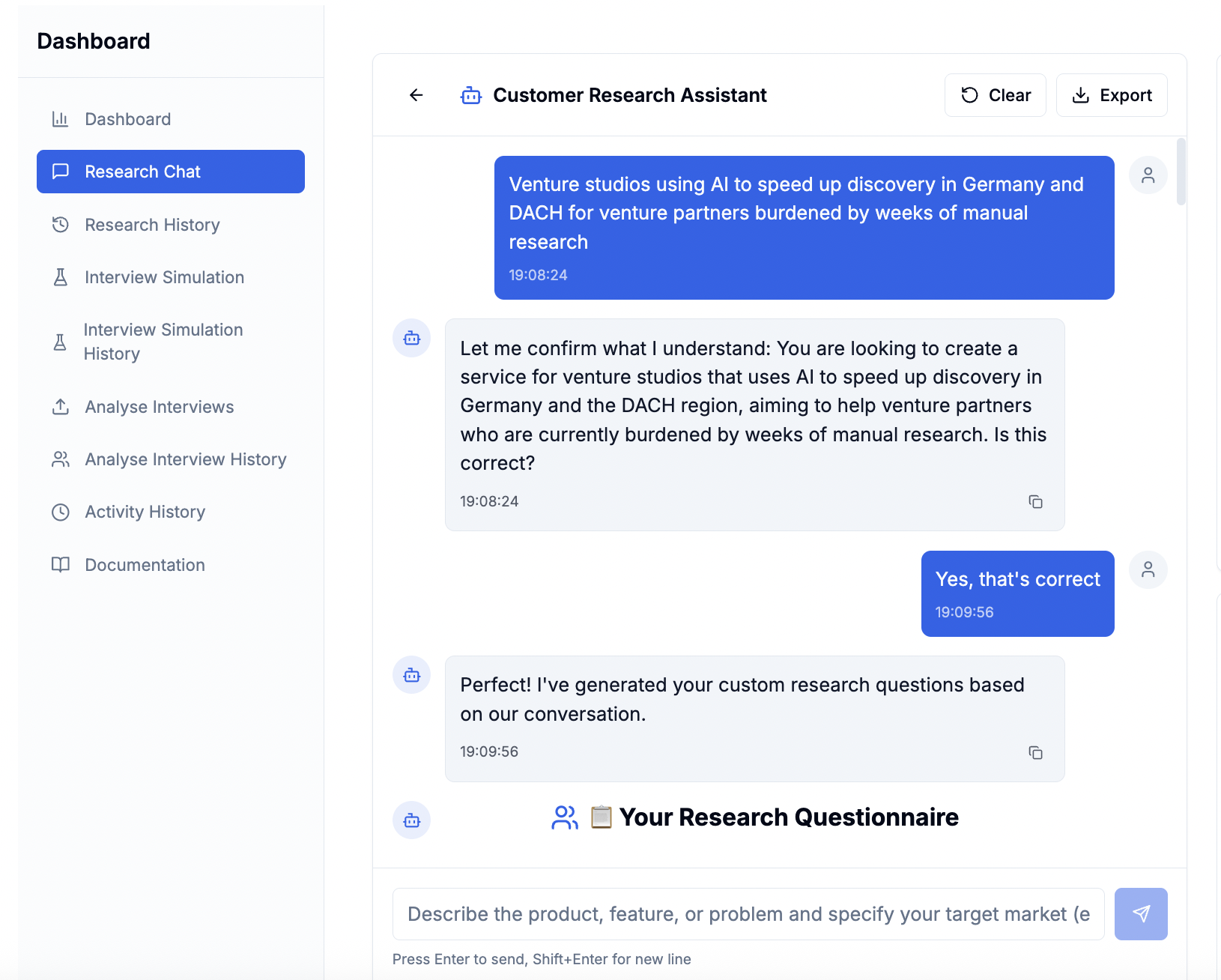 | 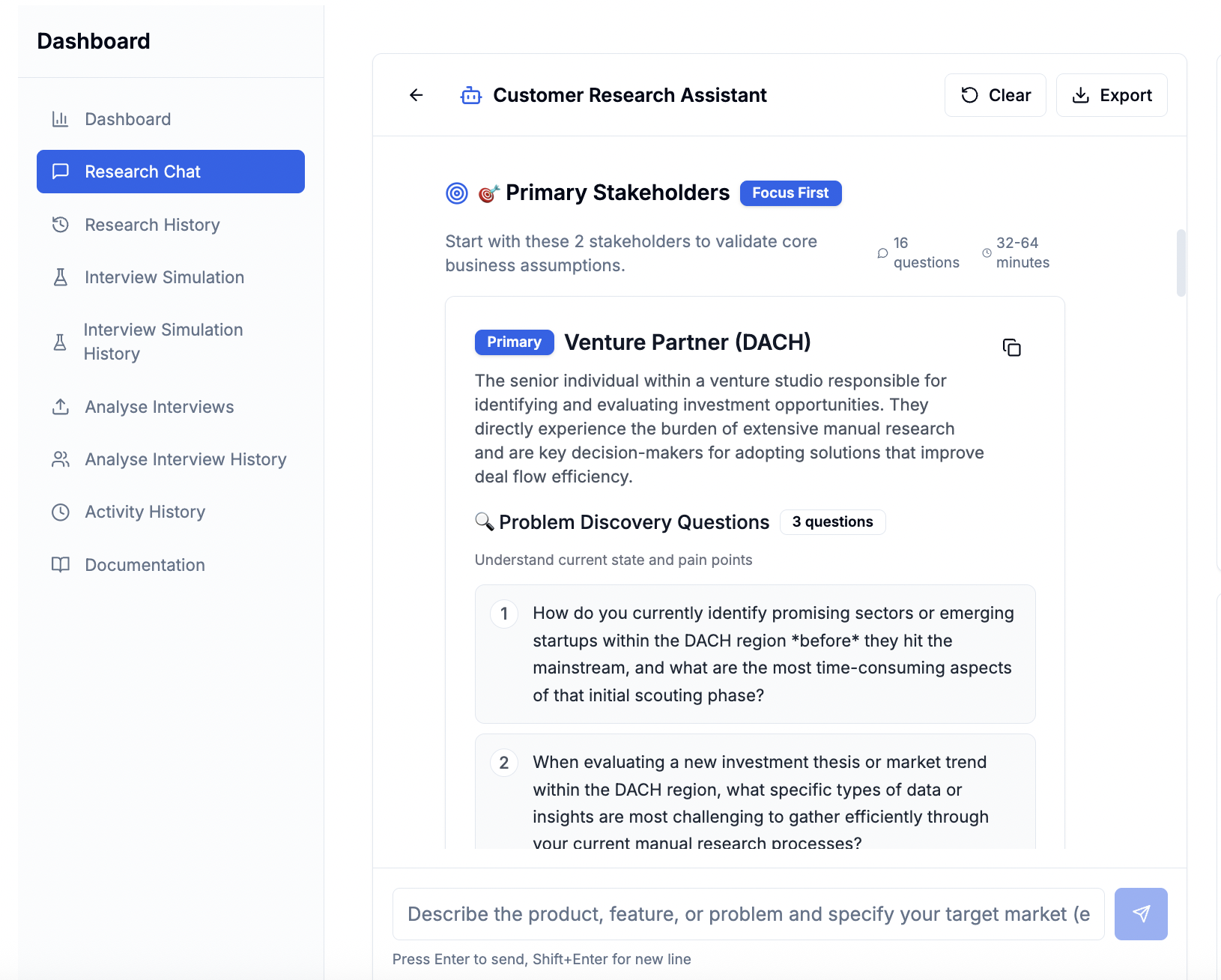 |
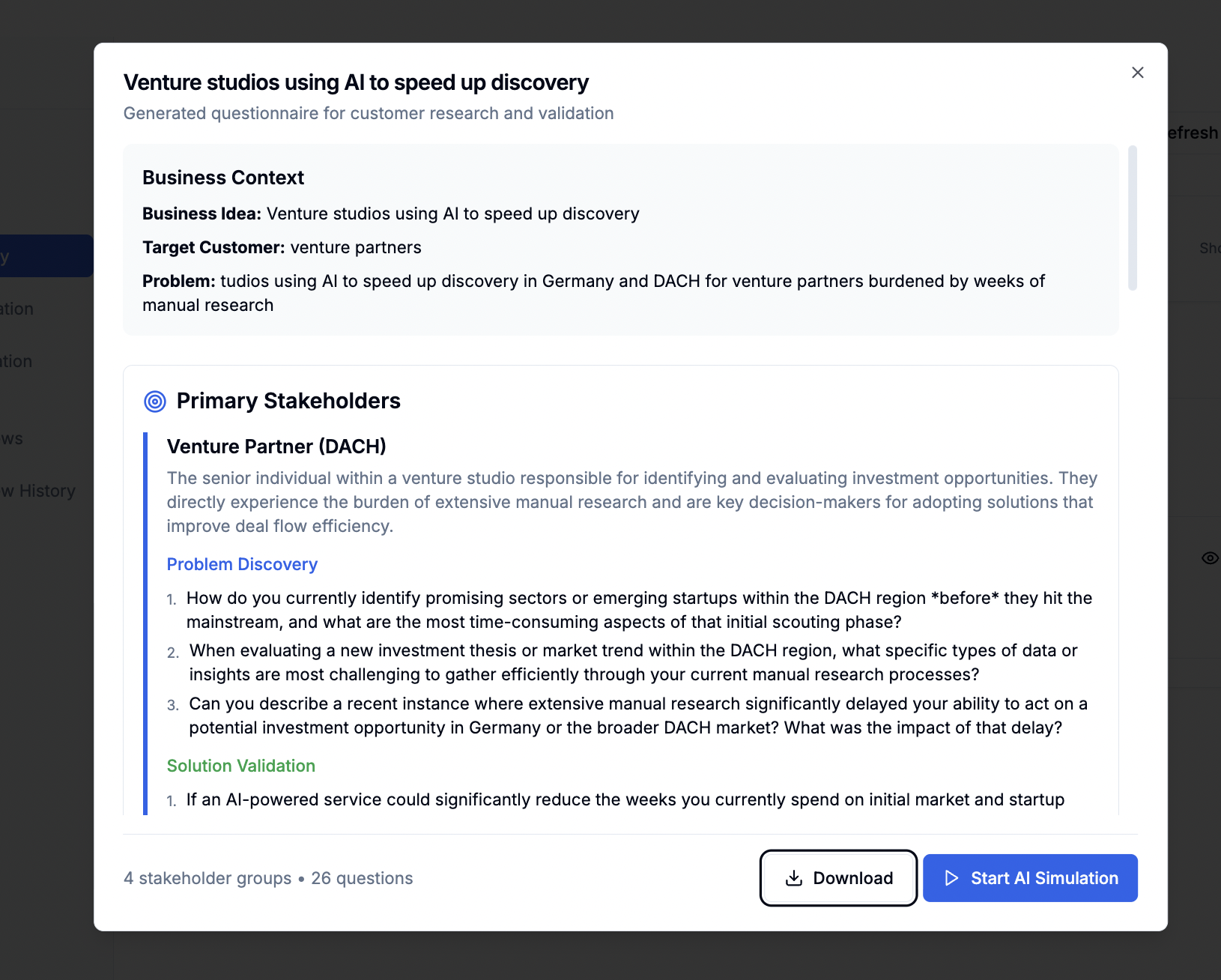 | 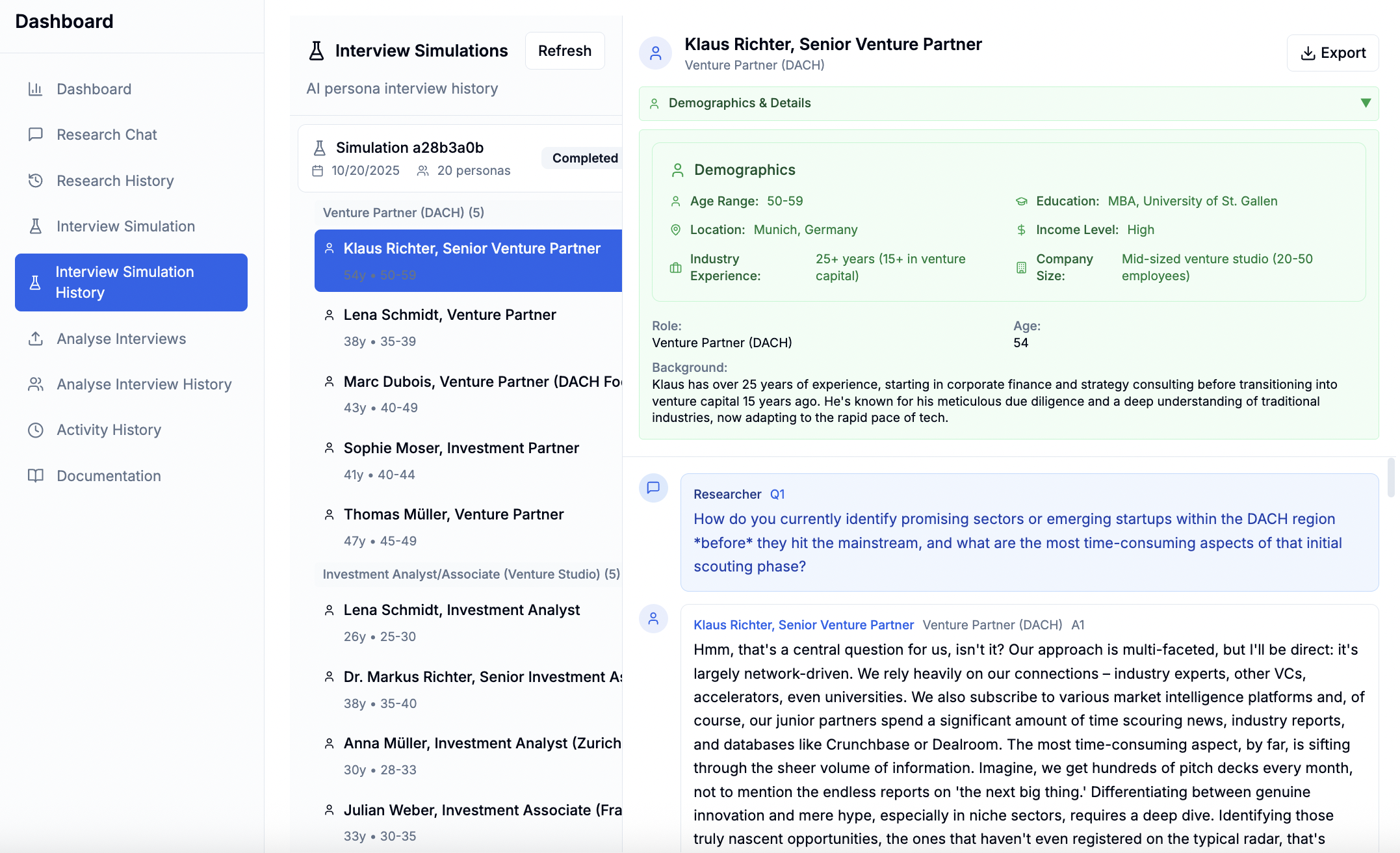 |
 |  |
OSS mode disables authentication and uses simplified configuration suitable for local development and self-hosting.
Key differences from production mode:
See backend/.env.oss for all available configuration options.
Essential variables:
OSS_MODE=true - Enable OSS modeDATABASE_URL - PostgreSQL connection stringGEMINI_API_KEY - Google Gemini API keycd backend
pytest
cd frontend
npm test
We welcome contributions! Please see our contributing guidelines.
git checkout -b feature/amazing-feature)git commit -m 'Add amazing feature')git push origin feature/amazing-feature)This project is licensed under the terms specified in the LICENSE file.
pg_isreadypsql -l | grep axwisepip install -r backend/requirements.txtbackend/.env.osspg_isreadycreatedb axwisebackend/.env.ossBuilt with ❤️ by the AxWise team and contributors.
Note: This is the open-source version of AxWise Flow. For the hosted version with additional features, visit axwise.de.
Sign in to join the discussion.
No comments yet. Be the first to say what this is good for.
"Vibe-Trading: Your Personal Trading Agent"

OpenHuman is an open source personal AI for Mac, Windows and Linux — local-first memory, agent orchestration, and deep research.

Your Personal AI Assistant; easy to install, deploy on your own machine or on the cloud; supports multiple chat apps with easily extensible capabilities.
User-friendly AI Interface (Supports Ollama, OpenAI API, ...)

macOS video editor built for AI
AIPOCH Open-Science is an open-source, local-first, model-agnostic AI research workbench for macOS, Windows, and Linux, with scientific agents, Python/R notebooks, data connectors, and reproducible provenance.