
DietrichGebert/ponytailPlugins
Makes your AI agent think like the laziest senior dev in the room. The best code is the code you never wrote.
138k
1 add
This plugin adds a live statusline to Claude Code so you can see model, effort, thinking, git state, context usage, and rate limits while the agent runs. It ships as a Claude Code plugin plus platform-specific install scripts and renderer scripts for several display sizes.
Builders who run Claude Code and want a statusline that shows what the agent is doing at a glance.
You can see Claude Code’s current context, effort, and usage limits without opening extra panels or rechecking settings.
Shows `/effort` values like `high`, `xhigh`, and `max`, plus extended thinking when the model supports it.
Renders context-window usage and 5h / 7d rate-limit bars from Claude Code data.
Uses Bash on macOS and Linux, and native PowerShell on Windows.
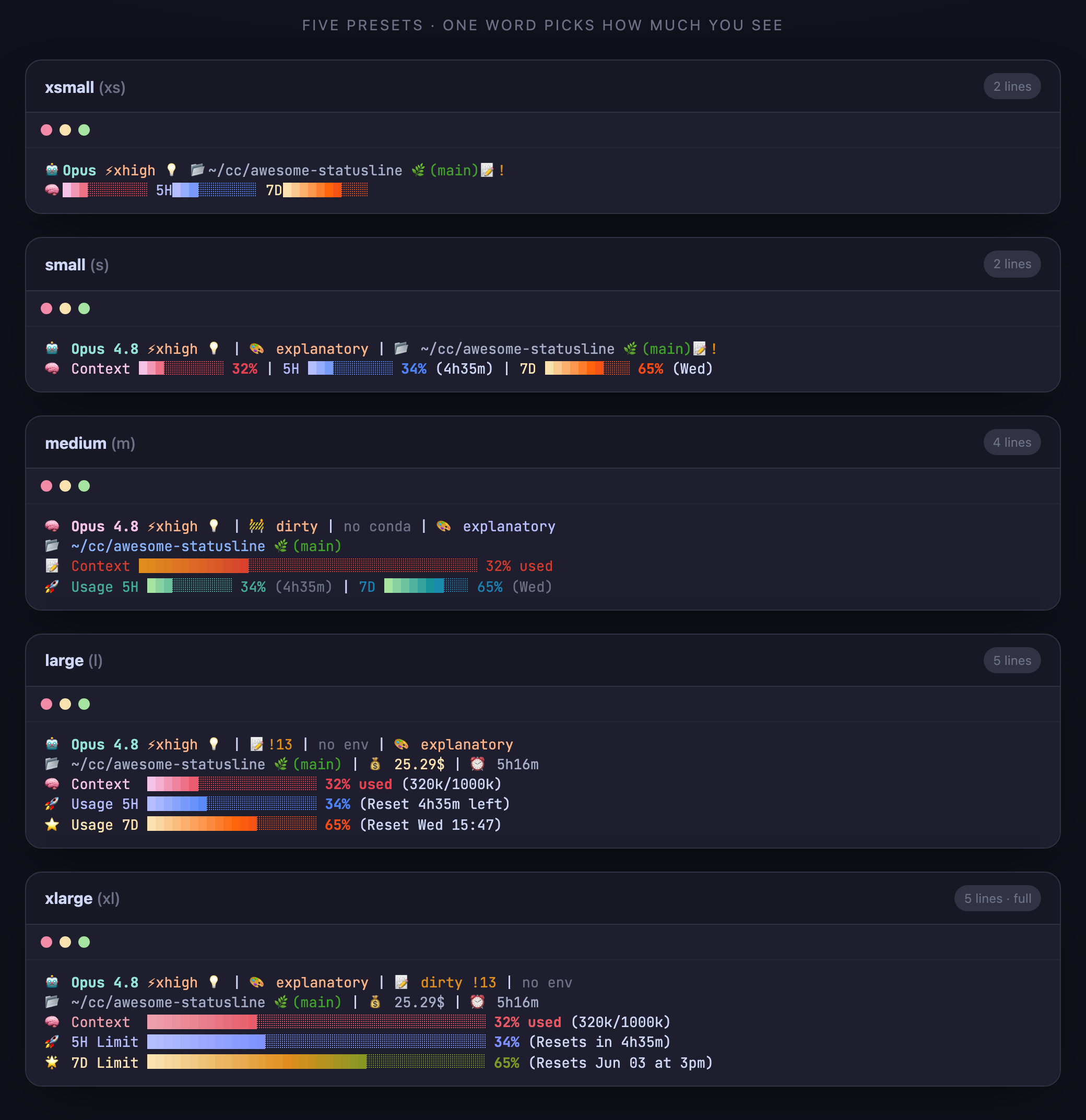
Provides `xs`, `s`, `m`, `l`, and `xl` layouts so you can choose how much detail appears.
Can be installed through the Claude Code plugin marketplace and set up with `/statusline-setup`.
curl -fsSL https://raw.githubusercontent.com/AwesomeJun/CC-statusline/main/install.sh | bash
irm https://raw.githubusercontent.com/AwesomeJun/CC-statusline/main/install.ps1 | iex
Invoke-WebRequest -Uri https://raw.githubusercontent.com/AwesomeJun/CC-statusline/main/install.ps1 -OutFile .\install.ps1
notepad .\install.ps1
powershell -NoProfile -ExecutionPolicy Bypass -File .\install.ps1
curl -fsSL https://raw.githubusercontent.com/AwesomeJun/CC-statusline/main/install.sh | bash -s -- xl
git clone https://github.com/AwesomeJun/CC-statusline.git && cd CC-statusline
./install.sh            # macOS / Linux
./install.ps1           # Windows PowerShell
/plugin marketplace add AwesomeJun/CC-statusline
/plugin install awesome-statusline
A beautiful statusline for Claude Code — context, usage limits, cost & reasoning ⚡effort, all at a glance. One line to install on macOS, Linux & Windows.
🇰🇷 한국어 · Quick Install · Presets · What it shows · FAQ





Built to keep pace with Claude Code — recent updates:
| Date | Update |
|---|---|
| 2026-06-02 | Windows native renderer — PowerShell statusline path, no Git Bash or jq required on Windows |
| 2026-05-31 | Opus 4.8 support · reasoning effort (high/xhigh/max) + thinking indicators · one-line cross-platform installer · 5 size presets (xs–xl) · JetBrains Mono |
| 2026-04-01 | 1M-token context window support (Opus) · usage bars render before the first chat |
| 2026-01-19 | Multi-mode display system · plugin marketplace |
| 2026-01-18 | Catppuccin gradient bars · live 5h / 7d usage-limit monitoring |
/effort (high/xhigh/max) and extended thinking, live from Claude Code's official statusline JSON (and hidden on models that don't support effort).jq if needed.xs–xl) — pick how much you see with one word.There are several great Claude Code statuslines out there — this one leans into reasoning-effort/thinking visibility and zero-setup, cross-platform install.
You don't need Node. On Windows, you also don't need jq, Git, or Git Bash — the installer uses PowerShell.
macOS / Linux
curl -fsSL https://raw.githubusercontent.com/AwesomeJun/CC-statusline/main/install.sh | bash
Windows (PowerShell)
irm https://raw.githubusercontent.com/AwesomeJun/CC-statusline/main/install.ps1 | iex
If your security software blocks irm | iex, download the installer first, inspect it, then run it:
Invoke-WebRequest -Uri https://raw.githubusercontent.com/AwesomeJun/CC-statusline/main/install.ps1 -OutFile .\install.ps1
notepad .\install.ps1
powershell -NoProfile -ExecutionPolicy Bypass -File .\install.ps1
To choose a specific size, append it explicitly:
curl -fsSL https://raw.githubusercontent.com/AwesomeJun/CC-statusline/main/install.sh | bash -s -- xl
Or clone and run:
git clone https://github.com/AwesomeJun/CC-statusline.git && cd CC-statusline
./install.sh            # macOS / Linux
./install.ps1           # Windows PowerShell
Use any size explicitly — abbreviation or full name: xs/xsmall, s/small, m/medium, l/large, xl/xlarge.
Then restart Claude Code. That's it.
One word picks how much you see. Smallest → largest:
| Size | Lines | At a glance |
|---|---|---|
xsmall (xs) | 2 | model · effort · thinking · path · branch · 3 tiny bars |
small (s) | 2 | + labels, percentages, output style |
medium (m) | 4 | classic layout, full-width context bar |
large (l) | 5 | + cost, session time, 20-block usage bars |
xlarge (xl) | 5 | everything: git ahead/behind, env, 40-block bars, resets |
🔤 Curious how it looks in your font? See the 12-font showcase → — 10 cross-platform mono fonts plus Menlo and MesloLGS.
Colors render live in your terminal:
xsmall ─ 2 lines
🤖Opus ⚡high 💡 📂~/project 🌿(main)
🧠████░░░░░░ 5H████░░░░░░ 7D██░░░░░░░░

small ─ 2 lines
🤖 Opus 4.8 ⚡high 💡 │ 🎨 default │ 📂 ~/project 🌿(main)
🧠 Context ████░░░░░░ 43% │ 5H ████░░░░░░ 42% │ 7D ██░░░░░░░░ 18%

medium ─ 4 lines
🧠 Opus 4.8 ⚡high 💡 │ 🚧 dirty │ no conda │ 🎨 default
📂 ~/project 🌿(main)
📝 Context █████████████████░░░░░░░░░░░░░░░░░░░░░░░ 43% used
🚀 Usage 5H ████░░░░░░ 42% │ 7D ██░░░░░░░░ 18%

large ─ 5 lines
🤖 Opus 4.8 ⚡high 💡 │ 📝 +5 !12 │ 🐍 venv │ 🎨 default
📂 ~/project 🌿(main) │ 💰 1.23$ │ ⏰ 1h2m
🧠 Context  █████████░░░░░░░░░░░ 43% used (87k/200k)
🚀 Usage 5H ████████░░░░░░░░░░░░ 42% (Reset 2h15m left)
⭐ Usage 7D ████░░░░░░░░░░░░░░░░ 18% (Reset Thu 19:00)

xlarge ─ 5 lines
🤖 Opus 4.8 ⚡high 💡 │ 🎨 default │ 📝 dirty +5 !12 │ 🐍 venv
📂 ~/project 🌿(main) │ 💰 1.23$ │ ⏰ 1h2m
🧠 Context  █████████████████░░░░░░░░░░░░░░░░░░░░░░░ 43% used (87k/200k)
🚀 5H Limit █████████████████░░░░░░░░░░░░░░░░░░░░░░░ 42% (Resets in 2h15m)
🌟 7D Limit ███████░░░░░░░░░░░░░░░░░░░░░░░░░░░░░░░░░ 18% (Resets Dec 31 at 7pm)
| Element | Meaning |
|---|---|
| 🤖 Model | Current model (Opus 4.8, …) |
| ⚡ Effort | Reasoning effort — low/medium/high/xhigh/max. Live with /effort. Hidden if the model has no effort param. |
| 💡 Thinking | Extended thinking is on for the session |
| 🎨 Style | Active output style |
| 🌿 Git | Branch, dirty/clean, ahead ↑ / behind ↓ (xlarge) |
| 🐍 Env | Active conda / virtualenv |
| 🧠 Context | Context-window usage bar with token count |
| 💰 Cost / ⏰ Time | Session cost (USD) and duration |
| 🚀 5h / 🌟 7d | Usage-limit bars + reset time (Pro/Max, from the official rate-limit API) |
All colors follow the Catppuccin palette. No Nerd Font required — every glyph is a standard emoji/Unicode block.
Change size — just re-run the installer with a new size:
./install.sh m # or: curl … | bash -s -- m
Uninstall — remove the statusLine entry from ~/.claude/settings.json (a timestamped backup is created on every install) and delete ~/.claude/awesome-statusline.sh or ~/.claude/awesome-statusline.ps1.
| Dependency | Why | Installed via |
|---|---|---|
jq (macOS/Linux only) | parse the Bash statusline JSON | brew / apt / dnf / pacman / zypper / apk |
| PowerShell (Windows built-in) | parse and render the Windows statusline | included with Windows |
On Windows, the installer writes a native awesome-statusline.ps1 and points Claude Code at powershell -NoProfile .... That avoids Git Bash, .sh file association issues, and jq PATH problems.
Does it slow Claude Code down? No — it's a small local script that runs per refresh.
I don't see ⚡effort. Your current model doesn't expose the effort parameter, so the field is intentionally hidden. Switch to a model that supports /effort (e.g. Opus 4.x).
Why emoji instead of Nerd Font icons? So it looks right out of the box on any terminal, with zero font setup.
Where are my old settings? Every install backs up settings.json to settings.json.backup-<timestamp> before touching it.
Statusline is blank, or blank terminal windows keep popping up (Windows)? Re-run ./install.ps1 — it now installs a native PowerShell renderer and removes the Git Bash / jq dependency from the statusline path. Details: TROUBLESHOOTING.md.
Characters stack vertically inside tmux? Enable truecolor in ~/.tmux.conf (set -ga terminal-overrides ",xterm-256color:RGB") and reload tmux. Details: TROUBLESHOOTING.md.
Prefer Claude Code's plugin system? It's also published as a marketplace plugin:
/plugin marketplace add AwesomeJun/CC-statusline
/plugin install awesome-statusline
Then run /statusline-setup to apply it, or pass any size like /statusline-setup xl. The one-line install.sh above is the primary path; this is just an alternative.
Built with 🩵 for the Claude Code community · Catppuccin theme · MIT License
⭐ Star it if it made your terminal nicer.
Sign in to join the discussion.
No comments yet. Be the first to say what this is good for.
Makes your AI agent think like the laziest senior dev in the room. The best code is the code you never wrote.

Graphs that teach > graphs that impress. Turn any code into an interactive knowledge graph you can explore, search, and ask questions about. Works with Claude Code, Codex, Cursor, Copilot, Gemini CLI, and more.

OmO: Just type "mass ulw" keyword with your prompt. Now you are the master of graph engineering.
Persistent Context Across Sessions for Every Agent – Captures everything your agent does during sessions, compresses it with AI, and injects relevant context back into future sessions. Works with Claude Code, OpenClaw, Codex, Gemini, Hermes, Copilot, OpenCode + More
Opinionated Oxlint rules for rejecting low-evidence TypeScript and JavaScript patterns
Teams-first Multi-agent orchestration for Claude Code