ClaudeCodeMonitor



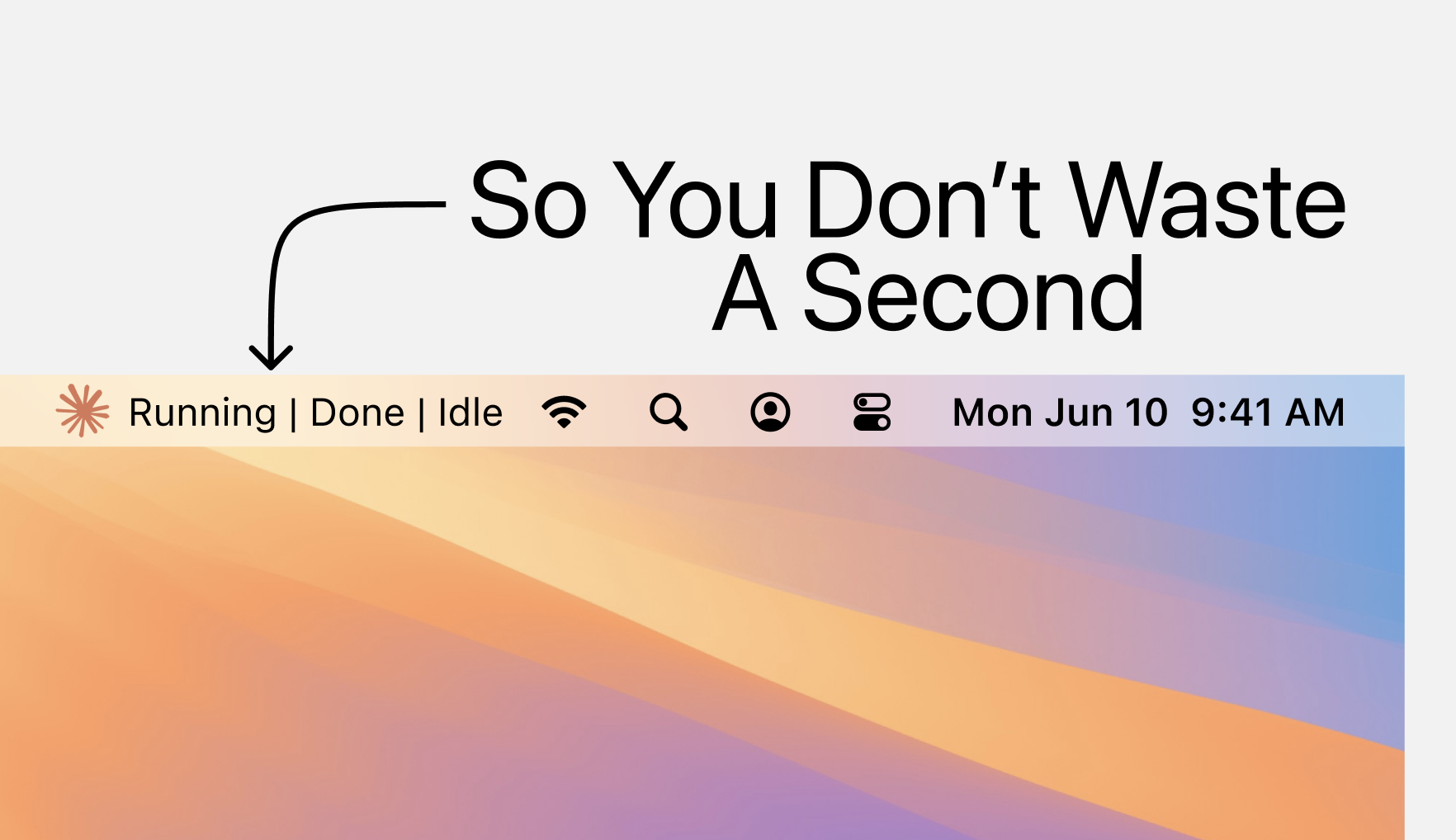
A lightweight macOS menu bar application that monitors and manages Claude Code instances in real-time. Keep track of multiple Claude sessions, their resource usage, and running processes - all from your menu bar.
✨ Features
Real-Time Monitoring
- Live Process Tracking: Automatically detects and monitors all running Claude Code instances
- Resource Usage: Displays CPU and memory consumption for each instance
- Smart Command Detection: Shows actual commands being executed, not just shell wrappers
- Status Indicators: Visual feedback for idle, running, and completed tasks
Instance Management
- Custom Naming: Rename instances for easy identification
- Quick Actions: Focus, kill, or manage instances directly from the menu bar
- Persistent Numbering: Maintains consistent instance numbering across sessions
- Multi-Instance Support: Track unlimited Claude sessions simultaneously
Smart Notifications
- Task Completion Alerts: Get notified when long-running tasks finish
- Configurable Thresholds: Set your own notification preferences
- Non-Intrusive: Toggle notifications on/off as needed
Performance Optimized
- Low Resource Footprint: Minimal CPU and memory usage
- Efficient Polling: Smart update intervals to balance responsiveness and efficiency
- Native macOS Integration: Built specifically for macOS using native APIs
🚀 Quick Start
Download & Install
- Download the latest
ClaudeCodeMonitor.dmg
- Open the DMG file
- Drag ClaudeCodeMonitor to your Applications folder
- Launch from Applications or Spotlight
The app will appear in your menu bar immediately upon launch.
📊 What It Monitors
ClaudeCodeMonitor tracks various aspects of Claude Code instances:
-
Process Information
- Process ID (PID)
- CPU usage percentage
- Memory consumption
- Running time
-
Command Execution
- Active commands and scripts
- Shell processes
- Background tasks
-
Instance State
- Idle (no active processes)
- Running (executing commands)
- Done (task completed)
🎯 Use Cases
- Development Workflow: Track multiple Claude coding sessions during development
- Resource Management: Monitor CPU/memory usage to prevent system slowdowns
- Task Tracking: Get notifications when long-running builds or tests complete
- Multi-Project Work: Easily switch between different Claude instances working on separate projects
⚙️ Configuration
Access settings through the menu bar icon:
- Notifications: Toggle task completion notifications
- Debug Mode: Enable detailed logging for troubleshooting
- Instance Names: Right-click any instance to rename it
Settings are automatically saved to ~/.claudemonitor_settings.json
🔧 System Requirements
- macOS 10.15 (Catalina) or later
- Apple Silicon (M1/M2/M3) or Intel Mac
- 5 MB disk space
- No additional software required
🔒 Privacy & Security
- Apple Notarized: Verified and notarized by Apple for security¹
- Local Only: All monitoring happens locally on your machine
- No Data Collection: No telemetry, analytics, or external connections
- Minimal Permissions: Only requires standard process monitoring permissions
- Sandboxed: Runs with limited system access for safety
📝 Troubleshooting
App doesn't appear in menu bar
- Check Activity Monitor for ClaudeCodeMonitor process
- Try restarting the app or logging out/in
- Ensure you've granted necessary permissions in System Settings
High CPU usage
- Enable Debug Mode to identify issues
- Check for zombie processes in Activity Monitor
- Restart the app if needed
Instance not detected
- Make sure Claude Code is actively running
- Check that you're running commands in Claude
- Try restarting ClaudeCodeMonitor
💬 Support & Feedback
For questions, bug reports, or feature requests, please contact:
🙏 Acknowledgments
- Built with rumps for macOS menu bar integration
- Process monitoring powered by psutil
- Designed specifically for the Claude Code community
¹ Apple Notarization: This app has been notarized by Apple, which means it has been scanned for malicious content and meets Apple's security requirements. When you download ClaudeCodeMonitor, macOS will verify that it hasn't been tampered with since notarization, ensuring you're running the authentic, safe version of the application. Learn more about notarization
Made with ❤️ for seamless Claude Code monitoring


