
JuliusBrussee/
caveman

🪨 why use many token when few token do trick — Claude Code skill that cuts 65% of tokens by talking like caveman
105k
1 add
AgentsMesh gives you a control layer for running many AI coding agents on your own machines. It schedules pods onto runners, keeps each agent in its own worktree sandbox, and shows their output in web, desktop, and iOS consoles.
Builders who want to direct a fleet of terminal coding agents from one place.
You can run, isolate, and monitor many agents at once without babysitting a pile of terminals.
Install runners on any number of machines, set capacity, and schedule agent pods across the fleet.
Each pod gets its own Git worktree sandbox and private credentials so agents do not overwrite each other.
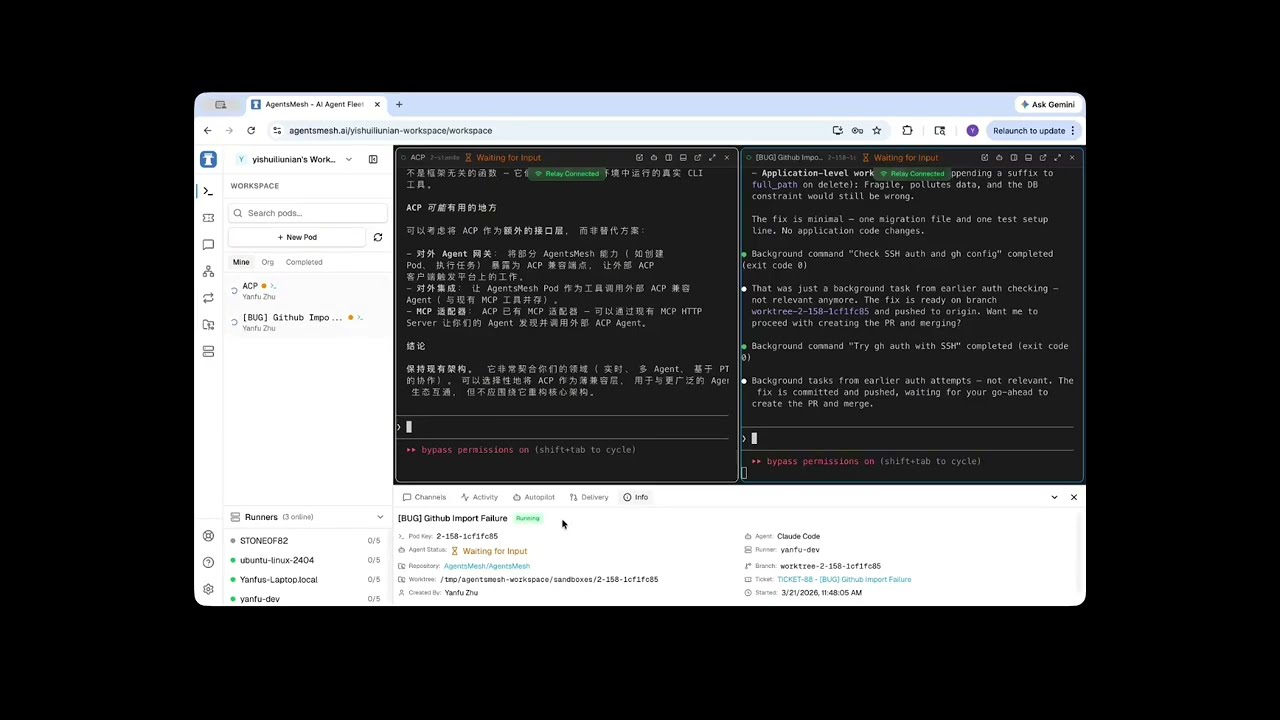
Web, desktop, and iOS clients show terminal streams, pod lists, and workspace views in real time.
A control agent can watch a pod, send the next step when it goes idle, and hand control back to a human.
Bind pods together so they can communicate with @mentions and shared channel topology.
Works with Claude Code, Codex CLI, Gemini CLI, Aider, OpenCode, and other terminal-based agents.
curl -fsSL https://agentsmesh.ai/install.sh | sh
agentsmesh-runner login
agentsmesh-runner login --headless
agentsmesh-runner login --server https://your-server.com
agentsmesh-runner run
agentsmesh-runner service install
agentsmesh-runner service start

The AI Agent Workforce Platform.
Run a hundred AI agents across your own machines — and command them all from one console.
Website · Docs · Quick Start · Discord · X · X (founder) · LinkedIn



AI coding agents have made individual engineers wildly productive — but individual productivity has a ceiling. The next 10x isn't a smarter agent; it's running many agents at once, and directing them like a team.
That ambition breaks the moment you try it for real:
What's missing isn't the agent. It's the control layer that turns one operator into the director of an agent workforce — the layer that schedules agents onto machines, isolates them, keeps them alive, lets them collaborate, and puts all of it on one screen.
AgentsMesh is that layer.
Every part of AgentsMesh exists to answer one question: how does a single person reliably run, watch, and steer a hundred agents? Each capability is the direct answer to a wall you hit when you scale.
| The wall you hit | What AgentsMesh gives you |
|---|---|
| 100 agents won't run on one machine | Runner fleet — install self-hosted runners across any number of machines. Each advertises its capacity (max_concurrent_pods), and agents are scheduled onto the runner you pick or an available one from the pool. Your code never leaves your infrastructure. |
| Every agent needs a clean, isolated environment | Workspace isolation — each agent runs in its own pod with a dedicated Git worktree sandbox (sandboxes/{pod}/workspace/), private credentials, and its own branch. Concurrent agents never step on each other. |
| You can't watch a hundred terminals | One console, every screen — Web, Desktop (Electron), and iOS (SwiftUI) clients, all driven by the same Rust core. Paginated pod sidebar, multi-pane workspace, and real-time terminal streaming let one person hold many agents in view. |
| Long-running agents stall and need babysitting | Autopilot — a control agent watches a pod and sends the next instruction the moment it goes idle, with iteration caps, decision history, and human takeover/handback. Self-healing, unattended runs. |
| Agents working alone don't compound | Mesh & Channels — bind pods together, let them talk over channels with @mentions, and watch the collaboration topology update in real time. |
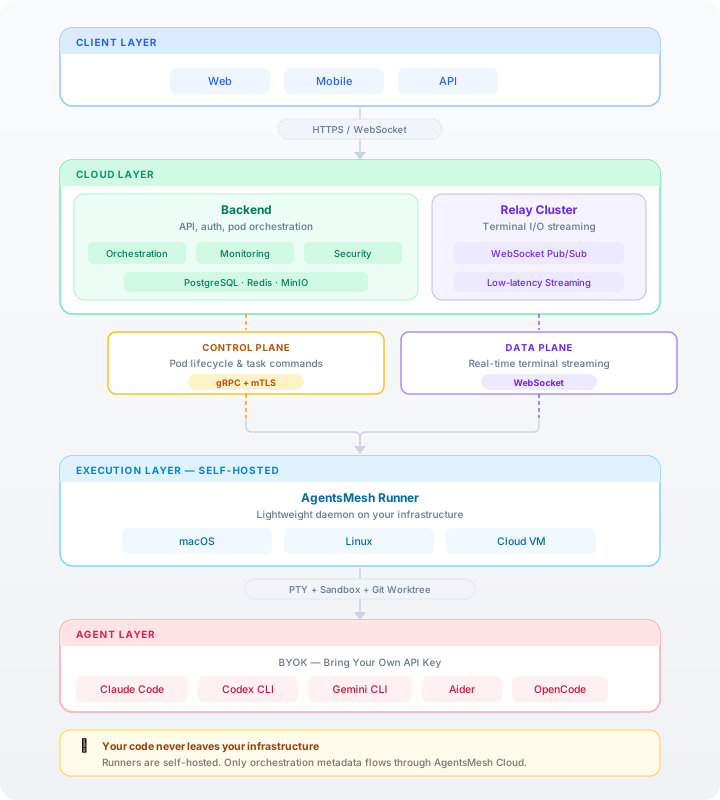
The rest is plumbing built so that chain holds up under load: a control-plane / data-plane split — orchestration over gRPC with mTLS, terminal bytes over a stateless Relay cluster — so the backend never bottlenecks on PTY traffic, no matter how many agents are streaming at once.
@mentions.AgentsMesh separates the control plane from the data plane: orchestration commands travel over gRPC with mTLS, while terminal I/O streams through a stateless Relay cluster. The backend never touches a single PTY byte — which is what lets the fleet scale.
Server-side (Go)
| Component | Role |
|---|---|
| Backend | API server (Gin + GORM) — auth, org/team/user, pod lifecycle, tickets, billing, and the PKI that issues runner certs |
| Relay | WebSocket relay for the terminal data plane — low-latency pub/sub between runners and clients |
| Runner | Self-hosted daemon — connects to the backend (gRPC+mTLS), spawns isolated PTY pods that run the actual agents |
Client-side
| Component | Role |
|---|---|
| Rust Core | Business-logic SSOT — 10 crates compiled to WASM (web/desktop) and a native dylib via UniFFI (iOS). One cache, one set of services, every client. |
| Web | Next.js console — terminal, Kanban, real-time mesh topology |
| Desktop | Electron app — reuses the web UI, talks to a native Rust core over NAPI |
| iOS | SwiftUI + TCA — the same Rust core via UniFFI bindings |
| Web-Admin | Internal admin console — user/org/runner management, audit logs |
The fastest way to use AgentsMesh is the hosted service at agentsmesh.ai — sign up, connect your Git provider, and start running agents in minutes. Bring your own AI API keys (BYOK): no usage caps, full cost control.
The Runner is a lightweight daemon that runs on your machine and executes AI agents locally. Your code stays on your infrastructure. Install one per machine you want in the fleet.
curl -fsSL https://agentsmesh.ai/install.sh | sh
See the Runner README for more installation options (deb, rpm, Windows, etc.)
agentsmesh-runner login
This opens your browser to authenticate. For headless environments (SSH, remote server):
agentsmesh-runner login --headless
For self-hosted deployments, add --server:
agentsmesh-runner login --server https://your-server.com
agentsmesh-runner run
Or install as a system service for always-on operation:
agentsmesh-runner service install
agentsmesh-runner service start
Once the runner is online, create an AgentPod from any console (Web / Desktop / iOS) and start putting agents to work.
Run the whole stack locally with one command.
git clone https://github.com/AgentsMesh/AgentsMesh.git
cd AgentsMesh/deploy/dev
./dev.sh
This starts the full stack: PostgreSQL, Redis, MinIO, Backend, Relay, Traefik, and a local Next.js frontend with hot reload.
Access:
| Service | URL |
|---|---|
| Web Console | http://localhost:3000 |
| API | http://localhost:80/api |
Test Accounts:
| Role | Password | |
|---|---|---|
| User | dev@agentsmesh.local | devpass123 |
| Admin | admin@agentsmesh.local | adminpass123 |
Ports are dynamically allocated per worktree. Check
deploy/dev/.envfor actual values.
Prerequisites: Go 1.24+, Node.js 20+, pnpm, Docker
# 1. Start infrastructure
cd deploy/dev && ./dev.sh

# 2. Backend (auto-starts in Docker with hot reload)
docker compose logs -f backend

# 3. Frontend (local with Turbopack)
cd clients/web && pnpm install && pnpm dev
Docker images are published to Docker Hub on every push to main:
agentsmesh/backend:sha-xxxxxxx
agentsmesh/web:sha-xxxxxxx
agentsmesh/web-admin:sha-xxxxxxx
agentsmesh/relay:sha-xxxxxxx
Tagged releases (v*) get semver tags:
agentsmesh/backend:1.0.0
agentsmesh/backend:1.0
See deploy/selfhost/ for the self-hosted deployment guide.
Any terminal-based agent works. The built-ins:
| Agent | Provider | Description |
|---|---|---|
| Claude Code | Anthropic | Autonomous AI coding agent |
| Codex CLI | OpenAI | OpenAI's code generation CLI |
| Gemini CLI | Google Gemini CLI | |
| Aider | Open Source | AI pair programming in the terminal |
| OpenCode | Open Source | Open source AI coding tool |
| Custom | Any | Any terminal-based agent |
| Layer | Technology |
|---|---|
| Backend | Go (Gin + GORM) |
| Client Core | Rust → WASM (web/desktop) + UniFFI (iOS) — shared business logic |
| Web / Desktop | Next.js (App Router) + TypeScript + Tailwind · Electron |
| iOS | SwiftUI + TCA |
| Database | PostgreSQL + Redis |
| Storage | MinIO (S3-compatible) |
| API | REST + gRPC (bidirectional streaming) |
| Security | mTLS for runner connections, JWT for web auth |
| Real-time | gRPC streaming (Runner ↔ Backend), WebSocket (Relay ↔ Client) |
| Reverse Proxy | Traefik |
AgentsMesh/
├── backend/          # Go API server
├── relay/            # Terminal relay server (Go)
├── runner/           # Self-hosted runner daemon (Go)
├── clients/
│   ├── core/         # Rust business-logic SSOT (WASM + UniFFI)
│   ├── web/          # Next.js console
│   ├── web-admin/    # Admin console (Next.js)
│   ├── desktop/      # Electron desktop app
│   └── ios/          # SwiftUI + TCA iOS app
├── proto/            # Protocol Buffers definitions
├── deploy/
│   ├── dev/          # Docker Compose dev environment
│   └── selfhost/     # Self-hosted deployment guide
└── docs/             # Architecture docs and RFCs
We welcome contributions! See CONTRIBUTING.md for guidelines.
Business Source License 1.1 (BSL-1.1)
The BSL allows you to use, copy, and modify the software for non-production purposes. Production use requires a commercial license until the change date, after which the software becomes available under GPL-2.0-or-later. See LICENSE for the full terms and additional use grant.
Sign in to join the discussion.
No comments yet. Be the first to say what this is good for.
🪨 why use many token when few token do trick — Claude Code skill that cuts 65% of tokens by talking like caveman

The best-benchmarked open-source AI memory system. And it's free.

Orca is the ADE for working with a fleet of parallel agents. Run any coding agent with your own subscription. Available on desktop, mobile and remote runtime.

A cross-platform desktop All-in-One assistant for Claude Code, Codex, OpenCode, OpenClaw, Grok Build & Hermes Agent. Only official website: ccswitch.io

Never stop coding. Free MIT AI gateway: one endpoint, 352 providers (150+ free), 1200+ models Kimi, Claude, GPT, Gemini, GLM, DeepSeek, MiniMax. Works with Claude Code, Codex, Cursor, OpenCode, Cline & Copilot. Quota-aware auto-fallback, RTK+Caveman compression saves 15-95% tokens, MCP/A2A, Desktop/PWA. Built by 550+ contributors

Compress tool outputs, logs, files, and RAG chunks before they reach the LLM. 20% fewer tokens for coding agents, 60-95% fewer tokens for JSON, same answers. Library, proxy, MCP server.