


obra/
superpowers

obra/superpowersSkills
An agentic skills framework & software development methodology that works.
285k
1 add
This skill pack guides an agent through the full path from topic to finished video podcast: research, script, TTS, Remotion composition, review, and render. It supports local Edge or Azure TTS, per-video asset manifests, subtitle syncing, shorts, and publish settings for Bilibili, YouTube, Xiaohongshu, Douyin, and WeChat Channels.

Builders who want a coding agent to turn a topic into a narrated video without stitching together the workflow themselves.
You can go from a plain topic prompt to a reviewed, rendered video podcast with subtitles, music, and publish metadata.
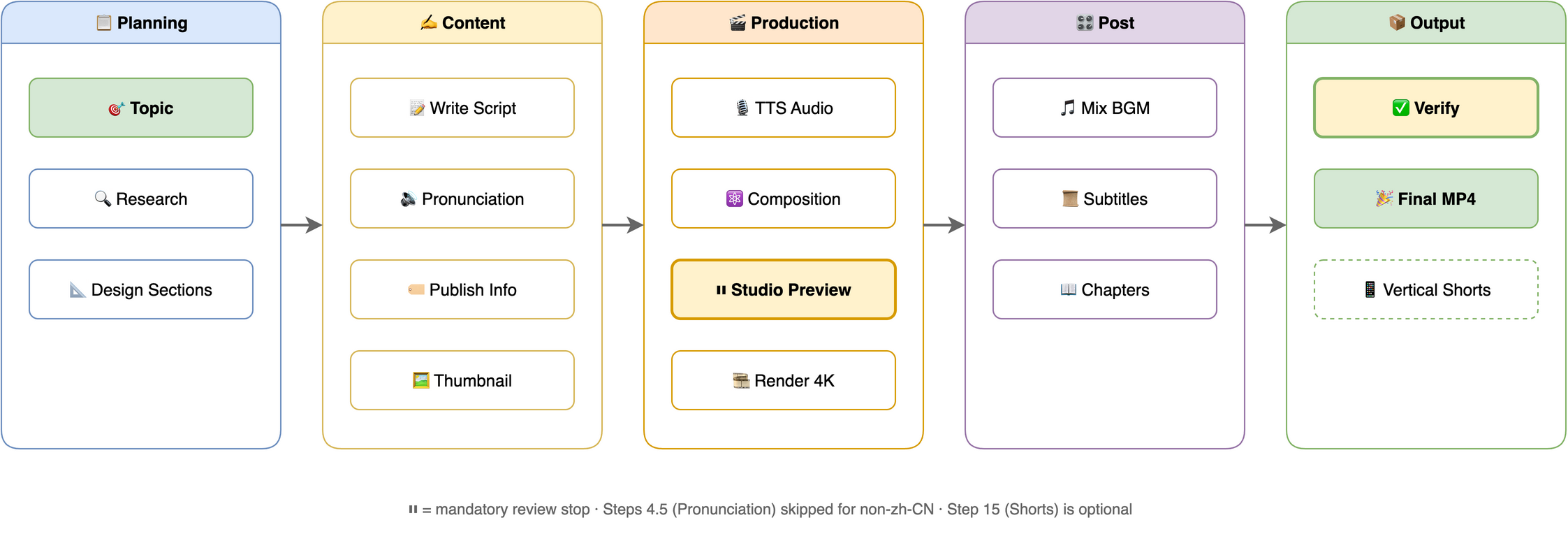
Runs research, script generation, TTS, Remotion composition, 4K render, and background music in one flow.
Uses Microsoft Edge TTS or Azure Speech in-house, so narration does not depend on an external component skill.
Tracks per-video assets with source and license provenance, and asks before paid generation.
Renders SRT subtitles in React at 4K, with FFmpeg burn-in still available.
Extracts styles from reference videos or images and reuses them when topics match.
Creates 9:16 highlight clips from long-form sections.
Supports global and per-project phoneme dictionaries for Chinese polyphones.
brew install ffmpeg node python3          # macOS (Ubuntu: sudo apt install ffmpeg nodejs python3)
pip install -r skills/video-podcast-maker/requirements.txt
npx create-video@latest my-video-project   # or reuse an existing Remotion project
cd my-video-project && npm i





Automated pipeline to create professional video podcasts from a topic. Supports Bilibili, YouTube, Xiaohongshu, Douyin, and WeChat Channels with multi-language output (zh-CN, en-US). Combines research, script generation, local TTS (edge free, plus azure), Remotion rendering, and FFmpeg mixing. Current release: v5.3.0 — see CHANGELOG.md for version history.
Works with: Claude Code · OpenClaw · OpenCode · Codex · Pi — any coding agent that supports SKILL.md
Publish to: Bilibili · YouTube · Xiaohongshu · Douyin · WeChat Channels
No coding required! Just describe your topic in plain language — the coding agent guides you through each step interactively. You make creative decisions, the agent handles all the technical details.
Note: This project is still under active development and may not be fully mature yet. Your feedback is greatly appreciated — feel free to open an issue.
1. Install — via the 365-skills marketplace (recommended) or by cloning this repo.
2. Set up — Python 3.8+, Node.js 18+, FFmpeg, and a Remotion project:
brew install ffmpeg node python3          # macOS (Ubuntu: sudo apt install ffmpeg nodejs python3)
pip install -r skills/video-podcast-maker/requirements.txt
npx create-video@latest my-video-project   # or reuse an existing Remotion project
cd my-video-project && npm i
One-time cost: a fresh Remotion project downloads ~2.2 GB of npm packages plus a ~90 MB Chrome headless shell. Prefer reusing an existing Remotion project (with
node_modules/already installed) for your next video — the heavy install happens once per project, not per video. Lottie animations are optional (@remotion/lottie+lottie-web); install them per project only if you useLottieAnimation.
3. Configure — set TTS_BACKEND plus its API keys (see TTS Backends and Environment Variables).
4. Tell your agent:
"Create a video podcast about [your topic]"
The agent runs the whole workflow (research → script → TTS → Remotion composition → Studio review → 4K render + BGM). Preview and iterate in Remotion Studio (npx remotion studio src/remotion/index.ts); the agent waits for your explicit "render 4K" confirmation before the final render.
podcast.txt, repeatedlyThis section is for you, the human — not the agent. Every downstream step — TTS narration, subtitles, section transitions, animation timing, final cut — is derived from this single
podcast.txt. A weak script renders into 4K garbage. No amount of polish downstream saves it.The AI-generated draft is a starting point, nothing more. Do these yourself — don't hand them off to the AI:
- Mentally read it as the narrator. Treat each sentence as one breath — if a line forces you to "catch your breath" or backtrack to parse, fix it. Where you stumble silently is where TTS stumbles audibly.
- Revise at least three times.
- Pass 1: typos, awkward phrasing, tongue-twisters
- Pass 2: cut filler, cut throat-clearing intros ("So today we're going to talk about…"), cut redundancy
- Pass 3: tune rhythm — where to pause, where to break a long sentence, which word carries the stress
- Read each
[SECTION:xxx]block end-to-end. Confirm each section opens with a hook and lands a clean transition into the next — not a bullet-point dump.- Audit numbers, proper nouns, and English terms separately. ~90% of TTS mispronunciations live here. If pronunciation is wrong, add it to
phonemes.json; if it just sounds awkward, rewrite it.- Know your length budget. Estimate ~280 zh-CN chars/min or ~150 en words/min. A 5–10 min video means ~1400–2800 chars / 750–1500 words. Don't pad to fill time.
The only acceptance test: read through it once in your head — does any line make you wince? If yes, don't move on to Step 7 (TTS) yet. Otherwise you're just rendering 4K of something even you don't want to hear.
Variants in this repo (skills/):
External skills:
| Software | Version | Purpose |
|---|---|---|
| macOS / Linux | - | Tested on macOS, Linux compatible |
| Python | 3.8+ | TTS script, automation |
| Node.js | 18+ | Remotion video rendering |
| FFmpeg | 4.0+ | Audio/video processing |
Marketplace install (recommended): users typically install this skill via the 365-skills marketplace rather than cloning. SKILL.md, scripts, and templates then live under the agent's
${SKILL_DIR}; paths in this README are written from the repo-root perspective for contributors.
TTS synthesis is in-house — no external component skill required. Set TTS_BACKEND to a platform id; only the active platform's env vars are needed:
TTS_BACKEND | Provider | Required env vars | Get Key |
|---|---|---|---|
edge (default) | Microsoft Edge TTS | (none — free) | — |
azure | Microsoft Azure Speech | AZURE_SPEECH_KEY, AZURE_SPEECH_REGION (default eastasia) | Azure Portal |
Want more platforms? The former ttscn component skill (cosyvoice, doubao, tencent, baidu, minimax, xunfei, elevenlabs, openai, google) is no longer a dependency. Install it separately and call it directly if you need those.
Add to ~/.zshrc or ~/.bashrc:
export TTS_BACKEND="edge"                  # edge (default) / azure
export TTS_VOICE="zh-CN-XiaoxiaoNeural"    # optional; unset = backend default
export TTS_RATE="+5%"                      # optional; also settable in user_prefs.json (global.tts.rate)
export TTS_STYLE="gentle"                  # optional; azure only
export AZURE_SPEECH_KEY="..."              # keys for azure (see table above)
export AZURE_SPEECH_REGION="eastasia"      # azure speech region
export GEMINI_API_KEY="..."                # optional: AI thumbnails (imagencn)
export DASHSCOPE_API_KEY="..."             # optional: AI thumbnails (imagencn; ark/hunyuan/zhipu/step also work)
Then reload: source ~/.zshrc
Mutable user-level files live in ~/.video-podcast-maker/ (shared across projects, safe from skill updates); the rest live in the skill root (skills/video-podcast-maker/ in this repo, ${SKILL_DIR} when installed):
| File | Location | Purpose |
|---|---|---|
phonemes.json | ~/.video-podcast-maker/ | Global polyphone dictionary; auto-created from the bundled template; per-project overrides in videos/{name}/phonemes.json |
user_prefs.json | ~/.video-podcast-maker/ | Your preferences (TTS, BGM, platform, visual overrides, style profiles); auto-created from template |
user_prefs.template.json / phonemes.template.json | Skill root | Default templates — sources for the user-level copies |
prefs_schema.json | Skill root | JSON Schema for preference validation |
tsconfig.json | Skill root | TypeScript config for Remotion templates |
Output structure — every video renders into its own videos/{name}/ directory:
videos/{video-name}/
├── topic_definition.md      # Topic direction
├── topic_research.md        # Research notes
├── podcast.txt              # Narration script
├── phonemes.json            # (Optional) pronunciation overrides
├── assets/manifest.json     # Asset registry (role / source / license)
├── podcast_audio.wav        # TTS audio
├── podcast_audio.srt        # Subtitles
├── timing.json              # Section timing (drives animation sync)
├── thumbnail_*.png          # Video thumbnails
├── publish_info.md          # Title, tags, description
├── output.mp4               # Raw 4K render
├── video_with_bgm.mp4       # With BGM
├── bgm.mp3                  # Background music
├── final_video.mp4          # Final output
└── shorts/                  # (Optional) 9:16 vertical shorts
Background music: bundled tracks live in skills/video-podcast-maker/assets/ — perfect-beauty-191271.mp3 (upbeat) and snow-stevekaldes-piano-397491.mp3 (calm piano). Per-platform behavior (thumbnails, chapters, CTA, publish formats) is documented in the skill's references/platform-matrix.md.
If this project helps you, consider supporting the author:
|
WeChat Pay |

Alipay |

Buy Me a Coffee |

Give a Reward |
Agents365-ai
MIT — Permission is hereby granted, free of charge, to any person obtaining a copy of this software.
Sign in to join the discussion.
No comments yet. Be the first to say what this is good for.
An agentic skills framework & software development methodology that works.

Turn any codebase, with its docs, SQL schemas, configs, and PDFs, into a queryable knowledge graph. A /graphify skill for Claude Code, Cursor, Codex, and Gemini CLI: local deterministic AST parsing, every edge explained, no vector store.

Topic in, narrated explainer video out. A Claude Code / Codex skill that turns any topic into a black-canvas motion-graphics explainer video with TTS voiceover, subtitles and a chapter progress bar. Chinese or English; every frame drawn in code with Remotion.
Public repository for Agent Skills
Open-source AI job search: scan job portals, evaluate listings into a structured A-H report with a global 1-5 score, tailor your CV, track applications — runs locally in your AI coding CLI (Claude Code, Codex, OpenCode, Antigravity…)

Production-grade engineering skills for AI coding agents.