

affaan-m/
ECC

affaan-m/ECCHarnesses
The agent harness performance optimization system. Skills, instincts, memory, security, and research-first development for Claude Code, Codex, Opencode, Cursor and beyond.
258k
Flowtrace turns an agent task into a trace: ordered steps, per-step files, and git commits for each write. That makes the work easier to inspect, stop, resume, hand off, and run again on new input.
Builders who want their agent work to stay readable, steerable, and reusable after the session ends.
You can run agent-led work as a step flow you can verify, edit, and reuse instead of a disposable chat log.
Runs a task as a sequence of steps, with each step writing its output to disk.
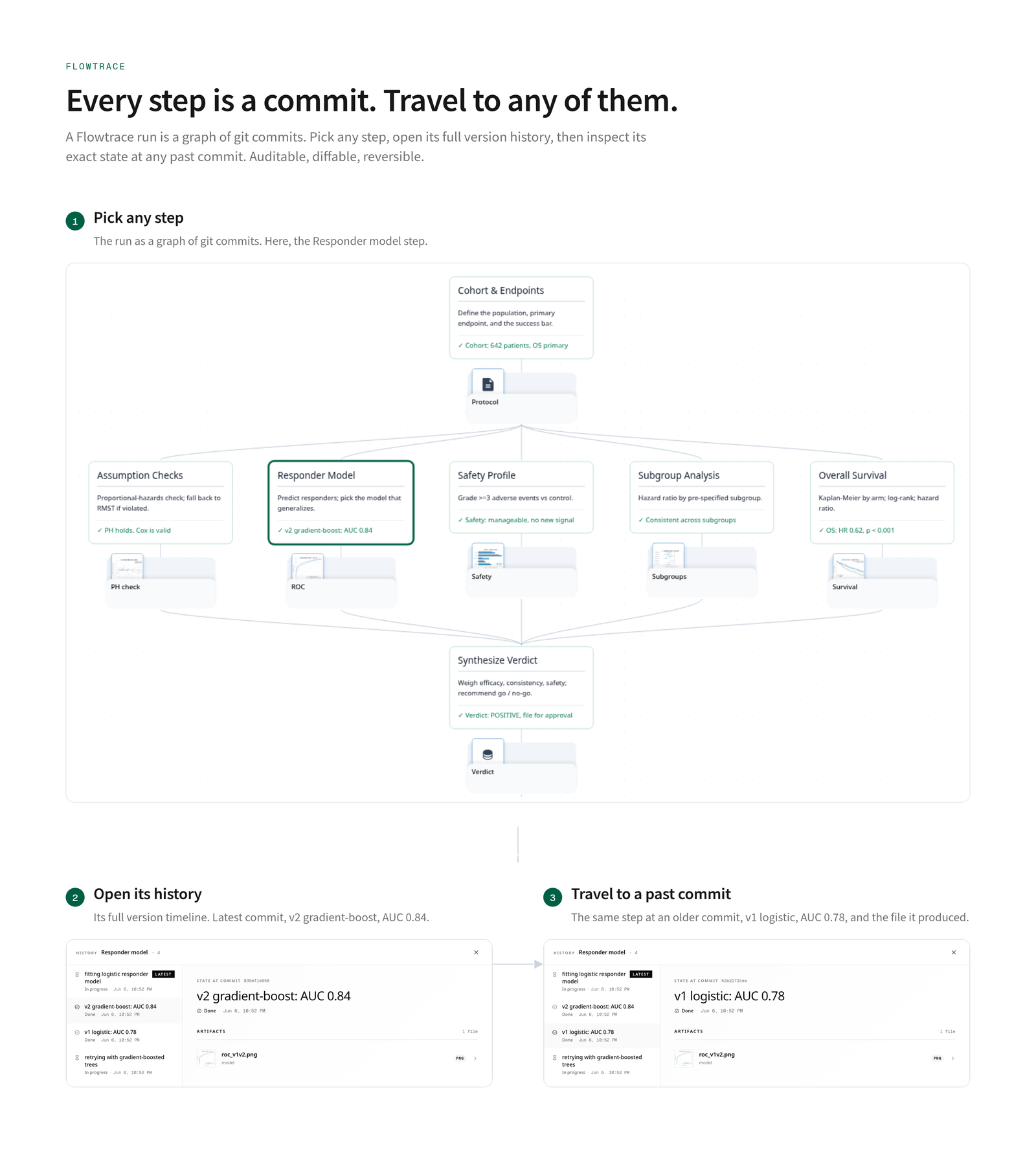
Stores each run in git so you can inspect past states, hand off work, and time-travel through changes.
Lets you change one step and rerun only the steps that depend on it.
Lets you turn a finished task into a trace you can run again on new input.
Includes a `make-trace` skill for turning a skill, runbook, chat log, or finished task into a trace.
Includes a frontend for viewing the flow, step outputs, and run history.
bash scripts/examples/tailored-resume/build.sh   # → ~/traces/tailored-resume/
flowtrace serve                                  # → http://localhost:3000
git clone https://github.com/AIScientists-Dev/flowtrace.git
cd flowtrace
./scripts/install.sh        # builds + symlinks flowtrace to ~/.local/bin/

Run your agent's work as steps you can follow, check, and reuse, instead of a stream of text that buries you and then disappears.
Works with the agent you already use: Claude Code, Codex, Cursor.




What it does · Get started · Examples · Docs
English · 简体中文
⭐ If Flowtrace looks useful, star it (button's top-right) — it's how we decide what to keep building in the open.
Real work with an agent happens as a stream of text. You run a skill and it does the whole task in one pass, or you go back and forth in a chat that keeps growing. Either way it piles up faster than you can follow, and once it is done you are left with a wall of messages.
For a quick question that is fine. For a buy or sell call, a due diligence memo, a security gate, anything you would actually need to verify or run again, it is a problem:
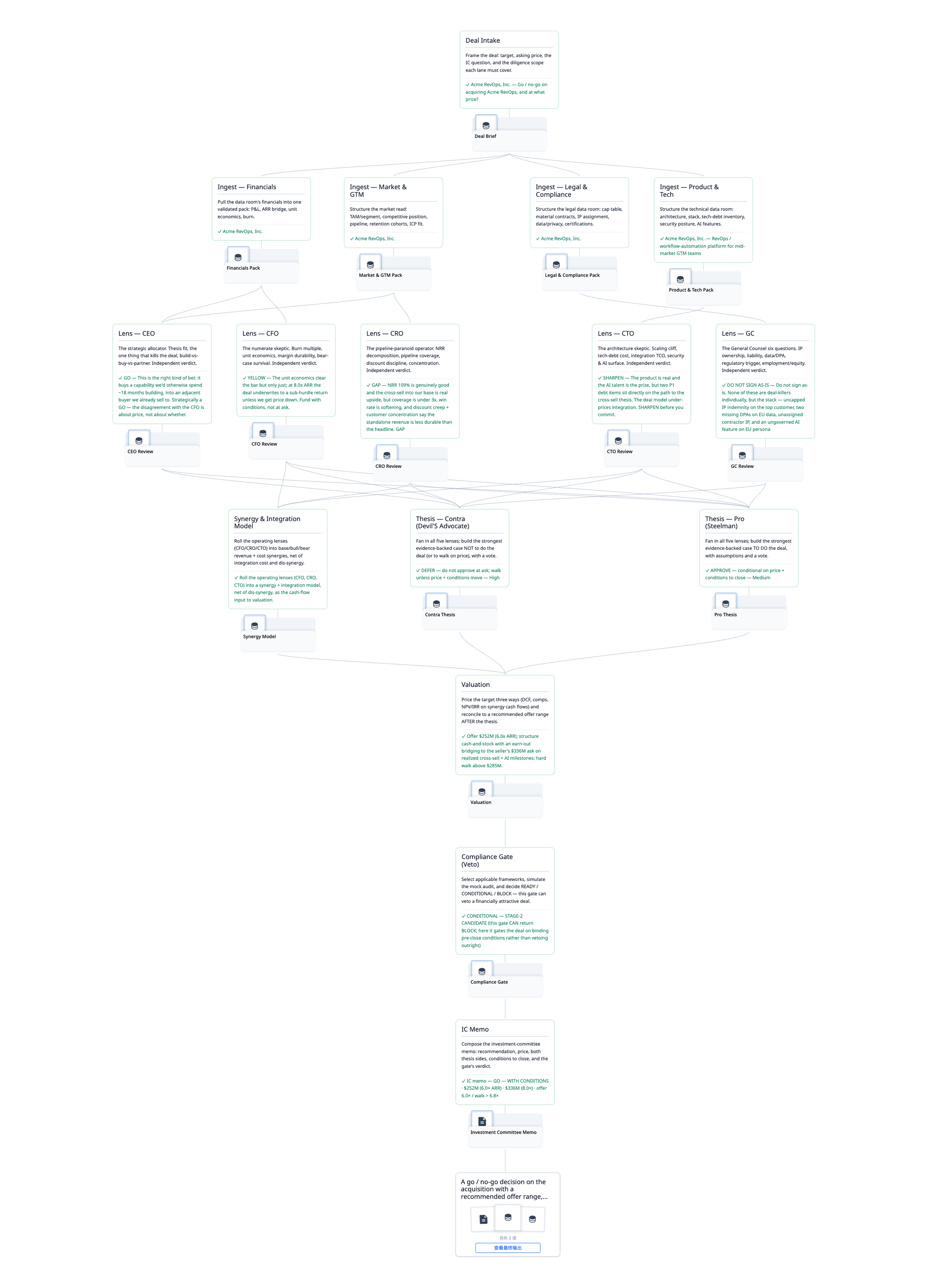
Flowtrace runs that same work as a trace: a flow of steps the agent moves through one at a time, each leaving its output on disk. Here is one, a buy or sell decision that ends in a fixed-format, citable PDF:
 The flow · click to enlarge | 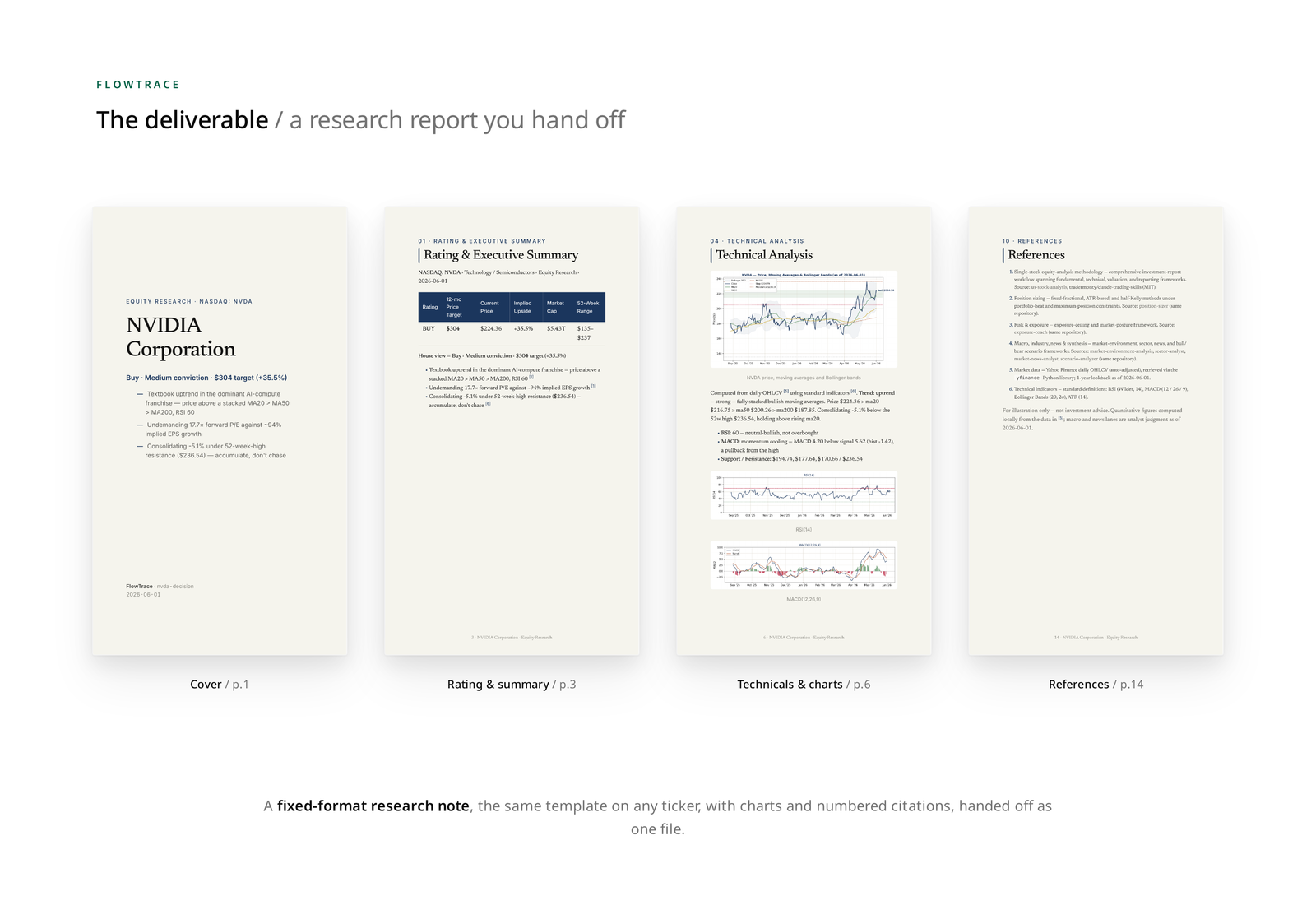 The deliverable · click to open |
Read the full research-note PDF
Same skills, same agent. Running that work as a trace is what changes:
Transparent. The work is a flow of steps you take in at a glance, not a thread you scroll. Each step's output is a file you open, so the intermediate work is right there instead of buried in messages.
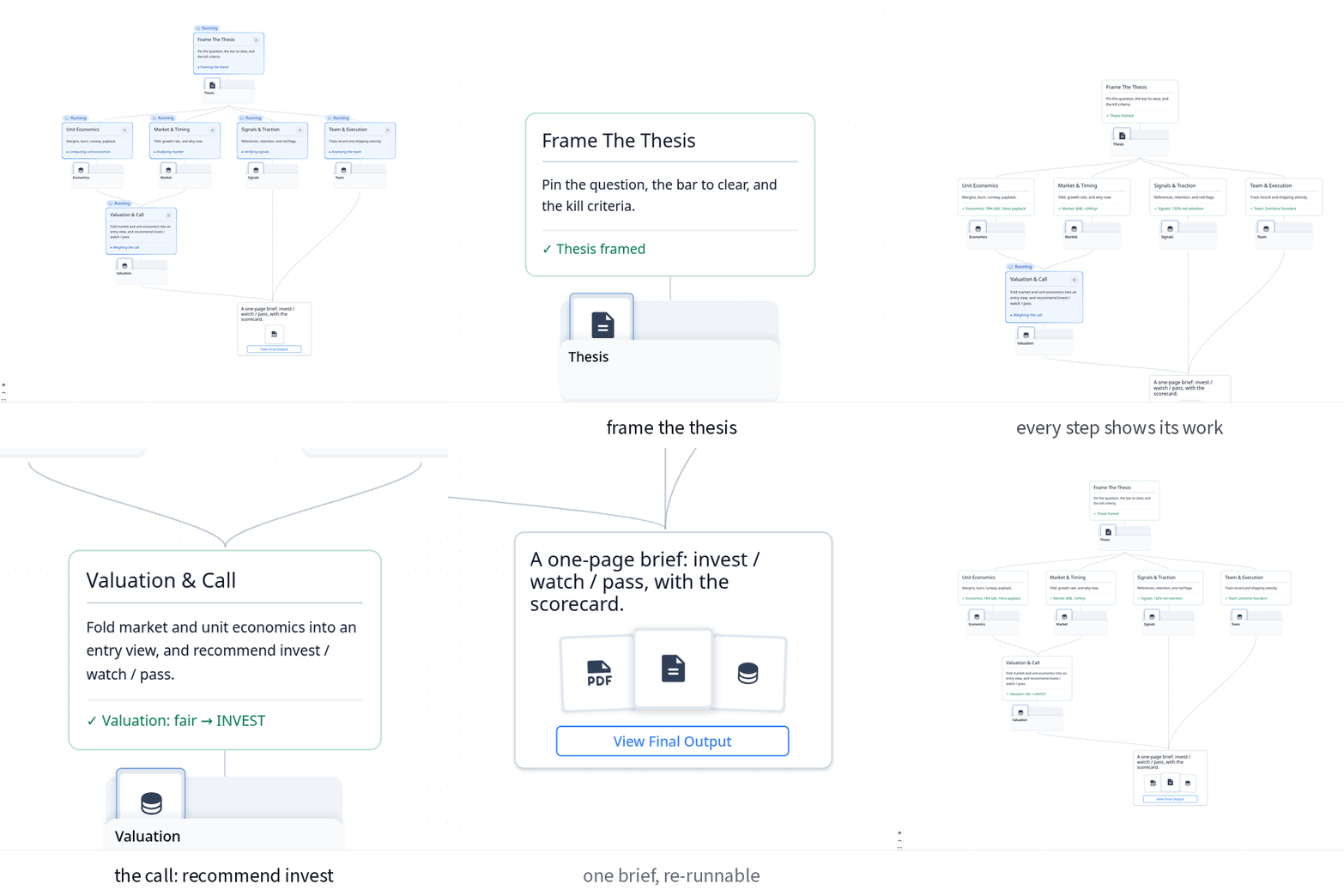
Grounded. Every result points back to the files it came from, so you verify instead of trust.
 Finance |  Clinical |
Steerable. Fix one step and only what depends on it re-runs. The rest stays put.
Traceable. The whole run is files and git, so it does not vanish when you close the tab. Stop and resume anytime, hand it to a teammate, read the full history.
Reusable. A finished task becomes a trace you run again on new input. The method is reused, not rebuilt.
Evolving. The trace gets better the more it runs. When a step misses its bar, the next version switches to a method that clears it, and the version that passes is the one that sticks.
Structured reading. A trace exposes the work as a graph of files, not a linear transcript. The agent reads it by structure and on demand, loading a step's contract, inputs, and outputs only while working on it and following explicit dependencies rather than carrying the whole history. This bounds working context, reduces drift, and yields a representation people and agents can both inspect and extend.
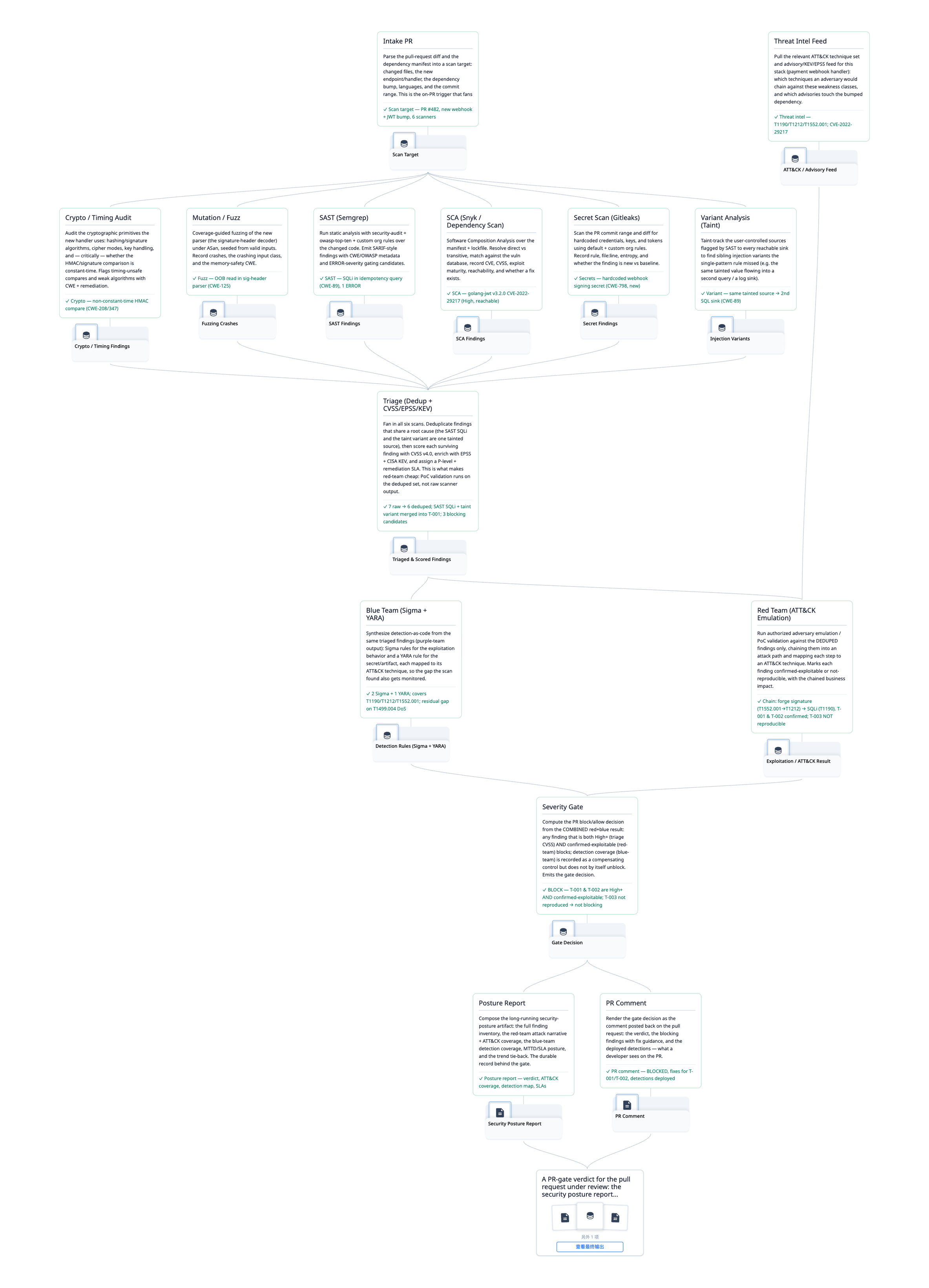
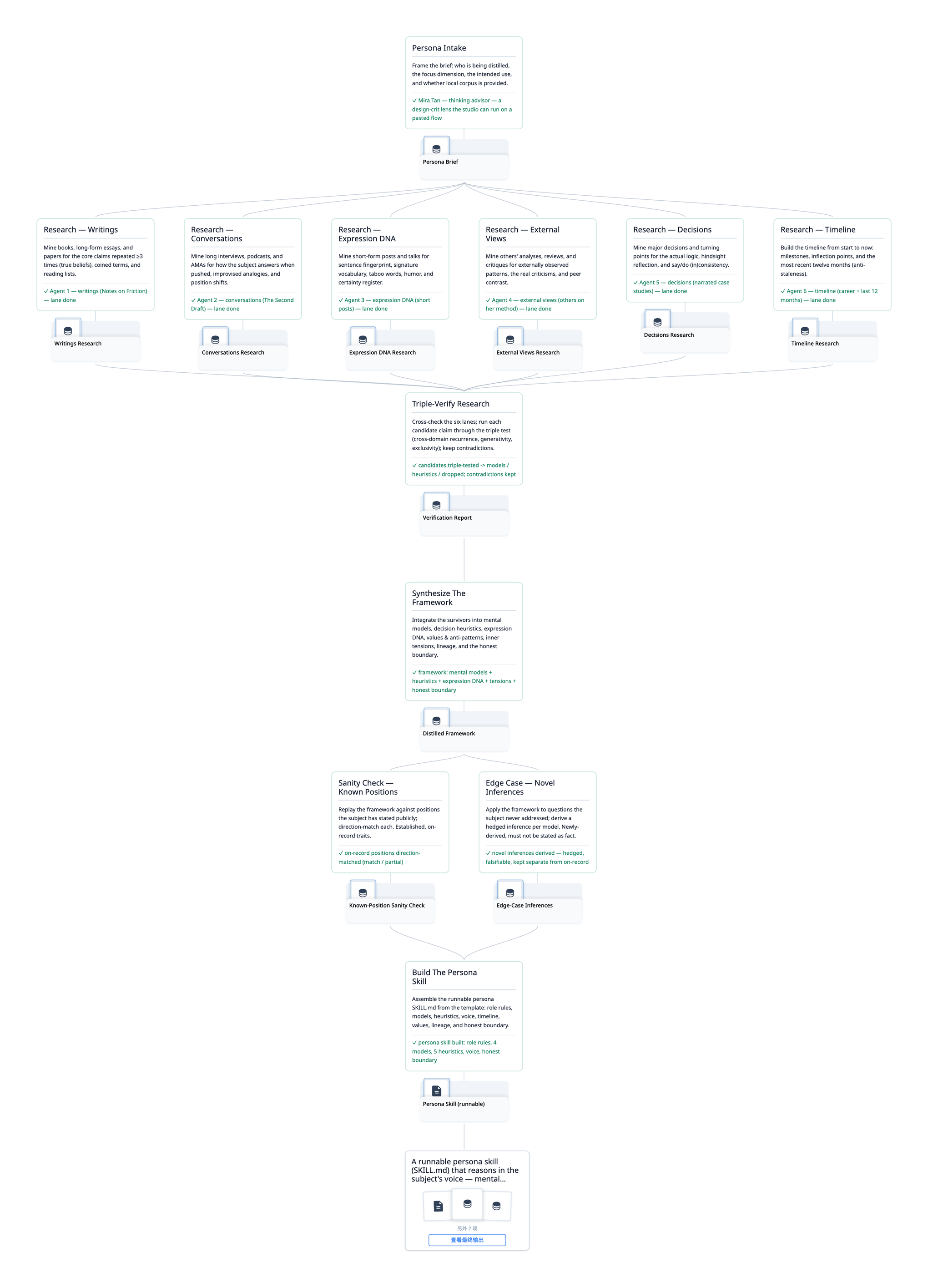
You do not start from scratch. A skill, a long session, a plan, a finished run: run any of them as a trace and you get the same steps you can follow, check, and run again. Open any one to read it full size.
 |  |
 |  |
Not every task needs this. A quick one off, just chat. Flowtrace earns its place when the result matters enough to verify, or when you will run the task again.
The fast path is to hand the repo to an agent. Point a coding agent (Claude Code, Codex, Cursor) at this folder and say:
"Install Flowtrace and run the tailored-resume example."
It installs the CLI, builds a real trace at ~/traces/tailored-resume/, and opens the web view at http://localhost:3000, where the flow lights up step by step.
Two ways to get a trace:
Try a reference. Each example ships as a builder that creates a real trace folder and walks one full run.
bash scripts/examples/tailored-resume/build.sh   # → ~/traces/tailored-resume/
flowtrace serve                                  # → http://localhost:3000
Make your own. The make-trace skill turns any source (a SKILL.md, a runbook, a chat log, a finished task) into a trace. Copy skills/make-trace/ into the agent's skills directory and run /make-trace.
A run is steerable: stop at any step, change it, and the steps that depend on it re-run while the rest stay put.
git clone https://github.com/AIScientists-Dev/flowtrace.git
cd flowtrace
./scripts/install.sh        # builds + symlinks flowtrace to ~/.local/bin/
Update with git pull && ./scripts/install.sh. Override the symlink target with INSTALL_DIR=…. Building from source or contributing? See CONTRIBUTING.md.
Nine examples built from popular open-source skills, spanning different domains. Open any one for its flow and a one-command demo in the examples gallery:
Plus six more:
A trace is one git repository. trace.json declares the steps, their dependencies, and the final deliverable. Each run lives under runs/<run_id>/:
<trace_root>/
├─ .git/                                    standard git repo, the audit trail
├─ trace.json                              the static plan (steps + deliverable)
├─ scripts/                                 shared code used by 2+ steps
├─ resources/                               shared static material (refs, papers, master data)
├─ steps/<step_id>/
│  ├─ STEP.md                               per-step contract + impl hints
│  ├─ scripts/                              step-local code
│  └─ resources/                            step-local material (figures, PDFs, fixtures)
└─ runs/<run_id>/
   ├─ state.json                            run status (sole source of truth)
   ├─ replies/NNNN.json                     append-only structured-output stream
   └─ <step_id>/                            run-time files (assets + scratch)
The same two-name convention (scripts/ for code that runs, resources/ for static material that doesn't) appears at both the trace root and inside each step. Anything reused across 2+ steps belongs at the trace root; single-step material stays inside the step folder. STEP.md references either with relative paths.
Every CLI write makes one git commit, scoped to exactly the paths it declares: state.json plus any --asset paths, or the new reply file plus its cited evidence paths. Scratch files stay untracked. The git history is the audit trail, and the UI can time-travel through it.
Steps pass data through files, not parameters: each step writes its output, and a downstream step reads it.
| To learn | Read |
|---|---|
| The idea, in depth | PHILOSOPHY.md |
| Driving a trace as an agent | docs/trace/CLI.md |
| Making a trace | skills/make-trace/SKILL.md, or run /make-trace |
| The format spec | SCHEMA.md and FIELDS.md |
| All examples | docs/EXAMPLES.md |
If Flowtrace is useful to you, consider starring the repo. It helps others find it.
MIT. See LICENSE.
Sign in to join the discussion.
No comments yet. Be the first to say what this is good for.
The agent harness performance optimization system. Skills, instincts, memory, security, and research-first development for Claude Code, Codex, Opencode, Cursor and beyond.
The job search that runs on your machine. AI job application framework built on Claude Code: evaluate postings, tailor CVs, write cover letters, prep interviews. Fork it and own it.
from vibe coding to agentic engineering - practice makes claude perfect
🌊 The original agent meta-harness. Deploy intelligent multi-player swarms, coordinate autonomous workflows, and build conversational AI systems. Features adaptive memory, self-learning intelligence, RAG integration, and native Claude Code / Codex / Hermes and many more Integrated
Practical patterns, starters & CLI tools for loop engineering with AI coding agents. Design systems that prompt and orchestrate agents (inspired by Addy Osmani and Boris Cherny). Includes loop-audit, loop-init, loop-cost.

Git. Ship. Done - Core