
HKUDS/
Vibe-Trading

HKUDS/Vibe-TradingOther
"Vibe-Trading: Your Personal Trading Agent"
33k
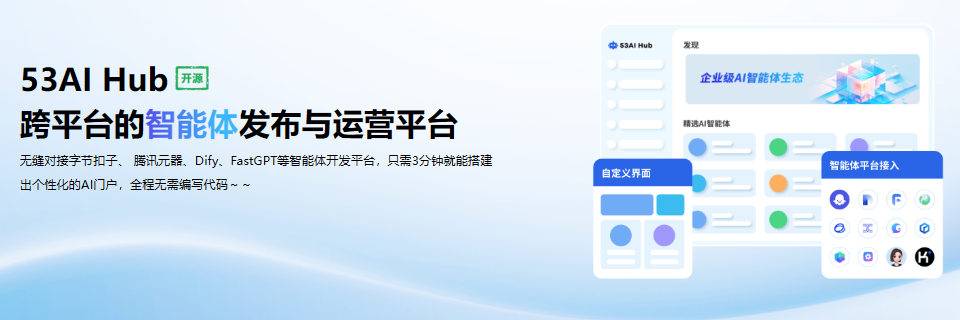
53AI Hub is a full portal for publishing and managing AI agents, prompts, AI tools, and knowledge content. It connects with external agent platforms and LLM services, and it includes user management, permissions, styles, and deployment support so you can run it as a portal rather than wiring pieces together yourself.
Builders who want a shared portal to publish and manage agents, prompts, and knowledge content.
You can run a ready-made AI portal instead of assembling a separate app for agent and knowledge management.
Lets you publish, group, sort, and control access to AI agents, prompts, and AI tools.
Connects with Coze, Dify, FastGPT, RAGFlow, and 53AI Studio, plus cloud and model platforms.
Supports registered users, internal users, login records, usage records, and access control.
Offers multiple site templates and interface styles that can be adjusted for different deployments.
Supports one-click deployment for cloud or local setups and binding a custom domain.
Includes AI knowledge base and workbench features for organizing content alongside agents.
sudo curl -fsSL https://download.53ai.com/install.sh | bash
git clone https://github.com/53ai/53aihub.git
cd 53aihub
cd docker
docker compose up -d


53AI Hub is an open-source AI portal, which enables you to quickly build a operational-level AI portal to launch and operate AI agents, prompts, and AI tools. It supports seamless integration with development platforms like Coze, Dify, FastGPT, RAGFlow, and 53AI Studio, and cloud platforms such as Aliyun , Tencent Cloud , and Baidu Cloud, helping developers and enterprises build production-grade AI portals without complex integrations. Even users with no technical background can participate easily, significantly lowering the barrier to AI inplementation.
Key features are as follows:
1. Platform Integration: Supports integration with mainstream agent development platforms, cloud services, and large language model platforms. Users can choose from site templates and styles, and customize the interface as needed.
2. Application Management: Provides full lifecycle management for AI agents, prompts, and AI tools, including publishing, grouping, sorting, and user permission configuration.
3. User Operations: Supports the operation of both registered users and internal users, with the ability to manage and view login and usage records.
4. Independent Deployment: Supports one-click deployment on both cloud and local environments, and binding to a custom domain name.
| Feature | 53AI Hub | NextChat | lobehub | Cherry Studio |
|---|---|---|---|---|
| Custom Interface | Multiple styles | Fixed style | Fixed style | Fixed style |
| Access Permissions | Enterprise-grade | None | None | None |
| Agent Integration | ✅ | ❌ | ❌ | ❌ |
| LLM Integration | ✅ | ✅ | ✅ | ✅ |
| Registered Users | ✅ | ✅ | ✅ | ✅ |
| Internal Users | ✅ | ❌ | ❌ | ❌ |
| SSO Support | WeCom, DingTalk, Feishu | ❌ | ❌ | ❌ |
| Local Deployment | ✅ | ✅ | ✅ | ✅ |
| AI Knowledge Base | ✅ | ❌ | ❌ | ❌ |
| AI Workbench | ✅ | ❌ | ❌ | ❌ |
| SKILL Support | ✅ | ❌ | ❌ | ❌ |
Minimum configuration for installing 53AI Hub:
The recommended way to install 53AI Hub Community Edition is to run the one-line installer:
sudo curl -fsSL https://download.53ai.com/install.sh | bash
After the script finishes, follow the prompts to complete the setup and then visit http://localhost:3000 to access the administration panel and begin setup.
If you prefer Docker, you can still install from our docker/docker-compose.yaml file. Before running the installation command, ensure that https://docs.docker.com/get-docker/ and https://docs.docker.com/compose/install/ are installed on your machine.
git clone https://github.com/53ai/53aihub.git
cd 53aihub
cd docker
docker compose up -d
Refer to the comments in .env.example, copy and rename it to .env, and edit the values. You may also modify docker-compose.yaml for things like image versions, port mappings, or volume mounts. After changes, rerun docker-compose up -d. You can find the full list of available environment variables here.
We're seeking contributors to help translate 53AI Hub into more languages. Interested? Get in touch!
We welcome your contributions—whether code, ideas, or issues. Feel free to share 53AI Hub at events, in talks, or on social media.
53AI has obtained the following certifications:
This repository is licensed under the 53AI Open Source License, which is based on Apache 2.0 with additional restrictions.
Star 53AI Hub on GitHub to get notified about updates and new releases.
Sign in to join the discussion.
No comments yet. Be the first to say what this is good for.
"Vibe-Trading: Your Personal Trading Agent"

Your Personal AI Assistant; easy to install, deploy on your own machine or on the cloud; supports multiple chat apps with easily extensible capabilities.
User-friendly AI Interface (Supports Ollama, OpenAI API, ...)

macOS video editor built for AI
Open-source Claude Design alternative. One-click import your Claude Code / Codex API key. Prompt → prototype / slides / PDF. Multi-model (Claude, GPT, Gemini, Kimi, GLM, Ollama). BYOK, local-first, MIT.
🤯 LobeHub is your Chief Agent Operator, organizing your agents into 7×24 operations by hiring, scheduling, and reporting on your entire AI team.