
JuliusBrussee/
caveman

🪨 why use many token when few token do trick — Claude Code skill that cuts 65% of tokens by talking like caveman
105k
1 add
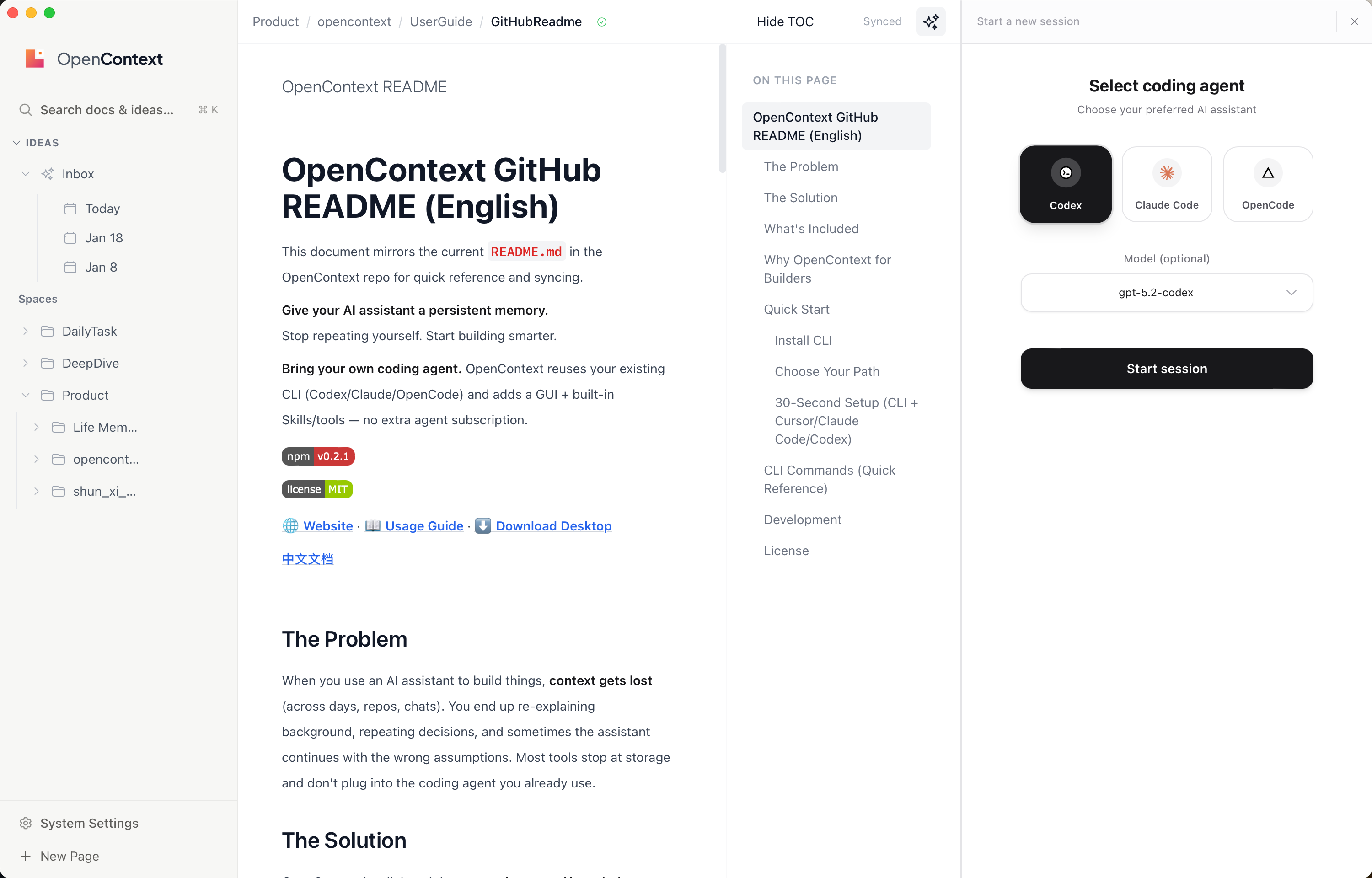
OpenContext stores project knowledge in a shared context library and lets your agent read, search, create, and update it. It plugs into existing coding agents through MCP, skills, and slash commands, while also offering a desktop UI and web UI for manual browsing and editing.
Builders who want one context layer their coding agent can reuse across days, repos, and chats.
You can stop repeating background and decisions, and let your agent pull the right context before it acts.
Manages folders, documents, and manifests under a shared `contexts/` library.
Exposes OpenContext through MCP so Cursor, Claude Code, Codex, and other agents can use it as tools.
`oc init` generates user-level skills and slash commands for supported agents.
Provides a native Tauri app for managing, searching, and editing context.
Runs a local browser UI for browsing and editing contexts without a desktop install.
Includes CLI commands like `oc search` and `oc context manifest` so agents can find and load relevant knowledge.
npm install -g @aicontextlab/cli
Give your AI assistant a persistent memory.
Stop repeating yourself. Start building smarter.
Bring your own coding agent. OpenContext reuses your existing CLI (Codex/Claude/OpenCode) and adds a GUI + built-in Skills/tools — no extra agent subscription.
|
|


When you use an AI assistant to build things, context gets lost (across days, repos, chats). You end up re-explaining background, repeating decisions, and sometimes the assistant continues with the wrong assumptions. Most tools stop at storage and don't plug into the coding agent you already use.
OpenContext is a lightweight personal context / knowledge store for AI assistants (Agents) and coding tools like Cursor / Claude Code / Codex. It reuses your existing coding agent CLI (Codex/Claude/OpenCode) while adding a GUI plus built-in Skills/tools, so your agent can "load history first, then act; ship, then persist".
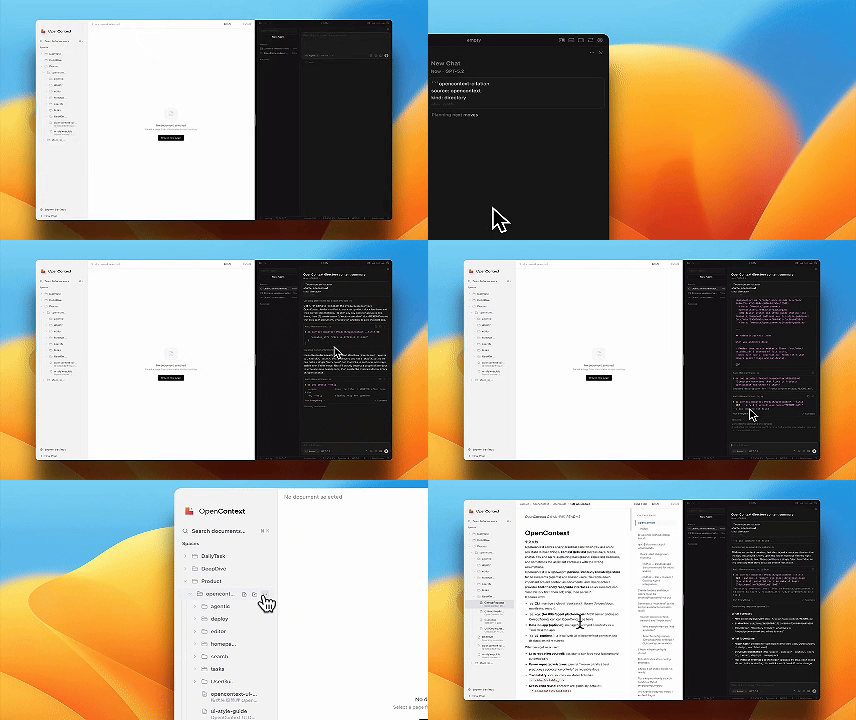
Skills-first support: oc init generates user-level skills (Cursor/Claude Code/Codex) plus slash commands (Cursor/Claude Code), so agents can load, search, create, and iterate your context with one command.
| Before OpenContext | After OpenContext |
|---|---|
| 📂 Hard to share context across repos/sessions | ✅ Global context library works across all projects |
| 🤷 Your ideas can't be quickly perceived by Agent | ✅ Agent loads your background & decisions automatically |
| 🔒 Existing knowledge can't be operated by Coding Agent | ✅ Agent can directly read/write your knowledge base |
oc CLI — manage a global contexts/ library (folders/docs, manifests, search)oc init)OpenContext's knowledge management Agent can be the coding agent you already use (Codex/Claude/OpenCode). You don't pay for a separate agent — you bring your own CLI and get a ready-to-use experience: a GUI for context management plus built-in Skills and tools that let the agent read, search, create, and iterate on your knowledge.
npm install -g @aicontextlab/cli
| Path | Best For | Get Started |
|---|---|---|
| 🖥️ Desktop App | Visual users who want a native UI | Download from Releases |
| ⌨️ CLI + Tools | Developers using Cursor/Claude Code/Codex/AI agents | npm install -g @aicontextlab/cli && oc init |
| 🔧 CLI Only | Power users, automation | npm install -g @aicontextlab/cli |
OpenContext works with the coding agent CLI you already have — it adds a GUI plus built-in Skills/tools instead of replacing your agent.
# 1. Install
npm install -g @aicontextlab/cli

# 2. Initialize (prompts for tool setup; defaults to all)
cd your-project
oc init

# 3. Use slash commands (Cursor + Claude Code)
#    /opencontext-context  — load background before working
#    /opencontext-search   — find relevant docs
#    /opencontext-create   — create a new doc
#    /opencontext-iterate  — persist what you learned
#    Tip: non-interactive installs can use --tools cursor,claude,codex or --no-claude/--no-cursor/--no-codex
#
#    Installed by oc init:
#    - Cursor: ~/.cursor/commands
#    - Claude Code: ~/.claude/commands (or $CLAUDE_CONFIG_DIR/commands)
#    Skills (wrapped from slash commands):
#    - Cursor: ~/.cursor/skills/opencontext-*/SKILL.md
#    - Claude Code: ~/.claude/skills/opencontext-*/SKILL.md (or $CLAUDE_CONFIG_DIR/skills)
#    - Codex: ~/.codex/skills/opencontext-*/SKILL.md (or $CODEX_HOME/skills)
#
# 4. MCP config is user-level (Cursor/Claude Code/Codex)
#    - Cursor: ~/.cursor/mcp.json
#    - Claude Code: ~/.claude/mcp.json (or $CLAUDE_CONFIG_DIR/mcp.json)
#    - Codex: ~/.codex/mcp.json (or $CODEX_HOME/mcp.json)
📖 For detailed usage guide, search configuration, and FAQ, visit the Website.
OpenContext is a lightweight personal context / knowledge store for AI assistants and coding tools like Cursor / Claude Code / Codex. It gives your AI agent a persistent memory so you can stop repeating yourself and start building smarter.
OpenContext reuses your existing coding agent CLI (Codex/Claude/OpenCode) while adding a GUI plus built-in Skills/tools. You don't pay for a separate agent subscription — you bring your own CLI and get a ready-to-use experience.
| Component | Function |
|---|---|
oc CLI | Manage global contexts/ library (folders/docs, manifests, search) |
| MCP Server | Cursor/Claude Code/Codex/Agents call OpenContext as tools |
| Skills + Slash Commands | User-level skills for Cursor/Claude Code/Codex + slash commands for Cursor/Claude Code |
| Desktop App | Manage/search/edit contexts with a native UI |
| Web UI | Browse/edit contexts locally (no install required) |
| Agent | Config Location |
|---|---|
| Cursor | ~/.cursor/mcp.json |
| Claude Code | ~/.claude/mcp.json |
| Codex | ~/.codex/mcp.json |
| OpenCode | ~/.config/opencode/ |
| Before OpenContext | After OpenContext |
|---|---|
| 📂 Hard to share context across repos/sessions | ✅ Global context library works across all projects |
| 🤷 Your ideas can't be quickly perceived by Agent | ✅ Agent loads your background & decisions automatically |
| 🔒 Existing knowledge can't be operated by Coding Agent | ✅ Agent can directly read/write your knowledge base |
Yes! OpenContext is free and open source. Check the repository for license details.
npm install -g @aicontextlab/cli
oc init
This generates user-level skills and slash commands for your coding agent.
Run oc <cmd> --help for details.
| Command | What it does |
|---|---|
oc init | Initialize OpenContext + user-level tool integrations |
oc folder ls | List folders |
oc folder create <path> -d "desc" | Create a folder |
oc doc create <folder> <name>.md -d "desc" | Create a document |
oc doc ls <folder> | List documents |
oc context manifest <folder> | Generate file list for AI to read |
oc search "query" | Search documents |
oc mcp | Start MCP server for MCP clients |
oc ui | Start local Web UI |
📖 Full command reference available on the Website.
# Clone & install
git clone https://github.com/0xranx/OpenContext.git
cd OpenContext && npm install

# Desktop app
npm run tauri:dev    # development
npm run tauri:build  # production build

# Web UI
npm run ui:dev       # development
npm run ui:build     # production build
MIT © OpenContext
Sign in to join the discussion.
No comments yet. Be the first to say what this is good for.
🪨 why use many token when few token do trick — Claude Code skill that cuts 65% of tokens by talking like caveman

The best-benchmarked open-source AI memory system. And it's free.

Orca is the ADE for working with a fleet of parallel agents. Run any coding agent with your own subscription. Available on desktop, mobile and remote runtime.

A cross-platform desktop All-in-One assistant for Claude Code, Codex, OpenCode, OpenClaw, Grok Build & Hermes Agent. Only official website: ccswitch.io

Never stop coding. Free MIT AI gateway: one endpoint, 352 providers (150+ free), 1200+ models Kimi, Claude, GPT, Gemini, GLM, DeepSeek, MiniMax. Works with Claude Code, Codex, Cursor, OpenCode, Cline & Copilot. Quota-aware auto-fallback, RTK+Caveman compression saves 15-95% tokens, MCP/A2A, Desktop/PWA. Built by 550+ contributors

Compress tool outputs, logs, files, and RAG chunks before they reach the LLM. 20% fewer tokens for coding agents, 60-95% fewer tokens for JSON, same answers. Library, proxy, MCP server.